This Week's Sponsor:

Turbulence Forecast

Know before you go. Get detailed turbulence forecasts for your exact route, now available 5 days in advance.


Posts tagged with "macappstore"

Enable Hidden Mac App Store Debug Menu

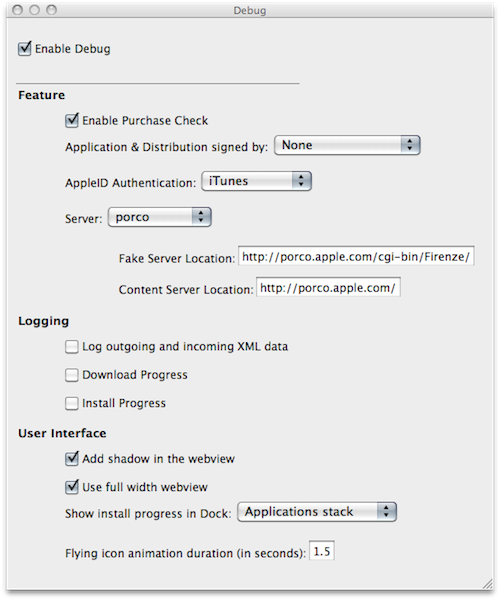
We’re not sure why the average Mac App Store user would want to do this, but we couldn’t resist to post about the Debug menu Apple left behind in the Mac App Store. Discovered by Daniel Jalkut of Red Sweater earlier today, enabling the menu is fairly easy: you just need to quit the Mac App Store, open Terminal and write:

defaults write com.apple.appstore ShowDebugMenu -bool true

Then relaunch the Mac App Store. To revert back to a Mac App Store without Debug menu, simply replace “true” in the string above with “false”. The menu, anyway, is quite interesting as it allows you to play around with a bunch of hidden settings such as shadows and width in the App Store’s webview, the animations and duration of “flying icons” (when you download an app and it goes straight to the Dock). You can also enable and disable the Purchase Check, although we wouldn’t really recommend to tweak these default settings – you don’t want to break the Mac App Store app.

We think this Debug menu will be removed in a future update, as Apple doesn’t want users to modify, or even see, this stuff. Still, you can check it out for now.

Developer Goes From 7 Sales A Day to 1,500 With Mac App Store

We have already seen what the Mac App Store effect looks like. The new Store for Mac users is providing an easy way to discover and install Mac applications and, together with that, a better way for developers to showcase their software to a larger audience, as the Mac App Store is installed  by default on every system running OS X 10.6.6. Several developers reported good sales for the Mac App Store launch day, but we think LittleFin Software might be the best example of the power of the Mac App Store so far.

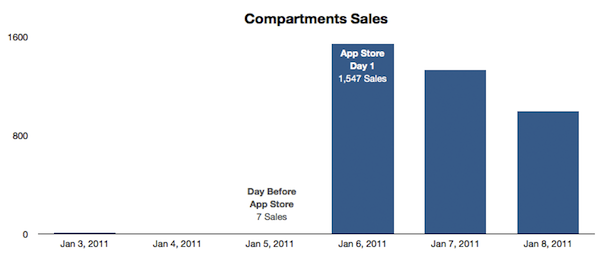
LittleFin was selling between 6 - 10 copies of Compartments, a simple home inventory app for the Mac we reviewed here, a day through their website. The day before the Mac App Store launch, they sold only 7 copies. But as soon as the Store launched on January 6 and Apple featured the app in the Mac App Store homepage and its “Great Mac Apps” webpage, LittleFin saw a terrific increase in sales. In fact, they sold 1,547 copies in the first 24 hours of the Mac App Store. The app, now featured under “Staff Favorites”, is available at $9.99. Before the Mac App Store the app was sold at $24.95; the developers decided to lower the price as an experiment. Since January 6, the app has been selling 1,000 copies a day on average. Read more


What The Mac App Store Effect Looks Like

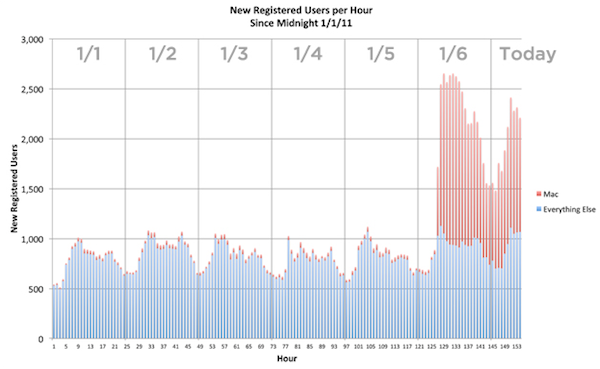
The Mac App Store is off to a great start. More than 1,000 apps already available, some of them ports of old and popular Mac applications, some of  them new ones specifically built and designed for the new Store. Some long-time Mac developers even decided to ditch their previous distribution systems and go Mac App Store-exclusive. More than 1 million downloads happened on the Mac App Store’s first day, and the first sales numbers show that the effect on the popularity of existing Mac apps has been incredible.

The developers of Alfred, an application launcher and Spotlight replacement for OS X, reported thousands of new downloads in the first 24 hours, while Evernote, a cross-platform “memory tool” and digital assistant, announced a 1800% increase of sign-ups through the Mac client, released for free in the Mac App Store. But a picture, as they say, is worth a thousand words, so here’s the Mac App Store effect visualized in a simple graph. Read more


CoverSutra: A Fistful of Dollars


Developer Sophia Teutschler is having a hard time trying to deal with her most popular application for the Mac, CoverSutra, becoming a Mac App Store exclusive. As we discussed here, the latest CoverSutra 2.5 version is only available in the Mac App Store at $4.99, instead of the $20 it used to be on Sophia’s website. The problem is, years ago Sophia promised to customers who bought a license for CoverSutra 2.0 that they would get the 3.0 upgrade for free; CoverSutra’s development slowed down, Sophia got involved in more projects and won an Apple Design Award in the meantime, Apple introduced the Mac App Store. CoverSutra 3.0 isn’t out yet, but the 2.5 version is a paid app in the Mac App Store. Clearly, that is not the free upgrade until 3.0 Sophia once promised.

This is a very serious issue that doesn’t originate specifically from Sophia, but provides a good example when looking at CoverSutra because of the way Sophia decided to handle things. As you may be aware of, Apple is not offering trials, upgrade policies and existing customer migration on the Mac App Store. You can release apps, for a price or for free. That’s it. You have been selling apps on your website all this time? Good for you. But there’s no way to migrate people who already bought a license to the new Store. Read more


How Apple Could Fix The Issue with “Installed” Mac App Store Apps

How Apple Could Fix The “Installed” Mac App Store Issue

Since the Mac App Store launched yesterday, hundreds (if not thousands) of users noticed that apps previously installed on a Mac through a developer’s website show up as, well, “installed” on the Mac App Store. That may lead you to think the new Store can handle updates for apps purchased and downloaded out of it just fine, but it can’t. Either a bug or a “feature” in Apple’s system, those apps seems to be “installed” simply because the Mac App Store sees the bundle identifier of an app already present on your Mac’s hard drive. So say you have iPhoto, Pages, Panic’s Coda or Coversutra already installed on your Mac and you fire up the Mac App Store, those apps may be listed as “Installed”. But they won’t go through the handy automatic update process apps you really purchase in the Mac App Store have. It happened to me. And if you ask me, that’s bad user experience.

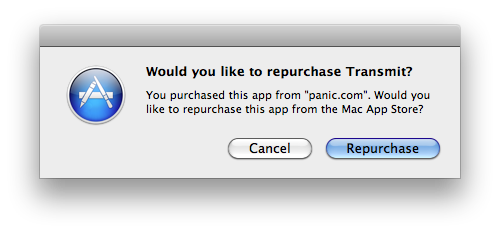
Daylen Yang has an interesting mockup on his personal blog of a simple feature that could fix this issue of apps showing up as “Installed”. Apple could simply offer a way to re-purchase applications found on your Mac although, yes, you’d have to pay again. But considering that several developers are moving to App Store-exclusive applications offering discounted prices now looking forward to future free version upgrades (example: you can buy Pixelmator again now at $29, but the future 2.0 version will be a free update), it doesn’t sound like a bad idea. Or, Apple could evolve the concept seen in this mockup developing a way for the Mac App Store to recognize installed apps and provide more detailed information and options about what you can do.

Permalink

Mac App Store’s First 24 Hours: Developers Post Sales Numbers

The Mac App Store was released as part of the Mac OS X 10.6.6 update earlier than expected. The new Store to discover and download Mac software opened its doors a few hours earlier than many initially thought, which means it’s been out for more than 24 hours now. Still, several developers were waiting anxiously this morning to check the sales numbers of their apps in the first day of the Mac App Store, as provided by Apple’s iTunes Connect service. And while many are still experiencing issues when trying to generate reports from IC’s “Sales & Trends” section, the first numbers are in. And they’re pretty interesting. Read more


Mac App Store Review: DropBook, Desktop Facebook Uploader

I’m not that kind of user who heavily relies on Facebook on a daily basis, but I can spot a good Facebook app when I see one. I may not be the guy who uploads hundreds of pictures every week and posts just about any thought on world’s most crowded social network, yet I don’t mind trying iOS apps that integrates with the platform from time to time. With the release of the Mac App Store, I expected to see some Facebook apps for the Mac to show up; new apps, software we haven’t seen before. After all, a platform like the Mac App Store seems to be meant for the average user who depends on another platform, Facebook.

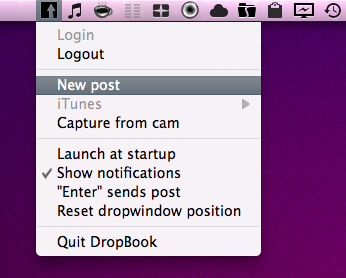
DropBook is a new app developed by i-NOVATION and released in the Mac App Store at $2.99. It looks like a simple Facebook uploader that’s actually packed with functionalities, but still manages to let users access these features with ease and a few clicks. Read more


Mac App Store Review: Unretina, Simple Utility for iOS Designers

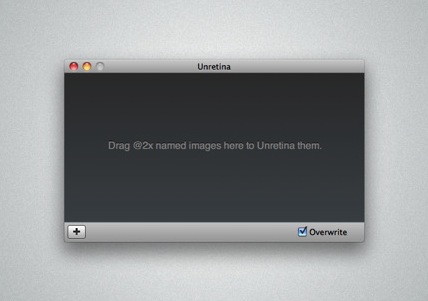
Released for free in the Mac App Store and developed by Bonobo Labs, Unretina is an OS X utility specifically geared towards iOS designers and developers. What this app does is very simple: it provides a way to easily resize “2x” images built for the Retina Display in order to make them compatible for artworks on older Apple devices.

Unretina takes graphic files designed for the iPhone 4 and iPod touch 4th gen and resizes them to a resolution compatible with, say, the iPhone 3GS and older iPod touches. It should work for all devices that don’t come with a Retina Display. Through a simple drag & drop interface, Unretina looks like a straightforward utility for designers that does one thing well.

Looking at the reviews in the Mac App Store description page, it appears that the app uses Bicubic resampling to resize graphic files. This may lead to a tiny sharpness loss, and a few pixels off. Something that, apparently, most designers won’t care about.

Unretina is available for free in the Mac App Store.