This Week's Sponsor:

Turbulence Forecast

Know before you go. Get detailed turbulence forecasts for your exact route, now available 5 days in advance.


Posts tagged with "macappstore"

Apple Releases Remote Desktop In The Mac App Store and 3.4 Update

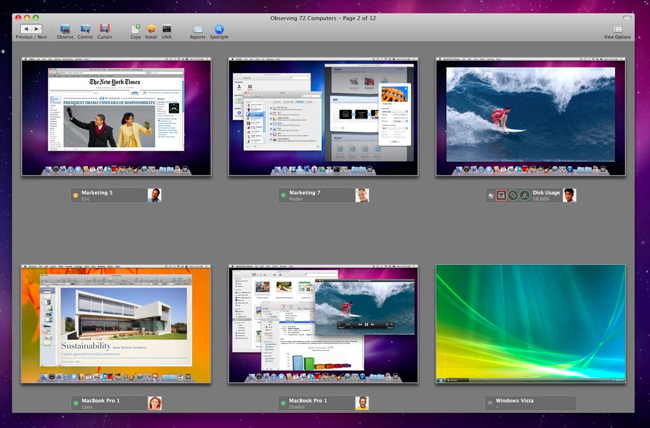
Earlier today, Apple released its VNC app / remote administration and assistance software Apple Remote Desktop in the Mac App Store. The app is available here at $79.99 (Mac App Store link) and, together with Aperture, it’s one of the “pro apps” that Apple decided to feature for the Mac App Store grand opening.The app, specifically tailored for network admins and users who need to manage a series of OS X machines in a local network, offers a huge feature set with functionalities such as software distribution, task server for package installations, UNIX shell scripts execution on clients and remote Automator tasks.

Today Apple also released an update to Remote Desktop, which reaches version 3.4 and it’s the same version that’s being sold in the Mac App Store. There’s no real changelog for this update just yet, except that Apple marks it as “recommended” for all Apple Remote Desktop users and addresses compatibility issues. More information are available here.

You can buy Apple Remote Desktop in the Mac App Store here.

How To Fix Mac App Store “Error 100”

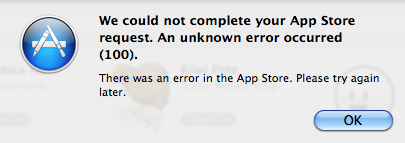
The Mac App Store went live less than an hour ago and as I installed the OS X 10.6.6 update required to use the new Store, I rebooted my computer and logged in the Mac App Store using my Apple ID. As I tried to download a free app, the Mac App Store returned Error 100, saying:

We could not complete your App Store request. An unknown error occurred.

We’re also getting several reports from users still unable to download apps from the Mac App Store because of this error. The cause seems to be lying in the fact that in the first minutes the Mac App Store went live and Apple let users log in with Apple IDs, they didn’t include the updated Terms and Conditions to accept before start using the Store. Thus many users, including me, logged in without accepting the Terms and were unable to download apps because they were stuck in some sort of “limbo”.

Here’s how you can fix it:

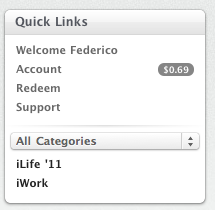
- Sign out from the Mac App Store. You can do it by accessing the “Quick Links” section in the Mac App Store homepage and clicking on “Account”. Sign out.

- Quit the Mac App Store app.

- Log out from your computer; log in again.

- Open the Mac App Store, sign in with your Apple ID, try to download a free app and accept the Terms and Conditions when asked. After that, the download should start.

- If a logout doesn’t fix the issue, restart your Mac instead. We’re hearing that a reboot fixed the problem for many users.

If you’re still experiencing the issue, please let us know in the comments.


Apple Releases OS X 10.6.6 and Mac App Store

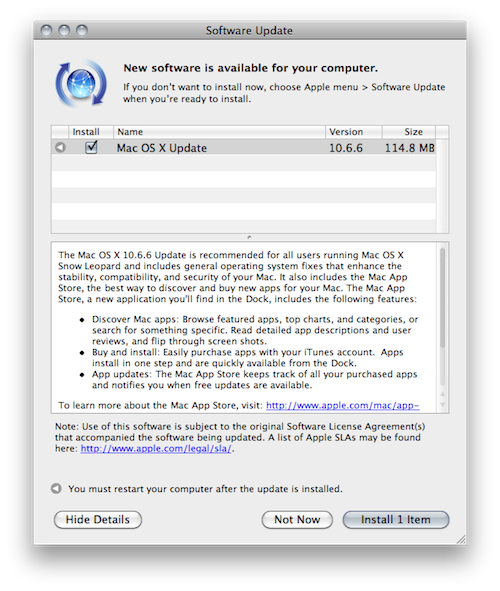
A few minutes ago Apple released OS X 10.6.6 with access to the Mac App Store in Software Update. It is available now as a free 114 MB download for Snow Leopard users. As noted by Macworld, the Mac App Store already includes some apps from Apple such as the iLife ‘11 suite with standalone apps sold at $15 each. Sadly, there’s no iWork ‘11 in the Mac App Store – the iWork ‘09 apps are sold at $20 each.

Aperture and Apple Remote Desktop are also on sale in the Mac App Store, both available at $79.99.

Full changelog and first screenshots of the Mac App Store below.

Update: here are the direct links to the OS X 10.6.6. update.

- Mac OS X v10.6.6 Update

- Mac OS X v10.6.6 Update Combo

- Mac OS X Server v10.6.6 Update

- Mac OS X Server v10.6.6 Update Combo

Update #2: And here’s everything you need to know about the Mac App Store.

Read more


Apple Releases OS X 10.6.6 and Mac App Store

A few minutes ago Apple released OS X 10.6.6 with access to the Mac App Store in Software Update. It is available now as a free 114 MB download for Snow Leopard users. As noted by Macworld, the Mac App Store already includes some apps from Apple such as the iLife ‘11 suite with standalone apps sold at $15 each. Sadly, there’s no iWork ‘11 in the Mac App Store – the iWork ‘09 apps are sold at $20 each.

Aperture and Apple Remote Desktop are also on sale in the Mac App Store, both available at $79.99.

Full changelog and first screenshots of the Mac App Store below.

Update: here are the direct links to the OS X 10.6.6. update.

Update #2: And here’s everything you need to know about the Mac App Store.

Read more


Hint At iWork ‘11 Coming Tomorrow On The Mac App Store?

As noted by 9to5mac, some graphic files found in the latest update to Keynote Remote, released today together with new Keynote features for iWork.com, hint at the presence of the iWork ‘11 suite on the Mac App Store tomorrow. Rumors of a new version of iWork have been going around since November, when AppleInsider suggested that, according to their sources, iWork ‘11 should have been released together with iLife ‘11 but was put on the shelf at the last minute and saved for a Mac App Store launch in January.

Today’s update to Keynote Remote includes two slightly changed Keynote icons that have “2011” on them. Traditionally, Apple updates the Keynote icon with a new year on it as a new version is released – it happened in the past with Keynote ‘09 as well, for example.

Of course, Apple might just have included these updated files and then release iWork ‘09 as standalone apps in the Mac App Store tomorrow. With all the rumors that have been going around recently, though, and the fact that Apple has heavily featured iWork apps in its Mac App Store promo material, there might be the possibility of seeing iWork ‘11 showing up tomorrow as a digital download in the new Store.


Mac App Store Preview: Filr, The Simple File Tagger & Renamer

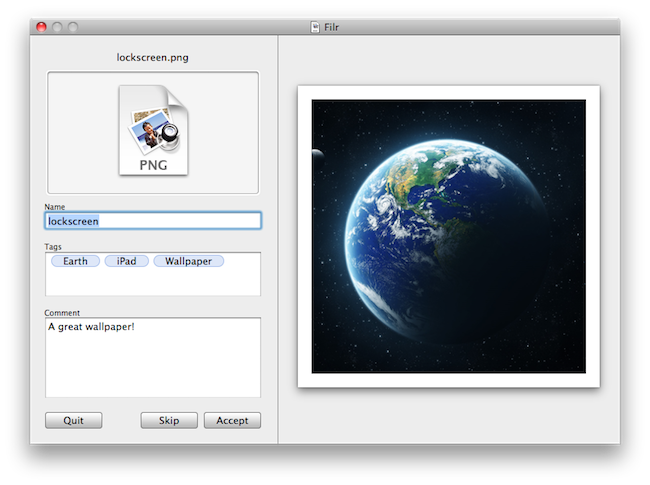
Developed by NovaStorm Software, Filr is a new simple utility for OS X that will be released tomorrow in the Mac App Store. The app, very user-friendly and straightforward in its approach, will let users do three things: rename files, tag them and apply comments to them. Unlike many other batch renaming tools available online, Filr will be focused on letting users modify one file at a time.

Tags you apply to files will be based on the OpenMeta standard, and thus will be compatible with most tagging softwares available for the Mac such as Ironic Software’s Leap 2. The Spotlight comments you’ll be able to attach to files will also be compatible with a variety of Mac apps such as Yojimbo or DEVONthink.

Overall, Filr looks like a really simple and focused app to quickly get more metadata into your Mac files, for more organization and better search functionalities in combination with other apps. Looking forward to it tomorrow, on the Mac App Store.


Preview: Chronos Is A Simple Time Tracking Utility Heading To The Mac App Store

While we’re literally mere hours from the Mac App Store launch in MacStories time, I wanted to show you all a nifty little utility that you can get your hands on tomorrow. While I don’t like the idea of developers simply porting iOS apps to the desktop (I’m afraid of “gunking up” OS X), I do like the idea that small developers such as myself can get encourage to just start making things and have almost instant visibility. Chronos is one of those apps, a tool made to fill a missing spot on the OS X desktop that keeps track of how long you spend on a project, and its various tasks. What’s really neat is that it’s super simple to use: add a project, a few tasks, and start the timer. If you need to, you can add time to an existing task just in case you forgot to set the clock when you began coding away. Little indie apps like this are what I’ll be looking forward to: I like seeing good ideas that fill a gap and can be improved on over time.


Mac App Store and OS X 10.6.6 Coming Tomorrow at 12 PM ET

We know the Mac App Store is launching tomorrow, on January 6. We also know that Mac OS X 10.6.6 will be required to use the Mac App Store. Jim Dalrymple over at The Loop, however, confirms that according to his sources (and when Jim says “my sources tell me” he always means “someone at Apple told me”) the Mac App Store is launching tomorrow at 12 PM ET, 9 AM Cupertino time.

According to my sources, the Mac App Store will be available at 12:00 pm (noon) ET on Thursday. That puts it at about 9:00 am PT where Apple is headquartered in Cupertino, Calif.

Of course, this means that come 12 PM tomorrow we should fire up Software Update and find a 10.6.6 update that, among fixes, will include the Mac App Store as a new system app. It is still unknown whether or not Apple will also offer a standalone Mac App Store download for 10.6.6 users on its website.

So anyway, get your credit cards ready: we’re 23 hours away from the Mac App Store.


Realmac Announces Mac App Store Pricing, Courier Becomes App Store Exclusive

Our friends over at Realmac have been busy deciding the approach to take for the Mac App Store, which in case you somehow missed by living under a rock for the past three months, is launching tomorrow as a free update for every Snow Leopard user. The Realmac team has evaluated all the options on how to best port all their applications to the new Store, while retaining the possibility to sell software to customers through their own website.

There’s been plenty of discussion about what developers will do with their apps and pricing, so today we’re announcing some pricing changes that will come into effect once the App Store goes live. Customers who purchase one of our applications via the Realmac Store will not be affected by these changes as, where applicable, they’re being applied to our own store.

First off, Courier – a beautiful app to send any file to a variety of online services we reviewed here – is going to be a Mac App Store exclusive priced at $4.99. The great news is, if you purchased Courier at full price in the past and you’re willing to re-download the app from the Mac App Store (you know, to keep a neat app library and forget about manual updates) the developers are offering a full refund. Just buy the app from the Mac App Store and send both the receipts (the old one, and the new iTunes receipt) to Realmac’s email address to get a refund for the old, full price. More details here.

As for Realmac’s other apps, RapidWeaver 5.0 is going on sale at $39.99 for a limited time, with LittleSnapper seeing a price drop as well to $24.99. The new prices will be effective tomorrow both on the Mac App Store and Realmac’s website.

Realmac is another example of long-time OS X developers that are believing in the new platform as the best new way to reach millions of new customers and Mac users. For other app previews and details, check out our Mac App Store hub.