


In case you missed it at Apple’s Back to the Mac event, Mac OS X 10.7 “Lion” is getting redesigned scrollbars and a brand new scrolling system. In fact, Apple is taking iOS’ “rubber banding” effect and minimal, fading scrollbars to the Mac with the next major iteration due next year. As demoed by Apple’s Craig Federighi in the Mac App Store app running on Lion, scrollbars will behave similarly to iOS – you won’t any scrollbar if you’re touching the trackpad. Read more
Posts tagged with "os x"
Want iOS Scrollbars On A Mac? There’s A Theme For That
MacPaw Teases Ensoul For Mac App Store

You might know MacPaw as the genius band of Mac savvy gurus who develop CleanMyMac and MacHider. The well known developers have introduced a fantastic teaser website and video showcasing a special project for the Mac App Store that’s going to bring a little soul to your iPhone. Details are sparse, but we’re pretty stoked after watching that gorgeous video a few times over. Heads up though, MacPaw is giving away a free copy of the app to every 100th person who subscribes to receives updates on the status of this yet unknown application. Give it a shot, and let us know what you think Ensoul could be in the comments below.
Invaders Corruption Mutates Invaders With Geometry Wars

I like to hunt down different indie games that fulfill the ever growing desire to feast my eyes on well made, yet simple titles that are available on a variety of platforms so that even our Windows readers can take part in all the fun. But mostly I’m just looking for some casual pixel love for my midnight Mac gaming cravings. Last week I came across Invader Corruption, where a unique name creates an individual gaming experience so that no two games are quite the same. What starts off as a boring and possibly mundane shooter ends up being compelling and totally addictive. Shoot past the break to learn more about this frantic free title.
Top 5 OmniFocus Applescripts→
Top 5 OmniFocus Applescripts

The OmniFocus Extras forum on the Omnigroup user forum is one of the great sources for ready-to-use Applescripts. All you need to do is move them into the right directory on your machine and occasionally modify some of the scripts parameters to fit your needs.
The following AppleScript are those which are extremely handy and I use on a daily basis. There are many others available on the forum and other places, but many of them didn’t really add much value to my workflow, which is a pretty standard one, or solve problems I never encountered.
The “find project” one is a must-have.
Alfred 0.8 Adds Clipboard Snippets, Inline Definitions
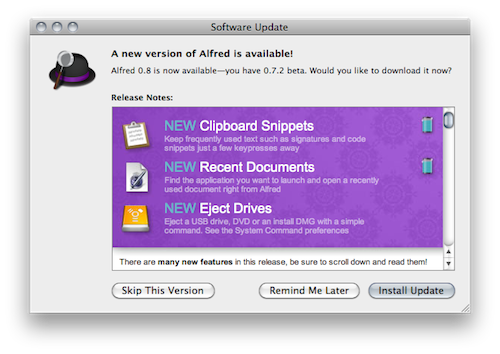
Here at MacStories, we’re big fans of Mac application launcher Alfred. I stopped using Apple’s Spotlight thanks to Alfred, and the app got a lot of better in the past months with clipboard history, improved keyboard navigation and several new features introduced in the paid version of the app, the Powerpack. For instance, I’m a huge fan of the iTunes Mini Player and the file system browser, which allow me to quickly start playing music from iTunes and browse in a Finder alternative view, respectively. Most of all, I like Alfred because it’s lightweight, blazing fast and entirely keyboard-based. Not to mention that the developers are coming out with updated every few weeks or so. I love it.
The latest Alfred update, version 0.8, brings lots of general improvements and bug fixes (check them out below) and a couple of new features that are very welcome in my workflow. Alfred can now save test snippets in its clipboard interface: say you have these recurring lines of text you find yourself typing on a daily bases (email addresses, templates, links), you can save them as snippets in Alfred’s preferences and paste them anywhere with a keyboard command. I type “snip” to open the snippet interface, then “keys” and there my snippet with unicode characters goes into the text field my cursor is on. Takes seconds and it just works.
Other new features include inline dictionary definitions, possibility to open recent documents and eject drives with just a few keystrokes. Great stuff for the keyboard geek. In case you still haven’t tried it, Alfred is available for free here.
Full changelog below. Read more
Daisy Disk 2 Public Beta Available
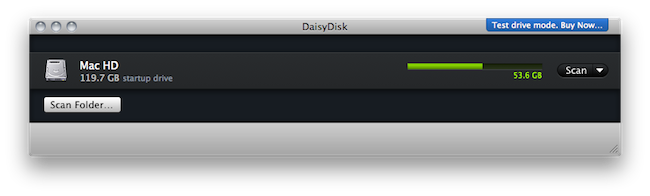
We previewed the new version of Daisy Disk for Mac back in November and I’ve been running the app on my computer since then. At regular weekly intervals, I’ve found myself using Daisy Disk 2 to take a peek into my Mac’s hidden and mysterious locations and see what was eating up all that space. Sometimes it was an iTunes backup. Sometimes it was a folder full of new apps to try. Most of the times it was just junk. Daisy Disk 2, with its gorgeous “sunburst” interface and file deletion functionality, provides a great way to “visually” know what has to be trashed on your machine. Read more
Disk Drill Is An Amazingly Simple Recovery App For HDDs

When we lose deleted files on our hard drives we tend to think of this information as unrecoverable. On a Wednesday afternoon it’s easy to forget that those nightly cleanup scripts aren’t going to do you any favors when you’re looking to reuse some stock images for an updated web template. And those deleted music files? It turns out that you liked that dirty ol’ garage band after all. In times of panic we resort to Google and often extreme utilities to scrounge our Macs for every last bit of recoverable data possible before sifting through the garbage of unreadable file names and Quick Look previews. We not only advise that you read John Gruber’s advice on the matter and keep consistent backups, but we’ve reviewed a brand new Mac utility that’s not only free during beta, it’s really (really) slick.
Evernote 2.0 Out Of Beta, Now Available For Mac Users
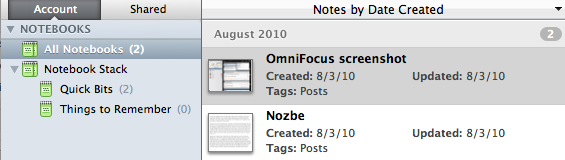
A few weeks ago we reported that Evernote launched a 2.0 beta version for Mac users to test some of the major new features like Stacks and in-app notebook sharing. In spite of the fancy name, stacks are basically folders for your Evernote notebooks that reside in the (redesigned) left panel. Stacks, sadly, are exclusive to the desktop client and won’t show up in the web version of Evernote.
Evernote 2.0 is now out of beta and available for download on Evernote’s website, or through the app’s built-in software update tool. This 2.0 update is pretty huge and comes with a lot of features such as support for up to 250 notebooks, a new attachment button to attach a file to a note and linked notebooks.
You can read about the new features over at Evernote’s official blog.
iOS X
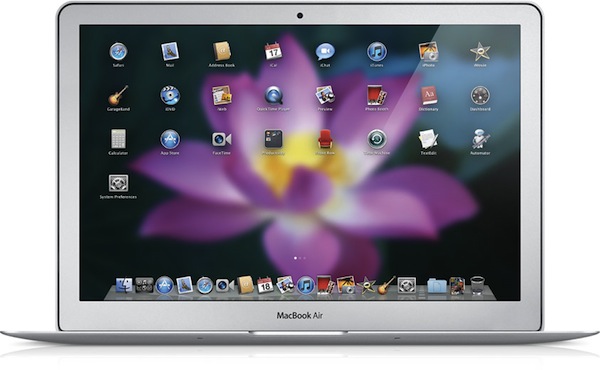
Like it or not, Apple is going back to the Mac. The regular Mac user, fan, fanboy – whatever you’d like to call someone who showed a deep affection to Apple’s desktop operating system for the past decade – should like the fact that Steve Jobs confirmed Apple is still committed to making the best personal computers, based on OS X. The same regular Mac user, though, is immensely scared by the concept underlying Jobs’ statements: Apple is going back to the Mac, taking the good things learned in 3 years of iOS development with them. OS X turned into iPhone OS. iPhone OS became iOS for iPhone and iPad. Now, everything’s going back to where it all started: the Mac.
We have heard this story before. In fact, we all commented on Apple’s October 20th event by saying that, with the right approach, the Mac App Store and some iOS elements coming to the Mac might be the best thing that ever happened to the platform in years. Read more