This Week's Sponsor:

Turbulence Forecast

Know before you go. Get detailed turbulence forecasts for your exact route, now available 5 days in advance.


Posts tagged with "safari"

JailbreakMe 3.0 Released, Jailbreaks iOS Devices Including iPad 2

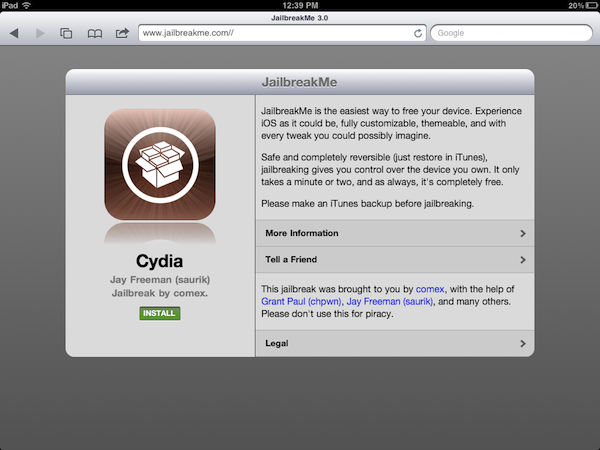
The long-awaited new version of popular jailbreak tool JailbreakMe has been released today and, as previously announced by developer and hacker comex and the Dev-Team, it is capable of jailbreaking a variety of iOS devices running iOS 4.3 and above, including the iPad 2. The procedure of jailbreaking allows users to install unauthorized software on their devices, like Cydia, an alternative marketplace that contains apps, tweaks and graphical modifications Apple can’t approve for sale in its App Store. The popularity of JailbreakMe raises from the fact that the tool is entirely Safari-based, enabling users to press a button in their browser to install Cydia with ease, without having to plug the device into a computer, restore, and follow other additional steps. JailbreakMe takes a few minutes to install Cydia, and it’s completely reversible in iTunes with a restore.

Because of the issues with people leaking the hack behind JailbreakMe 3.0 in the past week, creator comex was forced to accelerate the release, fearing a patch from Apple coming soon with a software update. Just like JailbreakMe 2.0, in fact, the new tool uses a vulnerability in iOS’ PDF display engine to allow the installation of Cydia from Safari. The hole will likely be fixed soon by Apple with a software update, perhaps iOS 4.3.4, but the same Cydia developers are offering a tweak called PDF Patcher 2 (available in Cydia) which patches the JailbreakMe vulnerability after the jailbreak.

JailbreakMe 3.0 supports the following devices as explained by a Dev-Team blog post:

  • iPad1: 4.3 through 4.3.3
  • iPad2: 4.3.3
  • iPhone3GS: 4.3 through 4.3.3
  • iPhone4: 4.3 through 4.3.3
  • iPhone4-CDMA: 4.2.6 through 4.2.8
  • iPod touch 3g: 4.3, 4.3.2, 4.3.3
  • iPod touch 4g: 4.3 through 4.3.3

The Dev-Team also illustrates the current scenario of restoring a device to older versions and SHSH blobs:

Q: Will I permanently lose the jailbreak if I need to restore my device?

A: For all except the iPad2, saving your SHSH blobs should let you always restore your device to iOS versions where this jailbreak works. The iPad2 is a little more complicated. If you have a wifi-only iPad2 and saved SHSH blobs, you’re in good shape. But if you have the GSM or CDMA iPad2, you won’t be able to restore to 4.3.3 or lower once Apple stops signing its baseband. There are a few ideas that might work to get around this limitation, but for now it’s best to assume there’s no going back to 4.3.3 once 4.3.4 is out for iPad2 GSM or CDMA owners.

As we said above, the exploit will likely be fixed soon by Apple (some bloggers are already claiming as early as this week), so if you’re willing to jailbreak your iPad 2 on iOS 4.3.3 or iOS device, head over JailbreakMe.com now, and follow the steps to install Cydia. For Cydia app & tweak recommendations, check out our coverage from the past months, and give a try to Cydia Search to browse available software for your jailbroken device from your desktop.


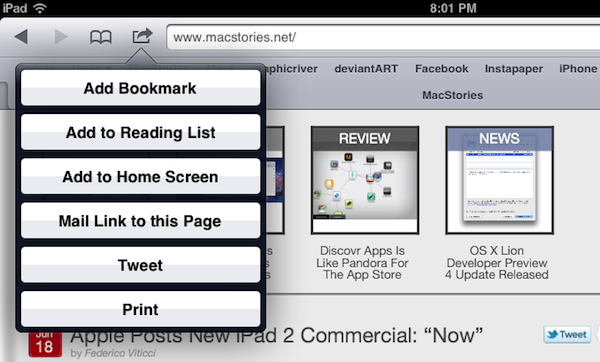
iOS 5 Will Apparently Support Nitro In Web Apps That Are Pinned To The Home Screen

Safari received quite a substantial speed bump with iOS 4.3 when Apple added the Nitro engine, a powerful JavaScript engine. However, some were left disappointed when it was revealed that the engine didn’t work with web apps that had been pinned to the home screen.

It seems that iOS 5 will eventually fix this inconsistency and bring those web apps up to speed. It comes after a user on Hacker News answered a question asking whether Nitro was included for those web apps pinned to the home screen.

This is probably breaking my NDA to say this, but yes, they did. Web.app now has the ‘dynamic-codesigning’ entitlement, which enables Nitro.

Apps that use the UIWebView alternative to Safari apparently won’t be getting Nitro, though the same user says that this is a security restriction rather than an inconsistency.

[Via CNet]


Safari 5.1 Developer Preview Released

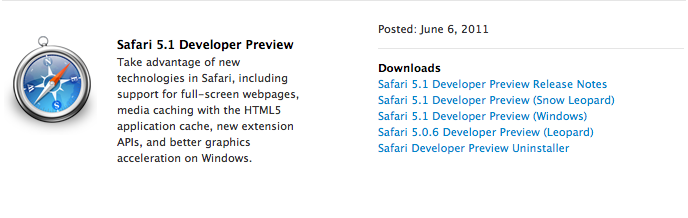
As a last update to the various Dev Centers that a few hours ago received new betas of iOS, OS X Lion and iCloud for developers, Apple has also posted the Safari 5.1 Developer Preview that, as seen on Lion (running 5.1 out of the box), will bring some of the browser’s latest advancements to Snow Leopard. According to Apple:

You can now download Safari 5.1 Developer Preview and take advantage of new technologies, including support for full-screen webpages, media caching with the HTML5 application cache, and better graphics acceleration on Windows.

With Safari 5.1 Developer Preview, you can tap into new extension APIs, including support for popovers, menus, new event classes, and interaction with Reader.

The Developer Preview can be downloaded now from the Safari Dev Center.


iOS 5: Safari Improvements

Apple has unveiled a number of improvements to the iOS version of Safari and in particular is proper tabbed browsing for Safari on the iPad. As can be seen above, you will now be able to switch tabs with just one touch.

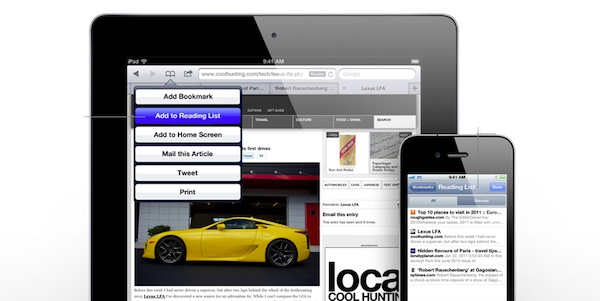
Other new features include ‘Reader’ which will strip a website down to the bare basics of just the text and image, similar to Readability and Instapaper functions. You can then email that “streamlined” article to any friends or family.

The second is the ‘Reading List’ which allows you to save articles for reading at a later time. It works on the iPhone, iPad or Safari and you can access the Reading List from any of those versions of Safari.


Facebook for iPhone Creator Tries to Improve Scrolling in iOS Web Apps

Joe Hewitt, creator and former developer of the Facebook app for iPhone, announced earlier this month his intention to leave the company to focus on personal projects to build tools for designers, programmers, and writers. The first result of his renewed development efforts is Scrollability, “a single script” that has no “external dependencies” and it’s aimed at dramatically improving scrolling on mobile web applications. One of the biggest problems of web apps, in fact, when compared to native iOS applications, is that web apps usually suffer from bad scrolling performances and an overall feeling of “slowness” that most App Store apps don’t have because of the tools and frameworks they were written with.

On the official project’s page, Hewitt explains Scrollability works best on the iPhone 3GS, iPhone 4 and iPad. Once implemented on a webpage (by adding a few “CSS classes to scrollable elements”), the effects of Scrollability can be immediately noticed thanks to a general snappier and more responsive scrolling than regular iOS web apps. For now there’s only a Table View demo out, and you can try it by heading over this link with your iOS device.

Hewitt also details some of the changes that are being worked on:

Bugs Being Worked On

  • Increase momentum as you flick up or down several times
  • When releasing finger slowly, make sure scrolling is completely stopped
  • Lots of other hard to describe discrepancies with native scrolling…

Features Planned

  • Scroll to the top when status bar is tapped
  • Option to snap to page boundaries
  • Sticky table headers
  • Photo viewer with zooming

Scrollability is available on GitHub, and you can follow Hewitt’s Twitter account to stay updated with the latest changes and modifications to the script. With the improvements introduced in Mobile Safari after the iOS 4.3 software update, there’s a huge opportunity for web developers to write apps for iPhones and iPads that don’t require Apple’s approval; Joe Hewitt’s project may become obsolete as soon as next month when Apple previews iOS 5, but it’s still worth checking it out now and testing it on mobile web pages. [via ReadWriteWeb]


Google News Goes Local on Mobile Browsers

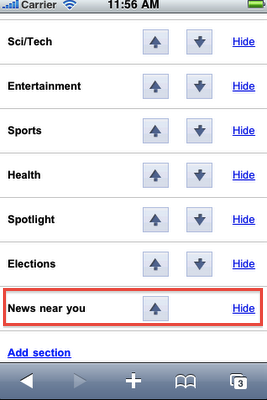
With an official post on Google News’ blog, Google has announced that starting today in the United States, Google News will be able of displaying location-based content on iOS and Android mobile browsers. By giving access to your location information in iOS Safari, Google News will find news relevant to where you are in the US with a new section called “News near you.”

To use this feature, visit Google News from the browser of your Android smartphone or iPhone. If this is the first time you are visiting Google News on your phone since this feature became available, a pop-up will ask you if you want to share your location. If you say yes, news relevant to your location will appear in a new section called “News near you” which will be added at the bottom of the homepage. You can reorganize the sections later via the personalization page.

The updated section is available now on news.google.com, but it’s restricted to the United States. Remember you’ll have to grant Safari access to your location, otherwise the feature won’t work.


Survey Shows iPad Still Primarily Used for Web Browsing, Email, Video

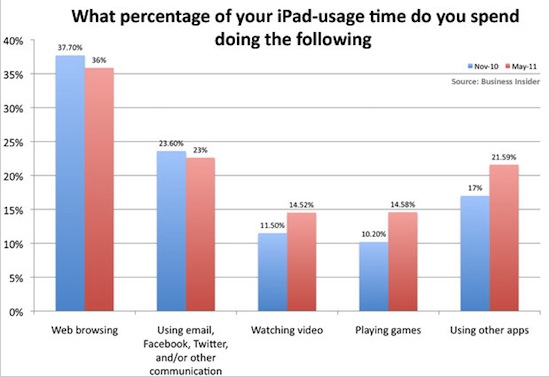
In an unsurprising turn of events following the launch of a survey among readers who own an iPad, BusinessInsider posts a chart detailing how people use an iPad. And unsurprisingly, the usual suspects are on top: the chart shows people use iPads to browse the web (36% in May 2011, 37.7% in November 2010), whilst 23% rely on the tablet for their email needs and communication skills happening on Twitter, Facebook, or other social networks that presumably have a native iPad app, otherwise that would count in the “web browsing” section, I guess. The iPad is also strongly used to watch videos (14.52% up from 11.50% in November 2010), play games and “use other apps.”

The end results of this survey don’t come as a surprise to anyone, but they confirm a widely popular theory – that Safari is the most powerful app Apple could have ever bundled with the iPad and iOS by default. Not only does Safari replicate most of the functionalities seen on the desktop, with the recent iOS 4.3 update it also got some nifty new Javascript engine that makes opening webpages blazing fast. That’s why every little feature that didn’t find its way into Safari and is requested a decent amount of users can become the reason to develop an alternative browser for iPad. The browser on the tablet is the best way to access the internet – it is for me, and clearly it is for other people, too.

What about those other apps? Watching videos with Plex or other media managers is a great experience, especially when combined with AirPlay and an Apple TV in your living room. Playing games? Between Angry Birds and Sword & Sworcery there’s plenty of choice to go by. Other apps? They must refer to things like OmniFocus, Simplenote, LogMeIn, Instapaper and Screens. It’s all about the apps, but Safari is still king when it comes to spending time with an iPad, browsing the web.


Amazon Cloud Player Now Works with iOS Safari

Back in late March, Amazon launched Cloud Player for the web and Android devices, an online interface that, relying on music uploaded to your Amazon account via Cloud Drive, allowed you to stream music from the cloud via a web browser or the native Android application, built into the OS with direct connection to Amazon’s servers to fetch and stream songs on the go. The service, however, wasn’t working with iOS devices, and it wasn’t a Flash issue: somehow, the website itself didn’t want to cooperate with Mobile Safari on iPhones, iPod touches and iPads. We noted that there was a way to make it work by using an alternative browser like iCab Mobile and changing the app’s user agent, but it was convoluted and far from being a reliable alternative to playing music locally in the iPod app, or from third-party services like MOG and Spotify, which do have native iOS apps. The lack of iOS compatibility for Cloud Player left many wondering whether the company intentionally decided to block the service, betting exclusively on the Android platform – which is the foundation for Amazon’s new app marketplace.

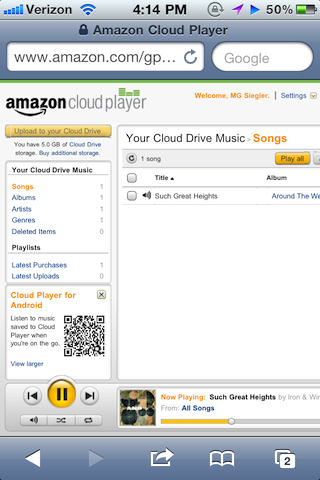
As noted by TechCrunch today, however, Cloud Player seems to be working in the iOS browser now. Songs stream just fine, and they even pause automatically during an incoming phone call or if a Push Notification is received. It’s unclear how Amazon exactly “unlocked” the feature and why it went online so quietly without any major announcement, but my guess is the Cloud Player team simply added a string to allow Mobile Safari to start a QuickTime streaming session within the browser.

You might think this had to due with Flash or another technology that iOS wasn’t compatible with, but it wasn’t. It looked like something else was simply blocking it from working. Well, good news. That’s no longer the case.

If you visit Amazon’s Cloud Player through the Safari web browser on an iOS device, you’ll see that it does in fact now work. You’ll first hit a warning page telling you that your browser is not supported, but just ignore that. Click into the music in your drive and it will begin playing.

MG Siegler notes the implementation is still far from perfect (uploading requires Flash, but you wouldn’t be able to upload files from iOS anyway) and the solution implies listening to music in a regular browser window. Still, it’s a start for Amazon, and it reignites speculation of a native Cloud Player app for iOS coming in the near future. The website, for now, is restricted to US access only.

Rumors in the past months pointed at Apple building a full-featured music streaming service based on iTunes, wrapped inside the upcoming iCloud infrastructure for Mac and iOS devices. There’s little doubt at this point Apple hasn’t at least considered the possibility of letting users upload their music collection or subscribe to an à la carte service for streaming songs off the cloud. With the WWDC roughly a month away, we should know more about Apple’s cloud plans and new music options soon.


Kickstarter: Dialoggs - A Better Communication Network

Yesterday we featured a unique Kickstarter project, Hive. Today we’re featuring the first type of browser-based Kickstarter Project we have featured on MacStories and it’s called Dialoggs by Drew Wilson, a popular designer/developer from California. Drew is best known for his Pictos icon sets and Valio, a web application development company. He also has a few new projects up his sleeve too, one being a Mac app called Screeny.

Dialoggs is set to be a new network for better communication, “filling the gap between Twitter, iChat and Tumblr” – it is NOT a client for any of the previously mentioned networks.

It’s realtime, has invites for open and private discussions, and all posts are saved and have their own page. You can attach media and code as well in each post. There’s even an option to “follow” and “unfollow” other Dialoggs users. Recommend users, browse others and “mention” people in posts like Twitter/Facebook; it’s more than just status updates, and it’s much more than a static blog with comments. Drew calls it “the best of both worlds. It’s realtime communication that is permanently stored and (optionally) publicly available.”

Video and screenshots after the break.

Read more