This Week's Sponsor:

Turbulence Forecast

Know before you go. Get detailed turbulence forecasts for your exact route, now available 5 days in advance.


Posts tagged with "video"

Air Video Finally Adds iOS 4.3 and AirPlay Support

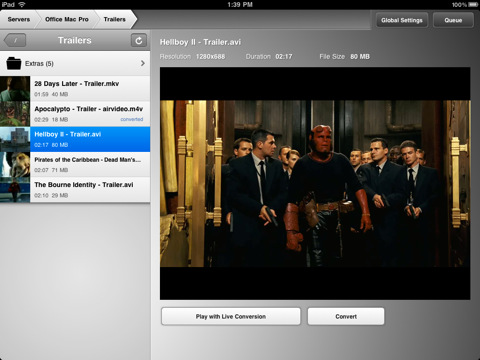
Air Video, the popular iOS application to stream movies from a computer with real-time conversion, was updated last night to include support for iOS 4.3 (now in GM and ready to be released this Friday) and a much requested feature since Apple unveiled iOS 4.2 months ago: AirPlay video out support.

You may remember, in fact, that Apple’s initial implementation of AirPlay didn’t allow third-party developers to use the new feature in their apps. AirPlay video streaming was exclusive to Apple’s own applications for iPhone and iPad, and not even Mobile Safari could stream videos to the Apple TV. With iOS 4.3, however, Apple revised its decision (or simply had time to properly enable system-wide AirPlay support) and now allows every developer to implement the AirPlay APIs for video-out streaming.

The latest Air Video update supports AirPlay with iOS 4.3, and that’s it. Not a huge changelog, but the feature is the one we’ve been waiting for. As for those who think the new Home Sharing might make apps like Air Video or StreamToMe useless, please keep in mind that Air Video supports any kind of file, in any location, with on-the-fly conversion to iOS. iTunes’ Home Sharing is sweet, especially for music, but Air Video still wins when it comes to video support.

The new Air Video is available here, and it requires iOS 4.3 and Air Video Server 2.4.5-beta3 or newer for AirPlay support.


They’re Back: Banned iPad 2 Promo Video

Last year, a US-based agency known as jLE made the rounds of the Internet with a series of fake “banned promo videos” for Apple products. They did videos for the white iPhone 4, the iPad, and even the iPhone 4 Antennagate. They were hilarious and spot-on, and now they’re back to their usual game with a banned iPad 2 promo video.

Once again, it’s funny. The “only Apple black employee” complains and jokes about the availability of a white iPad 2 at launch, other fake Apple executives comment on the two cameras they managed to put in the iPad 2, or the Photo Booth app that allows you to take “silly pictures with two heads”. There’s even a Charlie Sheen joke in there.

Check it out below. Once again, we love it. Read more


IMCapture For FaceTime Lets You Record Those Precious FaceTime Calls

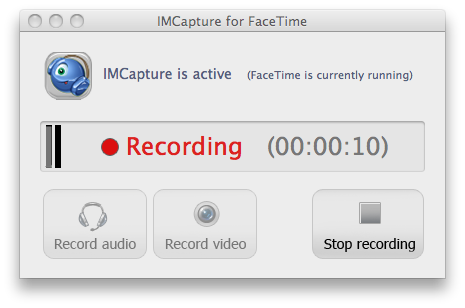
For those who have ever wanted to record FaceTime calls you may want to consider purchasing IMCapture for FaceTime, a new app that has the ability to record your precious FaceTime calls.  The developer has previously released an IMCapture for Skype and IMCapture for Yahoo Messenger which, as the names suggest allowed you to record calls in those alternative VoIP services.

The app comes with a variety of recording and output options, amongst the options include the ability to record just the audio choose which user (or both) to record and the video can be outputted to several QuickTime-supported formats including MOV, MPEG-4, FLV and SWF. The app runs on the Mac so you will have to be either calling or receiving the call through the Mac FaceTime client to record it. The one other negative is the price of the app, coming in at a very steep $50 - likely aimed at professionals rather than the average consumer who might record a couple of calls.

[Via MacNN]


Amazon Takes Another Swing at Apple with New Kindle Commercial

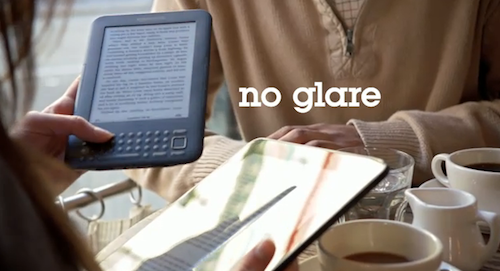
Amazon released another Kindle commercial today, titled “The book lives on”, which is – again – clearly targeting the issues with the iPad as an eBook reader. Just like in the first commercial posted months ago, Amazon points out you can’t read books in direct sunlight on the iPad because of screen glare – something the Kindle addresses with its digital ink paper-like technology.

The latest commercial, however, showcases more features than direct-sunlight reading. The Kindle is touted as a lighter device with battery life “up to a month”, is being used by people in their mid twenties / thirties (Apple’s typical userbase) and has access to more than 800,000 books available in the Kindle Store. Last, the commercial is backed up by a catchy pop song that’s very similar to Apple’s usual commercial strategy. It’s a very nice commercial if you ask me, but I do see a trend here.

Check out the video below. In the meantime, Apple is rumored to introduce a Kindle-like display technology for a better reading experience in the iPad 2. [via TechCrunch] Read more


Video of the Day: Grandparents Using Photo Booth

Here’s a video for a bit of Thursday evening fun. Remember Photo Booth? The app that ships by default with every Mac and allows you to take funny snapshots of yourself through the iSight camera using effects like squeeze, fisheye, dent and many others. Well, now imagine if your grandparents, not exactly the usual Mac geeks, discovered Photo Booth and started recording videos with it.

That’s exactly what the video below (via Thought Catalog) is all about. Grandparents using Photo Booth. It’s genuinely funny, and made me fire up Photo Booth to take some photos with my dad right away. Check it out after the break. Read more


iPhone Nano Concept: Squeeze To Close Apps

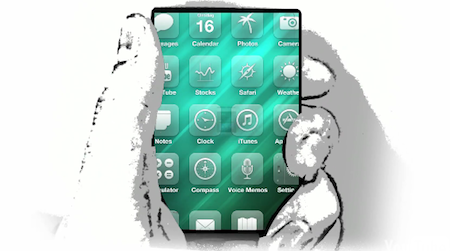
Max Rudberg of Max Themes has tried to imagine a smaller iPhone with, as according to recent speculation, an “edge-to-edge” screen. While the WSJ report doesn’t give many details about the nature of such a screen (is it “edge-to-edge” vertically, or horizontally?), it admittedly plays very well with previous rumors of future iPhones lacking a home button. So what Max did, and you can check out in the video below, is think about a phone that’s really just a screen, but that you can “squeeze” to close apps and go back to the Springboard.

A more intuitive way could be to equip the phone with a pressure-sensitive body. The phone could then be squeezed and the current app would shrink and return the user to the Home screen.

This could be a real wow effect. Seeing how the phone reacts to your grip and then having the app vanish in the palm of your hand.

To avoid ‘squeeze to go Home’ from happening by accident, a visual cue could show that pressure is being applied. In this concept, the app begins to shrink to reflect the pressure that is being applied. When the pressure goes over a defined threshold, the user is returned to the Home screen.

It sounds very futuristic, we know, but it could be a good idea for when the iPhone will eventually lose the Home button. What do you think? Read more


Steve Jobs Kicked In The Face In LG Optimus Pad Promotion

The LG Optimus Pad promo was just another boring tablet video that was more effects than awesome product showcase. At about a minute in, however, any morning coffee drinker would have instantly rewound the tape only to ask, “Did I just see get Steve Jobs get pummeled in the face?” We’re not kidding: In a mock game of Street Fighter (apparently called Spec Fighter), Optimus starts the match with a swift flying kick and stomach punch to none other than Apad, modeled after Steve Jobs. Tasteless? Of course. I mean, they didn’t even show the part where Jobs used his Hadouken. Video from CrunchGear after the break.

Read more


OmniOutliner for iPad Sneak Peek

We’ve already covered the plans of the Omni Group for 2011: a huge update to OmniFocus and OmniPlan, deeper cloud integration with the deployment of the Omni Sync Server in multiple applications and the arrival of outlining and text editing app OmniOutliner on the iPad. A few minutes ago, the Omni Group updated its official Vimeo channel to give a sneak peek of the work-in-progress build of OmniOutliner for iOS, which was demoed at Macworld a few weeks ago.

OmniOutliner for iPad, just like the Mac version, will make it easy to capture ideas and structure them hierarchically with drag & drop, multitouch integration and the possibility to nest as many levels as you need with gestures. Users will be able to apply custom styles to text through a popover menu, or styles to entire rows and multiple rows at the once. It sounds very intriguing. OmniOutliner for iPad, according to the Omni Group, will bridge the gap between a word processor and a spreadsheet app.

Frankly, we can’t wait to try out the app and see if the Omni Group manages to pull out a complete reinvention of OmniOutliner like they did with OmniFocus on the iPad. Check out the video below in its HD glory. Read more


BBC iPlayer For iPad Now Available In UK Store

As previously reported, the official BBC iPlayer app for the iPad has launched today in the App Store. Sadly, iPlayer is only out in the UK for now, and it looks like it will stay there for a while until BBC figures out a subscription method for users outside the United Kingdom.

iPlayer for iPad puts BBC’s TV and Radio programs directly on your iPad for easy access and consumption. The app has been entirely written with Apple’s API and Cocoa Touch technology – it’s a native port of the iPlayer experience for the iPad. You can watch TV and listen to radio, manage your favorite shows and episodes through a Favorite list, browse upcoming programs from BBC. The design is really clean and elegant.

BBC iPlayer is available here, for free. [iTunes via 9to5mac]