John Voorhees

5429 posts on MacStories since November 2015

John is MacStories' Managing Editor, has been writing about Apple and apps since joining the team in 2015, and today, runs the site alongside Federico. John also co-hosts four MacStories podcasts: AppStories, which covers the world of apps, MacStories Unwind, which explores the fun differences between American and Italian culture and recommends media to listeners, Ruminate, a show about the weird web and unusual snacks, and NPC: Next Portable Console, a show about the games we take with us.

The 2025 MacStories Selects Awards

This week, Federico and John reveal the winners of the 2025 MacStories Selects Awards, which celebrate the exceptional design, innovation, and creativity of apps across the iPhone, iPad, Mac, and Apple Watch.

On AppStories+, John has some Apple Music discovery tips for Federico, and they reveal the iPhone features they don’t use.


We deliver AppStories+ to subscribers with bonus content, ad-free, and at a high bitrate early every week.

To learn more about an AppStories+ subscription, visit our Plans page, or read the AppStories+ FAQ.


AppStories+ Deeper into the world of apps

AppStories Episode 465 - The 2025 MacStories Selects Awards

0:00
57:26

AppStories+ Deeper into the world of apps

This episode is sponsored by:

  • RevenueCat – It’s the easiest way to add in-app subscriptions and native paywalls into your mobile apps, and getting started is free.

Read more


Adobe Announces Image and PDF Integration with ChatGPT

Source: Adobe.

Source: Adobe.

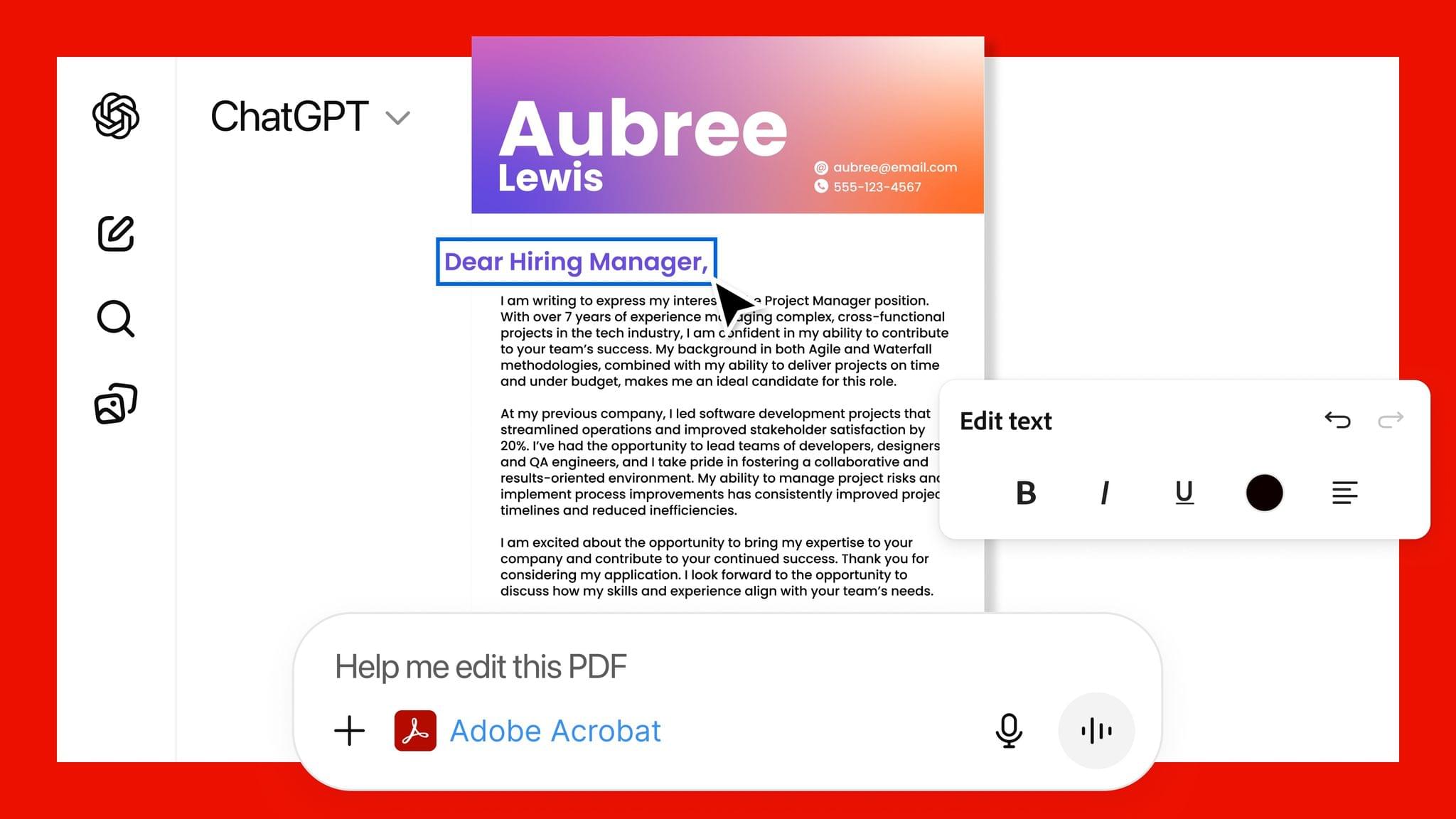
Adobe announced today that it has teamed up with OpenAI to give ChatGPT users access to Photoshop, Express, and Acrobat from inside the chatbot. The new integration is available starting today at no additional cost to ChatGPT users.

Source: Adobe.

Source: Adobe.

In a press release to Business Wire, Adobe explains that its three apps can be used by ChatGPT users to:

  • Easily edit and uplevel images with Adobe Photoshop: Adjust a specific part of an image, fine tune image settings like brightness, contrast and exposure, and apply creative effects like Glitch and Glow – all while preserving the quality of the image.
  • Create and personalize designs with Adobe Express: Browse Adobe Express’ extensive library of professional designs to find the best one for any moment, fill in the text, replace images, animate designs and iterate on edits – all directly inside the chat and without needing to switch to another app – to create standout content for any occasion.
  • Transform and organize documents with Adobe Acrobat: Edit PDFs directly in the chat, extract text or tables, organize and merge multiple files, compress files and convert them to PDF while keeping formatting and quality intact. Acrobat for ChatGPT also enables people to easily redact sensitive details.
Source: Adobe.

Source: Adobe.

This strikes me as a savvy move by Adobe. Allowing users to request image and PDF edits and design documents with natural language prompts makes its tools more approachable. That could attract new users who later move to an Adobe subscription to get more control over their creations and Adobe’s other offerings.

From OpenAI’s standpoint, this is clearly a response to the consumer-facing Gemini features that Google has begun releasing, which include new image and video generation tools and reportedly caused Sam Altman to declare a “code red” inside the company. I understand the OpenAI freakout. Google has a huge user base and has been doing consumer products far longer than OpenAI, but I can’t say I’ve been very impressed with Gemini 3. Perhaps that’s simply because I don’t care for generative images and video, but these latest moves by Google and OpenAI make it clear that they see them as foundational to consumer-facing AI tools.


Activas: Modern Design with a Sprinkling of AI

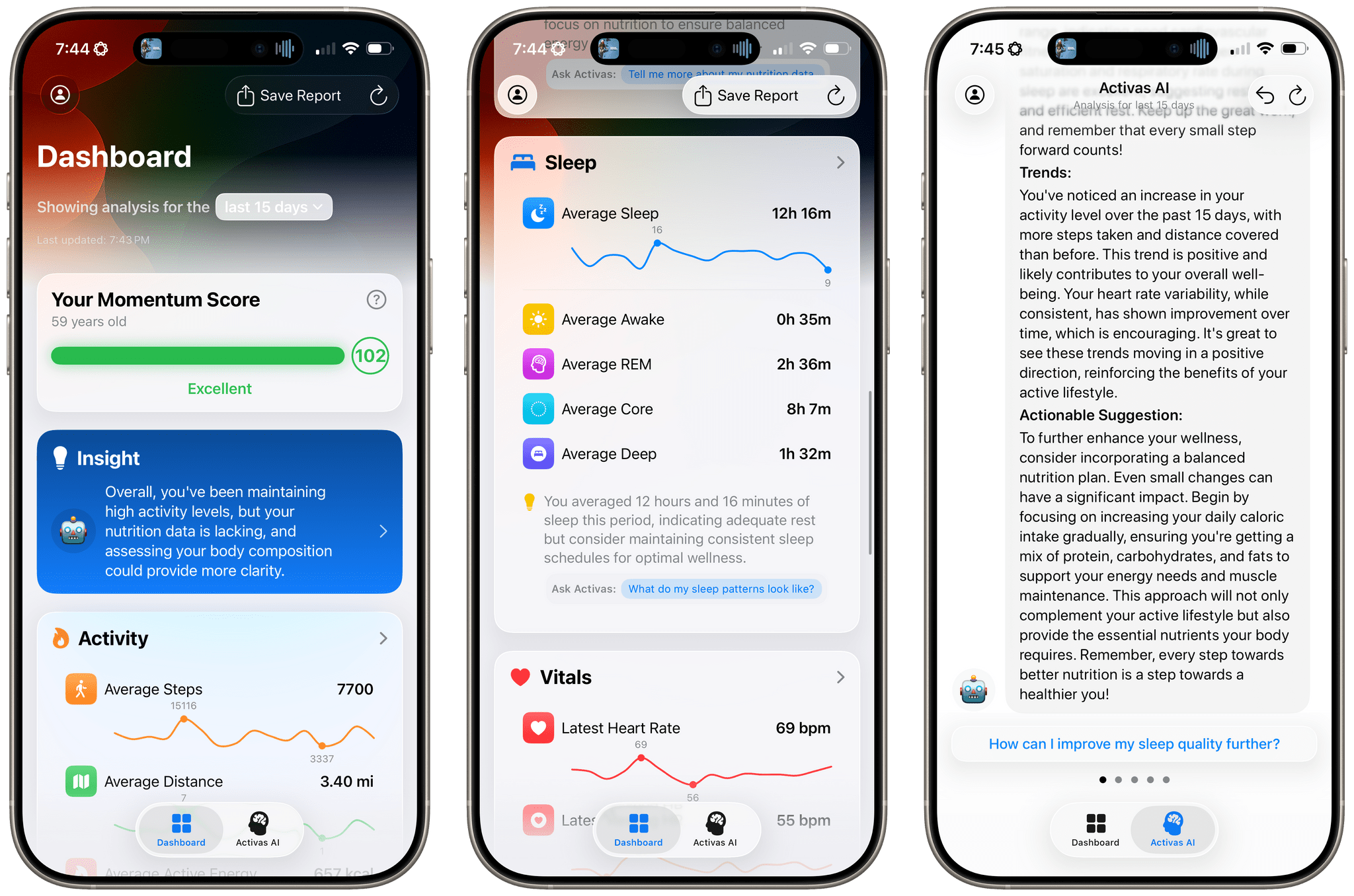
Activas is a new health and wellness tracker for the iPhone and iPad from developer Brian Hough, who built it from the ground up with Apple Intelligence and Liquid Glass in mind. The app serves as a dashboard that brings together information from the Health app in a colorful and easy-to-understand way, using progressive disclosure to avoid overwhelming users with data. It’s a fantastic example of modern design that marries form and function to elevate the user experience.

The app has just two tabs that adopt iOS 26’s Liquid Glass design without sacrificing legibility. The default view is the Dashboard, which can display your recent health and wellness metrics for the last 7, 15, or 30 days. At the top of the Dashboard is a Momentum Score that’s calculated based on a composite of step count, sleep, resting heart rate, and BMI targets, plus your calorie goal. Unlike many similar apps, Activas links to research supporting its targets, which I appreciate. The Momentum Score and a handful of additional stats can also be tracked using one of the app’s Home Screen widgets.

The Momentum Score is followed by an AI-generated insight about your metrics. Because I haven’t been tracking my calories or weight recently, the app suggested I should. That’s followed by overviews of Activity, Nutrition, Sleep, Vitals, and Body Measurement. Each of these sections appears as a SwiftUI-style card that includes graphs showing recent trends, an insight about your metrics, and a suggested question that you can ask the Activas AI with a tap. Sections can be turned on and off and reordered in the app’s settings, too.

The Dashboard’s design is superb. By collecting individual measurements in groups of related statistics and providing a takeaway about each section, the app allows users to get a quick, understandable overview of where they’re succeeding and what needs work.

Read more


How Stu Maschwitz Vibe Coded His Way Into an App Rejection and What It Means for the Future of Apps

This week on AppStories, Federico and I talked about the personal productivity tools we’ve built for ourselves using Claude. They’re hyper-specific scripts and plugins that aren’t likely to be useful to anyone but us, which is fine because that’s all they’re intended to be.

Stu Maschwitz took a different approach. He’s had a complex shortcut called Drinking Buddy for years that tracks alcohol consumption and calculates your Blood Alcohol Level using an established formula. But because he was butting up against the limits of what Shortcuts can do, he vibe coded an iOS version of Drinking Buddy.

Two things struck me about Maschwitz’s experience. First, the app he used to create Drinking Buddy for iOS was Bitrig, which Federico and I mentioned briefly on AppStories. His experience struck a chord with me:

It’s a bit like building an app by talking to a polite and well-meaning tech support agent on the phone — only their computer is down and they can’t test the app themselves.

But power through it, and you have an app.

That’s exactly how scripting with Claude feels. It compliments you on how smart you are, gets you 90% of the way to the finish line quickly, and then tortures you with the last 10%. That, in a nutshell, is coding with AI, at least for anyone with limited development skills, like myself.

But the second and more interesting lesson from Maschwitz’s post is what it portends for apps in general. App Review rejected Drinking Buddy’s Blood Alcohol Level calculation on the basis of Section 1.4, the Physical Harm rule.

Maschwitz appealed and was rejected, even though other Blood Alcohol Level apps are available on the App Store. However, instead of pushing the rejection with App Review further, Maschwitz turned to Lovable, another AI app creation tool, which generates web apps. With screenshots from his rejected iOS app and a detailed spec in hand, Maschwitz turned Drinking Buddy into a progressive web app.

Maschwitz’s experience is a great example of what we covered on AppStories. App creation tools, whether they generate native apps or web apps, are evolving rapidly. And, while they can be frustrating to use at times, are limited in what they can produce, and don’t solve a myriad of problems like customer support that we detail on AppStories, they’re getting better at code quickly. Whether you’re building for yourself, like we are at MacStories, or to share your ideas with others, like Stu Maschwitz, change is coming to apps. Some AI-generated apps will be offered in galleries inside the tools that created them, others will be designed for the web to avoid App Review, and some will likely live as perpetual TestFlight betas or scripts sitting on just one person’s computer, but regardless of the medium, bringing your ideas to life with code has never been more possible.

Permalink