

 Federico
Tusker The versatile Mastodon client Tusker, which we covered a few weeks ago on AppStories, was updated this week with a lot of enhancements and nice quality-of-life improvements. Some of the highlights include: you can now pin specific public timelines to the Home tab of the app; you can choose to hide rich link...
 Ascend

MacStories Unwind: A Ted Lasso Rewatch and The Reluctant Traveler







Sponsored by: Kolide – Ensures only secure devices can access your cloud apps. It’s Zero Trust tailor-made for Okta. Book a demo today.
This week on MacStories Unwind, rewatches Ted Lasso in preparation for season 3 and John binges his way through Eugene Levy’s new travel series, The Reluctant Traveler.
Links and Show Notes
Federico’s Pick:
John’s Pick:
- The Reluctant Traveler
- Trailer
- Eugene Levy profile and show overview in The New York Times
AppStories, Episode 318 – Apple Watch Ultra and The Watch Apps We Use→
This week on AppStories, we compare notes on the Apple Watch Ultra, including what makes it special and what frustrates us, and share the apps we’re using regularly.
Sponsored by:
- Kolide – Kolide ensures only secure devices can access your cloud apps. It’s Zero Trust tailor-made for Okta. Book a demo today.
- Squarespace – Make your next move. Enter offer code APPSTORIES at checkout to get 10% off your first purchase.
](https://cdn.macstories.net/banneras-1629219199428.png)
On AppStories+, we dig into HomeKit-enabled blinds, shades, and shutters and explain our Nintendo Switch HDMI upscaling experiments.
We deliver AppStories+ to subscribers with bonus content, ad-free, and at a high bitrate early every week.
To learn more about the benefits included with an AppStories+ subscription, visit our Plans page, or read the AppStories+ FAQ.
A Final Update to Tweetbot and Twitterrific That Allows Users to Support Tapbots and The Iconfactory
Usually, when a big company shuts down an API, they give customers time to prepare. It’s the right thing to do regardless of what any terms of service say. That’s not how things went down with Twitter. Instead, as I wrote in January, Twitter eliminated access to its API for many third-party apps, including Tweetbot by Tapbots and Twitterrific by The Iconfactory, with no notice at all and then made up an excuse for why they did so after the fact. One moment the apps worked; the next, they didn’t.
The ramifications of Twitter’s actions are unlike anything we’ve ever seen before on the App Store. Tweetbot and Twitterrific were both subscription-based apps. Because they had no notice, neither company had a chance to suspend new subscriptions or take other actions to deal with a change that, under the best of circumstances, would pose massive challenges to their development teams. As a result, both Tapbots and The Iconfactory are faced with refunding the 70-85% of subscription revenues that they received on a pro-rated basis. That’s how the App Store works, and it’s potentially devastating to both companies given how events played out.
To try to mitigate the damage, both Tweetbot and Twitterrific were updated this week with new interfaces. Now, both apps give subscribers the option to indicate that they don’t want a refund. Tweetbot also offers to transfer a user’s Tweetbot subscription to Tapbots’ new Mastodon app, Ivory, which Federico recently reviewed and is excellent. If users do nothing, they’ll receive a refund that will be credited to their App Store account automatically by Apple.
Tapbots and The Iconfactory have played an important part in the Apple developer community for a very long time, and their Twitter clients were two of the best ever created. It’s been hard for us at MacStories to watch as the makers of two of our favorite apps have been treated with such callous disregard by Twitter, which owes no small portion of its past success to both apps.
If you were a subscriber to either or both apps, you’re absolutely entitled to a refund, but we’d ask that you open the app you use and tap the button to decline a refund as a final act of support for their developers instead.
The App Store’s success is built on many things, but its cornerstone is the developers who care enough to make apps like Tweetbot and Twitterrific. Many of us have moved on from Twitter, but let’s not leave behind the developers who made it a place where we once enjoyed hanging out.
If you’ve already deleted either app from your devices, both Tweetbot and Twitterrific can still be downloaded from the App Store.
Pedometer 5.0 Update Adds Map-Based Workouts, Live Activities, Accessibility Improvements, and Apple Watch Ultra Integration→
](https://cdn.macstories.net/untitled-1677705093938.png)
Source: david-smith.org
David Smith announced the release of Pedometer++ 5.0 today, and it looks like a big one. Smith says 5.0 has been rewritten from the ground up using SwiftUI and includes:
- Dynamic Type support
- Workout tracking, which was previously Watch-only, is now available on the iPhone too
- Live Activities that display distance and duration data or a map and distance preview are available in multiple styles
- Map-based routes can be added by transferring GPX files to the iPhone app using the iOS share sheet, which then syncs them to your Apple Watch
- Saved and favorite routes can be added to the Apple Watch too
- Once on the Watch, routes can be used in a new maps-based workout tracking mode, which displays them live
- The Apple Watch Ultra’s Action button can be used to start a walk quickly or to switch between map and metric views in the Watch app
I’m looking forward to giving this update a try. I’ve enjoyed using Footpath’s map integration as I explore North Carolina, and I’m curious to see how the apps compare.
Pedometer++ 5.0 is available as a free download on the App Store. Some features, including workouts, require a subscription.
Apple Introduces New Peer Group Benchmarks for Developers→
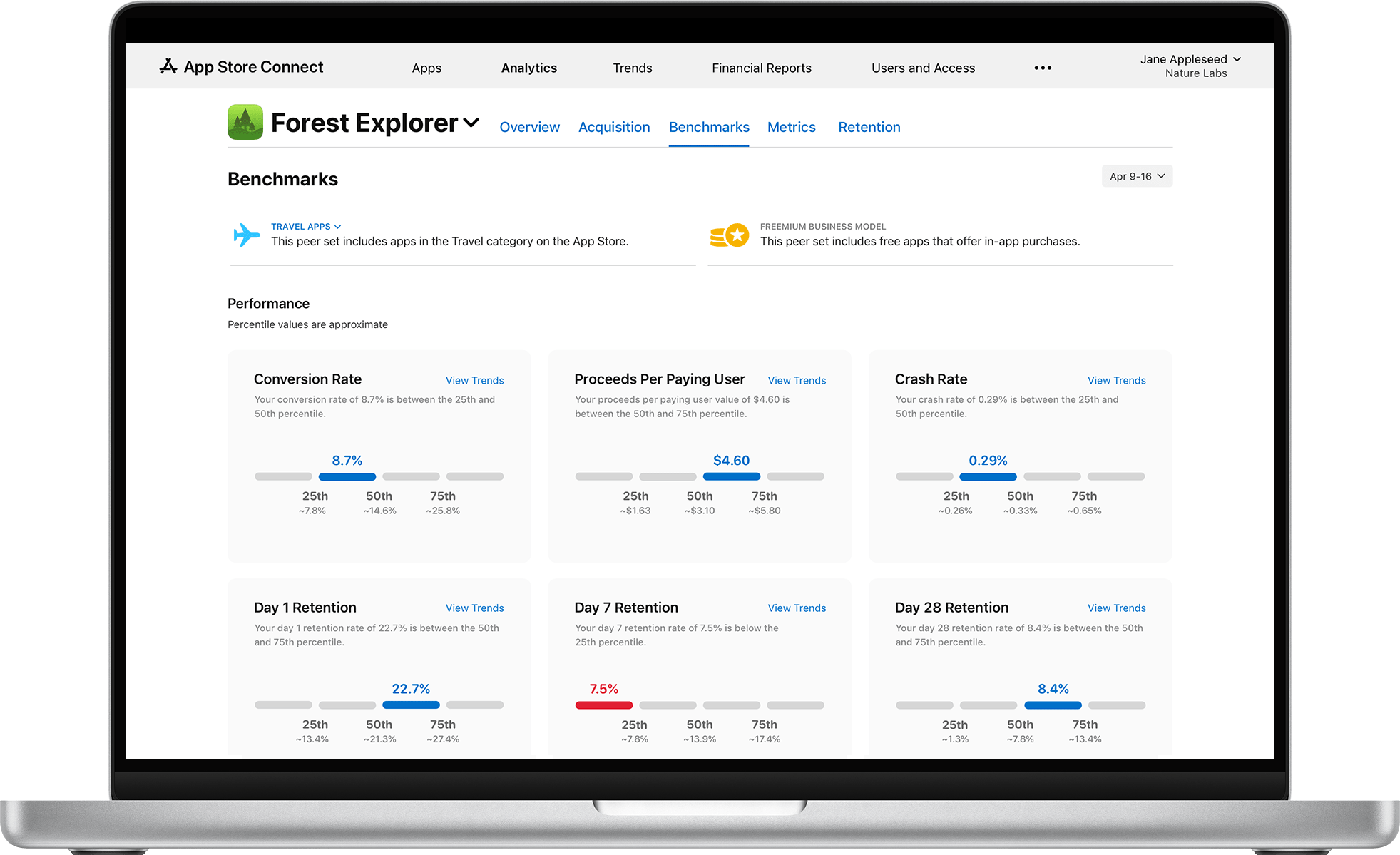
Today, Apple introduced new analytics for app developers designed to reveal how their apps are performing compared to peer apps. The developer site says that:
With data from the entire catalog of apps on the App Store, peer group benchmarks provide accurate, relevant, and privacy-preserving comparisons for apps across categories, business models, and download volumes. Learn how to take advantage of these insights to improve your app’s performance.
Apple defines an app’s peer group by its App Store category, business model, and download volume, providing metrics that shows where a developer’s app falls within the range of similar apps. Data is aggregated and uses differential privacy to ensure that the analytics do not reveal the identity of the apps against which a developer’s app is compared. The developer site also offers suggested actions that developers can take to improve their performance, including product page optimization tests, app events, pricing strategies, and more.
From the examples shared, the new tools look as though they will fit in nicely with existing analytics and other analytics available to developers. Providing insights into how an app is performing compared to its peers should help point developers in the direction of areas where adjustments can have the greatest impact on the success of their apps, saving them time and guesswork.
My Day and Time-Based Focus Modes
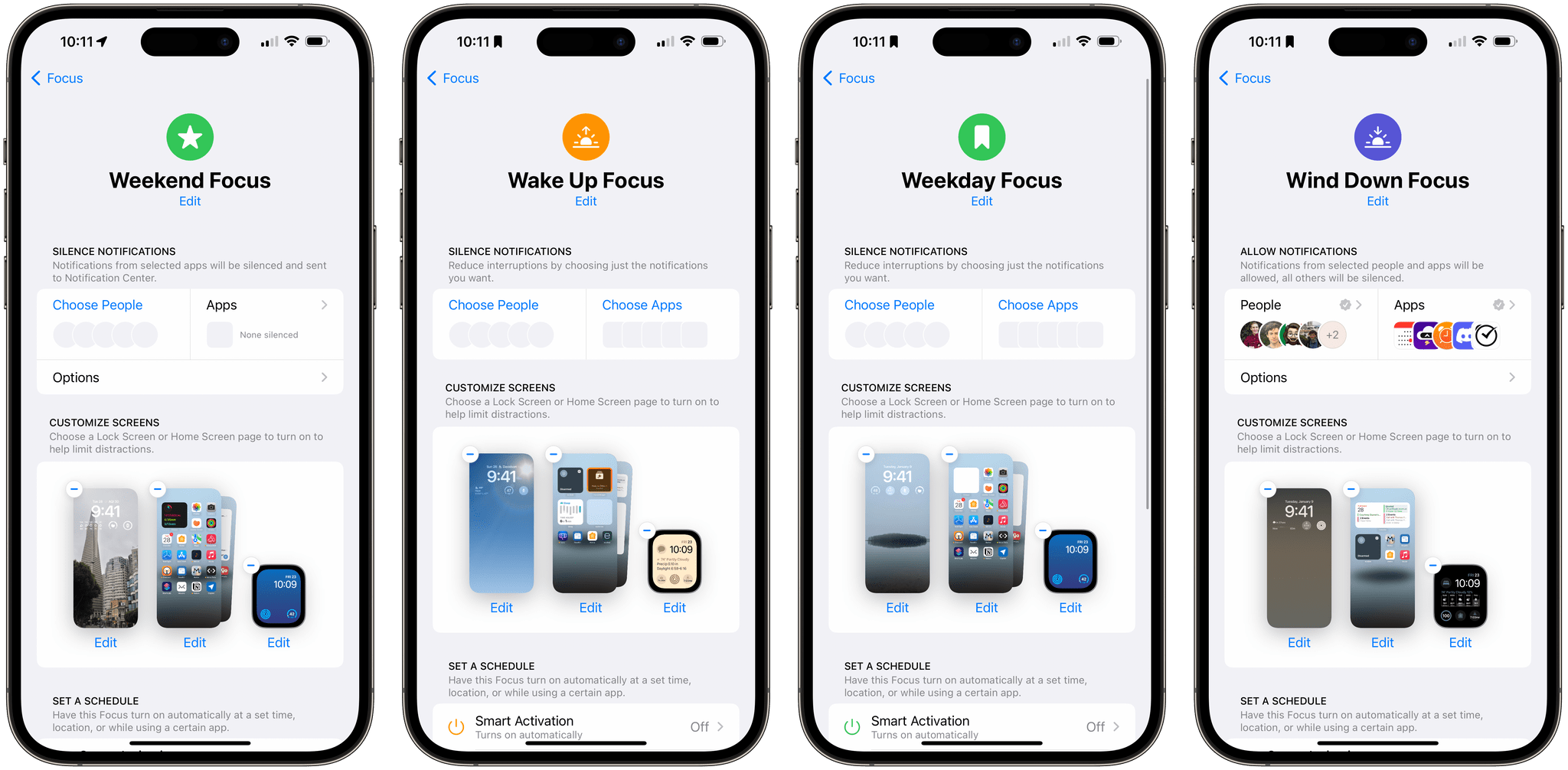
I haven’t had much success with Focus modes. Part of the problem is right in the name: Mode. My life isn’t very modal, so it’s counterproductive to try to organize my life that way. An entire productivity methodology was built around the idea of contexts. However, technology has blurred the lines between traditional contexts like...
Last Week, on Club MacStories: A Lighter Approach to Focus Modes and the Apple Watch Ultra, an iPhone Home Screen, and Glass Onion
Because Club MacStories now encompasses more than just newsletters, we’ve created a guide to the past week’s happenings:
MacStories Weekly: Issue 357
- Federico takes a lighter approach to Focus Modes and his Apple Watch Ultra
- I share my iPhone Home Screen for the first time in years
- Plus:
- App Debuts
- Highlights from the Club MacStories+ Discord
- Interesting links from around the web
- A sneak peek at what’s next on MacStories’ podcasts
- and more
Club MacStories+ AV Club Town Hall
- This month’s AV Club Town Hall in the Club MacStories+ Discord community featured the movie Glass Onion, directed by Rian Johnson.
- Club MacStories+ and Club Premier members can listen to the event in the Town Hall podcast feed.