


2022 is shaping up to be the year read-it-later apps make a comeback, which is odd when you think about it. Read-it-later apps like Instapaper pre-date the App Store and were originally driven by a desire to have something to read when you didn’t have a mobile Internet connection. Early parsers stripped out everything but...
Managing Music From Your Mac’s Menu Bar
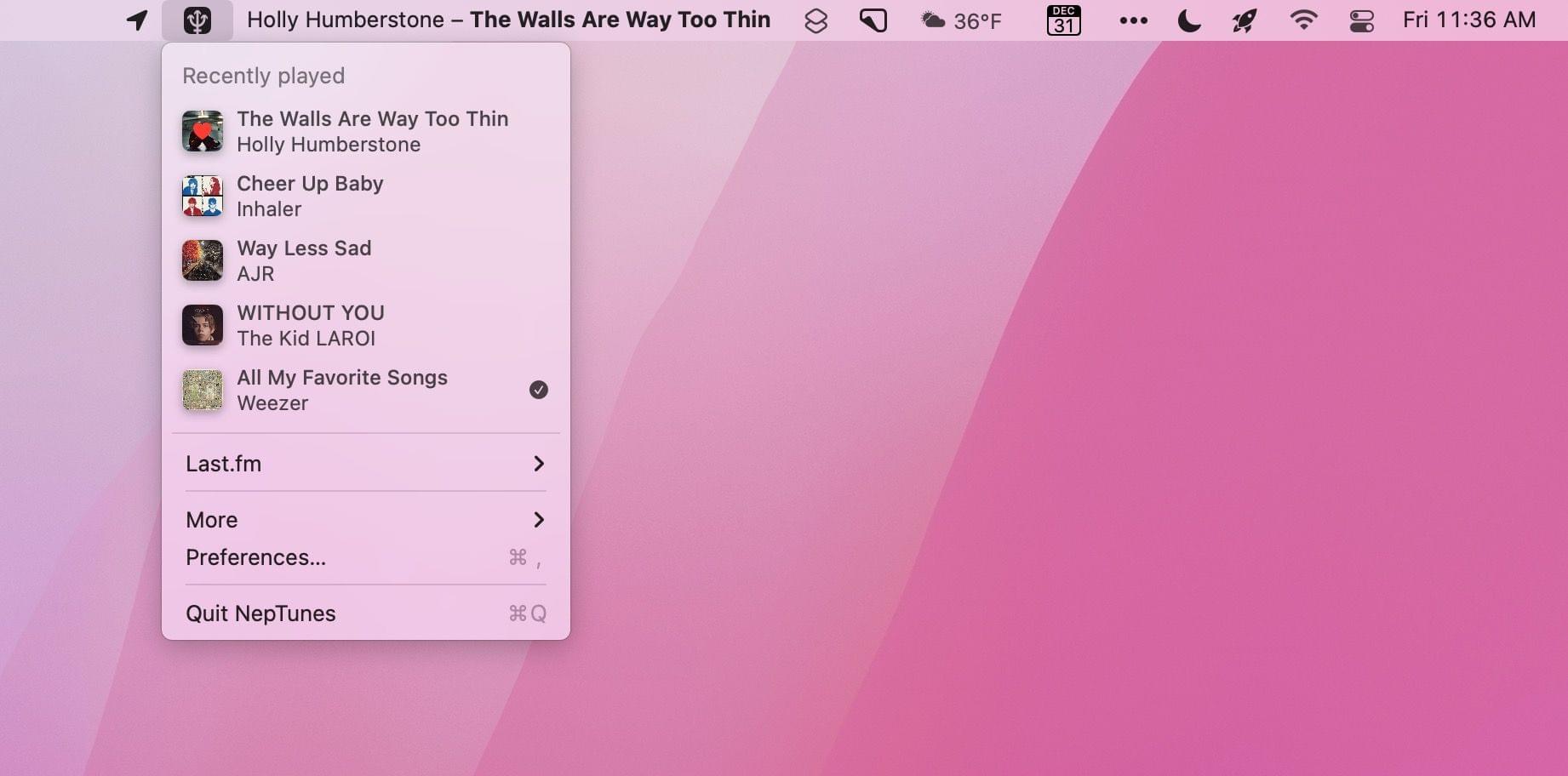
As Club MacStories members know, I use my Mac’s menu bar sparingly. With Bartender, our MacStories Selects Mac app of the year, I limit my menu bar to a handful of frequently-used apps and system controls that take up as little space as possible. That cuts down on clutter and means everything will fit when I’m using my MacBook Air in laptop mode.
However, every rule is meant to be broken, and for me, I break my menu bar rule by tracking and controlling my music from the menu bar, which takes up a lot of space but is worth it. You see, I listen to a lot of playlists as a way to discover new music, but that also means I find myself flipping to the Music app frequently to see artist and album information and perform simple tasks like adding a song to my music library or liking it. The constant context switching was a distraction I didn’t need, which led me to look for a better way.
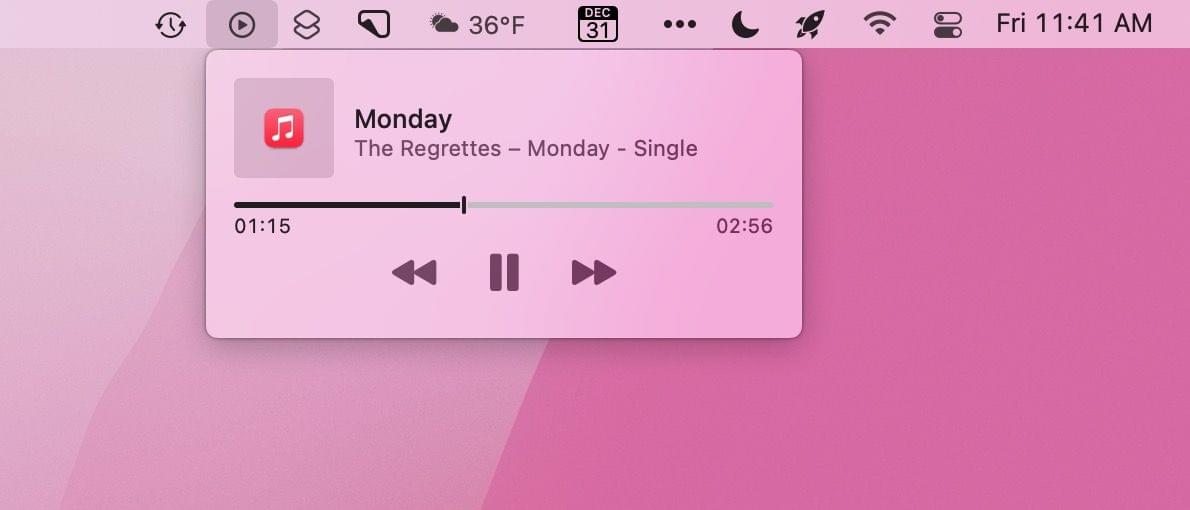
Fortunately, there are a lot of options depending on your needs. The simplest solution is to drag the Now Playing widget out of Control Center on your Mac and use it as a standalone menu bar item. That works well if you want simple playback controls and song information, but the functionality of Apple’s control is limited and requires a click to do anything.
The two third-party solutions I prefer are NepTunes and the recently-released Looking Glass music remote. Both apps live in your menu bar and offer different sets of features that will play a big part in which app will suit your needs best.
CNN Interviews Apple Maps’ Product and Design Leads→
Jacob Krol, writing for CNN, interviewed Apple Maps’ David Dorn, its product lead, and Meg Frost, its design lead, about the app’s steady improvements since its introduction in 2012. The story covers many of the features added in the fall with the release of Apple’s latest OS updates, which we’ve covered before, but adds the context of what Dorn and Frost’s teams were trying to accomplish with the changes. For example, with respect to complex roadways the updates have meant that:
“At a glance, drivers can understand a complex intersection more quickly than ever before,” said Frost. “And that detail helps with that split-second decision of which turn they’re going to make. So we want it to be both safer and visually satisfying to navigate.”
It was also interesting to learn that each of the 3D elements added to a handful of cities, and have begun to expand to new locales, are handmade by Apple’s designers:
“We pick the amount of detail we find appropriate and create a 3D mesh of the building landmark itself. And we apply it to the base map,” explained Frost.
In the past couple of years, Apple Maps has really hit its stride, at least in the places that I’ve used it. Maps are more detailed, I’ve encountered far fewer errors than in the past, and the experience of using the app with CarPlay is excellent. Although it’s nearly 10 years old now, Apple Maps still feels new to me because of the relentless iteration on the original app. By its nature, Maps demands constant attention, but it also shows how a competitive app category goes a long way toward keeping an app fresh and innovative.
AppStories, Episode 254 – App Trends for 2022
This week on AppStories, we look at the app trends we expect to see in 2022, including trends that will continue from 2021 and new trends we think will emerge in the new year.
Sponsored by:






](https://cdn.macstories.net/banneras-1629219199428.png)
On AppStories+, we chat about our holiday plans, John waits by the window for his Analogue Pocket to arrive, and Federico cracks Matter’s read later API.
We deliver AppStories+ to subscribers with bonus content, ad-free, and at a high bitrate early every week.
To learn more about the benefits included with an AppStories+ subscription, visit our Plans page, or read the AppStories+ FAQ.
 App Trends for 2022
 Federico
 My Menu Bar

Bridging Mac and iOS Alerts with Messages and Personal Automation
One of the many powerful options of Shortcuts on the Mac is running your shortcuts on a schedule using an app like BetterTouchTool. One category of shortcuts where this is especially handy is with monitoring HomeKit accessories. To do this, I typically set up a Repeating or Time Based Trigger in BetterTouchTool to run whatever...
Interesting Links
The Analogue Pocket portable console for playing Game Boy, Game Boy Color, Game Boy Advance, and other makers’ videogame cartridges finally began shipping this week, and Digital Foundry has an excellent video and accompanying review on Eurogamer. (Link) 9to5Mac covered a developer’s demo this week that shows how well the iPhone’s U1 chip could...
MacStories Unwind: Best Videogames of 2021
This week on MacStories Unwind:
Best Videogames of 2021
- Federico’s new service for tracking games
- Federico
- PS5
- Games
- Kena: Bridge of Spirits
- Final Fantasy VII Remake Intergrade
- Ratchet & Clank: Rift Apart
- Spiderman Miles Morales (2020 game finished in 2021)
- Games
- PS5
- John
- PS5
- Spiderman Miles Morales (2020 game)
- Ratchet & Clank: Rift in Time
- PS5
- Xbox
- Federico
- Switch
- What We Want to Play Next