

Toolbox Pro It feels like Toolbox Pro was just released yesterday and Federico reviewed it, but it’s already received a substantial update. The latest release adds: Offline speech recognition for transcribing spoken word audio files Calendar and event creation Calendar list retrieval UUID creation HEX color value detection and more In addition to new...
 Making Lists in Notes Using Keyboard Shortcuts
The winter holiday season means travel, shopping, parties, and other list-worthy activities. Instead of adding new projects and tasks to your task manager for one-off events, consider using Apple’s Notes app. There’s a lot to like about Notes for list-making, including that most of its functionality can be accessed using keyboard shortcuts that are...
Moment – Pro Camera

Moment makes add-on camera lenses for the iPhone. The lenses screw onto a special case Moment makes that holds them tight against the iPhone’s camera lens. The change to the camera configuration on the iPhone 11 required Moment to redesign its case, which should be shipping in the next week or so, so although...
Q&A
Question: On my Mac, I use PDF Scanner to crop, straighten, convert to black and white, and perform OCR on PDF scans of books. I’d like to move this task to my iPad, but I’m having trouble finding an app that has all these features. Can you recommend one? (Jannis Krämer, @johnderate)
My recommendation...
Loupedeck+ Review: Faster, More Natural Image and Video Editing with a Dedicated Control Panel
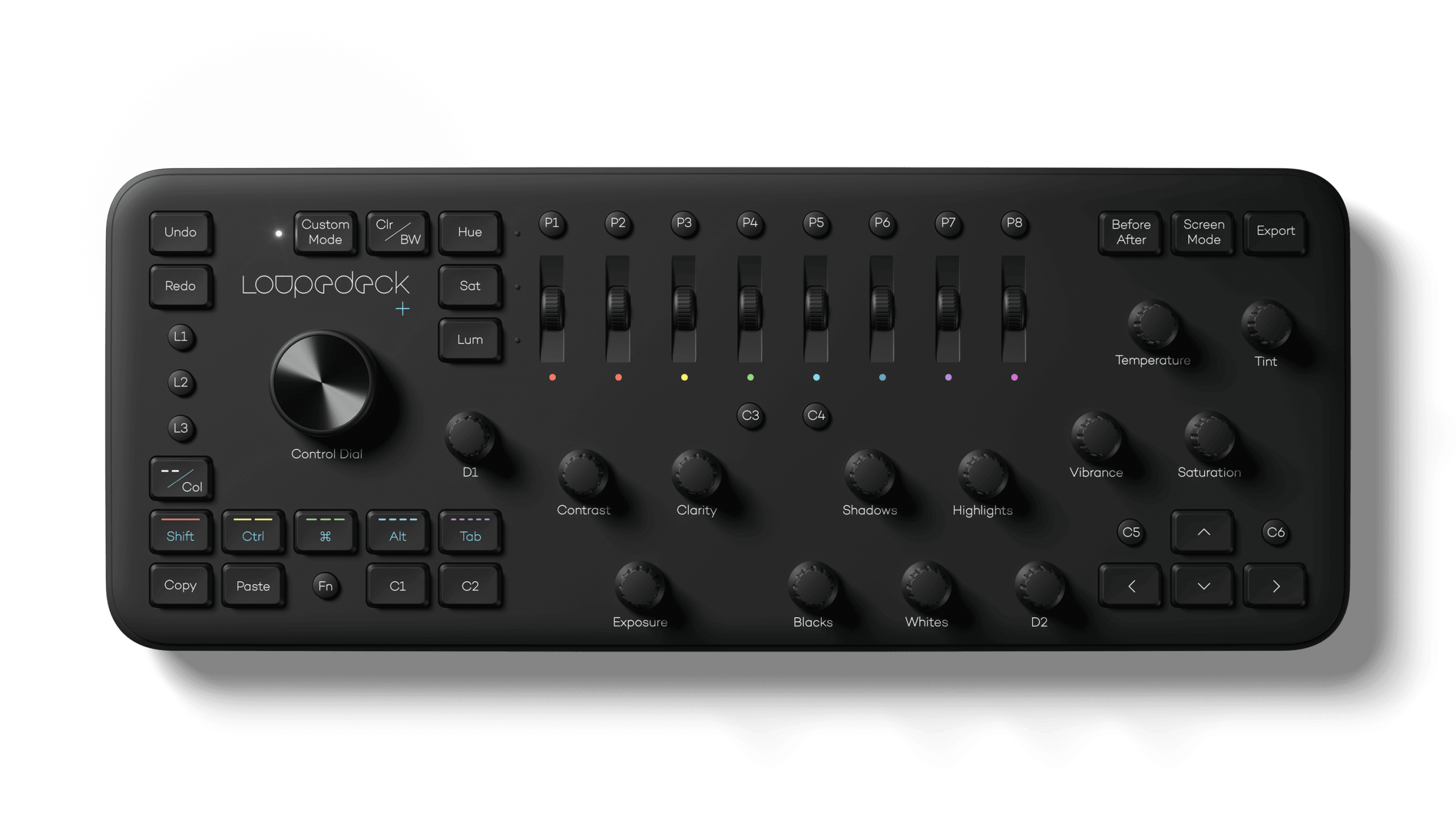
The Loupedeck+ is a hardware control panel for editing photos and video that transforms the software tools you’re accustomed to using with a mouse or trackpad into physical buttons, knobs, and dials. By eliminating the need to dive into menus and hunt for software, the Loupedeck+ changes the image editing process into something much closer to the feeling of editing on an iPad with the Apple Pencil. The seemingly endless series of swipes, drags, and clicks are replaced by something far more tactile and natural.
The result is a clear example of the benefit of using a dedicated tool for a particular task. Photo and video editing is often a high-volume, high-precision activity with lots of repetition, and depending on your job, tight deadlines. That makes any tool that can shave a little time off of editing each photo a win for professionals who often edit thousands of images in a week.
What I didn’t expect, though, is that the Loupedeck+ also makes editing more accessible for beginners like myself. As I’ll explain in more detail below, when Loupedeck sent me their device to test, I spent most of my time using it in Adobe Lightroom Classic, which I hadn’t used before. However, after a short time familiarizing myself with the Loupedeck+ layout, I found myself deep in the editing process with my eyes fixed on the images I was working on instead of darting back and forth hunting for the tools I wanted to use.
I may never enjoy the sort of time savings that a professional photographer could squeeze out of the Loupedeck+. However, simply knowing that I can dip in and out of Lightroom Classic for my editing needs with virtually no learning curve eliminates a significant hurdle that has slowed me down in the past. Although there are aspects of the Loupedeck+ that could be improved, it’s an incredibly powerful tool that fits into more workflows than I anticipated, which makes it an accessory worth considering for a wide range of users.
AppStories, Episode 140 – Our Favorite HomeKit Gear, Apps, and Automations→
This week, we dive into our favorite HomeKit devices, apps, and automations.
Sponsored by:
- Luna Display – Turn any Mac or iPad into a wireless second display.
- Linode – High-performance SSD Linux servers for all of your infrastructure needs. Get a $20 credit.
- Moo: Custom business printing and design. Save 15%.
https://staging.macstories.net/podcasts/appstories/episodes/140/embed/






Apple Releases Annual Holiday Video ‘The Surprise’

It’s become a tradition for Apple to release a special holiday season video each year, and this year is no different. Today, the company revealed the 2019 version entitled ‘The Surprise.’
The storyline follows a family as they visit the mother’s father. The video chronicle’s the family’s journey and visit with their two young children. To appease the kids when they fight or get in the way, their parents hand them an iPad to watch movies and play games. However, the children’s use of the iPad evolves over the course of the video, which reveals they’ve used it to create an interactive story about their family and their grandfather’s wife who had passed away.
It’s a touching video packed with emotion that does an excellent job of showing off the kind of creative projects that are possible with an iPad and pulls it off without being overbearing. The video reminds me a lot of the Emmy award-winning video called ‘Misunderstood’ from the 2013 holiday season.
 Our Favorite HomeKit Gear, Apps, and Automations
 Federico
iOS Photo Metadata Utility Metapho Adds Deep Fusion and Night Mode Photo Detection
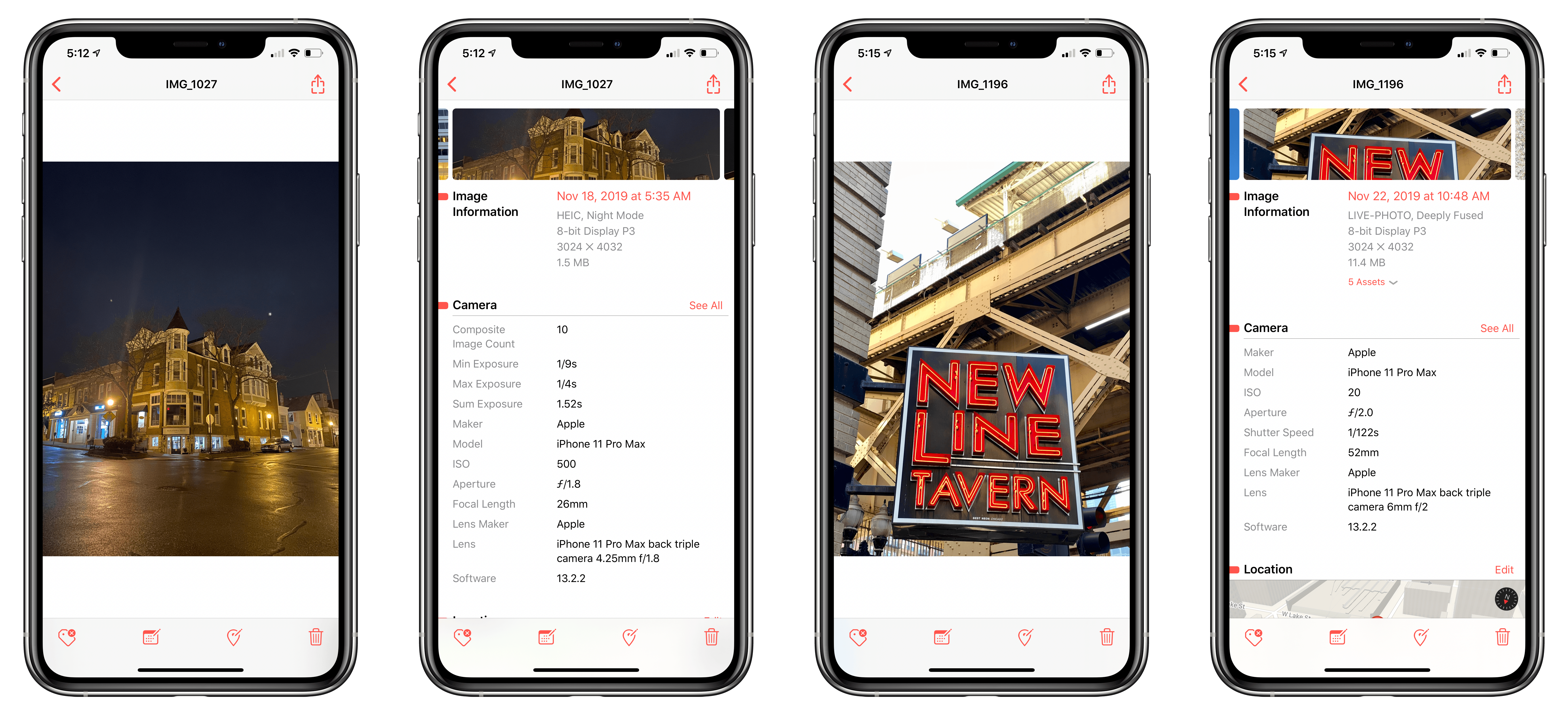
Metapho has been one of my favorite photo utilities on iOS for years. The marquee feature has always been its ability to strip metadata from images, which is handy when sharing photos online, for instance. Over time though, Metapho has grown to incorporate other functionality for inspecting and editing photo metadata that has made the app a must-have iOS utility. With its latest update, Metapho has added Deep Fusion and Night Mode photo detection, an intriguing addition that I haven’t seen any other app offer.