John Voorhees

5429 posts on MacStories since November 2015

John is MacStories' Managing Editor, has been writing about Apple and apps since joining the team in 2015, and today, runs the site alongside Federico. John also co-hosts four MacStories podcasts: AppStories, which covers the world of apps, MacStories Unwind, which explores the fun differences between American and Italian culture and recommends media to listeners, Ruminate, a show about the weird web and unusual snacks, and NPC: Next Portable Console, a show about the games we take with us.

iStat Menus 6 Released

Just ahead of the macOS High Sierra update, Bjango released iStats Menus 6, an update to its comprehensive suite of tools that sit in your Mac’s menu bar and monitor its systems and now, even the weather. With highly customizable notifications, iStat Menus is an excellent way to know what’s going on with your Mac and to be alerted if a problem is on the horizon. I’ve only been trying iStat Menus 6 for a short time, but like what I’ve seen.

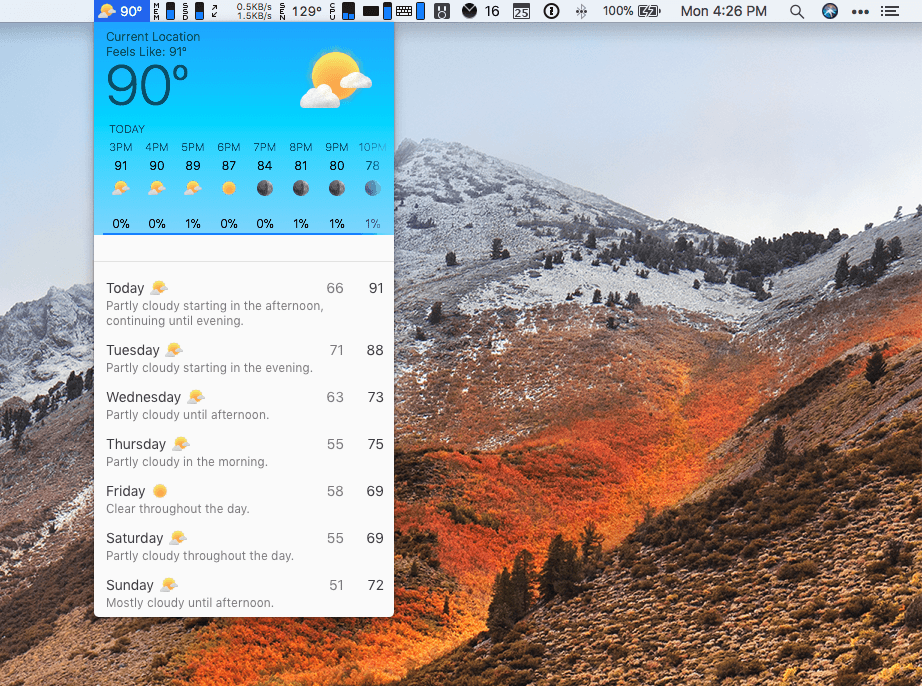
Adding a weather widget to iStat Menus is a departure for Bjango, which has previously stuck to system measurements, but I like it a lot. iStat Menus puts the temperature and an icon of current conditions in your menu bar. Clicking on the temperature reveals a wealth of additional information that will warm any weather geek’s heart and help everyone else plan their week.
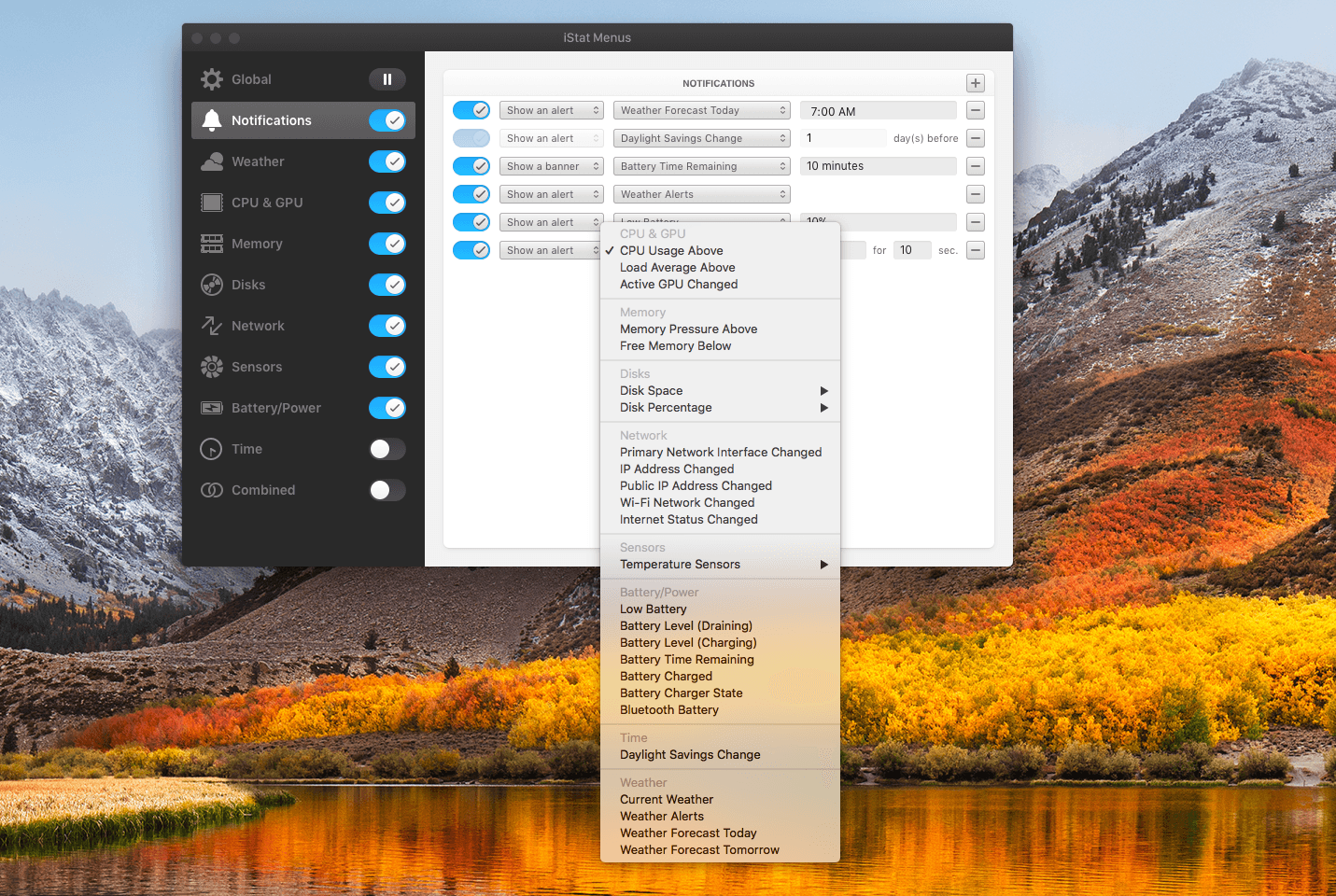
Notifications are highly customizable too. If there’s a statistic reported by iStat Menus, you can bet there’s a way to be notified of it. Already this morning it warned me of an air quality advisory issued for the unseasonably warm fall day we’re having in Chicago. I’ve also set it up to alert me if I run low on available storage and RAM.

iStat Menus has added a wide variety of additional features too including,

  • Additional theme and color options with light and dark menu options.
  • Hotkey support for opening and closing menus from the keyboard.
  • A new dual line clock option.
  • New ways to customize the menu items and their dropdowns.
  • A new Notification Center widget with the most popular statistics in one place.
  • Improved accessibility and localization.
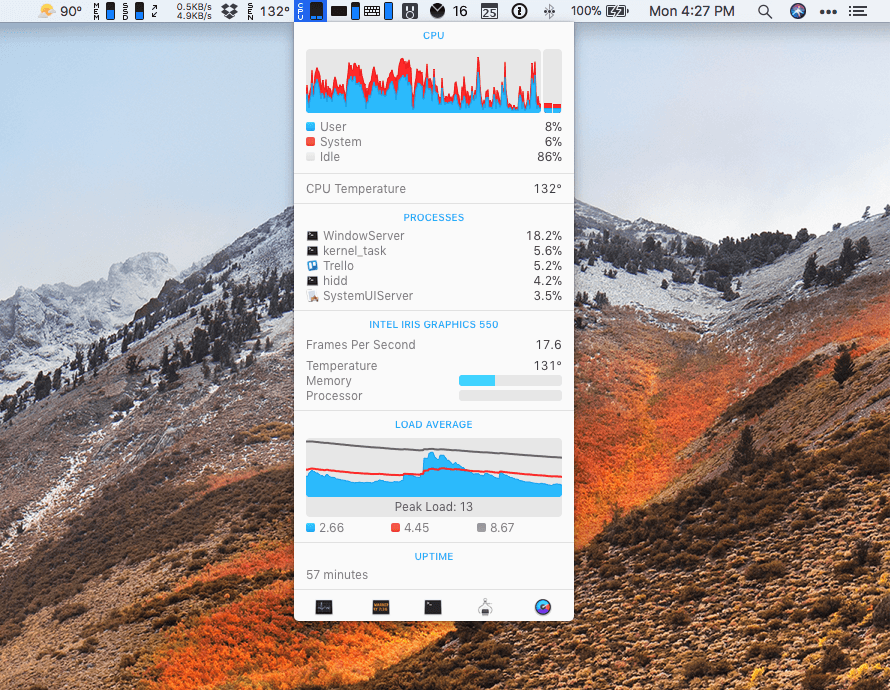
People familiar with iStat Menus will be right at home with this new version. There are dozens of refinements and new features, but the mission of the app remains the same: to provide a wealth of information in a compact, cleanly-designed interface that keeps users informed. I’ve enjoyed tweaking iStats Menus’ settings today to suit my current setup as I test its new features. I’ve used the app on and off since version 2 or 3, but it’s been at least a couple of years since I last used it. I’m impressed with how far it’s come over the past couple of versions and plan to keep it up and running going forward.

iStat Menus 6 is available from Bjango’s website.


macOS High Sierra: The MacStories Review

Since Mac OS X 10.5 Leopard was released in 2007, Apple has periodically paused to release updates to what is now known as macOS that are more a refinement of their predecessors than major upgrades. Apple signals each refinement release by picking a name that relates to the one immediately before it. In 2009, that meant Leopard was followed by Snow Leopard; in 2012, Mountain Lion followed Lion. It’s been a while, and Apple has moved from big cats to California landmarks and adopted the macOS moniker, but the company is back with another operating system update that predominantly focuses on under-the-hood features by following last year’s macOS 10.12 Sierra with macOS 10.13 High Sierra.

For a foundational release, High Sierra goes about as low as you can go by introducing an entirely new filesystem for the first time in almost twenty years. Apple File System, also known as APFS, is a modern filesystem developed by Apple to accommodate the needs of each of its platforms in ways that HFS+ couldn’t manage. If there’s a theme to each of the core technologies introduced with High Sierra, it’s laying the groundwork for the future across Apple’s product line. New video compression technology, Metal 2, and VR are all part of a new bedrock being laid to prepare for the future.

That’s not to say that there are no goodies in High Sierra though. Photos has received several new features, and although not individually as significant, changes to Mail, Notes, Safari, Siri, Spotlight, and other apps all add up to a solid collection of refinements that make the Mac more efficient than before. Even so, High Sierra won’t be remembered for revolutionary user-facing features. Instead, along with new iMac Pros and Mac Pros on the horizon, it shows that Apple still cares about the Mac, but is also taking a broader view, building the infrastructure for the next chapter in computing across all of its present and future products.

Read more


Balance Is a Wallet For the World’s Currencies [Sponsor]

The world is on the cusp of a financial revolution fueled by crypto-currencies and Balance makes it easy for anyone to get involved. You’ve probably heard of Bitcoin, one of the earliest crypto-currencies, but there are others including Ethereum. Balance connects to the most popular crypto-currency exchanges like Coinbase along with traditional financial institutions bridging the legacy financial world with the future.

Balance is a macOS app that sits in your menu bar and is available on the Mac App Store that connects with crypto-currency exchanges as well as traditional bank accounts, investment accounts, credit cards, and online services like PayPal. It does this using Plaid, a super-secure platform that interfaces with financial institutions around the world.

Once you set up accounts in Balance, the app automatically updates them periodically with new transactions, so you’re always up to date. You can click through its tabs to view balances, transactions, notifications and gain insights about your spending. Soon, Balance will release an iOS version of their app too.

Balance is ready for the future too. The current financial system is based on outdated, legacy software. Blockchains are the bedrock of a more secure and open financial system based on cryptocurrencies, but not many people are using them yet. Balance is poised to change that by becoming a single destination for traditional financial accounts and crypto-currency exchanges.

Balance has a great offer for MacStories readers who want to see what crypto-currencies are all about. Just go to bal.money/macstories and you’ll get $2 worth of Ether in a Coinbase account that you can link to Balance and track with its menu bar app. It’s a great way to see for yourself what the financial world’s future looks like.

Our thanks to Balance for sponsoring MacStories this week.


Our Favorite iOS 11 Apps, Part 1

AppStories+ Deeper into the world of apps

AppStories Episode 24 - Our Favorite iOS 11 Apps, Part 1

0:00
34:07

AppStories+ Deeper into the world of apps

Federico and John give an update on the iOS 11 review and anniversary activities at MacStories and Club MacStories then talk about some of their favorite new apps and updates that show off the new capabilities of iOS 11.

Read more


Album

Rag Tag If I only had one sticker I could take on a desert island, I think it would be Rag Tag’s dancing bacon. This was one of the first sticker packs I fell in love with and remains a favorite. With an update this week, Rag Tag Classic, Halloween, and Christmas stickers are...


App Debuts

Tweetbot Tapbots’ client for Twitter power users has received early support for iOS 11. The app’s integration with drag & drop isn’t as extensive as I hoped – you can only drag tweets from the timeline into other apps – but it’s a start. Currencies Edovia’s currency converter has come back after a couple...


Apple’s Quest to Transform Photography

John Paczkowski of BuzzFeed conducted a fascinating interview with Apple’s Senior Vice President of Worldwide Marketing Phil Schiller and Johnnie Manzari of Apple’s Human Interface Team about the iPhone’s camera. Much of the discussion is focused on the new Portrait Lighting feature available in the 8 Plus and X. As Paczkowski explains,

The camera’s effects don’t rely on filters. They’re the result of Apple’s new dual camera system working in concert with machine learning to sense a scene, map it for depth, and then change lighting contours over the subject. It’s all done in real time, and you can even preview the results thanks to the company’s enormously powerful new A11 Bionic chip. The result, when applied to Apple scale, has the power to be transformative for modern photography, with millions of amateur shots suddenly professionalized.

Manzari described the extensive process that went into creating Portrait Lighting:

“We spent a lot of time shining light on people and moving them around — a lot of time,” Manzari says. “We had some engineers trying to understand the contours of a face and how we could apply lighting to them through software, and we had other silicon engineers just working to make the process super-fast. We really did a lot of work.”

BuzzFeed’s article is worth a close read because it’s about more than just the camera in Apple’s new and upcoming iPhones. The behind-the-scenes peek at the development process of the many functions that the iPhone’s camera serves is the best example of one of Apple’s biggest competitive advantages: the fusion of hardware and software.

Permalink

AppStories, Episode 23 – The Apps Behind Federico’s iOS 11 Review

On this week’s episode of AppStories, we lift the curtain on some of the special events at MacStories and Club MacStories surrounding the release of iOS 11, discuss the removal of the App Store from iTunes on macOS, and dive into the apps Federico used to plan, research, write, and produce his iOS 11 review.

Sponsored by:

https://staging.macstories.net/podcasts/appstories/episodes/23/embed/

Permalink