John Voorhees

5429 posts on MacStories since November 2015

John is MacStories' Managing Editor, has been writing about Apple and apps since joining the team in 2015, and today, runs the site alongside Federico. John also co-hosts four MacStories podcasts: AppStories, which covers the world of apps, MacStories Unwind, which explores the fun differences between American and Italian culture and recommends media to listeners, Ruminate, a show about the weird web and unusual snacks, and NPC: Next Portable Console, a show about the games we take with us.

4K HDR Video Is Coming to the 5th Generation Apple TV

Long anticipated, 4K HDR streaming video is coming to the Apple TV. As announced at the Apple press event today, the first ever held at the Steve Jobs Theater in Apple Park, 4K streaming will be available on the new 5th generation Apple TV, which has been dubbed the ‘Apple TV 4K.’ The new Apple TV also supports HDR televisions with HDR10 and Dolby Vision. The Apple TV’s new capabilities are powered by an A10X Fusion chip, the same chip that powers the iPad Pro.

Based on the iOS 11 gold master leak last weekend, the Apple TV 4K’s content will be displayed at 2160p resolution, which is twice the standard 1080p HD resolution. 4K content on iTunes will be priced the same as existing HD content, and any HD content you already own will be upgraded for free to 4K resolution. 4K content will also be available from third-party streaming services including Netflix and, later this year, Amazon Prime Video.

Apple also announced that later this year, it will debut live sports and news inside its TV app. When browsing available sports, the Apple TV will display the time remaining in a game and the score to help you decide what to watch. However, the score display can be turned off if you’d prefer not to know. The TV app is also expanding to include Australia and Canada this month and France, Germany, Norway, Sweden, and the UK later this year.

The update to Apple’s television-connected box brings it in line with other hardware manufacturers who have offered 4K video support for a while. With more 4K content available than ever before from providers like Netflix, Hulu, and Amazon Prime Video (which will be debuting its own Apple TV app soon), the time was ripe for an Apple TV revision. According to Eddy Cue’s presentation during the keynote, the new Apple TV will be available for ordering on September 15th and will ship on September 22nd. Presumably, 4K video will start to show up in iTunes and on the Apple TV around the same time.

The new Apple TV 4K starts at $179 for the 32GB model, and the 64GB model will run $199. Apple will also continue to sell the 32GB 4th generation Apple TV for $149.


You can also follow all of our Apple event coverage through our September 12 hub, or subscribe to the dedicated September 12 RSS feed.

Apple Announces watchOS 4 Will Launch on September 19th

Apple confirmed the official release date of watchOS 4 at a media event held today at the Steve Jobs Theater at Apple’s headquarters in Cupertino. watchOS 4 will be released on Tuesday, September 19th.

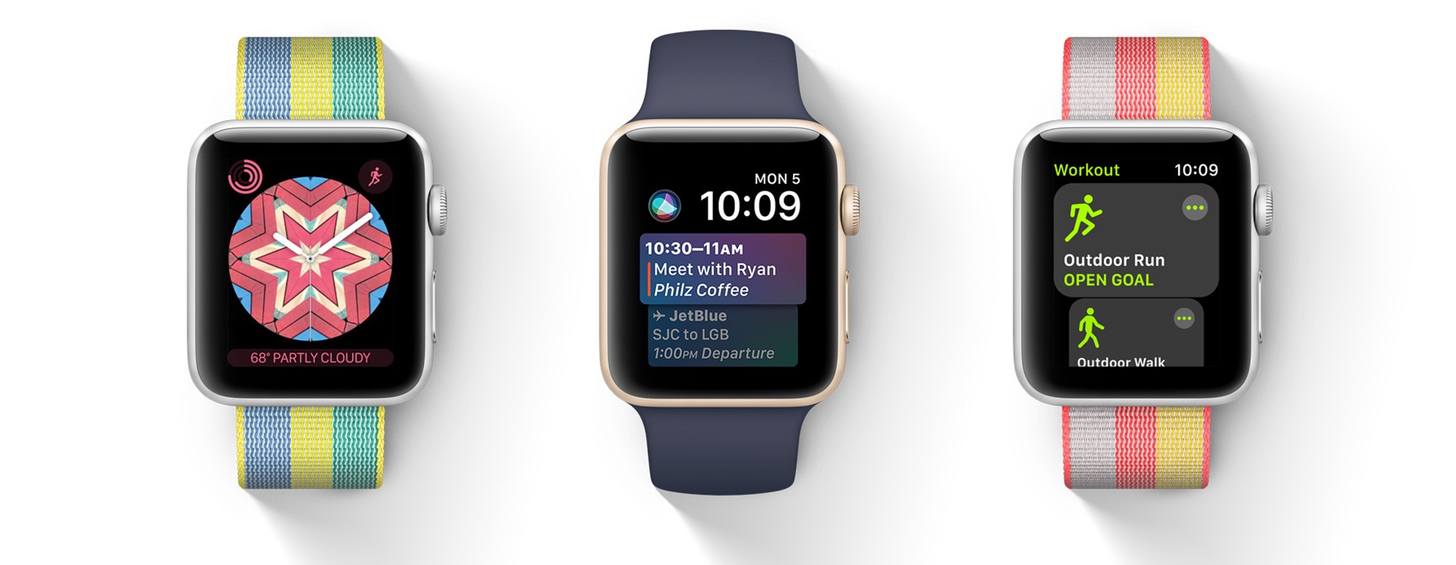
Announced at WWDC in June, watchOS 4 features new watch faces including a Siri watch face that displays personalized information based on the time of day, Toy Story and Kaleidoscope faces, motivational notifications to inspire you to close your Activity rings, a new Workout app interface, automatic syncing with curated Music playlists, a dedicated Apple News app, and more.

Apple hasn’t announced a Golden Master seed of watchOS 4 yet, but it will presumably be released to developers later today. Usually the last developer release before a public launch, the GM seed will allow developers to finalize their watchOS 4 apps and submit them to the App Store for approval before watchOS 4 is released publicly.


You can also follow all of our Apple event coverage through our September 12 hub, or subscribe to the dedicated September 12 RSS feed.


Apple Defends Siri Explaining How Its Voice Assistant Works

On the heels of a feature story in Wired last week, Apple executives and engineers opened up about how Siri works in interviews with Fast Company. As the publication explained it, a narrative has emerged that Apple’s AI work is behind other companies’ efforts because of its dedication to user privacy.

In an interview with Fast Company, Apple’s Greg Joswiak disagrees:

“I think it is a false narrative. It’s true that we like to keep the data as optimized as possible, that’s certainly something that I think a lot of users have come to expect, and they know that we’re treating their privacy maybe different than some others are.”

Joswiak argues that Siri can be every bit as helpful as other assistants without accumulating a lot of personal user data in the cloud, as companies like Facebook and Google are accustomed to doing. “We’re able to deliver a very personalized experience … without treating you as a product that keeps your information and sells it to the highest bidder. That’s just not the way we operate.”

The article provides concrete examples of how Siri works and the advances that have been made since it was introduced with a level of detail that has not been shared before.

The effectiveness of Siri and Apple’s machine learning research is an area where Apple’s culture of secrecy has hurt it. Apple seems to have recognized this and has made a concerted effort to turn perceptions around with interviews like the ones in Wired and Fast Company. Apple employees have also begun to engage in more public discussion of the company’s machine learning and AI initiatives through outlets like its recently-introduced journal and presentations made by Apple employees. Apple even enlisted The Rock to help it get the word out about Siri’s capabilities. Competition for virtual personal assistant supremacy has heated up, and Apple has signaled it has no intention of being left out or backing down.

Permalink

Manage Your iPhone Your Way With iMazing [Sponsor]

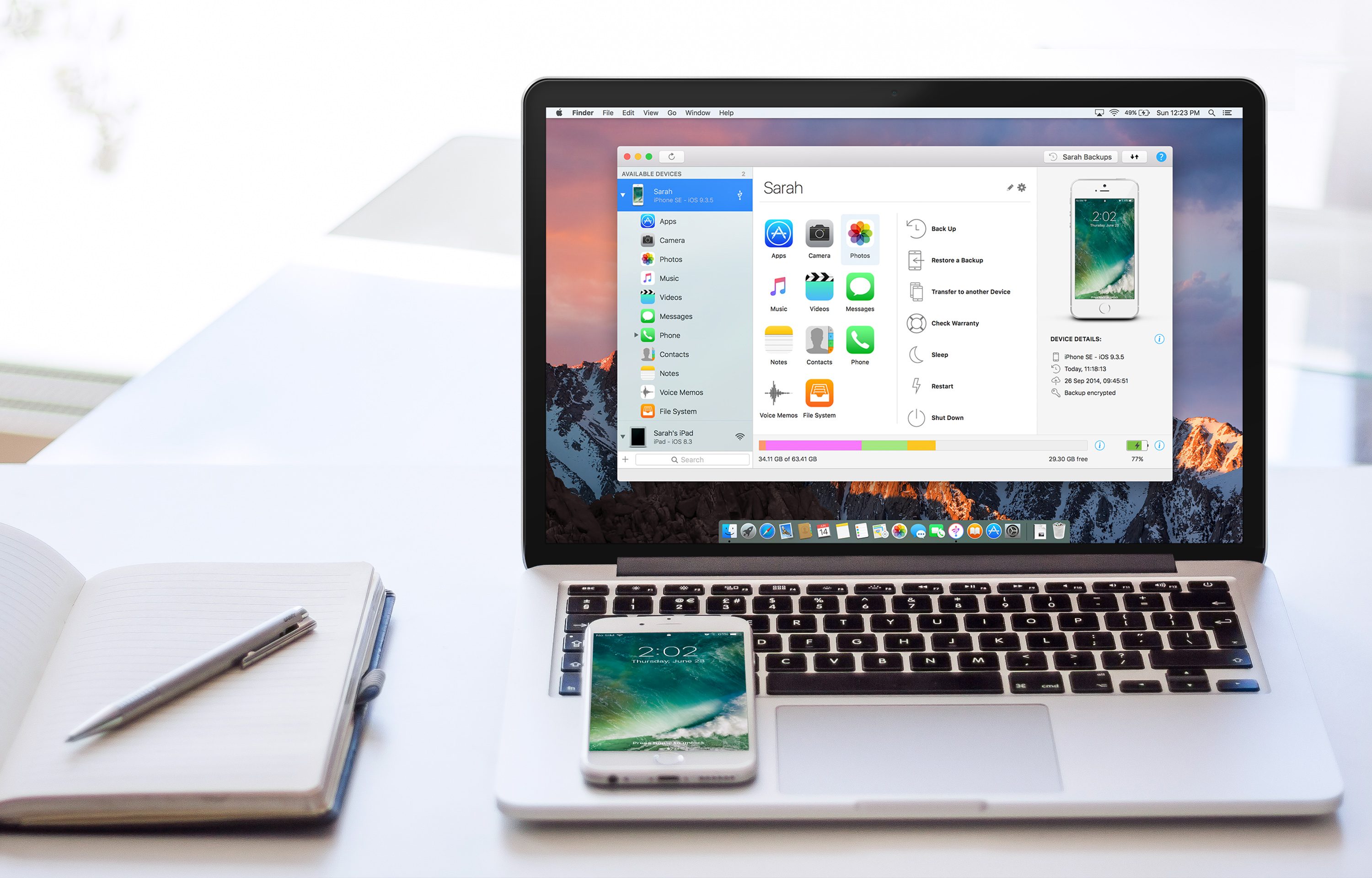
iMazing is a macOS app that provides unparalleled access to everything on your iOS devices. iMazing works over both WiFi and USB, so it’s ready whenever you are. With it, you can do things like pull your favorite photos or songs off your iPhone or send content the other direction to your favorite media player on your iPhone. It’s a great way to preserve memories too. For example, you can export years of Messages conversations with loved ones with just a couple of clicks.

iMazing is also a sophisticated iOS backup app. You can create advanced backups to any destination you want, including external drives or a NAS, and unlike iTunes, iMazing keeps a history of your backups so you can roll back to any prior backup. You can even automate the process with the recently-released iMazing Mini, a menu bar app for macOS that’s bundled with iMazing and is available for free as a standalone product too.

Backups support encryption and are browsable so you can access the contents of your backups even if your iOS device is lost or stolen. There are also great tools for power users like iOS installation tools, a device console, access to iOS log files, editable backups, and data export to the CSV file format. You have more data on your iOS devices than you might realize and iMazing is the perfect way to access and manage it.

iMazing has an amazing deal just for MacStories readers that you won’t want to pass up. For a limited time, you can get 30% off iMazing 2 at checkout by using this special link.

Our thanks to iMazing for sponsoring MacStories this week.


Apps with a Human Touch

AppStories+ Deeper into the world of apps

AppStories Episode 22 - Apps with a Human Touch

0:00
43:56

AppStories+ Deeper into the world of apps

Federico and John discuss what’s left now that Federico is finished writing the text of his iOS 11 review, preview some of the upcoming coverage on MacStories and the upcoming second anniversary of Club MacStories, and consider the importance of little human touches that make apps by indie developers a delight to use.

Read more


App Debuts

Telegram Messenger Telegram continues to add sophisticated messaging features to its app. Group chats are easier to navigate than ever. An ‘@‘ badge in your chat list indicates that you have unread mentions and replies. Within a group, an ‘@‘ button navigates among your unread mentions and replies. You can get back to favorite...


Q&A

Question: I’m wondering how you guys manage to write in Ulysses while still backing everything up and version controlling it in GitHub. I’m trying to make the switch to Ulysses but like to manage my files with GitHub. As far as I can tell, Ulysses doesn’t store your files in an easily accessible format that...


Album

Crazy Eyes Animated Emoji This collection features an odd little bald character that looks vaguely like Casper the Friendly Ghost. The animations help bring a little attitude and charm to the set. Halloween Face Simple Emoji Some sticker packs, like these, are best used in combination with other sets or photographs. It’s still a...


Elk Adds Lock Screen Currency Conversion

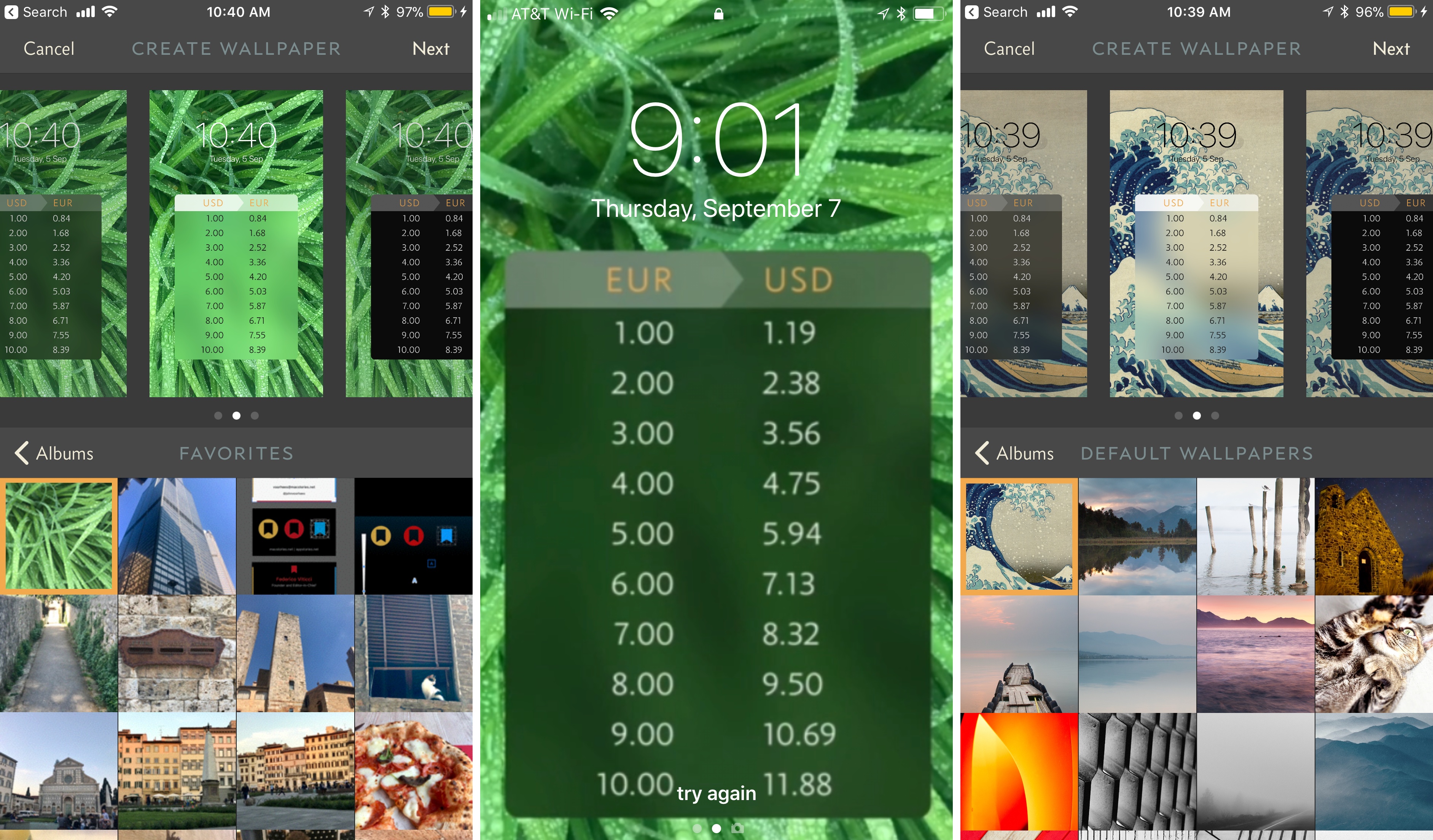
Elk, the currency converter app that we reviewed earlier this year has been updated with a smart feature that allows you to access a currency conversion table from the Lock screen of your iPhone. The feature is a hack in the best sense of the word. By leveraging your iPhone’s Lock screen wallpaper, Elk allows you to quickly get a ballpark sense of what something costs in another currency without unlocking your phone and navigating to the app.

The simple feature grew out of the developers’ practice of manually creating a currency conversion table and setting it as their Lock screen wallpapers. Like many tedious tasks though, there was a better solution through software that eliminated typing a conversion table before every trip.

To create a currency conversion wallpaper, open the currency table you want to show on your Lock screen in Elk and tap the share icon. By default, the app will show you the system wallpapers available on your iPhone along with previews of three different currency tables overlaid on the selected wallpaper. You can also navigate to the photos on your iPhone and pick one of those for your wallpaper. After you select an image, you can save it to your photo library with the currency conversion overlay as a still or Live Photo wallpaper. Finally, open up the Settings app and set your newly created image as the lock screen wallpaper.

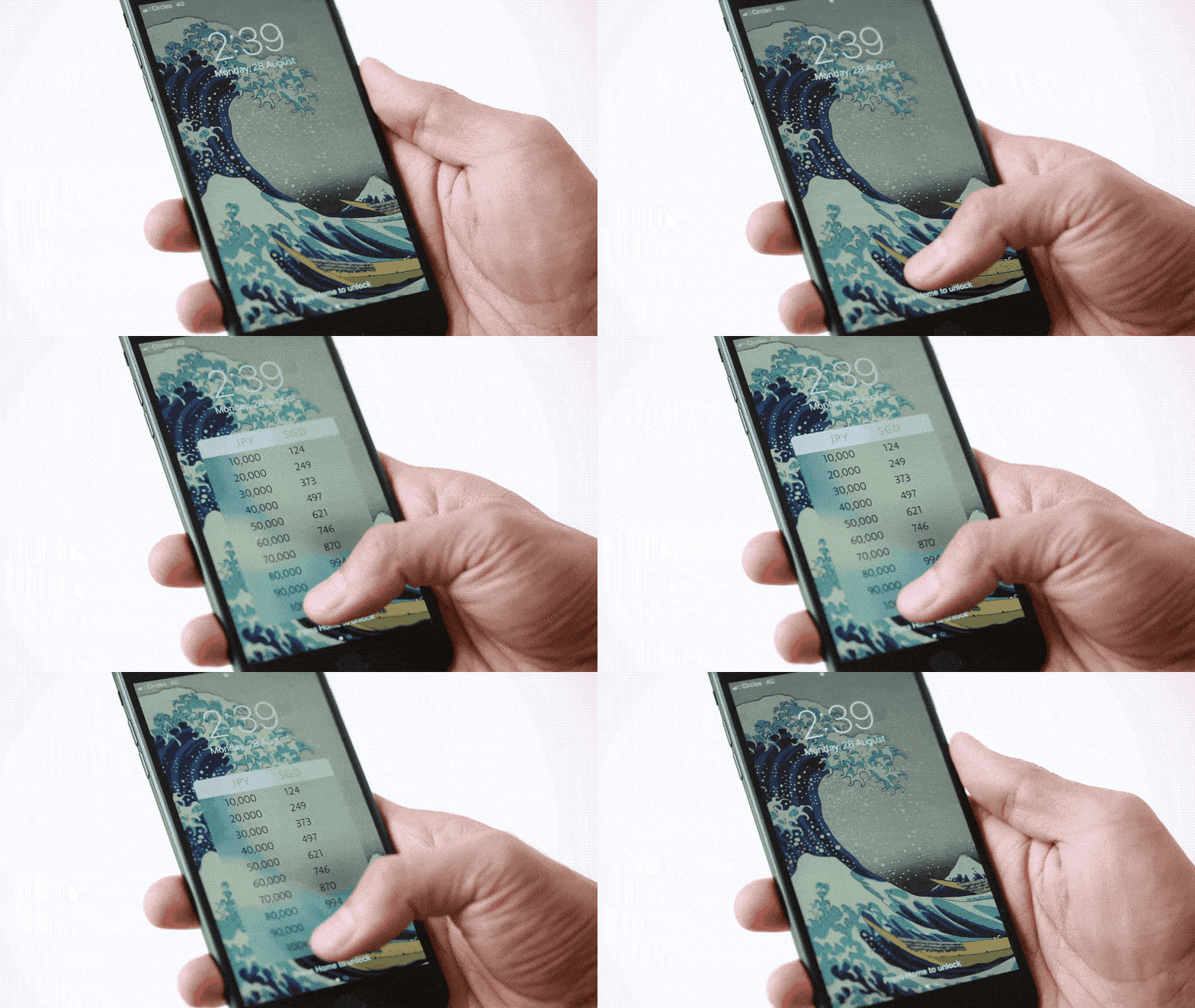
That’s all there is to the feature, but it’s extraordinarily handy when you want to get a rough idea of a conversion on the go. I particularly like the Live Photo version of the wallpaper because I can enjoy the image on my Lock screen, but still get to the currency table with a short press on the screen.

Of course, the data overlaid on the wallpaper cannot be updated, but it’s close enough for short trips, and you can always regenerate the wallpaper periodically with the latest rates.

Elk is available on the App Store.