John Voorhees

5429 posts on MacStories since November 2015

John is MacStories' Managing Editor, has been writing about Apple and apps since joining the team in 2015, and today, runs the site alongside Federico. John also co-hosts four MacStories podcasts: AppStories, which covers the world of apps, MacStories Unwind, which explores the fun differences between American and Italian culture and recommends media to listeners, Ruminate, a show about the weird web and unusual snacks, and NPC: Next Portable Console, a show about the games we take with us.

iTunes Connect’s App Analytics Adds Source and Referrer Data

Two years ago, Apple rolled out App Analytics on its iTunes Connect developer portal. Originally announced at WWDC in 2014, App Analytics gave developers a better understanding of how and when their apps were used, how many views their app’s page on the App Store received, and more. However, the original version of App Analytics did not report how customers got to the App Store.

Yesterday Apple announced an expansion to App Analytics that adds source and referral data. According to Apple’s developer news website:

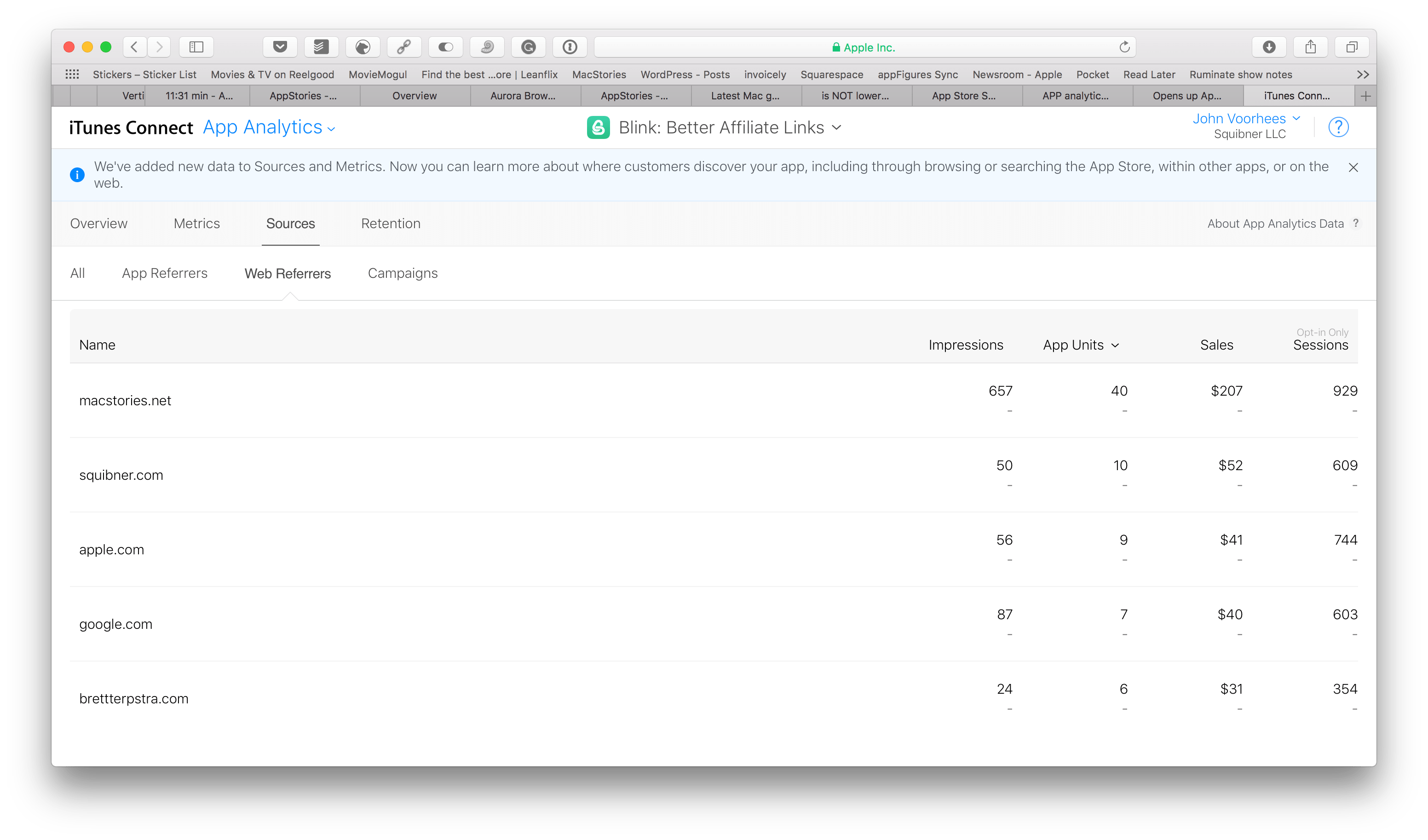
App Analytics in iTunes Connect now provides insight on where customers discover your app, including App Store browsing and search, within other apps, or on the web. With key metrics based on source types, you can see your top referring apps and websites, making it easier to optimize your marketing campaigns.

Apple’s App Analytics page elaborates:

With App Analytics, you can see how many users discover your app while searching or browsing the App Store — including tapping on Search Ads for your app — to gain insight into how your marketing and metadata impact downloads.

App Analytics counts users who visit your app’s product page from a link within another app.

Blogs, websites, and other online sources that link to your app’s product page, are critical in driving user acquisition through word-of-mouth marketing and PR. With App Analytics, you can see which organic marketing channels drive the highest traffic, downloads, usage, and revenue for your app.

There is a lot of interesting new data for developers to digest in App Analytics that should help them market their apps more effectively. I particularly appreciate the ability to drill down into any source of App Store traffic to see how it has performed over time and from which countries those customers are coming.


Apple Q2 2017 Results: $52.9 Billion Revenue, 50.8 Million iPhones, 8.9 Million iPads Sold

Apple has just published its financial results for Q2 2017, which covered the period from January 1, 2017 through to April 1, 2017. The company posted revenue of $52.9 billion with a quarterly net profit of $11 billion. Apple sold 8.9 million iPads, 50.8 million iPhones, and 4.2 million Macs during the quarter.

“We are proud to report a strong March quarter, with revenue growth accelerating from the December quarter and continued robust demand for iPhone 7 Plus,” said Tim Cook, Apple’s CEO. “We’ve seen great customer response to both models of the new iPhone 7 (PRODUCT)RED Special Edition and we’re thrilled with the strong momentum of our Services business, with our highest revenue ever for a 13-week quarter. Looking ahead, we are excited to welcome attendees from around the world to our annual Worldwide Developers Conference next month in San Jose.”

Read more


Interview: App Camp for Girls with Jean MacDonald and Grey Osten

AppStories+ Deeper into the world of apps

AppStories Episode 3 - Interview: App Camp for Girls with Jean MacDonald and Grey Osten

0:00
29:06

AppStories+ Deeper into the world of apps

Federico and John interview Jean MacDonald and Grey Osten, the co-founders of App Camp for Girls – an organization that helps middle-school age girls get started with app development.

Read more


Felix Grey Computer Glasses

One blurry-eyed night in front of my MacBook Pro, I was procrastinating on Product Hunt, or perhaps I was doing research for MacStories — it’s not always easy to tell the difference. In any event, it was almost Christmas and I was finishing up a pile of writing assignments and other tasks before taking some...


Game Day: Invert

Invert from Copenhagen-based Glitchnap stretches the concept of tile flipping games in new directions. The only constants in the game are that each flippable tile has two different colored sides, and the goal is to flip them, so the board is one, uniform color. Glitchnap describes Invert as a 2D Rubik’s cube-like puzzle game, which is apt on many levels.

Invert starts with fairly simple puzzles laid out in a grid with only a few flipped tiles. The challenge is that you can only flip whole rows of tiles at once requiring you to consider the impact on other tiles in the row. As the game progresses, Invert introduces the ability to flip tiles in patterns other than rows. The buttons at the end of each row of tiles indicate the shape of the flip pattern. It’s a small difference that adds complexity because it forces you to consider how each pattern interacts with the others adjacent to it.

Read more


Finder Shortcuts

There are a bunch of obscure, but useful Finder shortcuts. I still feel like Cmd+N should create a new folder instead of a new window (creating a new folder is Cmd+Shift+N), but once you get beyond hang-ups you might have like that, there are many useful shortcuts available in Finder that can save you...


Album

Fat And Lazy Hamster For the most part, this is a sticker pack about a fat and lazy hamster doing things, which is okay. But then you see the sticker where the hamster has a human face and a creepy expression. This sticker alone will ruin conversations with everyone. Kawaii Food Party From a...


Apps for Exploring and Tracking Media

There are plenty of ways to buy media online whether it’s games, apps, movies, comics, or other media. What’s hard is that there’s never enough time to get to it all. Fortunately, there are excellent apps for finding media and creating lists for later, when you have the time to enjoy it. Pixeldb...


Annotable 2.0 Adds Deep Customization Features

Annotable, an image annotation app from developer Ling Wang, received a major update yesterday. Version 2.0 of the app is all about customization. From the tools that appear when you open the app, to the formatting of text added to an image, Annotable gives you precise control over how you use the app and the look of marked up images, making it my hands-down favorite app for image annotations.

Read more