
John Voorhees

5429 posts on MacStories since November 2015

John is MacStories' Managing Editor, has been writing about Apple and apps since joining the team in 2015, and today, runs the site alongside Federico. John also co-hosts four MacStories podcasts: AppStories, which covers the world of apps, MacStories Unwind, which explores the fun differences between American and Italian culture and recommends media to listeners, Ruminate, a show about the weird web and unusual snacks, and NPC: Next Portable Console, a show about the games we take with us.

AirPods Make Their Video Debut

Update: Apple has posted an additional video featuring the AirPods called ‘Stroll,’ which is a longer version of the Siri video described below. You can watch the video at the end of this article.


Apple posted three 15-second advertisements featuring AirPods. Each video is black and white, except for the screens of the iPhones that make an appearance in two of the clips. All three also features the single ’Down’ by Marian Hill.

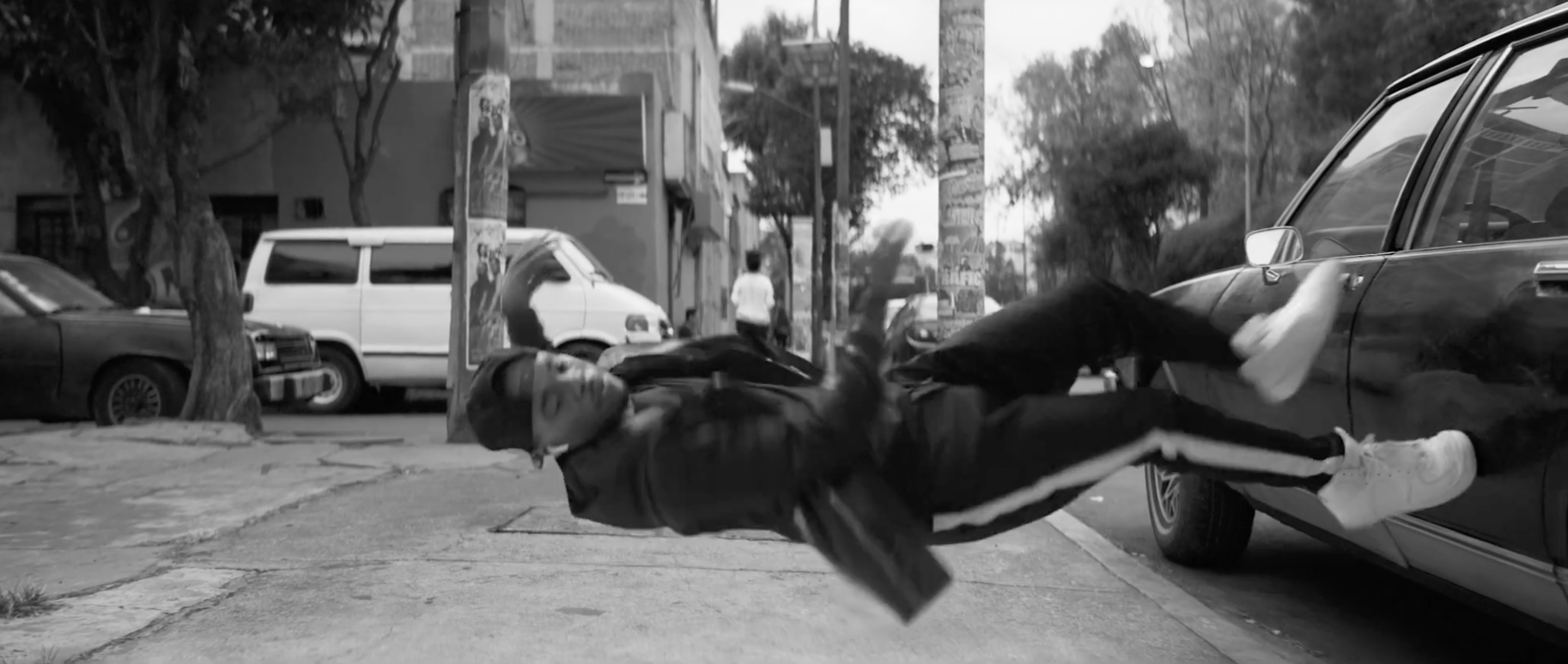
Two of the videos start with a man walking down the street of a city. In the first spot, the lead character taps his AirPods twice to activate Siri and says ‘Play Marian Hill,’ which starts the music. The second spot opens with another person flipping open his AirPods case to pair his AirPods, then immediately cuts to him dancing down the street and horizontally along the side of a car. Both ads close with the taglines ‘AirPods on iPhone 7’ and ‘practically magic.’

The third ad substitutes musical notes on a staff with AirPods scrolling by as ‘Down’ plays. The clip concludes with AirPods emerging from their case and the pairing interface opening on an iPhone 7.

These are the first advertisements to focus on AirPods. The first two ads do a great job of quickly showing off a feature then focusing on the freedom of movement afforded by AirPods. The final spot that substitutes musical notes with AirPods is more focused on showing off the product, delightfully linking the AirPods with the music they play.

Game Day: Open Bar

The App Store is running a feature called ‘The best games you’ve never played,’ which is a nice way to promote games that may have slipped under your radar. One game in particular caught my eye: Open Bar by Gingear Studios, which was originally released in early 2016 and went on to win a PAX East Indie Showcase Award.

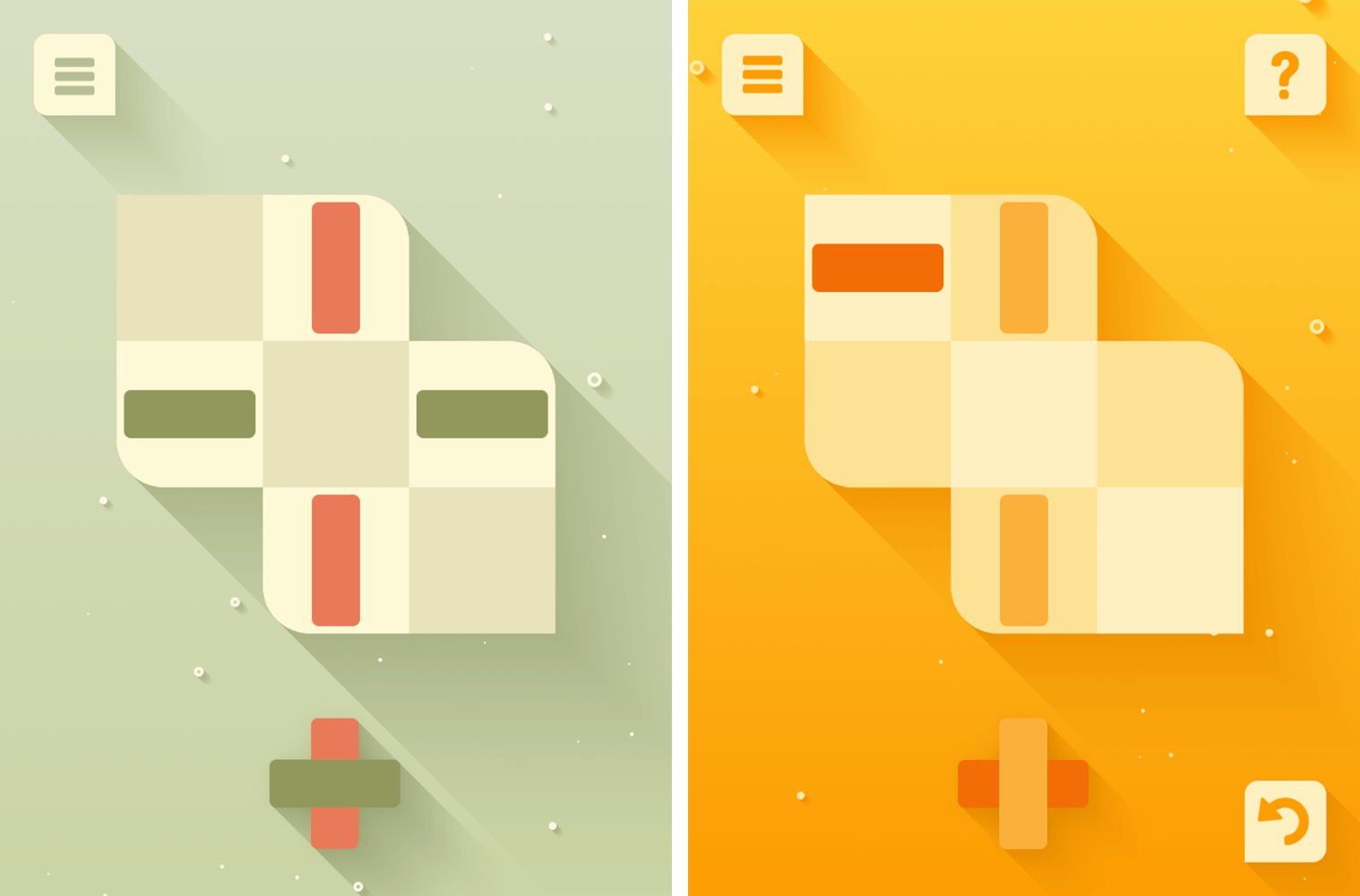
Open Bar is a classic iOS puzzle game involving color and shape matching on an irregularly-shaped grid. The goal is to form bars of matching colors that reach across the entire board. Bars cannot be finished with just the pieces on the board, however. You have to place pieces from the bottom of the screen onto the board too. What’s tricky is that when you move a piece that is already on the board to another spot, the next available piece on the bottom of the screen automatically takes the original position of the piece you moved.

That may sound a little complex, but it isn’t. Open Bar does an exceptional job of introducing each of the rules of the game gradually through a series of simple levels. If you get stuck, there’s a hint system built in that requires you to spend in-app currency. It isn’t currency bought with an In-App Purchase, though. Coins are earned by completing puzzles and can be used to buy hints or new color themes. Because the coins you earn are limited, it pays to keep some in reserve for when the levels get harder.

Open Bar’s design is excellent. The color schemes are loosely based on classic cocktails. Bubbles rise in the background of each level behind the board that seems to pop off the screen thanks to drop-shadows that create a layered effect among the game’s elements. The visuals are complemented by entertaining animations and sound effects that remind me a little of similar touches used in Letterpress.

Gingear Studios keeps Open Bar fun and low-stress by not telling you how many levels there are in the game. You can go back and retry levels, which is one way to earn coins for hints if you run out, but you can’t skip forward. Each level can be completed in just a few moves, so it’s also the kind of game that can be played in short sessions when you’re bored, which I also appreciate.

There are a lot of puzzle games on the App Store, but Open Bar strikes a unique balance between smart gameplay and a fresh design that makes it stand out from its peers. Open Bar is available on the App Store for $1.99.


Album

Aminal Stickers Over 120 charming animals including cats, corgis, sloths, unicorns, and koalas. Some of these stickers are animated, and there’s also a separate Winter category for holiday-themed variations. Pokémon Chat Pals Another sticker pack from The Pokémon Company, this time featuring Pokémon from Sun and Moon as well as Pickachu and other familiar...


Q&A

Question: Why do you and some other writers prefer a monospaced font? (Ben Smith, @benfsmith)

This is a matter of personal taste, but I feel like monospaced fonts make it easier for me to edit long documents and spot typos. I fell in love with Nitti when it was added to iA Writer several...


GIF Toaster

Working with GIFs can be tricky. If you encode at a resolution that’s too high, the file will be huge, which is no good if you want to attach it to a tweet or post it on a website. The best way I’ve found to deal with this on iOS when I need to...


App Debuts

Pixel Paint: 8bit art + photos Pixel Paint is a new 8-bit paint app for iOS that lets you shoot photos in retro camera modes as well as draw pixels, apply dithering effects, and more. There’s a full image editor built into the app, which also offers iCloud sync, a customizable color palette, and...


Wikipedia Apps, Vol. 1

Wikipedia Wikipedia’s official iOS app got a big update in 2016 that brought me back to it for the first time in a while. The focus of the app is discovery. Wikipedia opens in the Explore tab that includes suggested articles based on your past searches, featured articles, popular articles, a picture of...


Skipping Unskippable YouTube Ads

YouTube videos start with unskippable ads more often than not. However, with the new MacBook Pro, you can skip those pesky ads. The process is simple. Any time a YouTube video plays in Safari on the new MacBook Pro, a scrub bar appears in the Touch Bar regardless of whether the video is an...


After Retesting, Consumer Reports Recommends the MacBook Pro

Two days ago, Apple issued a statement disputing battery life tests run on the new MacBook Pro by Consumer Reports. Based on those tests, Consumer Reports concluded it couldn’t recommend the laptop. After retesting, Consumer Reports now recommends the MacBook Pro. In a new article explaining the retesting, the publication says:

Consumer Reports has now finished retesting the battery life on Apple’s new MacBook Pro laptops, and our results show that a software update released by Apple on January 9 fixed problems we’d encountered in earlier testing.

With the updated software, the three MacBook Pros in our labs all performed well, with one model running 18.75 hours on a charge. We tested each model multiple times using the new software, following the same protocol we apply to hundreds of laptops every year.

Permalink