John Voorhees

5429 posts on MacStories since November 2015

John is MacStories' Managing Editor, has been writing about Apple and apps since joining the team in 2015, and today, runs the site alongside Federico. John also co-hosts four MacStories podcasts: AppStories, which covers the world of apps, MacStories Unwind, which explores the fun differences between American and Italian culture and recommends media to listeners, Ruminate, a show about the weird web and unusual snacks, and NPC: Next Portable Console, a show about the games we take with us.

Apple News Quietly Takes Off

Apple News got a major overhaul with iOS 10. Part of that was a change in its design, but there were other significant changes like human curation of news stories that have greatly improved the app. According to an article published by The Nieman Journalism Lab, those changes have had a big effect for some news organizations:

CNN… says its Apple News content got 36.5 million unique readers in September, a major increase from August’s 5 million. Its pageviews also increased significantly to 274 million, up from 43 million a month before.

“It’s really quite a remarkable story,” said Alex Wellen, CNN’s chief product officer. While CNN had seen “steady traffic growth” for most of the year,” said Wellen, Apple’s tweaks to its news app have changed the traffic picture significantly.

Bloomberg has seen a similarly significant spike in readership via Apple News. The difference appears to be at least in part a consequence of large news organizations’ regular inclusion in the Top Stories and human-curated Featured Stories sections. Other sites, like Slate, told The Nieman Journalism Lab that their pageviews have been flat.

Notwithstanding the eye-opening increases in traffic for some sites, the jury is still out on whether Apple News can generate significant revenue for news organizations:

Monetization is “still a work in progress,” noted [Bloomberg’s] Havens. Slate, in a similar position, is “not monetizing Apple News very well at the moment,” said Schieffer. Wellen said CNN “has monetized its stories,” though he wouldn’t give specific details. Ads still feel like a rare occurrence for its Apple News content; publishers are still eager for integration with comScore, a major hurdle to getting advertisers interested in the platform.

Permalink

Gmail Refreshed with New Design, Swipe to Archive or Delete, ‘Undo Send,’ and Faster Search

Until today, Gmail hadn’t been updated since January 2016. That’s a long time between updates for a major Google service. Meanwhile, Inbox, Google’s other email client, has been repeatedly updated throughout 2016. That led me and others to wonder whether Google was abandoning its more traditional email client for Inbox’s cutting-edge features. Although Gmail appears to be on a slower update cycle than Inbox, today Gmail received a handful of solid new features and a design update that breathes fresh life into the app.

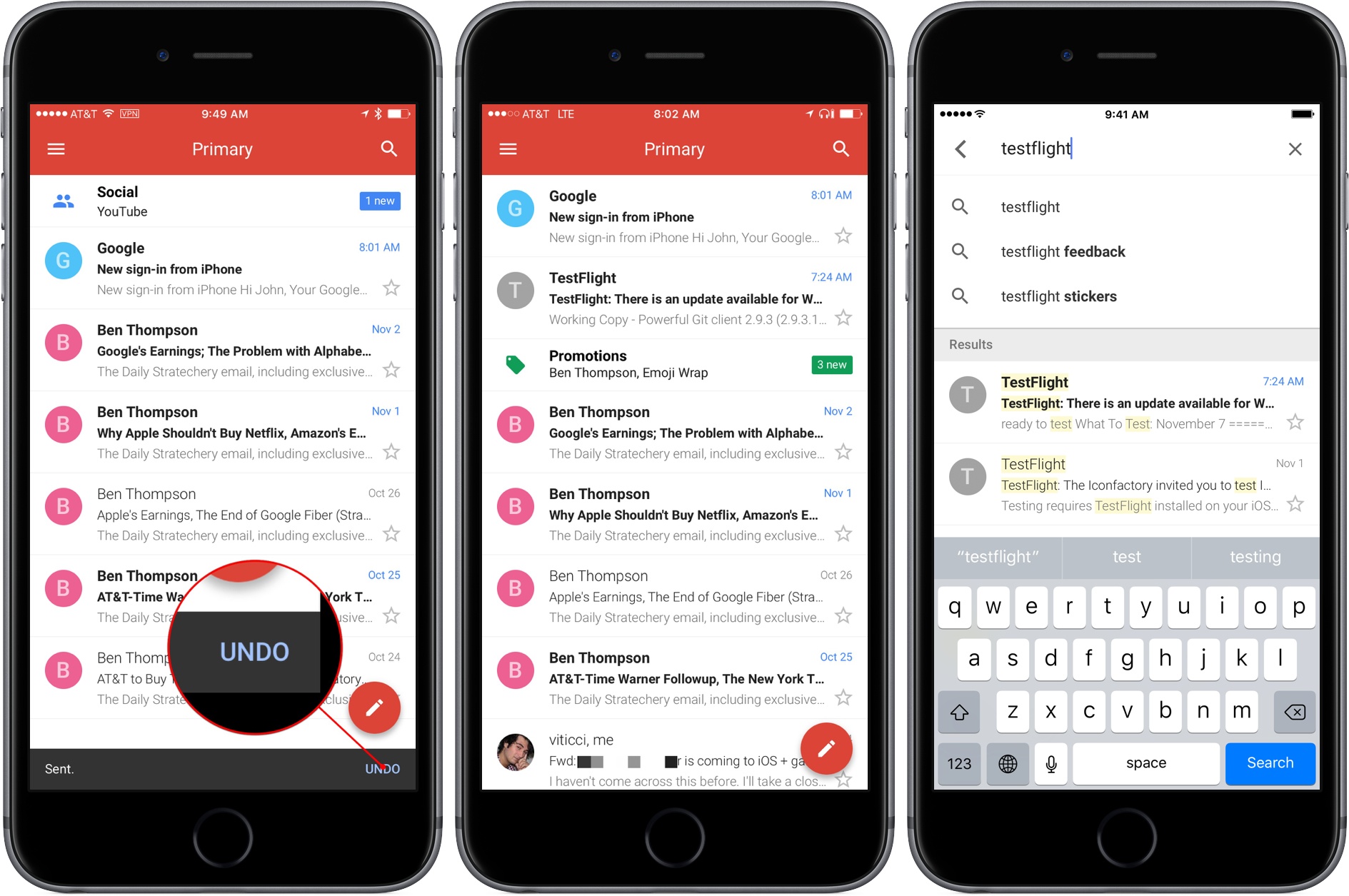
Gmail’s new design brings it much closer to the UI of its Android cousin and other Google apps available on iOS. The design is colorful, uncluttered, and easy to read with a compose button right where you expect it in a Google app.

Google also added the ability to quickly archive or delete messages with left or right swipe gesture from your inbox. By default, Gmail is set to archive when you swipe on a message, but you can switch it to delete messages in settings on a per-account basis.

Gmail’s new ‘Undo Send’ feature gives you about five seconds to tap an Undo button in the lower right hand corner of the screen to retrieve a message that you didn’t mean to send. It would be nice to be able to adjust the length of the delay before a message is sent, but I suspect five seconds is enough in most circumstances.

In addition, Google says it has made email search even faster. The speed and accuracy of Gmail’s search is the primary reason I keep Gmail installed. I don’t use Gmail regularly enough to comment whether the new search is faster, but in my limited testing search results appeared almost instantly on a good WiFi connection, even when retrieving months-old email.

I’m glad to see Google pushing Gmail forward. With this update, it fits better aesthetically with the rest of Google’s iOS apps and adds features that keep Gmail on par with other iOS email clients. I only wish that Gmail also included a unified inbox option instead of requiring me to switch among multiple accounts.

Gmail is available on the App Store as a free download.


Game Day: Alone

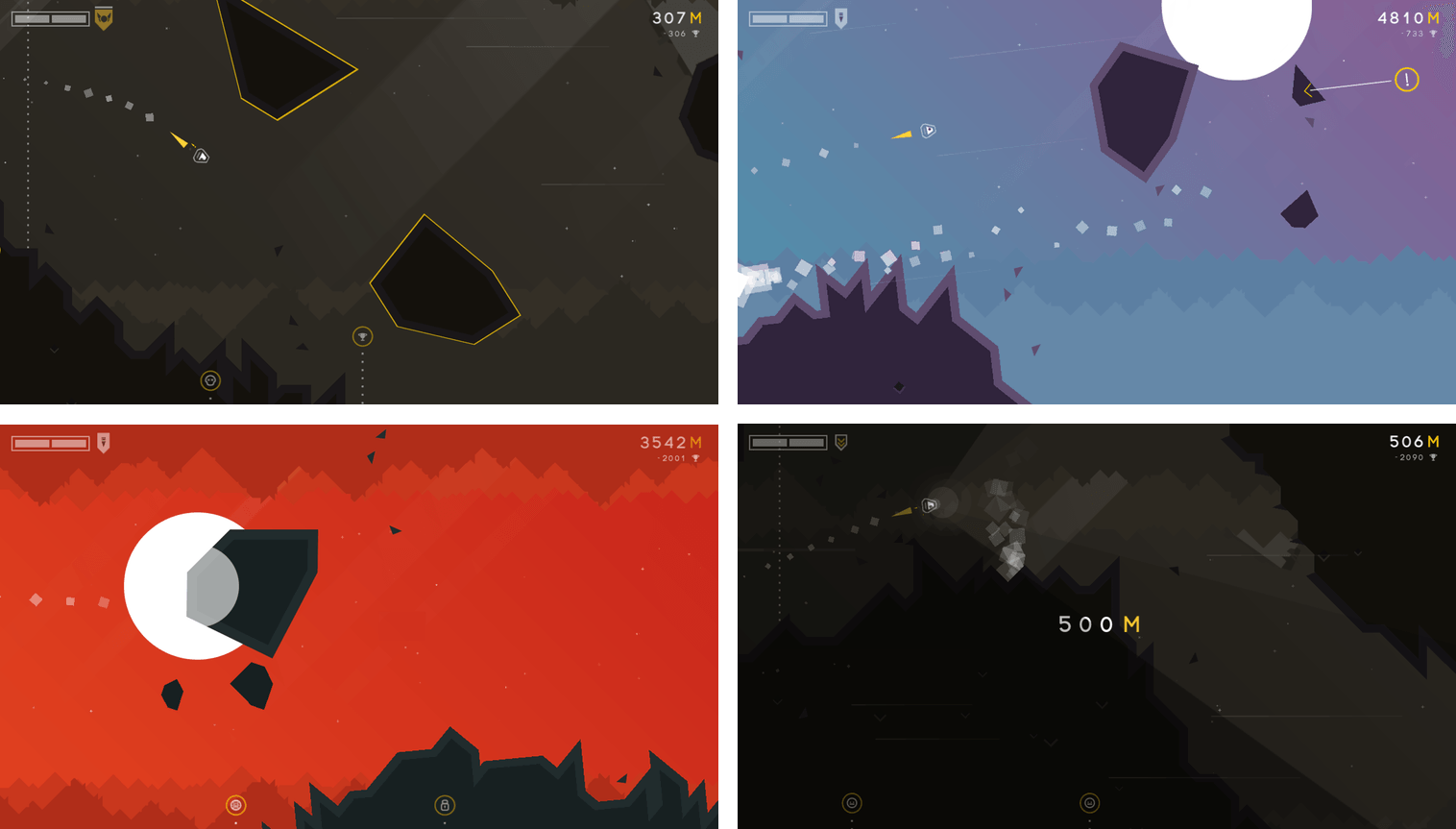
Every week thousands of new games are released on the App Store. As I set up my new iPhone 7 Plus recently and scrolled through the Purchased tab in the App Store, I realized that there’s another ‘new’ category - new to me. I download a lot of apps, including games, and sometimes they get lost in the shuffle. That’s exactly what happened to Alone, a fantastic endless runner by Laser Dog released about two years ago. Alone may not be new to you, but even if you’ve played it before, Alone is worth rediscovering.

Alone, adds a sci-fi twist to the endless runner genre. You’re a spacecraft navigating thorough collapsing caves. Rocks fall as you maneuver your ship through the tunnels. The design of the game echoes its name. Your ship feels small and isolated in the harsh space environment. You can take a couple of small hits from debris, but more than that, or a collision with a wall, and it’s game over. Make it far enough in a world and you’ll be rewarded by unlocking new environments to explore.

Navigate your tiny spaceship through an unforgivingly bleak environment.

Navigate your tiny spaceship through an unforgivingly bleak environment.

Alone requires concentration and fast reflexes. Even though I’m not great at twitchy arcade games, I’ve had a lot of fun playing Alone. The focus it requires makes it easy to get absorbed in the game.

As you progress, Alone’s pace increases and additional obstacles, like rockets, are introduced, making for an even more harrowing journey. The controls are sensitive, which requires focus and concentration to make it very far. By default, dragging your finger down on the screen makes your ship rise and dragging it up does the opposite. If this feels counterintuitive, you can reverse the controls in the settings. The sensitivity of the controls would be more frustrating, but by building in the ability to survive small collisions, Alone has struck a good balance that makes it fun without being discouraging.

The fast pace of Alone and the relentless electronic beat of the soundtrack are a great combination. Endless runner games are by their nature somewhat one-dimensional, but Alone sets itself apart with its design and unique gameplay. Whether you’ve played Alone before or not, take it for a spin this weekend. Some of the best iOS games are hidden beneath a mountain of new releases.

Alone is available on the App Store for $1.99.


Siri for macOS

I recently started playing with Siri on my Mac and have found it to be handy for a lot of little things. Before you dive into Siri on your Mac,though, check out the Siri entry in System Preferences. When I’m typing, I find triggering Siri by a keyboard shortcut easier than navigating my cursorto...


Member Requests

Question: I have a job where I’ll be taking stock of inventory soon. My workflow records a product’s barcode and quantity, then asks to repeat the process. I want the name of the product associated with the UPC displayed in an alert. Can this be done with Get Contents of URL? (Todd)

Without knowing...


Album

The Washington Post I wasn’t expecting The Washington Post to make one of the funniest iMessage sticker packs to date, but Newsworthy is one of my new favorites. Imagine if the This Is Fine dog became a reporter and someone made stickers about him. Yeah. Mister Hedgehog What’s not to love about a cute...


Q&A

Question: I am thinking of trying Spotify Premium after a few years of exclusively using Apple Music and iTunes. My library is organized in a way that privileges albums over playlists. Is there a good way to get my local purchased tracks into Spotify such that they are streamable on my iOS devices immediately (i.e....


Modern Atlas

Modern Atlas is the synthesis of multiple data sources into an easy-to-use resource for travelers. I first tried Modern Atlas this past summer. What grabbed me immediately was the excellent integration of so many different reference sources into its cleanly-designed map interface. Home base in Modern Atlas is its map view. From there, you...


App Debuts

Blocky Basketball - Endless Arcade Dunker Fun new iPhone game that feels like a mix of Crossy Road, classic endless runners, and a basketball game. You have a limited amount of time to pass the ball to other players before dunking, and the more you advance, the trickier passing becomes. A combination of genres...