John Voorhees

5429 posts on MacStories since November 2015

John is MacStories' Managing Editor, has been writing about Apple and apps since joining the team in 2015, and today, runs the site alongside Federico. John also co-hosts four MacStories podcasts: AppStories, which covers the world of apps, MacStories Unwind, which explores the fun differences between American and Italian culture and recommends media to listeners, Ruminate, a show about the weird web and unusual snacks, and NPC: Next Portable Console, a show about the games we take with us.

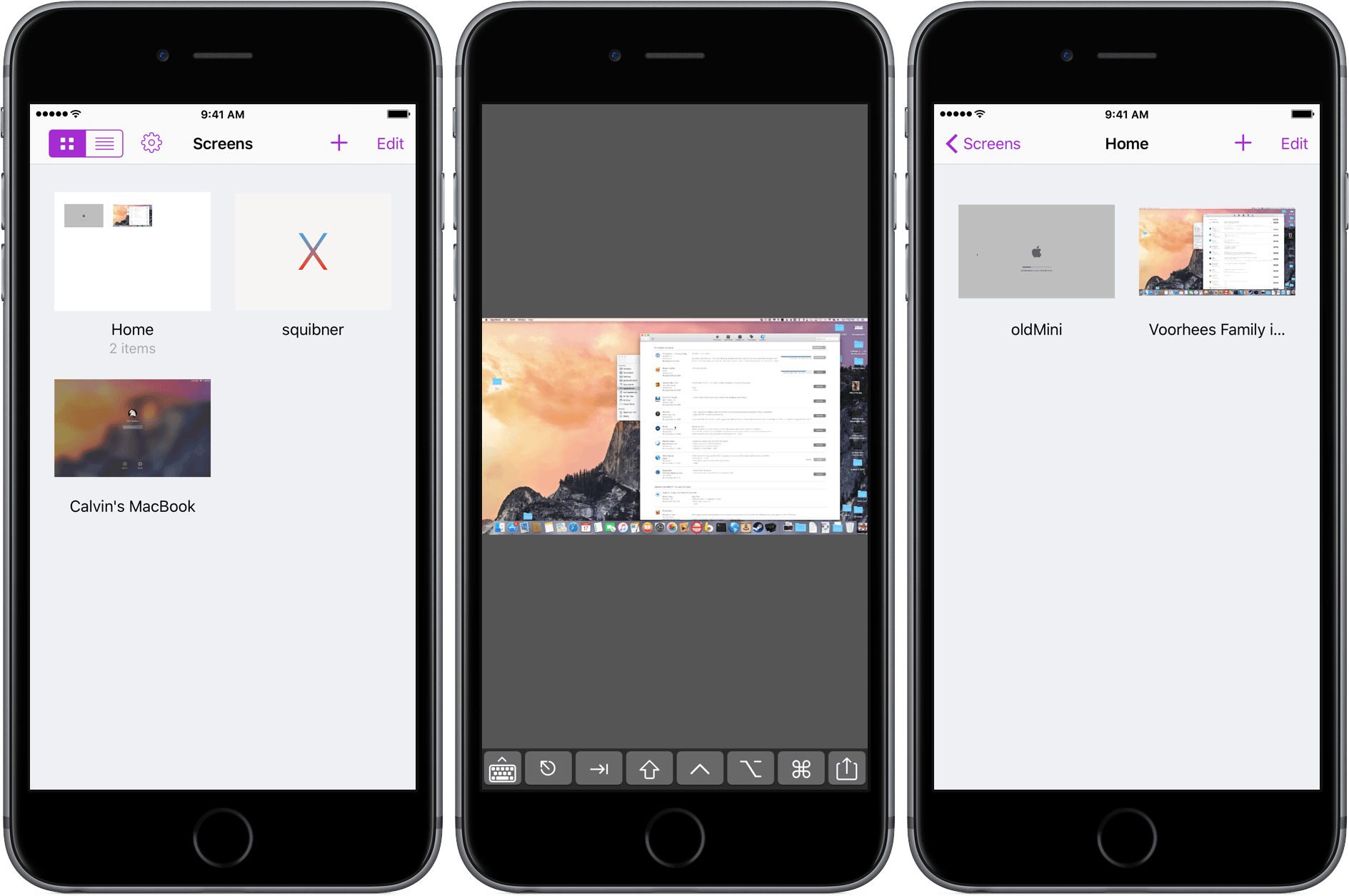
Screens 4 Refines Remote Management of Macs and PCs

Screens for iOS is a great example of an iOS app that has been at the top of its category for years and stayed there by not standing still. Longtime readers of MacStories will know that Screens has been a favorite from the earliest days of the site when Federico declared that:

Screens by Edovia has become the best VNC app I’ve ever run on my iPhone and iPad.

That’s as true today as it was in 2010, but with today’s release of Screens 4, connecting remotely to Macs, Windows PCs, and Linux PCs from an iOS device has never been more convenient and fast.

Read more


Imprint Brings Effortless Shopping to iOS

Imprint for iOS is designed to make shopping easy and enjoyable, which is a good thing because I can’t stand shopping, especially for clothes. I’d much rather order clothes online and have them show up on my doorstep than go to the mall. The trouble is, clothes shopping on the web is usually a mixed bag. Many sites do a poor job of describing and photographing what they sell, making it hard to know what you’re ordering, which leads to returns. Other sites have overly complex and tedious checkout processes, requiring what sometimes feels like page after page data entry that fails if you don’t enter information exactly as the site expects.

Need, which offers hand-picked collections of clothing, accessories, and other items like coffee and books, is different. I’ve been a customer of Need since Matt Alexander launched it in late 2013. Through a combination of excellent photography, quality writing, and attention to customer service, Need has provided a superior shopping experience on the web from the beginning.

Today, Need relaunched and rebranded its website as Imprint and released a companion iOS app by the same name. Imprint for iOS is a delight to use. Imprint’s browsing and shopping experience is faster, easier, and more fluid than other iOS shopping apps, exhibiting the same degree of care and attention to detail that has made me a happy customer of its predecessor, Need, from the beginning.

Read more


Smile Adjusts Pricing For Existing Customers of TextExpander

Smile Software found itself at the center of a firestorm of controversy last week when it moved to a subscription pricing model for TextExpander that made a lot of sense to business users, but less so for individuals. To its credit, Smile has listened to customer feedback and is instituting two changes to what was announced last week.

  • First, existing customers of TextExpander will receive a lifetime 50% discount on its new subscription service, instead of a discount on the first year only. With this change, existing customers can continue to enjoy TextExpander and future updates for $20/year.
  • Second, TextExpander 5 for Mac and TextExpander touch 3 for iOS will continue to be sold and maintained. So, if you prefer, or need, Dropbox or iCloud syncing of your text snippets, you can continue to use these products.

Software pricing is hard, and it’s never been more difficult to build and maintain sustainable Mac and iOS apps. Smile’s initial decision struck many as an abandonment of consumer software for an enterprise model. As Smile Founder Greg Scown explained on Smile’s blog, that is not the case:

To some of you it may seem we don’t care about our individual customers any more and only care about business use. We care about both, and in the changing software world a single focus is not a viable long term strategy for TextExpander. We did not make these changes easily or lightly, but for the long term life of the product so we can all enjoy it and engage with it for many years to come.

I’m glad to see Smile make these changes. It’s not easy to balance the needs of business and individual customers, but I think the changes announced today strike a fair balance that addresses the legitimate complaints that many individual users of TextExpander had with its new business model. I for one am signing up.


Sean Malto Skateboard Documentary Shot on iPhone

Ghost Digital Cinema released a documentary about professional skateboarder Sean Malto that was shot entirely on an iPhone using an app called FiLMiC Pro, which is just $9.99 on the App Store. The filmmakers supplemented the iPhone with equipment like professional lenses, a gimbal and a drone, but the heart of the operation was an iPhone and a $10 app.

In addition to the documentary, Ghost Digital Cinema posted a behind the scenes video explaining how they made the Malto documentary. The amazing things that people make on their iPhones never never ceases to amaze me.


Apple Debuts New Apple TV Ad, ‘Father Time’

Actor Michael B. Jordan and NBA legend Kobe Bryant star in a new Apple TV commercial called ‘Father Time’ that highlights the Apple TV’s Siri integration. Bryant who announced his retirement at the end of the 2015-16 NBA season, sits down on a couch with Jordan and says “Siri, open the NBA app.” The app opens and the two begin watching footage of Bryant’s early career. Bryant explains to Jordan, “That’s the guy you’re playing in this movie, a cold blooded assassin.”

Jordan clearly has something different in mind. He grabs the remote and asks Siri to play The Curious Case of Benjamin Button and then to fast forward to 20:36 where he pauses the movie on an image of Brad Pitt as an old man and says “Now that’s the guy I’m playing in this movie”, at which point Bryant kicks Jordan out. The minute-long advertisement is funny and cleverly manages to incorporate both sports and movie content on the Apple TV, while also demoing some of the core Siri features on the Apple TV.


Tips

This tip goes well with the favorite this week, Boom 2. The volume button on a Mac have 16 increments between no sound and full volume. If you hold down Option-Shift while adjusting the volume using the volume buttons on the function keys, the volume will increase and decrease in quarter increments. Instead of...


Member Requests

Question: How can I quickly append a word (along with its definition) that’s been highlighted and/or copied to the clipboard to my Evernote note “Words to Learn”? I only see the action “Show Definition” in Workflow but I’m not sure how I can get those results into the note. I’ve also tried using Terminology but...


Ongoing Development

If You Can’t Find Time, Make It Making time is easier than finding it. A couple weeks ago I spoke at CocoaConf Chicago. The closing speaker was Jaimee Newberry. Jaimee challenged the audience to stop making excuses and start making something. It was a great talk, but one thing in particular that Jaimee said stuck...


Microsoft Launches Hub Keyboard for iOS

Microsoft has been on a roll on iOS lately. In addition to the news from the Outlook team that Sunrise integrations are coming back as Calendar Apps for Outlook on iOS, Microsoft Garage, its experimental apps project, launched an iOS keyboard called Hub.

Hub, which has a nice clean design, is tightly integrated with Microsoft Office 365. Hub has an extra row at the top of the keyboard that lets you paste from a clipboard history, your contacts, or your OneDrive and Sharepoint documents. Hub, which is a free download on the App Store, can also help you translate what you type into other languages.

Permalink