

A recap of the week’s perks and where to find them,Federico digs into the Obsidian plugins, shortcuts, and apps he used to write this year’s iOS and iPadOS review, Brian King covers how the animation and chapter images were created for the review, plus a long list of App Debuts,Links, highlights from the Club MacStories+...
 Up Next, On Club MacStories’ Podcasts
Next week on AppStories, Federico and John go beyond the specs to figure out what it is about the new iPad mini that makes it so special....
Announcement
Club Perk Recap We released a lot of perks for Club members this week as part of the release of Federico’s iOS and iPadOS 15 review and wanted to summarize them here, so they’re easy for everyone to find. This week we released the following for all Club members: eBooks (available on your Club Downloads...
Export Markdown with Embeds: An Obsidian Plugin to Compile Documents with Embedded Notes
 Finn
Finn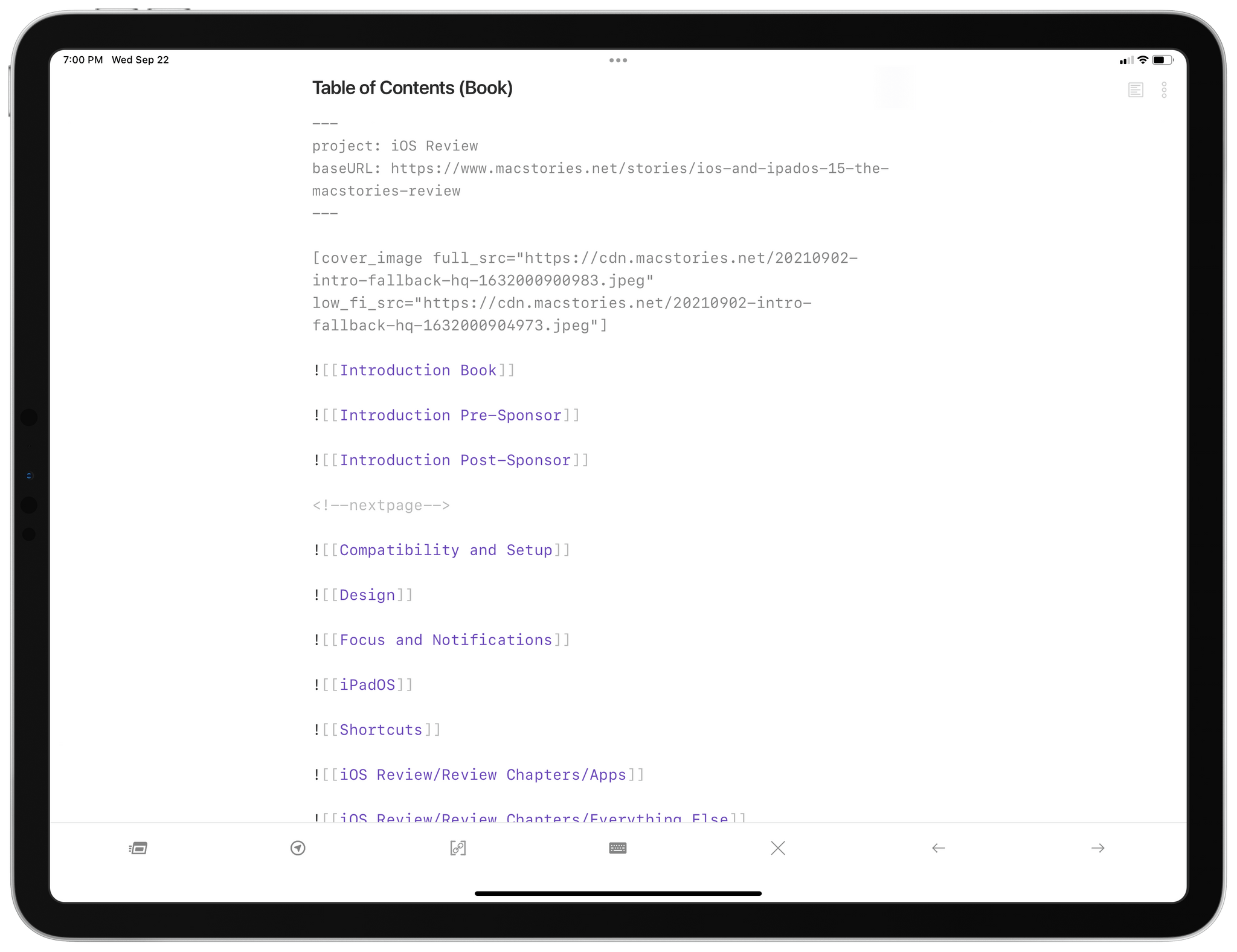
Export Markdown with Embeds is a customizable plugin that compiles documents with embedded nested documents into a single document. Obsidian’s note embed feature allows you to embed a file or note in another note using the syntax: ![[My Note]]. The contents of embedded notes will be shown in Obsidian’s preview mode in place of the link. The feature is a good way to break up longform writing into sections but still be able to review it as a single document. However, when you export a note that has others embedded in it, the exported text includes the note, not the contents of embedded notes.
When the Export Markdown with Embeds plugin is run, it swaps the contents of any linked notes into the note that you’re exporting. This makes it easy to to create a note that serves as a table of contents of embedded notes for navigating between sections of a long document. You can use Obsidian’s built-in preview functionality to read the full document in the app or use Export Markdown with Embeds to export it as Markdown-formatted text.
Markdown Insert: An Obsidian Plugin for Creating Markdown-Formatted Web and Image Links
Markdown Insert is an Obsidian plugin that takes advantage of your system clipboard to let you link text and images as you write using Markdown syntax. The process is simple:
- Copy a URL or image
- Highlight some text in Obsidian
- Invoke the Markdown Insert command in Obsidian
That’s all there is to it. The highlighted text becomes linked text. If you have a URL on the clipboard, it’s linked to the text you highlighted. If you have an image link on the clipboard, an Obsidian image link is created instead, which can be viewed when you switch to Obsidian’s preview mode.
Markdown Insert also works if you haven’t highlighted any text. In that case, the plugin creates a Markdown-formatted link with no title, placing the cursor between the square brackets, so you can easily add the linked text.
If you spend a lot of time writing in Markdown, this simple plugin saves a lot of keystrokes over time, which makes it much faster to write in Obsidian.
Upgrade to Club MacStories+ or Club Premier
Markdown Insert requires a Club MacStories+ or Club Premier subscription. You can read more about our plans here, then sign up or upgrade your existing Club MacStories account using the buttons below:
Join Club MacStories+:
Join Club Premier:
Todoist Tasks: An Obsidian Plugin to Create Tasks in Todoist with Two-Way Linking
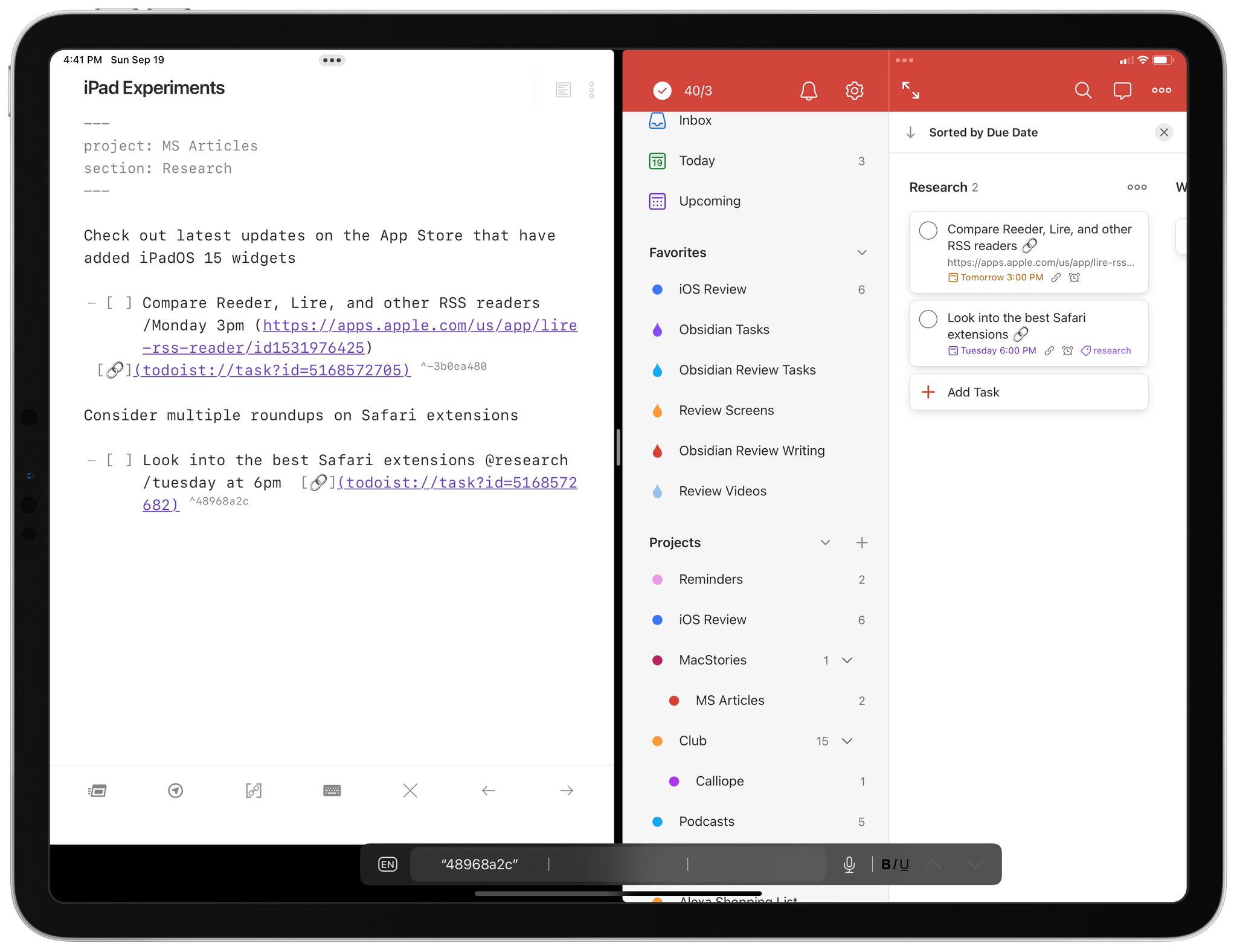
Todoist Tasks is a plugin for Obsidian that enables you to create tasks in Todoist directly from Obsidian. As you take notes or write in Obsidian, you can create inline tasks using syntax describing the project, label, section, due date, priority, and any notes associated with a task.
Running the ‘Create and update tasks in current file’ command in Obsidian will find new tasks in the current note, create the task in Todoist using the Todoist API, and add a link to the task in Obsidian using the Todoist URL scheme.
Tasks can then be marked as completed in Obsidian or Todoist, and they will be marked as completed in the other when running the command next.
Upgrade to Club MacStories+ or Club Premier
Todoist Tasks requires a Club MacStories+ or Club Premier subscription. You can read more about our plans here, then sign up or upgrade your existing Club MacStories account using the buttons below:
Join Club MacStories+:
Join Club Premier:
DetailsPro: A Design Tool Made for SwiftUI [Sponsor]

DetailsPro is the accessible, graphical tool for the iPhone, iPad, and Mac that brings your app designs to life with SwiftUI. The future of modern app design on Apple’s platforms is SwiftUI, and with DetailsPro, you can be up and running immediately, designing UIs without typing a line of code.
DetailsPro uses a drag and drop interface to make designing app interfaces, widgets, and screens a completely graphical, natural experience. There are no multi-gigabyte downloads or any of the complexity you find in a tool like Xcode. Instead, DetailsPro focuses on your design first. The app is a fantastic way to learn core SwiftUI concepts in an environment that provides immediate feedback. There’s also a terrific DetailsPro community that offers in-app downloadable templates to learn, remix, or use as starting points for your own projects.
When you’re happy with your design, simply export it to SwiftUI code to Swift Playgrounds or Xcode. That’s the sort of design pipeline that makes handing your work off to your developers simple while ensuring that the fidelity of your designs is preserved in the process.
Built in SwiftUI itself by a former Apple Design Prototyper, DetailsPro is trusted industry-wide by designers at companies like Apple itself, Starbucks, Microsoft, Nike, and Porsche, and it’s easy to see why. DetailsPro brings sophisticated SwiftUIs to life quickly and easily in a way that feels like magic.
If you’ve been looking for a way to get into designing with SwiftUI, your search is over. You can download DetailsPro today for free and use it with five files, but you can unlock unlimited files and upcoming features like versioning, reusable components, MapKit maps, and more for just $9.99/year or with a one-time payment of $29.99. That’s a fantastic price for an app that will save you time and simplify your design process.
So, download DetailsPro today, and get started designing with SwiftUI.
Our thanks to DetailsPro for sponsoring MacStories this week.
Previously, On MacStories
Apple’s September 14, 2021 Keynote: By the Numbers Apple Updates the iPad mini and 10.2” iPad Apple Watch Series 7: The MacStories Overview The New iPhone 13 Lineup: The MacStories Overview Replay Apple’s September 14, 2021 Keynote and Other Videos Apple Announces New iPhones, iPads, and Apple Watch Availability Shazam Crosses 1 Billion Songs Recognized...
In This Issue
A collection of John’s favorite moments from this week’s keynote, iPad mini accessory recommendations, an announcement about perks coming alongside Federico’s annual iOS and iPadOS review, plus the usual Links, App Debuts, spotlight on the Club MacStories+ Discord, a recap of MacStories articles, and a preview of upcoming podcast episodes....