

Earlier this week, Apple announced a special event that’s scheduled for Tuesday, September 14th. We’ll be covering the event on MacStories and following up with event-related content in MacStories Weekly later in the week, but we’re doing something more this year. As part of the Club MacStories+ Discord community, we hold monthly Town Hall live...
 In This Issue
The cross-platform OS features that John is using most, what an Apple event day is like at MacStories, an ETA giveaway, Club member Scott Willsey’s iPad Home Screen, Club member Mac S’s desk setup, plus an announcement about an upcoming Club MacStories+ Town Hall and the usual Links, App Debuts, spotlight on the Club MacStories+...
Reader Setup: Mac S.

Twitter: @mmaaaacc. Detroit City FC supporter. Current Z Fold user. Favorite hobby: Endlessly scrolling through Steam library and never choosing anything. I live with a roommate, and while our apartment isn’t small, its layout is such that it necessitates my setup be part of our shared space; combine that with a remote job, and that...
Quill: Messaging to Make Your Team Better [Sponsor]
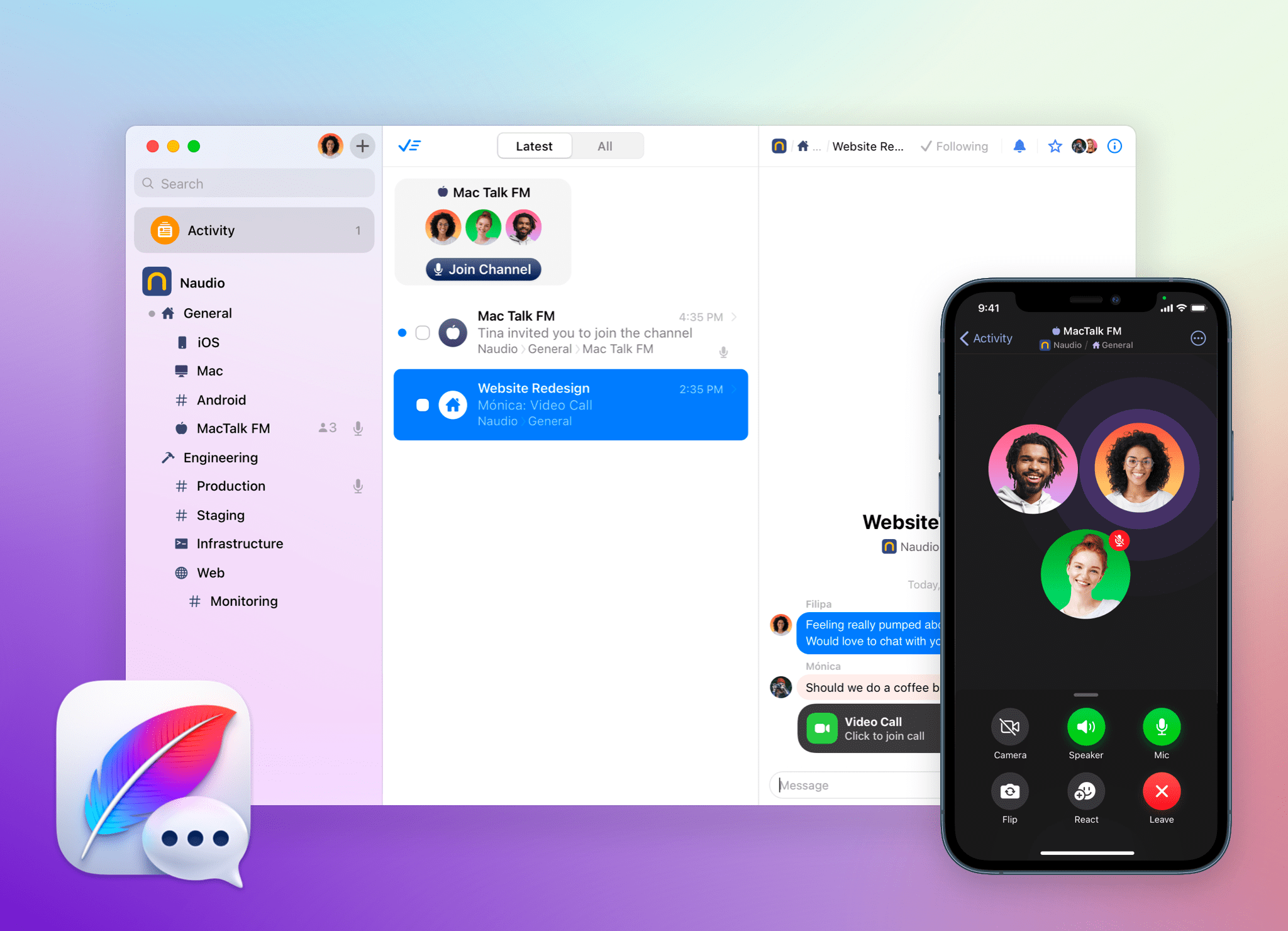
Quill is the messaging app and service that puts you, your time, and your focus first so you and your team can work together better.
With Quill, you’re in control of what messages you see and how much you see. That helps you stay focused and on task without constantly being interrupted. At the same time, though, Quill makes it easier than ever to get involved in the conversations and decisions that need your input.
Quill accomplishes all this by focusing conversations around threads instead of channels. You don’t need to follow a channel to be part of a thread. You can join one simply by starting a thread or being mentioned in one. It’s a simple, elegant solution that keeps conversations from getting mixed and muddled together. You can also decline to follow threads in the channels you do follow to cut down on the noise.
Push notifications are off by default for all channels and threads. Instead, events show up in the Activity Feed. Get caught up whenever works best for you instead of being interrupted and distracted. Of course, when something is truly urgent, you can send a priority mention, and the recipient is sent a push notification immediately.
When you see a thread you want to follow in the Activity Feed, you can follow it right then and there. You can also retroactively create a thread, split one thread into two, quote messages, move direct messages to public channels, and a whole lot more. Quill’s unique approach and features make it perfect for individual productivity while also facilitating remote collaboration among distributed teams.
To learn more and try Quill for free, visit quill.chat today. Messaging has never been more easy and natural.
Our thanks to Quill for sponsoring MacStories this week.
Previously, On MacStories
Apple to Allow Reader Apps to Link to Account Management Pages on the Web in Early 2022 Reminders’ Smart Lists Put Unprecedented Control in the Hands of Users Building Calliope: A Technical Journey Through MacStories’ Big Software Project Relay FM’s Third Annual Fundraiser for St. Jude Children’s Research Hospital Is Underway...
Club Perks

Tempo Exclusively for Club MacStories members, we have 20 copies of Tempo, the workout log for runners, walkers and hikers, which was recently updated with the ability to set goals to help motivate you and maintain a consistent training routine. Enter your email address using the button below by Noon, Eastern US time on Wednesday,...
Up Next On MacStories’ Podcasts
Next week on AppStories, Federico and John look at Reminders’ new Tag Browser and Smart Lists feature, Notes’ Smart Folders, and consider the growing trend of user customization in Apple’s iOS and iPadOS apps. This week on MacStories Unwind, Alex joins John to talk about John’s feature story on Reminders, Alex’s deep dive...
Reader Setup: Rod Christiansen

Twitter: @RodChristiansen. Tech. Marketing. Systems. Biking. Smoothies. Running Resilient Consulting. Editor’s Note: When Rod shared his desk setup in the #share-your-setup channel of the Club MacStories+ Discord, we knew immediately that we wanted to spotlight it here for everyone to enjoy. My desk setup since the 24” M1 iMac has been my pride and joy....
In This Issue
The Clock, Federico shares a shortcut to split PDFs and make images from specific PDF pages, Club member Rod Christiansen shares his desk setup, highlights from the Club MacStories+ Discord, plus the usual Links, App Debuts, a recap of MacStories articles, and a preview of upcoming MacStories podcast episodes....