Weather Line
...

 Weather Line
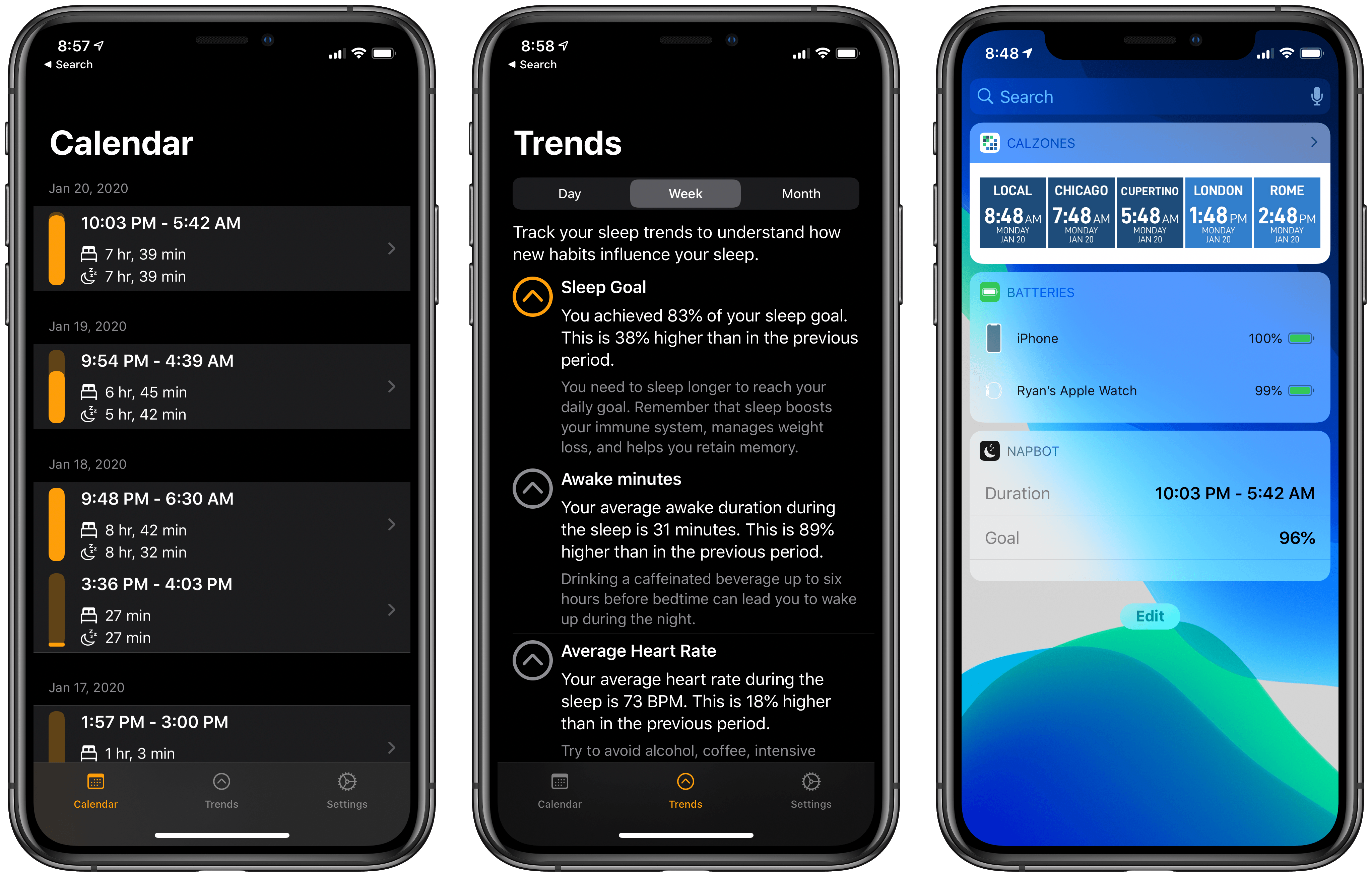
 NapBot debuted last fall as a Swift UI-powered app that makes sleep tracking easy thanks to CoreML and a clean, simple design. The app recently received a variety of improvements via a 1.3 update that enhances both the watchOS and iOS components of NapBot.
On the watchOS side, NapBot now features a fully independent Watch app, meaning it can be downloaded from the Watch’s App Store and run without needing the iOS app installed. The current Watch app only shows sleep data for the previous day, rather than the full history that’s available on the iPhone, so I hope this release is just the first step toward offering full feature parity between watchOS and iOS apps.
Timed with its upgrade to independence, NapBot’s Watch app also now has complications available for every type of watch face and every complication size, so no matter which face is your go-to, you can find a fit for your sleep data.
The iPhone app now tracks a new trend, accessed from inside the Trends tab: Awake minutes. This enables keeping a pulse on how much time you spend awake during a normal night, and if the number doesn’t look good, NapBot will recommend you try reducing caffeine consumption during the latter parts of your day. If your Awake minutes trend shows just limited awake time, you’ll receive reassurance that brief waking periods can be perfectly normal.
Finally, NapBot has added a Today widget that documents your sleep data from the previous evening, and a notification in the morning to let you know sleep has been tracked. Using one or both of these options can reduce the need to open the full NapBot app as often and enable passive use instead, which I find ideal for a sleep tracking app.
The appeal of NapBot is in combining an easy-to-understand interface and effortless sleep tracking with data analysis powered by CoreML. Version 1.3 doesn’t change anything fundamental about the app, but it brings system feature integrations that make a meaningful difference in everyday use.
Over the weekend, Apple debuted its TV+ content lineup for the first half of 2020 at the Television Critics Association Winter Press Tour. This Press Tour is a tradition of the TV industry, where traditional networks and streaming services alike share about the new content they’ll be releasing soon. Apple got to join the festivities this year for the first time, detailing its TV+ lineup through early summer, including release dates for highly anticipated series we already knew about, plus the debuts of new shows that hadn’t been previously announced.
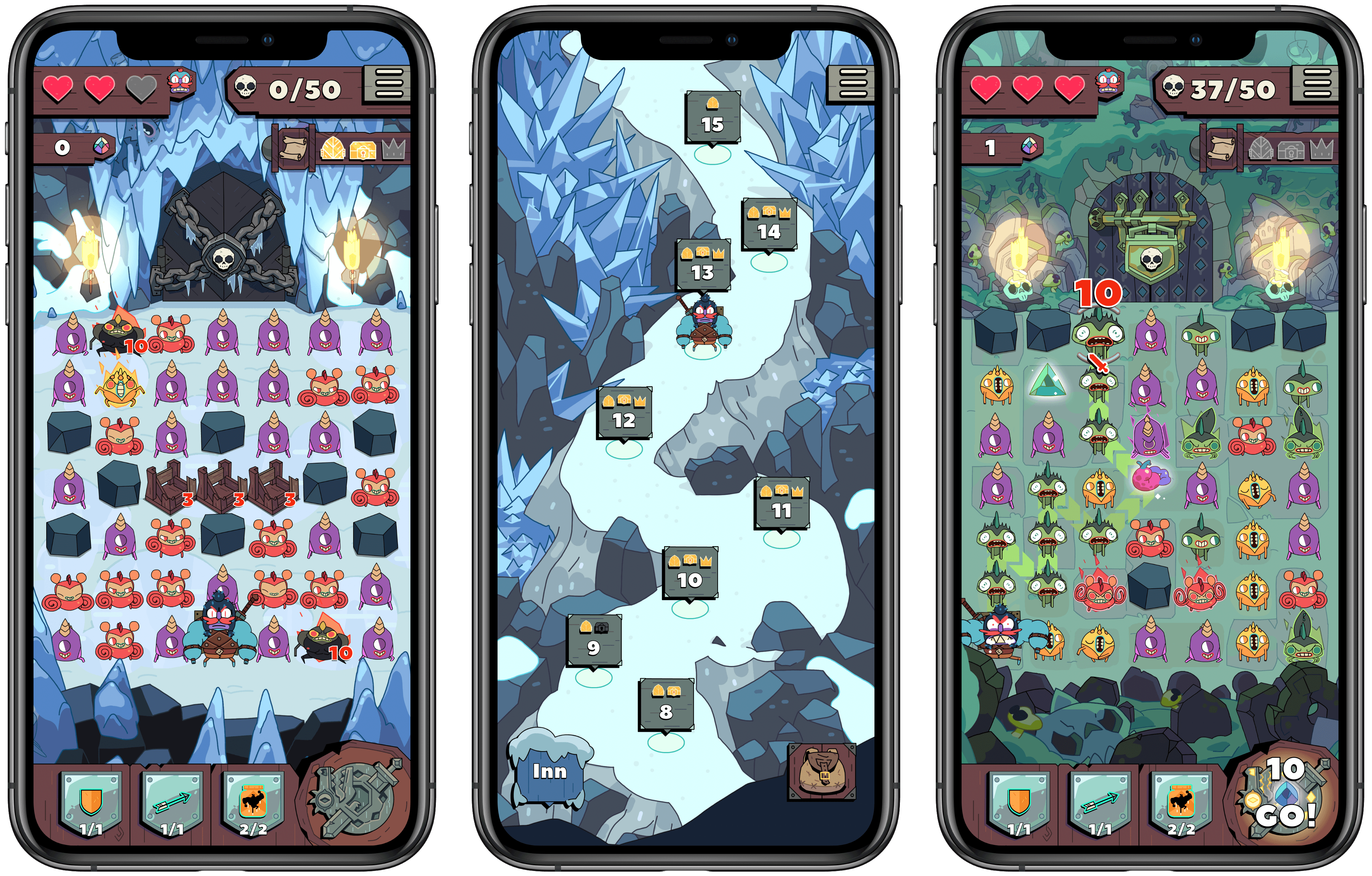
iOS Utility Grab Bag When it comes to mobile games, all a new title has to do to draw me in is show a Candy Crush-style grid of objects. There’s something about the simple mechanic of making connections on a grid that’s hard for me to resist. Most of the time, though, I find that while such games can easily grab my interest, many will quickly lose it when I actually start playing. It’s usually just standard match three games that keep my attention, so when I first tried out Grindstone, I didn’t think it would be for me.
Grindstone is an Apple Arcade title from Capy and the creative team behind the excellent Superbrothers: Sword & Sworcery EP. It features a familiar grid of objects – in this case monsters to defeat – but rather than rearranging matching monsters in a Candy Crush fashion, you’re tasked with tracing a line from one matching monster to another, determining the order in which you’ll slay them and potentially earn rewards. Monsters have to be adjacent to each other for you to string them together, so essentially you’re completing a connect the dots puzzle each turn with as many monsters destroyed as possible.
Marco Arment on marco.org, outlining his self-created Low Power Mode-like system which relies on a third-party app, and making the case for Apple to add something similar as an official macOS feature:
The vast majority of the time I’m using it, the 16-inch MacBook Pro is a much better laptop with Turbo Boost disabled.
It’s still fast enough to do everything I need (including significant development with Xcode), while remaining silent and cool, with incredible battery life.
But soon, I bet I won’t be able to do this anymore.
Turbo Boost Switcher Pro relies on a kernel extension that’s grandfathered into Apple’s latest security requirements, but it can never be updated — and when macOS Catalina loads it for the first time, it warns that it’ll be “incompatible with a future version of macOS.” I suspect that this is the last year I’ll get to run the latest OS and be able to turn off Turbo Boost at will, making all of my future laptop usage significantly worse.
Low Power Mode is one of many useful features that iOS has had for years but that Mac users have been forced to live without. The feature’s popularity on iOS makes it a no-brainer addition for portable Macs, where battery life is already worse than what’s found in the iPhone and iPad.
Update: Former MacStories contributor TJ Luoma helpfully pointed out something that genuinely surprised me: Low Power Mode isn’t on the iPad either. Here’s hoping Apple brings it not only to the Mac, but the iPad as well.
Starting a Running Habit with the Apple Watch John Siracusa writes on Hypercritical about the new Mac utility he just released in partnership with Lee Fyock. Following the release of macOS Catalina and its lack of support for 32-bit apps, such as DragThing, Siracusa needed a new solution for restoring a classic Mac OS behavior that he didn’t want to lose.
In classic, when you click on a window that belongs to an application that’s not currently active, all the windows that belong to that application come to the front. In Mac OS X (and macOS), only the window that you clicked comes to the front.
[…]
I tried to get used to it, but I could not.
Front and Center is the name of Siracusa and Fyock’s creation. It’s a tiny app that re-enables the classic behavior mentioned above, while also providing the option of using shift-click to engage the modern default of selecting the clicked window only. With Front and Center, long-time Mac users can have both the classic Mac OS behavior they enjoy, and the benefits of macOS’ modern approach, all at once.
Front and Center is available on the Mac App Store for $2.99.
Benjamin Mayo of 9to5Mac has published an excellent journey down memory lane of Apple’s last decade:
Apple entered the 2010s just as the iPhone began to explode in popularity. The iPhone became the most successful consumer product, ever. Sales surged for another five years and still make up a majority of Apple’s revenues. However, we exit the decade with the iPhone making up a smaller portion of Apple’s business than ever before, as the company diversifies into strong lineups of wearables, tablets and services offerings.
But nothing is a simple straight line. Apple had to graduate through the passing of its founder, juggle relationships with an ever-expanding list of consumer and professional market segments, and adapt to the public attention and scrunity that only comes along as a consequence of being the biggest company in the world. This is a decade in Apple, on one page.
Mayo’s first Apple product was an iMac in 2010, so the timeframe of the decade lines up with his own initial interest in Apple, leading all the way to today, when he’s one of the most prominent Apple reporters. I always enjoy reading Mayo’s perspective on Apple, so it was especially fun getting to hear his personal takes of the biggest moments of the company’s past decade. If you want to spend time basking in the nostalgia of Apple’s last 10 years, Mayo’s story is a great way to do that.