Ryan Christoffel

991 posts on MacStories since November 2016

Ryan is an editor for MacStories and co-hosts the [Adapt](https://www.relay.fm/adapt) podcast on Relay FM. He most commonly works and plays on his iPad Pro and bears no regrets about moving on from the Mac. He and his wife live in New York City.

Latest iPad Pro Ads Highlight the Device’s Versatility

Today Apple published six new videos that focus on the iPad Pro. Five of them are continuations of the ‘A New Way’ series that debuted in January, highlighting the device’s versatility in tasks like video creation, wedding planning, and serving as the perfect travel companion. The final video, titled ‘Life on iPad,’ follows a man around town as he uses the iPad Pro during what’s presented as an average day – he uses the device to make a Group FaceTime call, do illustrative work while connected to an external monitor, email a file, and draft a document during a flight.

All five ‘A New Way’ videos do a great job showcasing real-life tasks being tackled on the iPad. Most are focused on getting things done, but the video about travel also highlights the iPad’s strengths as a video player and even coloring book. The task-focused videos offer step-by-step examples of workflows that can be helpful to users aiming to stretch their use of the iPad Pro.


As with the prior round of ‘A New Way’ ads, these all end by highlighting how they were filmed, edited, designed, and made entirely on iPad Pro, no doubt with similar workflows to the ones Apple previously documented.

Read more


Calory Review: Simple, Convenient Calorie Tracking

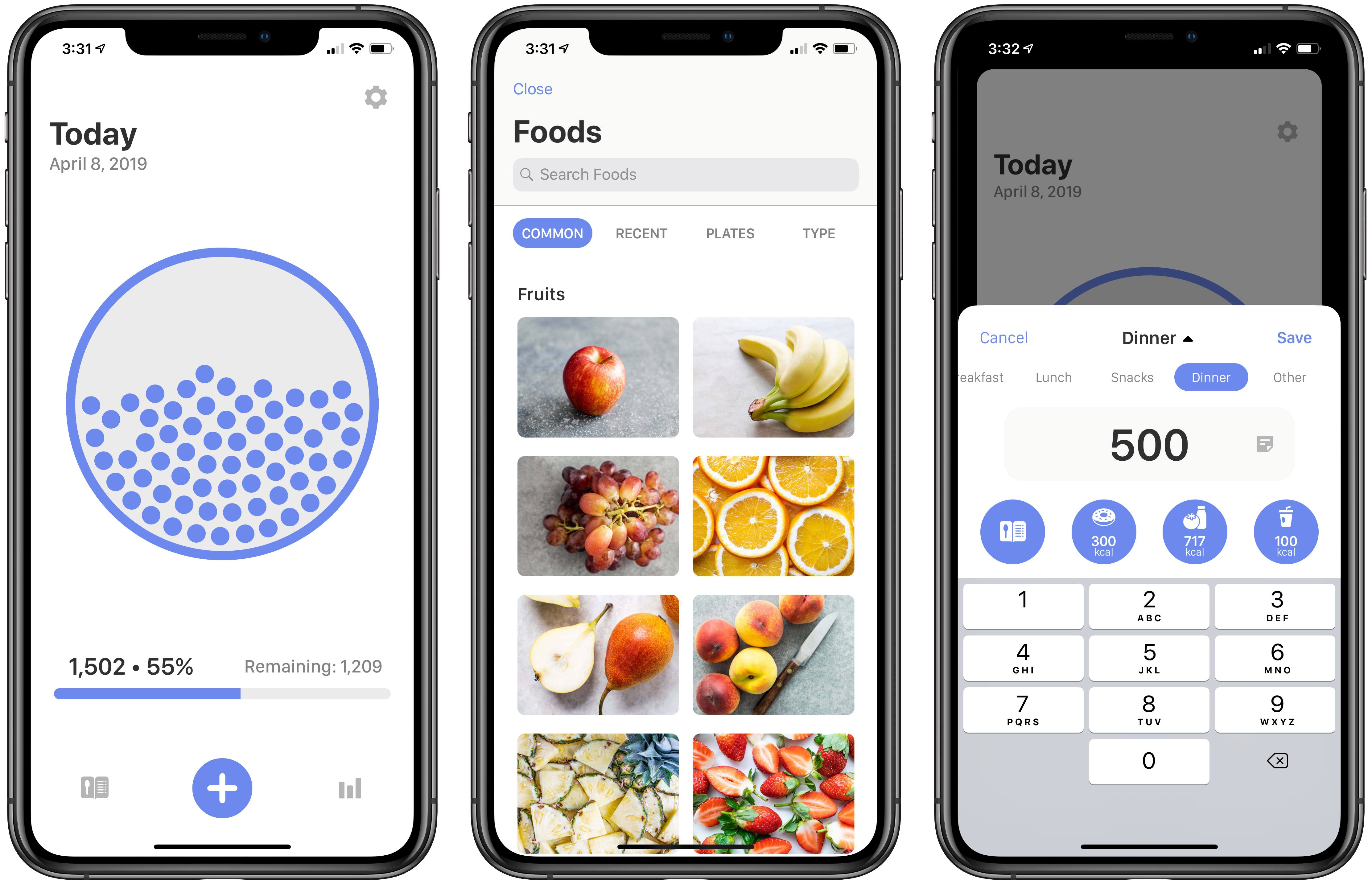
In my estimation, there are two types of nutrition-tracking apps on the App Store: those for users who want full control of all nitty-gritty details regarding what they consume, and those for people like me who just want to do simple calorie-tracking. Calory, a new iOS app from the makers of WaterMinder, HealthView, and HabitMinder, falls strictly in the latter category. While you can optionally track certain statistics like fat, carbs, and protein, the primary purpose of Calory is convenient calorie tracking – and the app excels at that.

Read more


Castro Launches Top Picks Feature for Intelligent Episode Recommendations

In an update arriving today, Castro is introducing a new Top Picks feature designed to make managing a large number of podcast subscriptions easier than ever.

One of Castro’s most defining traits is its triage system: the app by default stores new episodes of shows you’re subscribed to in a New section, not in your playback queue, and inside New you can send the episodes you care about to your queue, while archiving anything that doesn’t interest you. If you subscribe to a wide array of shows, Castro’s New section is great; however, one drawback is that it previously lacked any sort of priority or hierarchy. Though Castro offers the option of having certain shows go straight to your queue, that requires manual configuration, and it’s really only ideal for shows that you want to listen to every single episode of. In most cases, the majority of shows will land in New, and Castro previously had no way of knowing which of those episodes you were more likely to care about. That’s why Top Picks was created.

Top Picks is an addition to the New tab which highlights episodes from your subscriptions that Castro thinks you’ll want to listen to. You can still access your full subscription roster at any time, but Top Picks will serve as a curated subset of episodes that’s easier to sort through.

Shows are surfaced in Top Picks based on your listening history, which the app analyzes on-device using only local data, so it remains private. If you’re new to Castro, this means it may take a little time to get the best Top Picks suggestions, but the good news is that training the system merely requires listening to the shows you care about. As you make decisions about what to listen to, Castro learns from those choices and uses that data to inform what does and doesn’t get sent to Top Picks.

If you only listen to a handful of podcasts, Top Picks likely isn’t for you because it addresses a problem you don’t have. But for users whose subscriptions can be a lot to keep up with, the feature simplifies the act of triage and, in the process, makes Castro an even better tool for enjoying the ever-growing world of podcasts.


BBEdit Returns to the Mac App Store After 4+ Year Absence

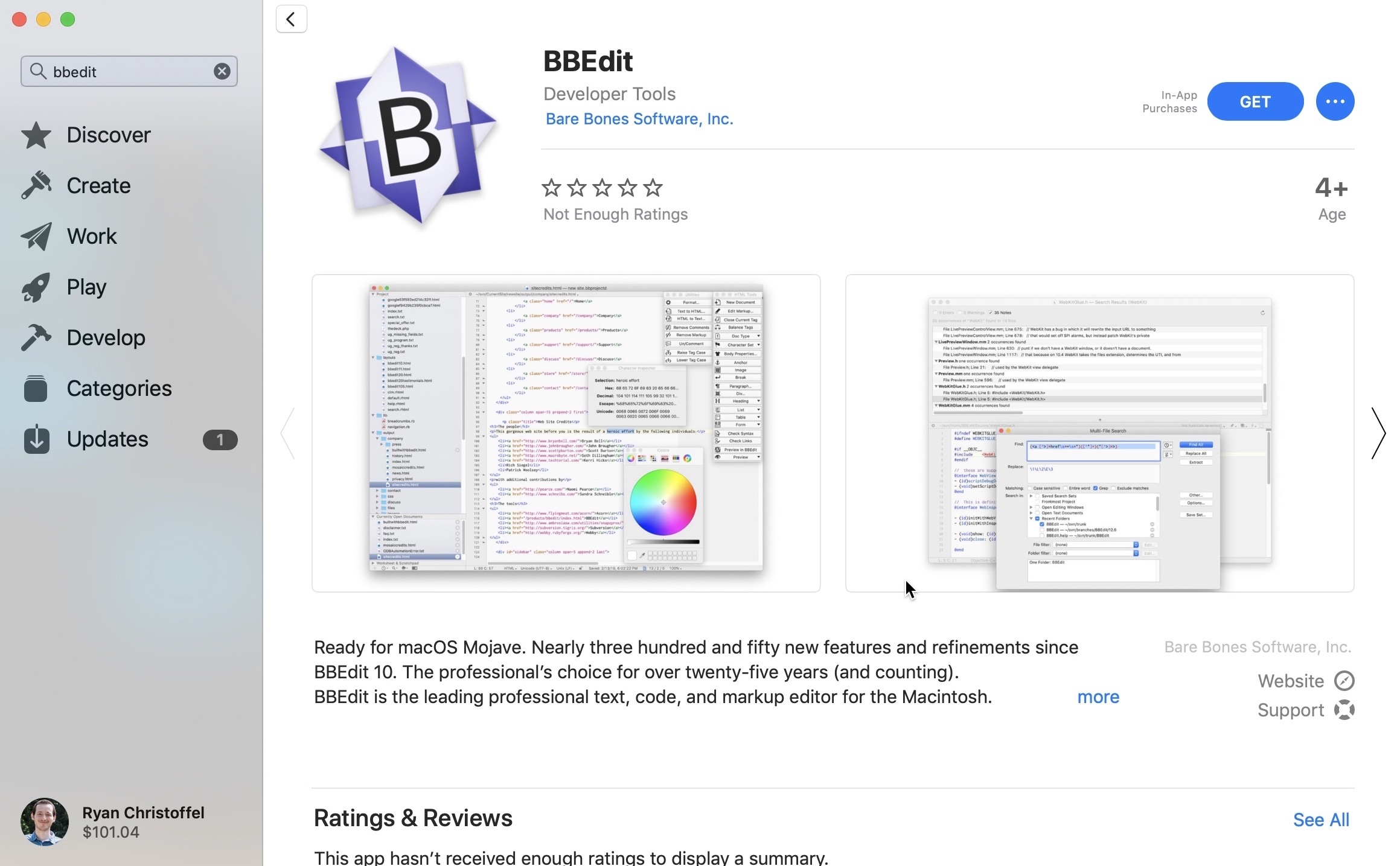
Beginning today, BBEdit 12 is available for download through the Mac App Store. BBEdit was previously listed for purchase through the Mac App Store, but famously left the store in October 2014. Last year, however, Apple announced on-stage at WWDC that BBEdit would be returning to the new Mac App Store in the near future, and that day has finally arrived. From the developers’ press release:

“We are delighted to be offering BBEdit in the Mac App Store again,” said Rich Siegel, founder and CEO of Bare Bones Software, Inc. “Since the release of macOS Mojave, the Mac App Store provides a beautiful new look; unique editorial content; and an emphasis on human curation, while offering a trusted and secure source for macOS software. In addition, the new Mac App Store makes it possible for us to offer our customers the option of a subscription-based pricing model.”

BBEdit 12, the latest version of the popular writing app for macOS, features more than three hundred new features and refinements since the app was last available on the Mac App Store. It also introduces a new pricing model: unlike direct purchases from Bare Bones Software, where an app license can (still) be purchased for a one-time $49.99 cost, on the Mac App Store BBEdit is available only as a subscription.

For those who wish to get BBEdit from the Mac App Store, the app is a free download, and you can use it in full up to 30 days at no cost, after which a subscription will be required to unlock its web authoring tools and a variety of other pro features; basic editing functionality will continue to work without a subscription, however.

Subscriptions are available at $3.99/month or $39.99/year. One advantage of the subscription option is that it will always provide access to the latest version of the app, whereas purchasing the app directly from Bare Bones will earn you the current version of the app only – if you want major new versions as they’re released, you’ll need to purchase upgrade licenses.

When Apple unveiled the new Mac App Store last year, it promised that not only would the app itself be modernized, but the store would be ripe with major app additions as well. Following Microsoft Office and Panic’s Transmit, BBEdit’s arrival today helps make good on that promise. This time last year some of the Mac’s best, most popular software wasn’t available in the Mac App Store; it’s good to see that begin to change.


PageTurn Uses Facial Recognition for Hands-Free Navigation of PDFs, Perfect for Musicians

Developer and musician Stephen Coyle just released a new app that enables hands-free page turning of PDFs via facial expressions. The aptly-named PageTurn utilizes the power of the TrueDepth camera system found in all iOS devices that support Face ID – the iPhone X, XR, XS, and XS Max, plus the 2018 iPad Pros – to enable turning pages of a PDF using only your face.

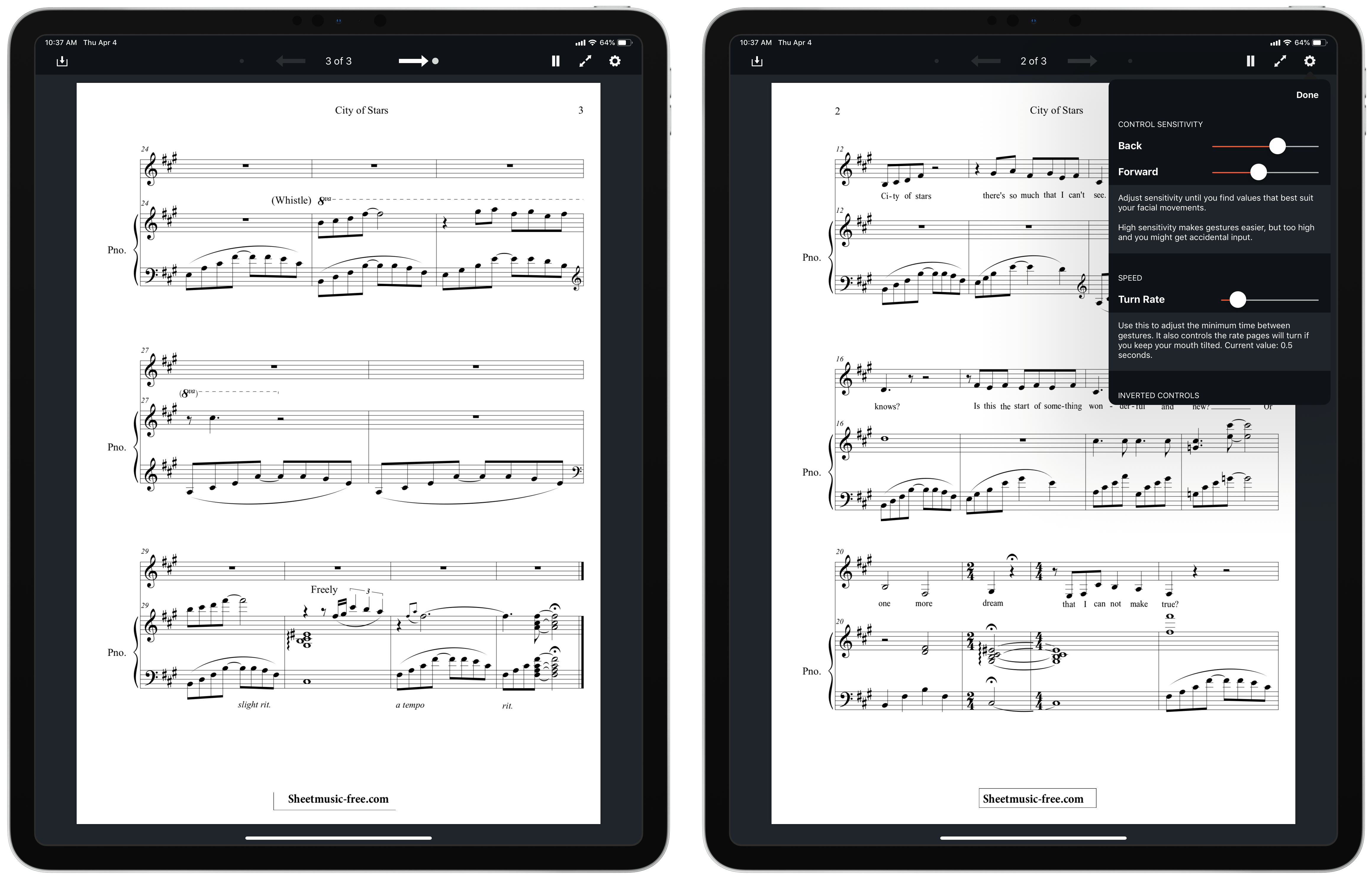
There are two options of facial gestures available to control page turning: mouth control, which is the default, or wink control. Mouth control works by tracking the movement of your mouth: if you move it right, you’ll advance forward a page, while moving it left goes back a page. Wink control advances forward with a right wink, and goes back with a left wink. With both of these options, PageTurn provides the ability to set sensitivity so you can customize each gesture to whatever’s most comfortable for you. It feels odd at first making these gestures to turn pages, but in my experience it quickly became comfortable.

PageTurn was designed primarily for musicians, who often bear the unenviable task of turning pages of sheet music while both their hands are occupied playing an instrument. It works with any PDF though, so readers can have hands-free page navigation as well. You can get PDFs into the app via the import button in the upper-left corner, which opens a Files picker, or if you have a PDF open in another app, you can copy it to PageTurn using the share sheet.

PageTurn is a simple utility, but for those who could benefit from it – musicians in particular, and also users with accessibility needs – it’s a potentially revolutionary tool that enables new ways of doing a common task that weren’t previously possible. The app is a shining example of the creativity of indie developers.


The New TV App: Our Hands-On with Channels, the Redesign, and More

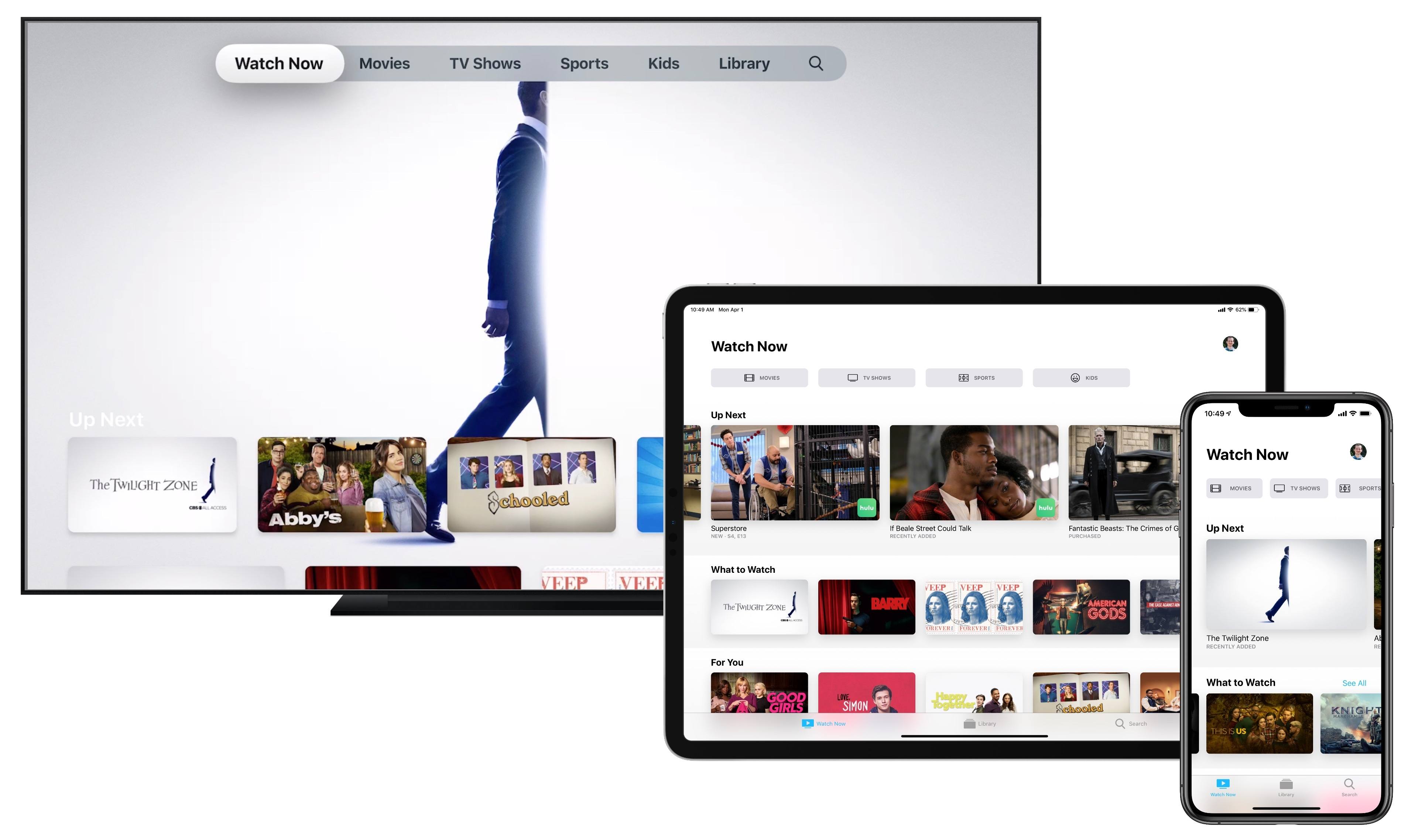
Apple’s TV app is getting a makeover, and just in time for its expansion to smart TVs and third-party streaming devices. The new app is coming first, of course, to Apple’s own hardware: the Apple TV, iPhone, and iPad will be updated in May with the new TV experience; the Mac will follow this fall.

I’ve used Apple’s TV app as my primary video hub since it launched in late 2016, so I was eager to get my hands on the updated app. Fortunately, I didn’t have to wait long – an early version of the new TV app is available now as part of the iOS 12.3 and tvOS 12.3 beta releases. Here are full details on all the ways it’s new and improved.

Read more