

This week we’re featuring our third installment of iPads Around the World. Previously, we’ve shared stories from a blind musician and a pair of interpreters who rely on the iPad for their work. Today, we’d like to introduce Paul Williams – Paul lives in Australia and uses his iPad to manage a university’s student...
 Apollo

Apollo is an iOS Reddit client that launched less than six months ago, but immediately impressed me with its debut. The app’s lengthy development process truly showed, as developer Christian Selig loaded Apollo out of the gate with strengths in several areas, including the general feed browsing experience, iPad Pro support, and extensive customization...
Imagining a Revamped (i)Books App
I’ve been a reader all my life. While I’ve had plenty of times when reading was minimal in my life, those typically would follow a period of voracious book-binging to finish a story (or series) I was hooked on. In general though, I definitely read more often than the average person, and over the...
Dropbox Announces Forthcoming Integration with Google Docs, Sheets, and Slides→
Today on its blog, Dropbox announced an exciting piece of news: the company will soon add integrations between its service and Google’s G Suite. The most prominent of those new ties involves Google Docs:
Dropbox users will be able to create, open, edit, save, and share Google Docs, Sheets, and Slides directly from Dropbox. And when you’re working in Dropbox, you’ll be able to save Google Docs, Sheets, and Slides to your Dropbox account.
Considering how much effort Dropbox has poured into building its own Google Docs competitor in Dropbox Paper, it’s surprising to see the company embrace the competition wholeheartedly with a full-fledged integration like this. It’s certainly good news for Dropbox users though, as Google Docs has long been the gold standard of web-based, collaborative document services.
Today’s announcement post is unfortunately short on details of exactly when this integration will launch (besides saying “later this year”), or what it will look like. It’s unknown, for instance, if the change will primarily impact Dropbox on the web, or if Dropbox’s mobile app will be also optimized to do things like preview Google files and open them in their appropriate iOS apps for editing; one would hope mobile will reap the benefits too. The solid implementation of Dropbox’s existing support for Microsoft Office gives hope that the service will play just as nicely with Google when the time comes.
One related piece of news from the post is that Dropbox is also building native integrations for Gmail and Hangouts Chat, so you’ll be able to select files from your Dropbox account while using those services, plus a couple other small things.
Dropbox is pushing forward as a platform-agnostic, service-agnostic file hub for your working life. Whether the strategy will lead to long-term health for the company remains to be seen, but for me personally, it’s one of the points keeping me from giving Dropbox up and going all-in on Apple’s iCloud.
Twitter Launches Bookmarks Feature in New Share Menu→
Twitter had previously shared that it was working on a new feature, Bookmarks, which would let users privately save tweets for later. Today the company announced that Bookmarks have officially launched and are beginning to roll out to all users across iOS, Android, and Twitter’s mobile site.
As part of this launch, the Direct Message button previously available on every tweet is being replaced by a new Share button – hit Share, and you’ll see the following three options:
- Send via Direct Message
- Add Tweet to Bookmarks
- Share Tweet via…
The latter option will load the system share sheet on iOS.
Tweets added to your Bookmarks are available only for your private viewing, and they can be found by opening the app’s sidebar and hitting the Bookmarks menu option. You can see the whole process of how Bookmarks work in the tweet below.
https://twitter.com/twitter/status/968908970109812736
Everyone will have their own purposes for using Bookmarks, but for my own use, I’m considering saving links shared on Twitter for reading later. Normally I do this by saving to Safari Reading List, but Bookmarks may be a simpler alternative. Also, anytime I come across a tweet I want to share with my wife at the end of the day, Bookmarks should be a perfect fit for that.
Optimizing Each Half of the Work Day Using Things
Workflow optimizations are a common task among the MacStories team. We’re always looking for a new app, form of automation, or other tool that can help improve both our work and personal lives. Even when it comes to simple things like schedule changes or patterns of work, I evaluate my setup fairly often, making...
Notion

Notion is a relatively new tool for notes, tasks, and wikis. It’s a web-based service that started as a desktop-first product, but recently branched out officially into mobile with the debut of an iPhone app late last year, and now there’s an iPad version too. What I love about Notion is how clean and...
Anchor 3.0 Exhibits a New Level of Maturity for the Podcasting Service
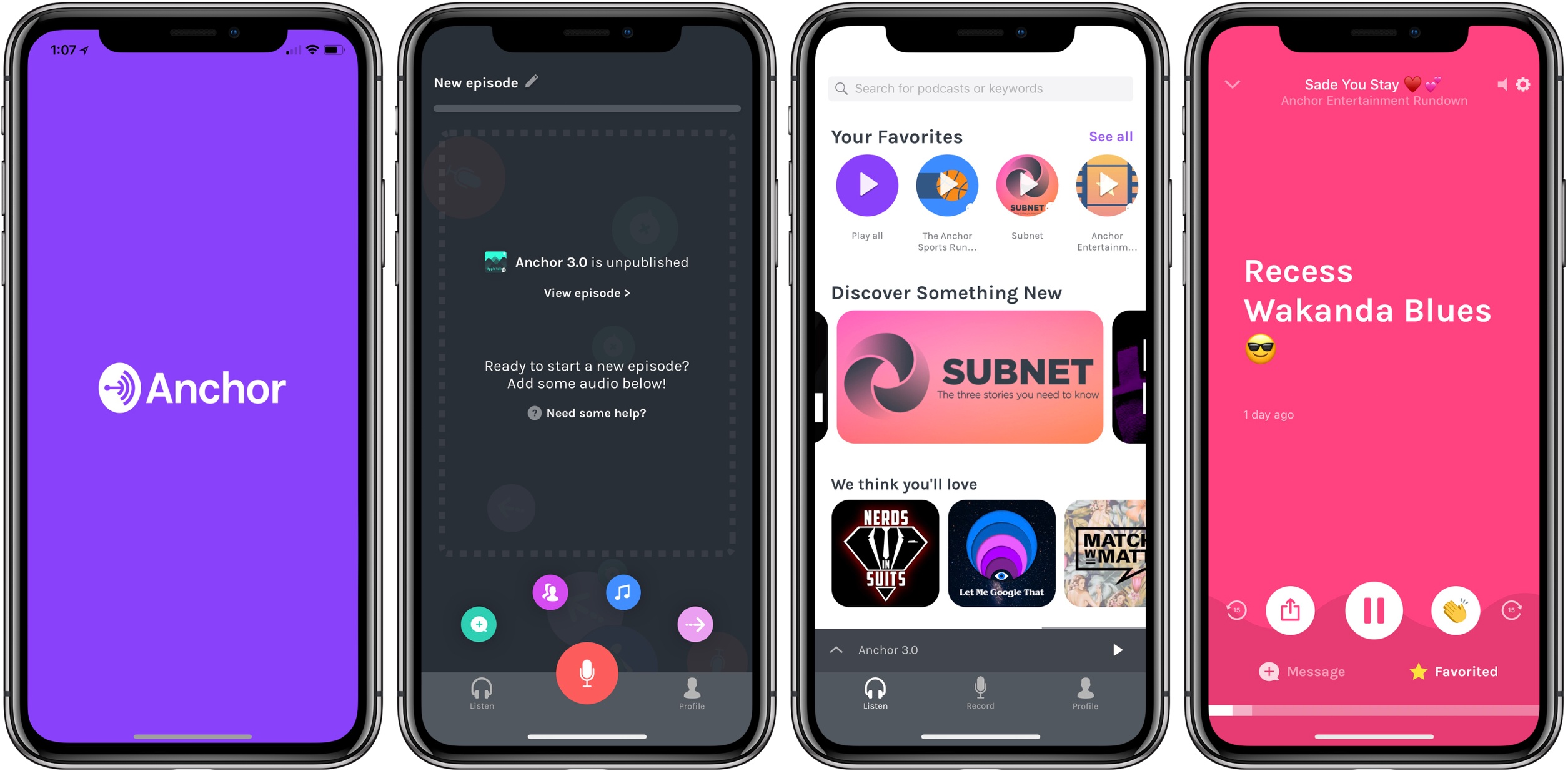
Anchor today launched a major new version of its iPhone app, alongside a new web experience for creators. Anchor 3.0 is a ground-up redesign that takes lessons learned in past versions and applies them for the purpose of making podcasting as effortless and accessible as possible.
My prior experience with Anchor has been limited, but every time I’ve given it a try, I came away impressed. The latest update to Anchor isn’t so much about flashy new features, but more about demonstrating a new level of maturity: the interface is now cleaner and easier to navigate, the task of recording and publishing podcasts has never been simpler, and there are new built-in tools available to creators to help make recordings professional-grade.
In preparing this story, I wanted to approach the app as a new user might, documenting the experience of getting set up and creating a new show. Anchor has always done fairly well at being user-friendly, but I think that’s more true now than ever before.
A Year-Long Experiment Comparing the Best Map Navigation Services→
We all have our own anecdotal reasons for thinking a certain map navigation service is best, but few of us are willing to perform a committed experiment that gathers enough data to prove our beliefs. Artur Grabowski, however, did just that.
In an experiment that began early last year and led to recording 120 different driving trips, Grabowski compared the big three mapping services: Apple Maps, Google Maps, and Waze. Though more complex studies could certainly be done, Grabowski kept things simple by focusing on answering only three questions:
- Which navigation app estimates the shortest travel time?
- How does each app over/underestimate travel times?
- Which navigation app actually gets you to your destination most quickly?
His results found that Waze estimated the shortest travel times, but that actually wasn’t a good thing, because the service also had the least accurate estimates. Apple Maps estimated the longest times, but that resulted in it being more accurate than its competitors. Google Maps, meanwhile, most often produced the fastest actual travel times, with Apple Maps and Waze placing second and third, respectively.
Grabowski’s tests are accompanied by the asterisk that his routes were all taken in the San Francisco Bay Area, where Apple Maps is likely at its strongest. Even so, the data he compiled over the year is fascinating to analyze, and shows just how competitive these services are with each other in the areas that matter most.