Ryan Christoffel

991 posts on MacStories since November 2016

Ryan is an editor for MacStories and co-hosts the [Adapt](https://www.relay.fm/adapt) podcast on Relay FM. He most commonly works and plays on his iPad Pro and bears no regrets about moving on from the Mac. He and his wife live in New York City.

Motherboard Offers Inside Look at iFixit’s iPhone X Journey

After several years of inquiries, Jason Koebler and the team at Motherboard were granted permission last November to follow iFixit on its journey of tearing down the latest iPhone. Video of that job, which included a plane ride from California to Australia for the iPhone X’s launch, is now available.

iFixit is best known for its commitment to tearing down new tech as soon as it becomes available, but as the video documents, the company’s primary mission is to equip people to repair their devices. Whether you’ve followed iFixit’s work in the past or not, the video is a fascinating look into the efforts that fuel each device teardown.

Permalink


‘sodes Embodies Beauty and Minimalism in a Podcast Player

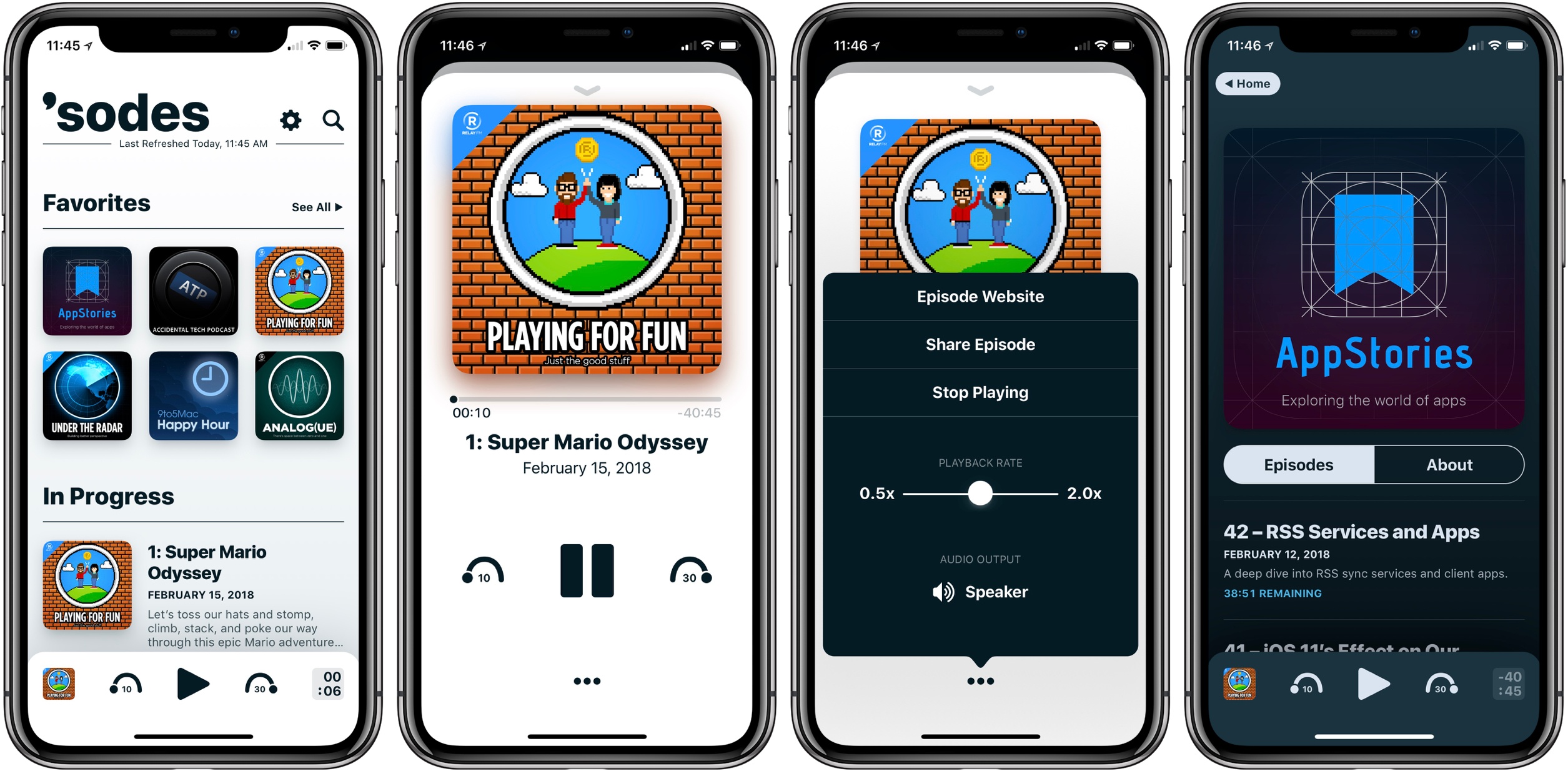
Jared Sinclair launched a new iPhone app today, ‘sodes. Short for ‘episodes,’ the app offers a simple, no-frills podcast listening experience.

Unsurprisingly considering Sinclair’s previous work, ‘sodes is a beautiful app. Perhaps my favorite designed area is the Now Playing view; after I first tried it, going back to another app’s Now Playing screen was painful. The app especially shines on the iPhone X’s full-width display. As was highlighted in Federico and John’s discussion on AppStories last year, an indie app’s little human touches can elicit such delight – and ‘sodes is a great example of that.

‘sodes was designed to be nearly feature-absent (at least to the user’s eye), so you won’t find things like chapter support, Smart Speed, playlists, or any such extras. You can adjust the duration of skips forward and back, there are multiple color themes, and playback speed can be set anywhere from 0.5x to 2x – but that’s about it. Mainly, the app gives you podcasts in a clean, minimal, delightful wrapper. If that’s enough for you, you might just love it.

‘sodes is available on the App Store.

Permalink

HomePod Leaving Residue on Some Wooden Furniture

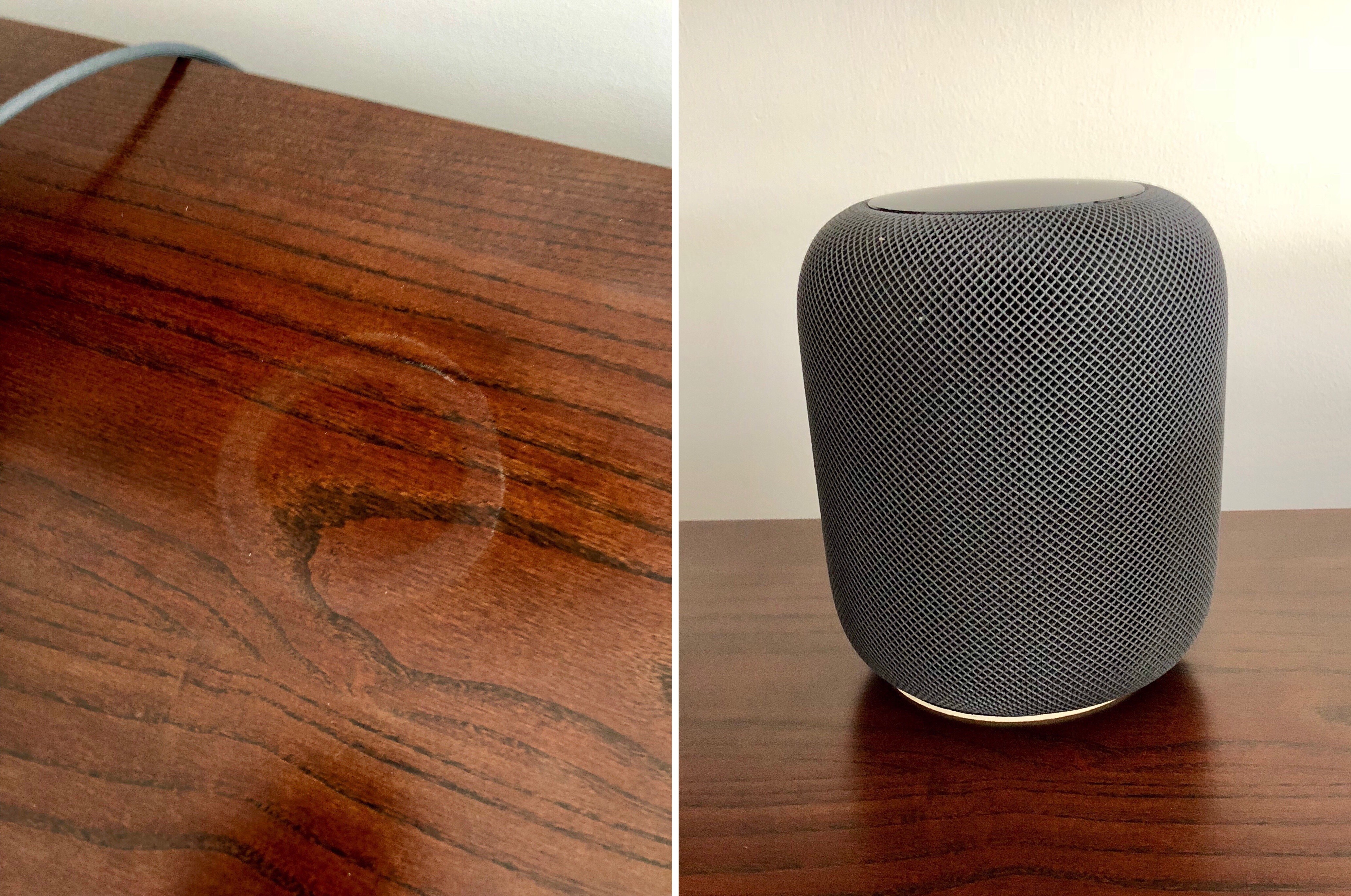
John Voorhees' HomePod ring; the device now sits on a coaster.

John Voorhees’ HomePod ring; the device now sits on a coaster.

Nearly a week after its launch, HomePod owners are discovering that in some cases, the device leaves a white ring in its place when stored on wood furniture. John Chase of The Wirecutter reports:

An unhappy discovery after we placed a HomePod on an oiled butcher-block countertop and later on a wooden side table was that it left a defined white ring in the surface. Other reviewers and owners (such as Pocket-lint, and folks on Twitter) have reported the same issue, which an Apple representative has confirmed. Apple says “the marks can improve over several days after the speaker is removed from the wood surface,” and if they don’t fade on their own, you can basically just go refinish the furniture—the exact advice Apple gave in an email to Wirecutter was to “try cleaning the surface with the manufacturer’s suggested oiling method.”…In other testing, we have seen no visible damage when using it on glass, granite countertop, nice MDF, polyurethane-sealed wood, and cheap IKEA bookcases.

Among the MacStories team, Federico and John have both encountered this issue, while I have not. Serenity Caldwell of iMore explains the inconsistency:

Not all whole-wood table finishes are alike: Certain wood oil treatments include drying agents that have organic compounds present in them — compounds that could potentially interact with the silicone in Apple’s base.

It appears that for those who will face this problem, it doesn’t take more than a couple days for the white ring to become at least faintly visible. If you’re not seeing anything after several days of HomePod use, it’s likely that your furniture will be fine, but if you’re concerned, using a coaster seems like the best low-budget fix at this point.

Update: Also per Serenity Caldwell, Apple has now put together an official support document, dubbed “Cleaning and taking care of HomePod.” It provides official details regarding HomePod and wooden surfaces:

It is not unusual for any speaker with a vibration-dampening silicone base to leave mild marks when placed on some wooden surfaces. The marks can be caused by oils diffusing between the silicone base and the table surface, and will often go away after several days when the speaker is removed from the wooden surface. If not, wiping the surface gently with a soft damp or dry cloth may remove the marks. If marks persist, clean the surface with the furniture manufacturer’s recommended cleaning process. If you’re concerned about this, we recommend placing your HomePod on a different surface.

The new document also addresses the matter of cleaning HomePod – only with a dry cloth, or, if necessary, a slightly damp one – and informs users to keep HomePod away from liquids and heat sources.

Permalink

CARROT Weather 4.5 Brings Achievements, Alternate Icons, and More

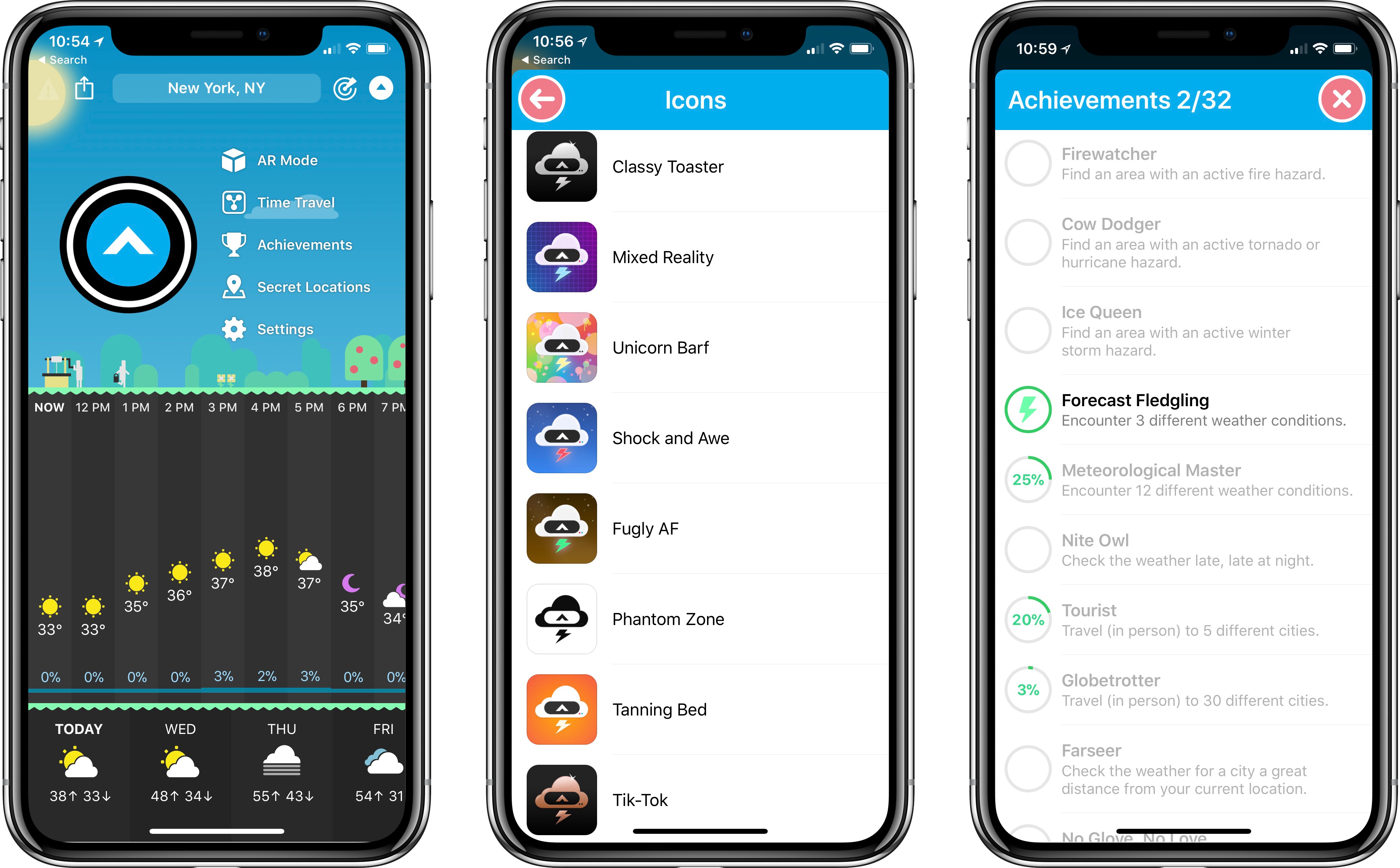
The latest update to CARROT Weather, a MacStories favorite among iOS weather apps, brings a variety of improvements big and small, with the most noteworthy designed to add extra fun to the app: achievements and alternate icons.

Achievements are an attempt to gamify your weather app experience. While with most apps that sentence would sound ridiculous, achievements fit well with the personality and character of CARROT Weather. Currently there are 32 achievements you can unlock, many of which have to do with weather events you experience, while some involve travel and other activities. All available achievements can be viewed from CARROT’s dropdown menu.

Alternate icons, like achievements, aren’t a necessary addition to a weather app, but they do add joy to the user experience. Developer Brian Mueller has put together a diverse, high-quality set of icons to choose from, ensuring you can make CARROT fit in well with your existing Home screen layout vibes.

Other changes worth noting in version 4.5 are that the Secret Locations feature has been removed from its previous home in the search box, instead getting its own dedicated place in the dropdown menu. This move is accompanied by a revamp of the map view for carrying out assigned missions. Also, the app’s main search box has had its autocomplete upgraded to work much faster and comprehensively, and you can reorder saved locations easily using drag and drop.

Today’s update isn’t a major one, but it does make a great weather app even better. Features like custom icons and achievements help boost CARROT Weather’s already extensive amount of character, endearing the app to users in a way few apps can. If you haven’t tried the app yet, I highly recommend it.

CARROT Weather is available on the App Store.


A Promising Work in Progress: Initial Thoughts on HomePod

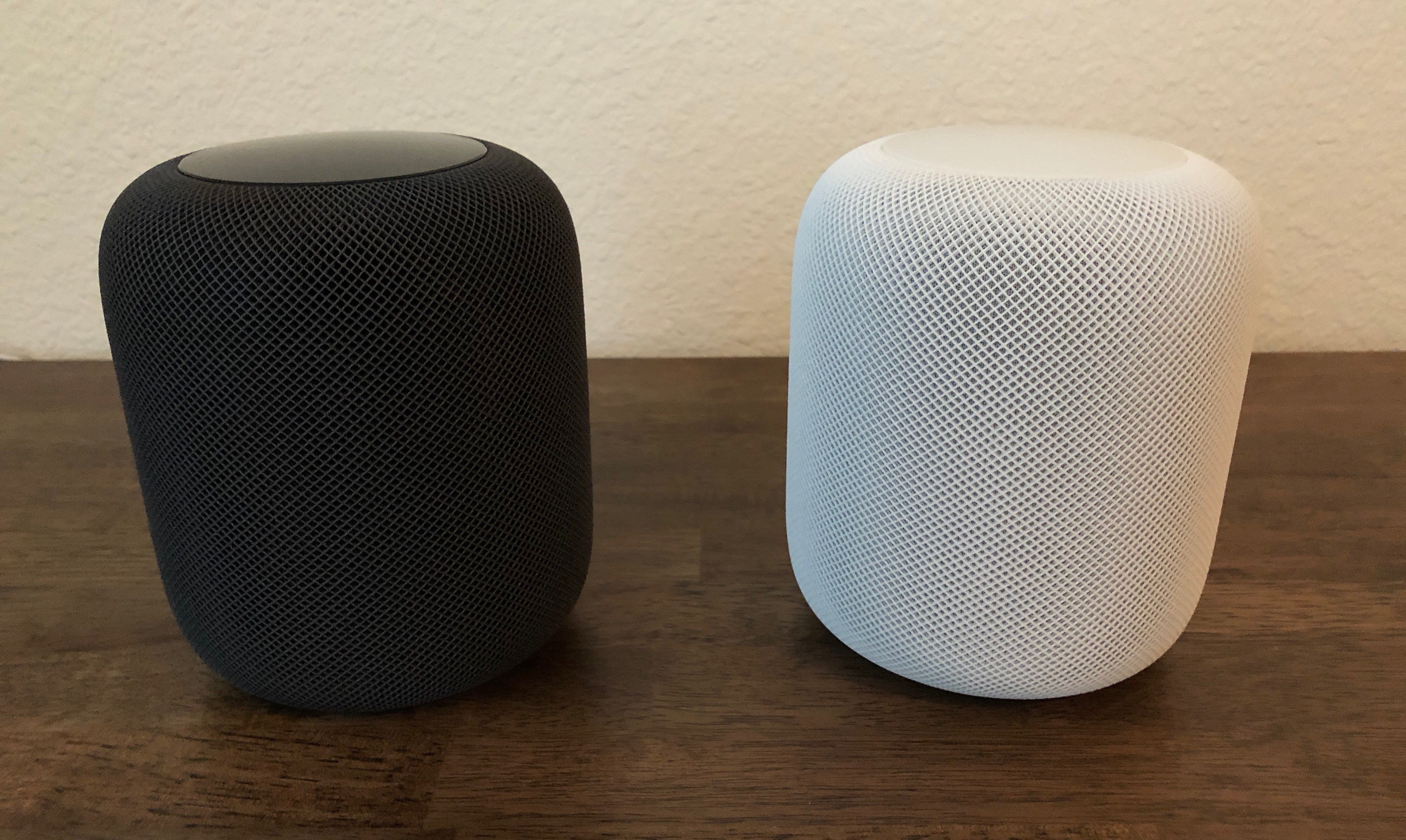
At the start, you should know two things about me: HomePod is the first smart speaker I’ve ever owned, and I’m all-in on the Apple ecosystem.

These facts make me the HomePod’s perfect customer, and they will surely color my comments. I’m guessing if I had more experience with other smart speakers, or I didn’t own nearly every modern Apple product, my thoughts on HomePod would be different. That said, here are my early impressions.

Read more


The Problem of Many Siris

Bryan Irace writes about one of the biggest challenges Apple faces with Siri:

It’s no easy task for a voice assistant to win over new users in 2018, despite having improved quite a great deal in recent years. These assistants can be delightful and freeing when they work well, but when they don’t, they have a tendency to make users feel embarrassed and frustrated in a way that GUI software rarely does. If one of your first voice experiences doesn’t go the way you expected it to – especially in front of other people – who could blame you for reverting back to more comfortable methods of interaction? Already facing this fundamental challenge, Apple is not doing themselves any favors by layering on the additional cognitive overhead of a heavily fragmented Siri experience.

I think Irace is right on in this observation – Siri’s fragmentation is a real problem.

On the more optimistic side, it could be taken as good news that the fix appears fairly obvious: create a single Siri that’s consistent across all platforms. This seems like it would be a clear net positive, even though such a change could reduce Siri’s accuracy in some cases; for example, I’m guessing Siri on the Apple TV is currently tuned to expect TV and movie queries more than anything else, so it can more effectively produce the right kind of results – tweak that tuning, and Apple will have to work even harder at helping Siri understand context.

One thing that’s concerning about the apparent simplicity of this fix is that Apple hasn’t made it yet, meaning, perhaps, that the company thinks there’s nothing wrong with Siri’s current fragmentation. This conversation would be different entirely if Apple had begun showing an increased effort to unify Siri across its platforms, but recently, the opposite has been true instead. The latest major Apple product, HomePod, includes a stripped-down Siri that can’t even handle calendar requests. And SiriKit, which launched less than two years ago, was designed in a way that fundamentally increases fragmentation. Irace remarks:

If the Lyft app is installed on your iPhone, you can ask Phone Siri to order you a car. But you can’t ask Mac Siri to do the same, because she doesn’t know what Lyft is. Compare and contrast this with the SDKs for Alexa and the Google Assistant – they each run third-party software server-side, such that installing the Lyft Alexa “skill” once gives Alexa the ability to summon a ride regardless of if you’re talking to her on an Echo in your bedroom, a different Echo in your living room, or via the Alexa app on your phone.

The only recent occasion that comes to mind when Siri has moved in the right direction – gaining knowledge on one platform that previously existed only on another – was when iOS 10.2 brought the full wealth of Apple TV Siri’s movie and TV expertise to iOS. This only happened, though, because iOS 10.2 introduced the TV app.

Until Siri can answer the same requests regardless of what platform you’re on, most people simply won’t learn to trust it. Users shouldn’t have to remember which device’s Siri can answer which questions – all they should have to remember is those two key words: “Hey Siri.”

Permalink