

September is just around the corner, and with it the public releases of Apple’s major operating systems. The big hitter is of course iOS 11, which brings major iPad upgrades, ARKit-powered apps, and a whole lot more. And while I have certainly been enjoying iOS 11 this summer, there’s another OS that really has...
Apple Releases Developer Guidelines for ARKit Apps→
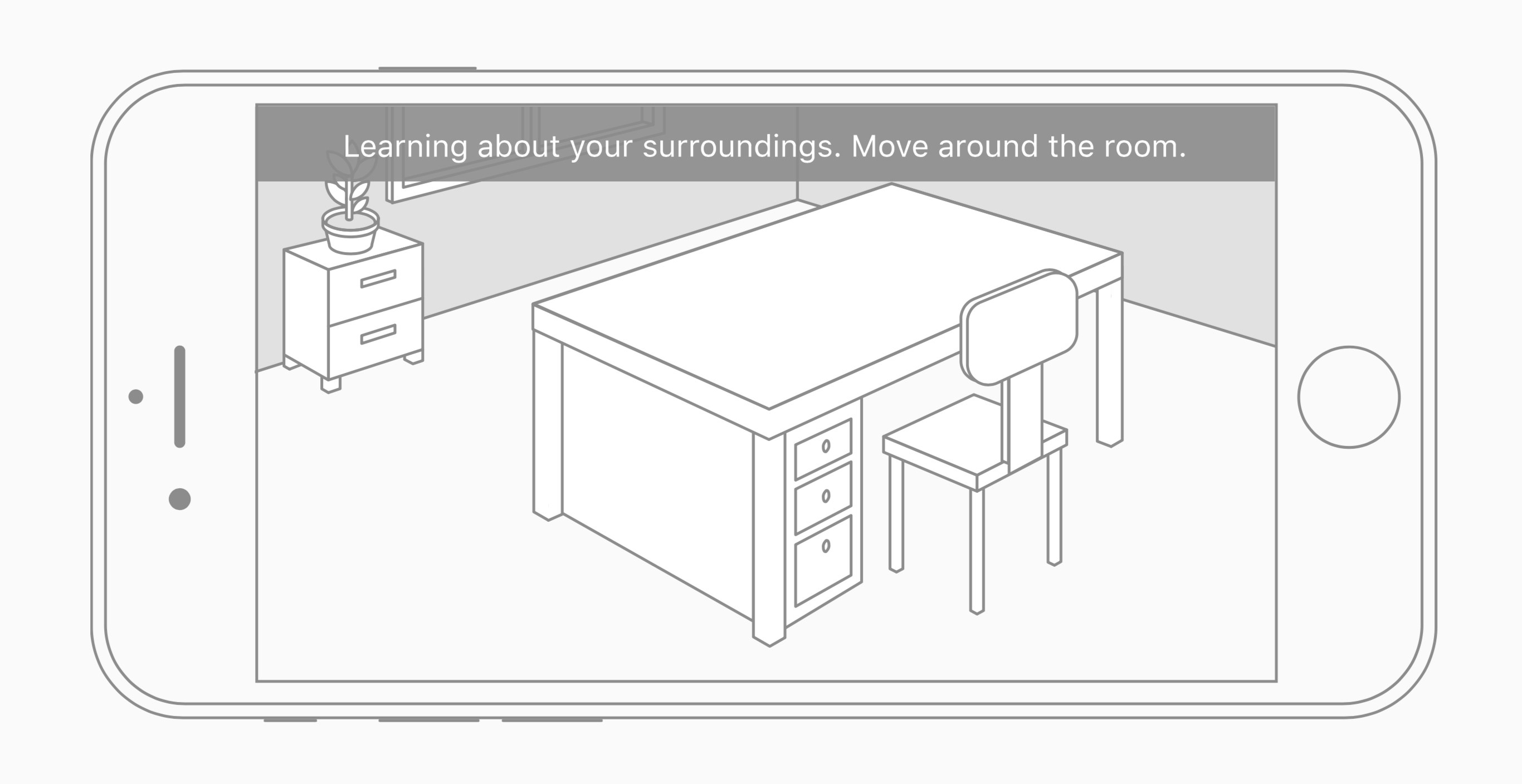
Apple’s developer site now contains Human Interface Guidelines for augmented reality apps. The guidelines are not hard, fast rules for developers working with ARKit, but more “best practices” Apple suggests for an ideal user experience. Guidelines that stand out include:
Use audio and haptic feedback to enhance the immersive experience. A sound effect or bump sensation is a great way to provide confirmation that a virtual object has come into contact with a physical surface or other virtual object.
To the extent possible, provide hints in context. Placing a three-dimensional rotation indicator around an object, for example, is more intuitive than presenting text-based instructions in an overlay.
Favor direct manipulation over separate onscreen controls. It’s more immersive and intuitive when a user can touch an object onscreen and interact with it directly, rather than interact with separate controls on a different part of the screen.
Suggest possible fixes if problems occur. Analysis of the user’s environment and surface detection can fail for a variety of reasons—there’s not enough light, a surface is too reflective, a surface doesn’t have enough detail, or there’s too much camera motion. If your app is notified of insufficient detail or too much motion, or if surface detection takes too long, offer suggestions for resolving the problem.
ARKit is a brand new technology that opens up a world of possibilities to app developers. But alongside its potential for magical, immersive experiences is the potential for user frustration as developers learn the hard way what works best. Apple’s guidelines – though released later than I’m sure many developers would like – should help minimize those frustrations.
YouTube Revamps Logo, Adds Dark Mode for Web, Playback Speed Adjustment for Mobile, with More Coming Soon
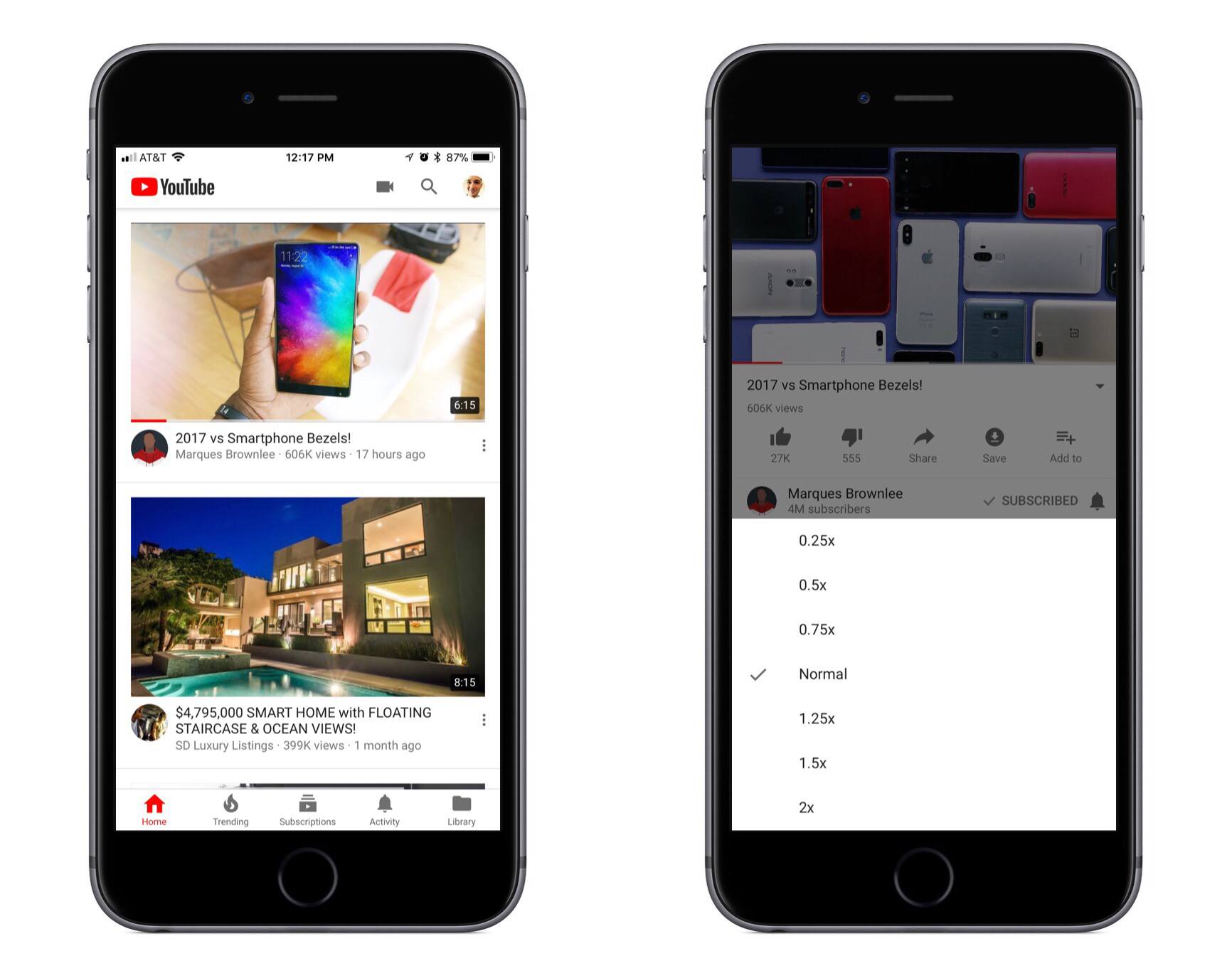
YouTube today introduced a new logo and announced a host of improvements to its service across mobile and web platforms – some of which launch today, while others are coming soon.
After testing with limited groups for a time, YouTube’s Material Design web update is now being rolled out to all users. With it comes the exciting addition of a Dark Theme – a feature I hope makes its way to the service’s mobile apps soon.
YouTube’s iOS app received a minor update today that brought two primary changes: a redesigned header dominated by white space and the new logo, and new playback speed controls. Playback speed can be set as slow as 0.25x or as fast as 2x, with several options in-between. You’ll find the controls in a video’s settings menu, which can be accessed from the top-right corner of the screen.
Perhaps more exciting than the new features launching today are those coming in the near future, such as adaptive video:
Soon, the YouTube player will seamlessly change shape to match the video format you’re watching, such as vertical, square or horizontal. That means you’ll always get the best viewing experience automatically – including vertical videos with no black bars on the sides!
A new gesture to switch videos with a single swipe is also coming soon, and lastly a revamped area below the video player for improved browsing.
Elgato Introduces Five New Eve HomeKit Devices
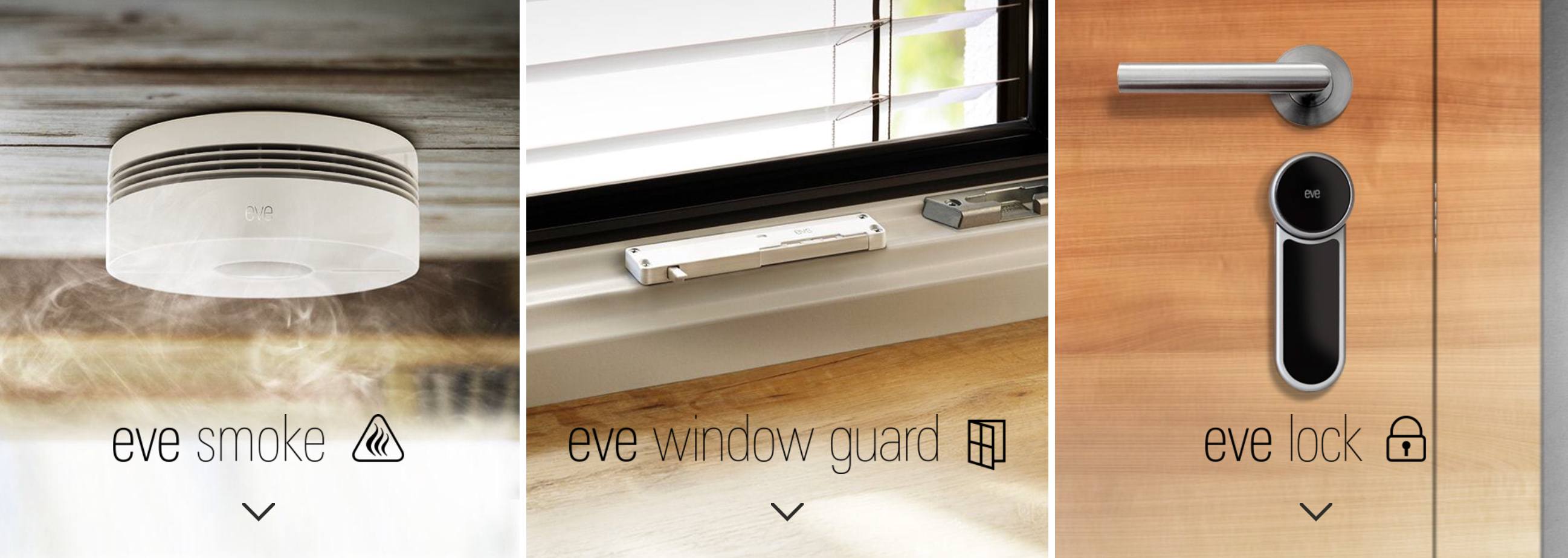
Adding to its collection of HomeKit-supported devices, Elgato today introduced five new devices that are coming soon, each of which serves different areas of the home.
- Eve Thermo is a second-generation connected radiator valve that brings the typical benefits of a smart thermostat to the world of radiators. It includes capacitive touch control on-device, doesn’t require a connected bridge, and starts shipping September 26.
- Eve Smoke is a smart smoke detector that can not only set off an alarm, but also trigger different HomeKit notifications and scenes. One of the benefits is that in addition to offering a ten-year battery life, you can also check the device’s state using Siri or your iPhone to ensure it’s working properly.
- Eve Lock enables control of locking and unlocking a door via HomeKit, even if you’re away from home. It can also automatically lock the door every time it shuts. It’s powered by an internal battery and uses Bluetooth.
- Eve Window Guard monitors the state of a window, so you can easily see if it’s open or closed from your iPhone. It also can sense when the window is being tampered with and will send a notification to let you know.
- Eve Aqua makes watering the lawn or plants easy by allowing you to set up and manage irrigation schedules from your phone. You can also activate and monitor irrigation on-demand.
Besides the Eve Thermo, every other new Eve device is currently without a shipping date.
It’s always good to see more devices enter the HomeKit ecosystem, especially now that Apple will soon have HomePod, a voice-powered HomeKit hub, on the market. Hopefully the combination of HomePod’s launch and the changes Apple has in store for HomeKit in iOS 11 will lead to a renewed enthusiasm for Apple’s ecosystem among smart device makers.
Amazon Announces Multi-Room Music for Echo Devices→
In a press release today, Amazon announced the newest feature addition to its Echo devices:
Amazon today announced an all-new Alexa feature that lets you control and synchronize music across multiple Amazon Echo devices in your home. Starting today, you can target music to a specific Echo device or a group of devices—just ask. Soon, this ability will be extended to control multi-room music on other connected speakers using simply your voice.
The feature is currently only available on Echo devices, but Amazon has also announced a couple new tools to help expand Alexa-powered audio to other speakers. There’s a new Alexa Voice Service SDK that device makers can adopt to enable their speakers to play music in sync with Echo devices. That SDK will be made available early next year. And there is also a new set of Connected Speaker APIs, available today, which allow third-party speakers to be controlled via an Alexa-enabled device.
It should be noted that multi-room audio is only available through a handful of music services. Amazon Music, Pandora, iHeartRadio, and TuneIn are available today, while Spotify and SiriusXM support is coming soon.
The Sweet Setup Launches ‘Learn Ulysses’ Video Course

Today The Sweet Setup launched a new ‘Learn Ulysses’ course that’s designed to help users get the most out of the powerful writing app.
The meat of Learn Ulysses is its seven video guides that walk through key aspects of the app in detail. Videos cover the following topics:
- Getting to Know Ulysses
- Writing Tips and Tricks
- The Ulysses Toolbar
- Main Features
- iPhone & iPad Apps
- Backup & Restore
- Powerful Search, Find, & Replace
Each video can be either streamed or downloaded, and they are all accompanied by full transcripts. The videos I’ve seen are of the highest quality; the team at The Sweet Setup has handled well the difficult task of going deep into Ulysses while still making everything easy to understand.
In addition to the seven main videos, Learn Ulysses includes bonus content such as a quick reference cheat sheet of additional features and keyboard shortcuts for the app. My personal favorite bonus is the included series of setup interviews, where different writers share exactly how they use Ulysses in their daily workflows. Some of these are in video form, while others are written. I always love hearing how others use a powerful app, as it helps me find new practices to adopt.
The regular price for Learn Ulysses is $29, but during launch week it’s available at 20% off for a discounted rate of $23. You can purchase the course here.
 Member Requests
Question: I keep a log of my activities each day, and at the end of the day I write down my completed tasks from Todoist. I would like a workflow that allows me to grab the completed tasks from Todoist. It could be something with the API or Zapier. (Juan)
Zapier has a variety...
LiquidText

All across the U.S. schools are beginning the fall semester, and many high school and college students have started receiving assignments that require heavy research work. If you’re one of those students and you have an iPad, or especially an iPad Pro, LiquidText is the must-have app for conducting that research. LiquidText, at its...
Apple Stores to Host Star Wars: The Last Jedi Toys and AR Experience

Star Wars merchandise is a big deal in the retail world, especially when it coincides with a new film in the main saga. Two years ago, Disney held the first ‘Force Friday’ to kickoff the launch of Star Wars toys and other products tied to The Force Awakens. Now the Mouse House has set September 1 as ‘Force Friday II.’ And this time around, there’s an AR experience tied to the launch called Find the Force, which Apple will be involved in hosting.
Beginning on Force Friday II, Apple Stores, along with other popular retailers like Wal-Mart and Target, will begin selling Star Wars: The Last Jedi merchandise and play host to Find the Force, which lasts through September 3. During that time, shoppers can use the Star Wars iOS app to scan in-store displays as part of an AR treasure hunt. When the display is scanned, it will reveal a Star Wars character who appears through AR in the store. In total there are 15 characters to find over the three-day window. If you plan to participate in Find the Force, it’s best to download the Star Wars app now and launch the feature ahead of time, as it requires a substantial in-app download before you’re up and running.
With the launch of iOS 11 and ARKit-powered apps later in the month, September is shaping up to be a big month for augmented reality.