Ryan Christoffel

991 posts on MacStories since November 2016

Ryan is an editor for MacStories and co-hosts the [Adapt](https://www.relay.fm/adapt) podcast on Relay FM. He most commonly works and plays on his iPad Pro and bears no regrets about moving on from the Mac. He and his wife live in New York City.

Zapier Launches Support for Productivity App Alfred

Zapier today added support for Alfred, one of the most popular productivity apps for macOS. Alfred is like a supercharged version of macOS’s built-in Spotlight; it enables you to quickly, easily search for files, webpages, or apps, perform text expansion, control music playback, and much more. Despite Alfred’s already extensive capabilities, Zapier support opens up a world of new possibilities.

Zapier is an automation web service that we use and love here at MacStories. Its power is found in integrating with a substantial number of web-powered services that can be hooked together to automate tasks in all sorts of ways. Zapier’s support for Alfred means that access to that extensive catalog of web-based services and tools is now at the fingertips of Alfred users, making tasks of varying complexity levels possible with a few simple keystrokes.

In Zapier’s announcement post, Matthew Guay walks through how to get Zapier set up with Alfred, and he also shares several examples of workflows now made possible thanks to today’s news.


Siri’s Co-Creator Shares His Vision for the Future of AI

Earlier this year Tom Gruber, the co-creator of Siri and current member of Apple’s AI team, gave a TED talk focusing on his vision for the future of AI, which is rooted in a philosophy he calls “humanistic AI.” The video and full transcript for that talk recently became available, providing a broader audience with Gruber’s insights into the place of AI in our everyday lives. While he doesn’t offer any specifics regarding work Apple is doing in this space, it is clear that Gruber’s vision represents, at least in part, the vision of Apple for Siri and AI as a whole.

Gruber describes humanistic AI as “artificial intelligence designed to meet human needs by collaborating and augmenting people.” This theme of AI augmenting, complementing humans is fleshed out by Gruber in several ways; one example involves Siri serving as an accessibility tool, while another theorizes at the benefits AI can offer to the human memory. The full talk provides an interesting glimpse into how Apple sees AI evolving in the near future.

Permalink


ESPN for Apple TV Launches MultiCast Feature, Enabling Multiple Simultaneous Streams

Todd Spangler has a story for Variety on an improvement to the ESPN Apple TV app that should make the most avid sports fans very happy.

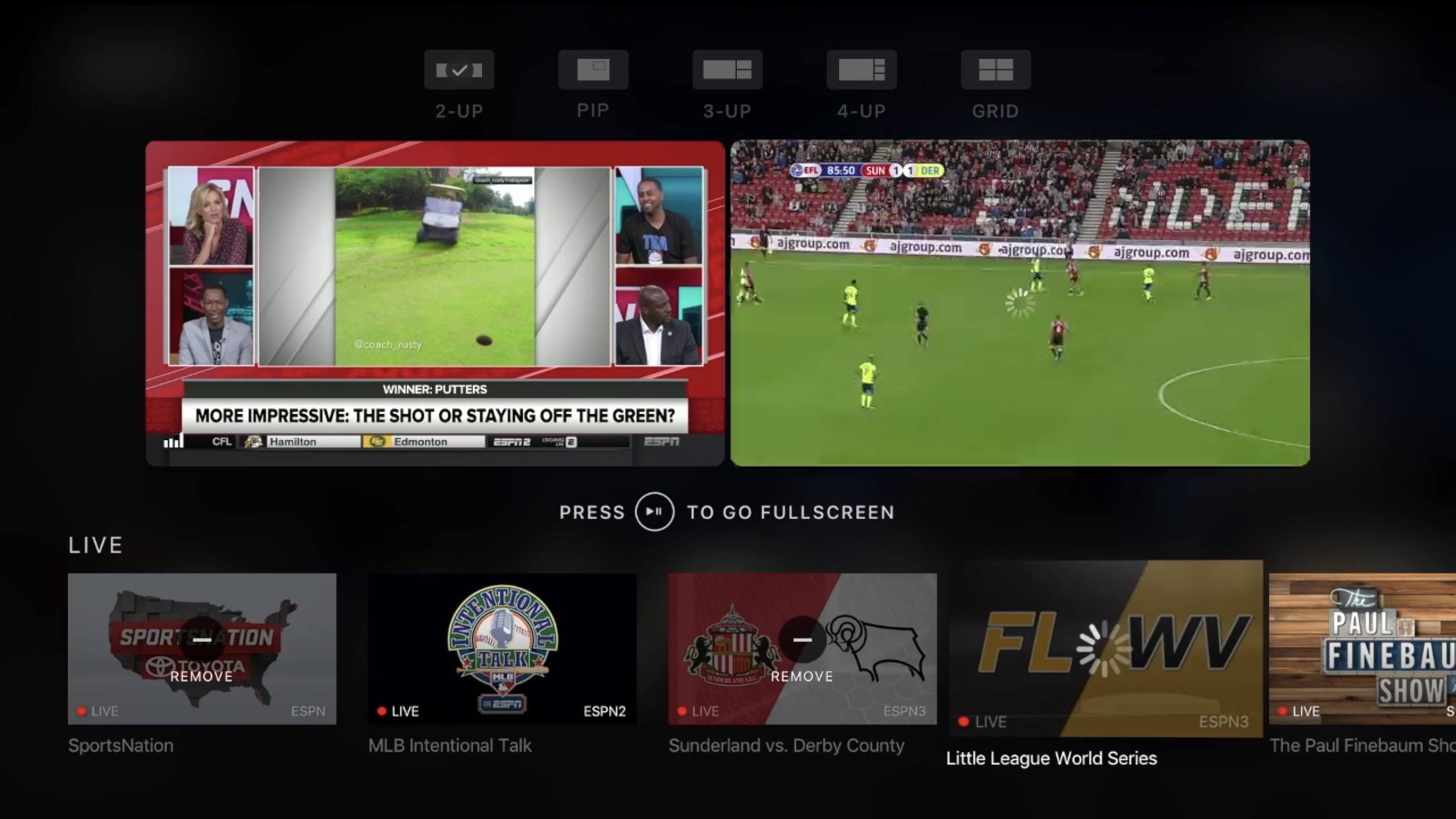
A new version of the ESPN App for Apple TV’s tvOS, available Wednesday, includes a feature called MultiCast that provides the ability to view up to four simultaneous live streams at once. On any given day, ESPN users can choose from 30 or more live events airing across its networks.

From everything I’ve seen, the implementation of this feature appears well designed and well thought through. As seen at the top of the image above, MultiCast makes a number of different customization options available to users. You can watch anywhere from one to four different streams at once, and depending on the number you have playing, the screens are resized and optimized for the best viewing experience.

While I don’t see myself using MultiCast often, I know there are bigger sports fans than me who constantly flip between different games at certain times of year, such as during the upcoming college and professional football seasons.

Permalink

Twitter for iOS Adds Topic Feeds to Explore Tab

Alex Kantrowitz of BuzzFeed shares news on a feature Twitter recently rolled out in its iOS app:

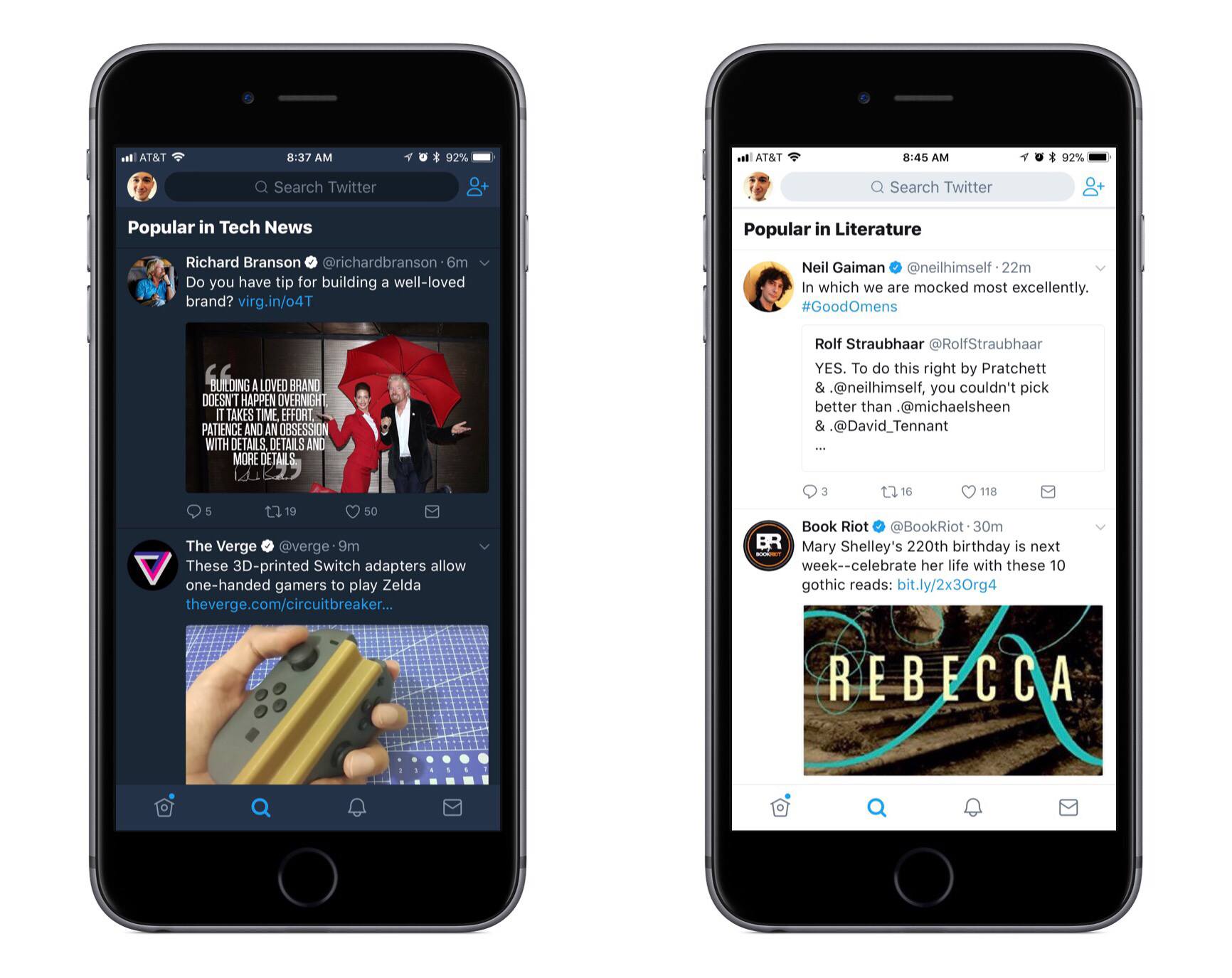
Now you can view tweets sorted by topic, without having to follow anyone, right in Twitter’s Explore tab…Twitter’s algorithms will show you these topics based on what they know about your interests. Eventually, the platform will give users more control over what they see, the spokesperson said. The company will roll out controls that allow people to tell it they don’t like a topic, which will inform Twitter’s decisions on what to show them.

These featured topics are the first major addition to Twitter’s app since it launched a refreshed design earlier this summer; combined with those previous changes, topics make the Explore tab a more attractive place than ever to visit. As the home to search, Moments, trending hashtags, and now tweets organized by topic, Twitter has created an information hub worthy of one of its four primary tabs.

My favorite tidbit from the Buzzfeed piece is that Twitter plans to give users more control over which topics they see. Hopefully this isn’t limited to simply disliking certain topics, but instead will extend to offering full control of topics you want to see. There are certain topics I’d love to keep up with, but that I don’t necessarily want to follow specific accounts for, so a full-fledged list of topics to choose from – whether those topics relate to accounts I’m currently following or not – would be great.


Walmart’s Vudu Streaming Service Launching Apple TV App Soon

Dani Deahl reports for The Verge:

Walmart has confirmed a native app for Vudu, its video streaming service, is set to become widely available on Apple TV beginning August 22nd.

Vudu is one of the major players in the video streaming space, so its arrival on Apple TV is welcome. What that arrival will look like, however, remains to be seen. The service offers a digital marketplace where users can buy or rent films, but it’s unlikely those options will exist on Apple TV due to Apple’s policy of taking a 30% cut of all In-App Purchases. More likely, the new app will simply serve as a way to play films that are already in your library.

Permalink

OneDrive for iOS Adds Offline Folders, Improved Document Scanning, and New Sharing Options

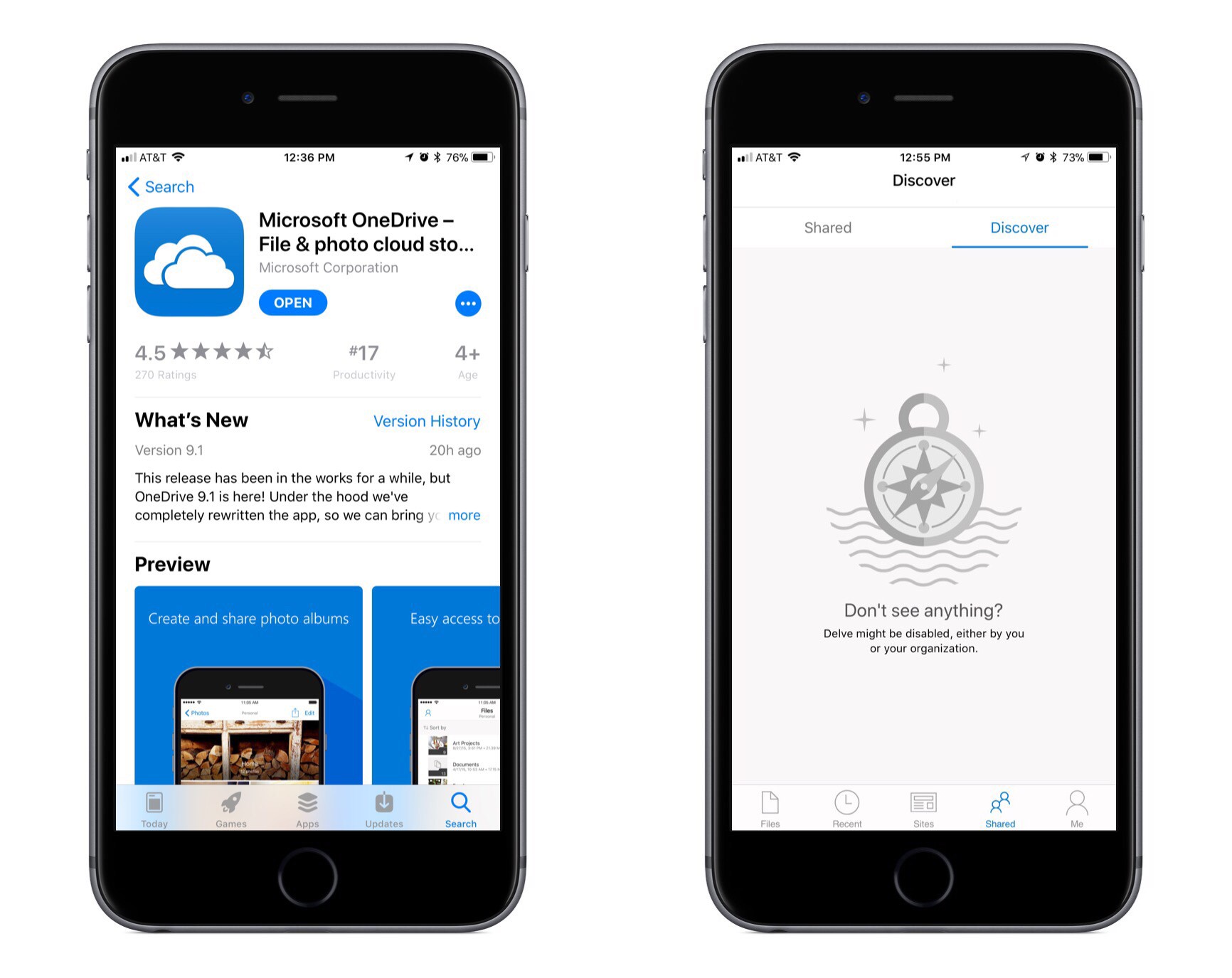
Microsoft has released a big update to OneDrive for iOS, bringing several significant user-facing features as well as a full rewrite of the app under the hood to improve performance. According to the release notes for the update, all the new features are being progressively rolled out over the next couple days, so you may not see them right away. They are also all, at least for now, exclusive to Office 365 subscribers, and it is unclear if that will change in the future or not.

The first new feature of note is offline folders. OneDrive has offered offline files for a while now, but the ability to save entire folders offline has been painfully absent. I expect this feature will make a lot of users very happy.

Earlier this year OneDrive added a scanning tool, but it was very basic and rudimentary, requiring scanned documents to be a single page only; there were also no editing options whatsoever for scanned pages. The latest version of the app remedies these issues by introducing multi-page scanning along with tools to crop, rotate, or delete scanned pages.

The final two changes to OneDrive center around improving file sharing. One of those improvements is that you can now give someone temporary access to a file by creating a shared link with an expiration date of your choosing. The other improvement is found in the app’s ‘Shared’ tab, where users with a work or school account will see a new ‘Discover’ section. This section features an assortment of documents personalized for you based on who you work with and what projects you’re working on together.


Carpool Karaoke: The Series Now Available on Apple Music

Last night Apple launched the premiere of its second original television series, Carpool Karaoke. Like Planet of the Apps before it, Carpool Karaoke will release new episodes every Tuesday for Apple Music subscribers. It can be accessed from the ‘TV & Movies’ section of the Apple Music app’s ‘Browse’ tab. Alternately, you can also find it in Apple’s standalone TV app, which Apple Music has a direct integration with.

The premiere episode of Carpool Karaoke is twenty minutes and features James Corden and Will Smith. The concept for the series comes from the popular segment on “The Late Late Show” where Corden rides around with a celebrity singing songs and exploring the city. Based on previews for the series, Corden will only appear in one other episode of Apple’s spinoff this season, while other episodes will contain a host of other celebrity groupings.

You can see a six-minute clip of the series’ first episode below, followed by an extended preview of the upcoming season.


Anchor Introduces Video Generation for Sharing Audio Clips

Anchor, the service that aims to bring audio creation to the masses, introduced a new feature today in its iOS app that offers a better way to share audio clips on social media: Anchor Video.

Put simply, an Anchor Video takes your recorded audio, transcribes it, then creates a video out of the content. The finished product includes your original audio complemented by a running stream of the clip’s spoken words in written form; transcribed words animate across the screen as the clip plays, providing an elegant visual way of sharing your content on social media. If a follower comes across your video and doesn’t want to or can’t listen to audio in a given situation, they can simply watch the transcription fly by; and even if they do want only audio, presenting that audio as an Anchor Video will make it stand out more in a social media feed.

The creation of an Anchor Video is smooth and easy. It starts with selecting a recorded clip on your Station and tapping the video button to the left of the share icon. Anchor will then work to transcribe the clip, which for longer clips may take a while, so there’s a feature to get notified when it’s done – a nice touch. After the transcription is complete, you can check to make sure it got everything correct and make any edits as necessary, including adding, removing, or editing words. When it all looks good, the video will generate – again, there’s the option to get notified when it’s finished if you don’t want to wait – and you can then share it in one of three formats: Square (1:1), Wide (16:9), and Stories (9:16). You don’t pick the format until after the video’s generated, so it’s easy after the fact to export in different formats for different services.

Anchor Video is a well-polished solution to the problem of sharing audio across social media. It makes the task simple for users, takes into account how different services are optimized for different aspect ratios, and creates a finished product that looks good enough to share.