iPhone Made Me a Techie
Image Editing and Uploads for WordPress Bloggers
Google Photos Launches Advanced Sharing Features
First announced last month at Google I/O, Google Photos for iOS has now been updated to include several new sharing features, including suggested sharing and shared libraries.
The suggested sharing feature brings with it a new dedicated navigation tab labeled ‘Sharing.’ Here you’ll find a listing of all prior sharing activity, as well as suggestions of photos you haven’t shared yet but may want to. These suggestions are made for one of two reasons: either the photos in question appear similar to images you’ve shared in the past with certain people, so Google thinks you may want to share them, or the photos contain people that Google knows are in your contacts, and thus you may want to share them.
If a Google Photos user shares images with another Google Photos user, and the sharing recipient appears to have photos from the same time and place, Google will suggest adding those images to the shared album. This can be used most effectively when sharing photos around a certain event, like a wedding or vacation. One person may initiate the sharing, but Google Photos makes it easy for the other people who attended the event to improve the shared album by seamlessly adding their own captured memories to it.
The new library sharing features are accessed from the sidebar menu’s ‘Share your library’ option, not the ‘Sharing’ tab. After you’ve selected one or more people to share with, there are a couple settings you can adjust. You can choose to share your entire library, or only photos of specific people. You can also set a time period from which the library sharing should begin – for example, you can set sharing to only happen with all photos from this day on, or from six months ago on, etc.
Google Photos was already an excellent service, but today’s updates make it even better. The automatic library sharing in particular has been on my wish list for Apple Photos for a long time. At the time these features were announced, details about iOS 11 were still unknown, but now that the WWDC unveiling has come and gone without any announced improvements to sharing in Apple Photos, Google Photos is more tempting than ever.
Microsoft OneNote
Coding on iOS Is More Feasible Than Ever Before
In a series of tweets yesterday, one of the developers behind Codea announced that a new version of the iPad coding app had been approved for release, and this update would enable code sharing for the first time.
Previously we covered the revised App Store guidelines that now permit downloading and executing code inside of apps, but we haven’t seen those changes put into practice before now. With version 2.3.7 of Codea you can now import projects from both .zip files and .codea bundles, making it easy to share code with others.
https://twitter.com/twolivesleft/status/877300467084042240
Although Codea is the first prominent adopter of features made possible by Apple’s newly-granted permissions, it certainly won’t be the last. Other notable programming apps and IDEs like Pythonista and Continuous can follow suit as they so choose. These policy changes, combined with Apple’s own entrance into iOS coding via Swift Playgrounds, all of the sudden make iPad a much more attractive programming environment than ever before.
One excellent example of the power of coding on iOS is a game called Starsceptre. Starsceptre is a retro-style arcade shooter that was coded entirely on an iPad using Codea. Creator Richard Morgan wrote the game primarily during his daily commute on a train. “My work commute is basically the only spare time I have, so I needed a way to make games in that time – on the move, on my iPad.” The game’s trailer is embedded below.
With the less restrictive new App Store policies on coding, and the upcoming power user iPad features in iOS 11, hopefully we will see a lot more examples of apps coded entirely on iPad going forward.
Snap Map Brings Location Sharing and Global Discovery to Snapchat
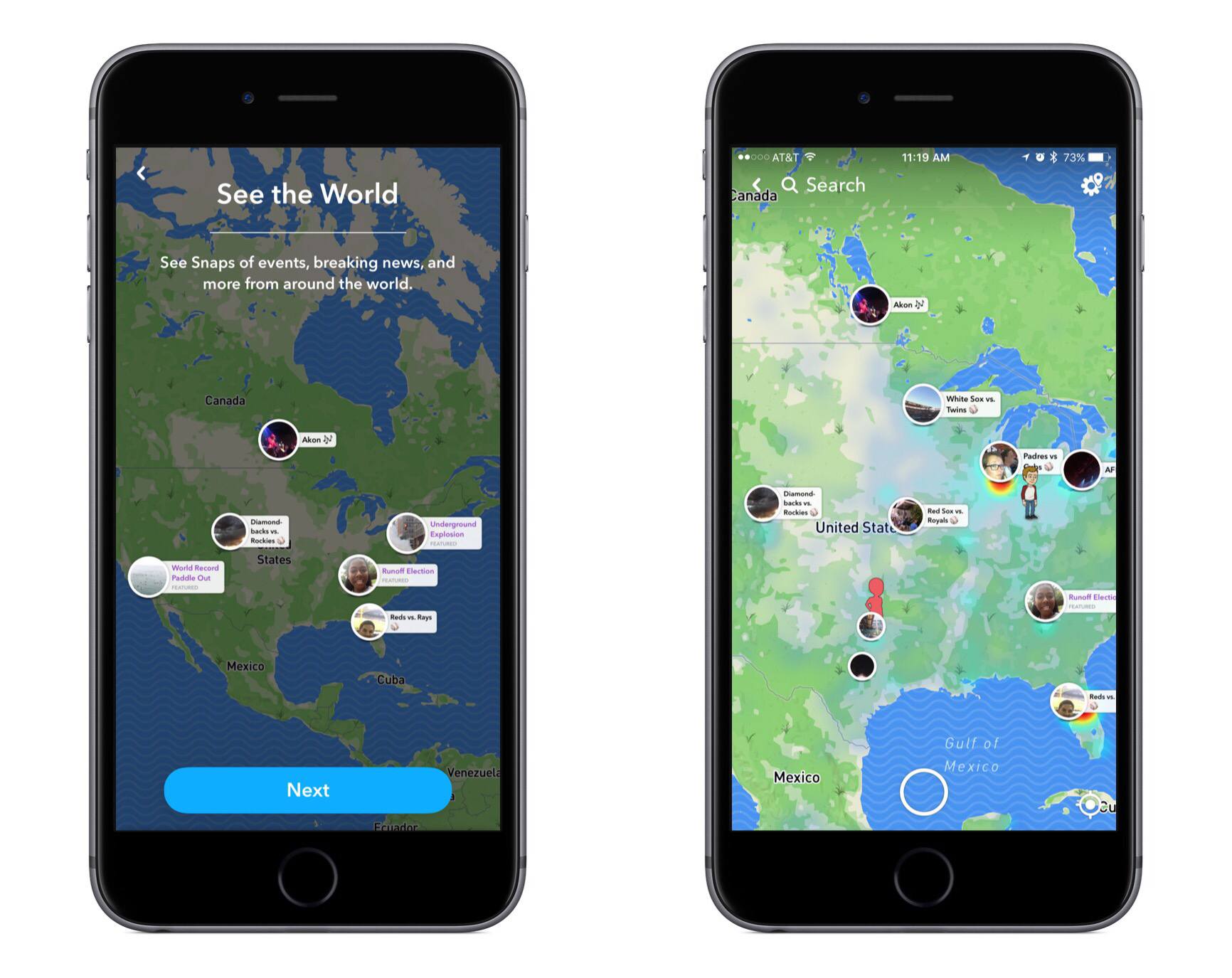
A new feature is rolling out to all Snapchat users today called Snap Map. From the camera screen inside Snapchat, pinching two fingers together will bring Snap Map into view. The map consists of two main pieces: it shows you friends’ locations (if they have location sharing activated) and it serves as a place to discover Stories from people all around the world.
The location sharing piece includes some very simple controls. You can choose to not share your location at all, which is called ‘Ghost Mode,’ or you can either share it with all your friends or a selected assortment of them. The app makes it easy to share your location only when you want to – in the upper right corner of the screen, there’s a settings menu that includes a toggle to activate or deactivate Ghost Mode. While your friends are sharing their location, their Bitmoji will appear on the map and you can tap them to zoom in on their location and access a convenient chat box.
The Story discovery aspect of Snap Map appeals more to me personally, as it makes viewing other Stories from significant places or events fun and easy. Discovery appears to revolve around the collaborative Stories feature introduced just last month, with shared Stories that center on an event rather than a particular person. Scanning the map, you’ll find Stories for things like baseball games, concerts, visits to national parks, and even significant news like natural disasters. It works well both as a way to see what events your friends may be attending, and as a way to explore different activities from all around the world.
The JPEG Format’s Days May Be Numbered→
Kelly Thompson writes for 500px about Apple’s upcoming transition from JPEG to the HEVC-based HEIF for photos across all its platforms:
JPEG is 25 years old and showing its age. Compression has become a big deal as we’ve moved to 4K and HDR video, and HEVC was developed to compress those huge video streams. Luckily HEVC also has a still image profile. The format doesn’t just beat JPEG, JPEG 2000, JPEG XR, and WebP—it handily crushes them. It claims a 2 to 1 increase in compression over JPEG at similar quality levels. In our tests, we’ve seen even better levels, depending on the subject of the image.
By using it internally on the camera, it means storing twice as many images in the same space. People with full iPhones are weeping with joy.
Think about it for a second—if we could reduce every picture delivered on the web by two times and have it look the same (or better)… game changer.
A move away from JPEG is significant, but Apple clearly has good reason for making the transition now. The recent massive increases of photos taken by the average user have led to persistently-scarce storage space. Apple has responded in the past year by increasing the base storage of new iPhones and iPads, but storage bumps are only a bandaid fix – adopting HEIF should make a long-term difference.