

The default layout of the iTunes Store on iPhone includes tabs for the most common store sections, but any section without its own tab is hidden behind the ‘More’ tab. Thankfully, the default tabs can easily be changed. Visit the ‘More’ tab then hit ‘Edit’ in the upper right corner to enter editing mode....
 Board Games for iOS, Vol. 4
Galaxy Trucker Galaxy Trucker is a fun, potentially stress-inducing game where you quickly build a spaceship from a variety of parts at your disposal then send that ship off to explore galaxies – avoiding meteors, pirates, and other dangers along the way. The app includes a lot of personality, with various computer characters...
Twitter Launches Redesigned UI Across iOS, Web, and Other Platforms
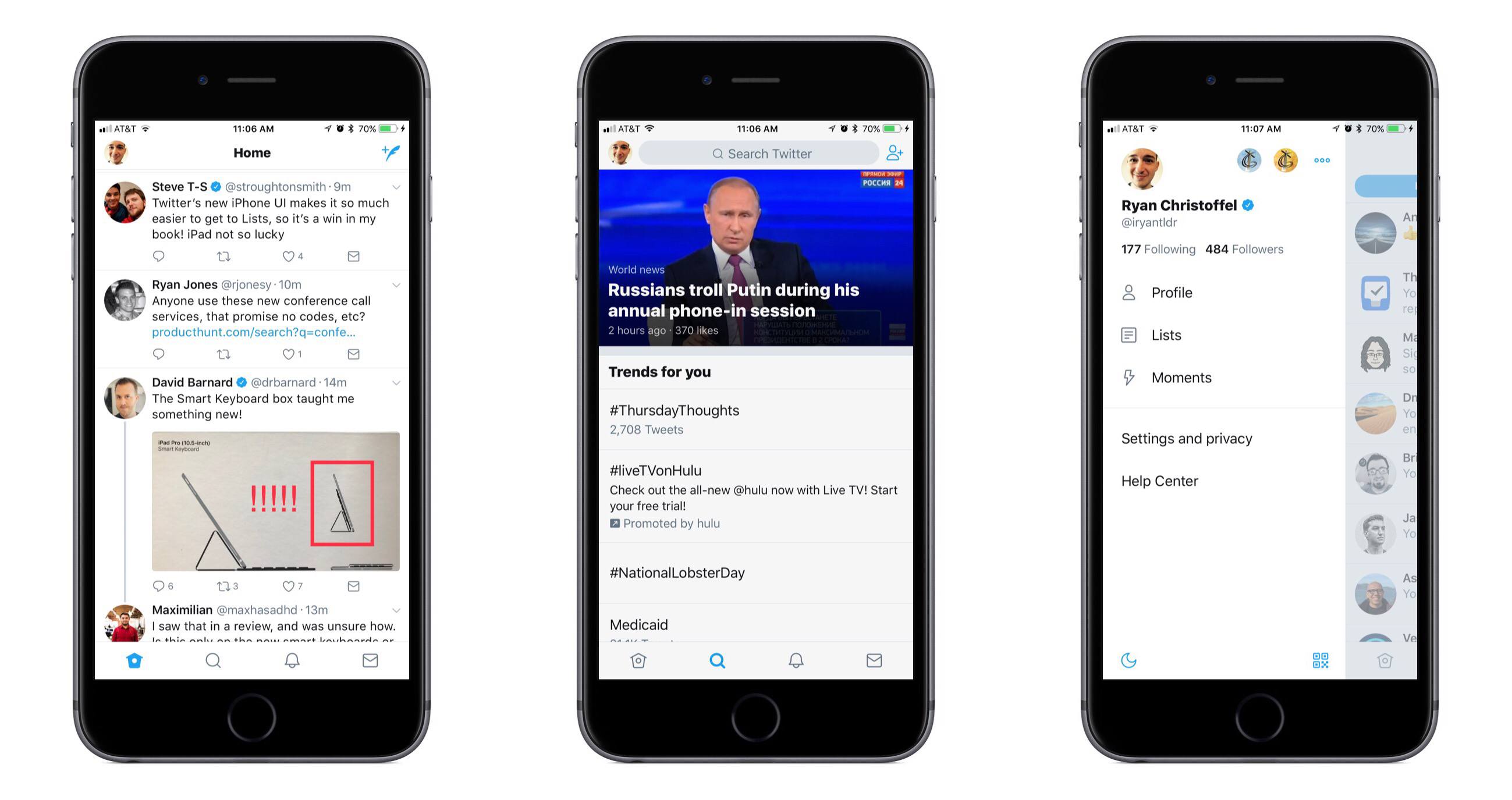
Announced in a blog post earlier today, Twitter has a major update to its iOS app and other platforms rolling out to all users starting today.
The new design is inspired by Twitter’s Android client – and while that detail scared me at first, using the updated iOS app for a few minutes allayed all my fears. This is a clean, beautiful redesign that brings few drastic alterations, and instead focuses on lots of nice polishing touches.
The most significant change to the iOS app is the existence of a new sidebar menu that pops out from the left side of the screen. This menu provides a quick way to switch between different accounts, and also lists your Following and Follower counts, navigation buttons to access your Profile, Lists, created Moments, and Settings, as well as a handy toggle to switch Night Mode on and off. Everything in the sidebar is clear and well organized, with plenty of breathing room; my initial impression of this new menu is entirely positive.
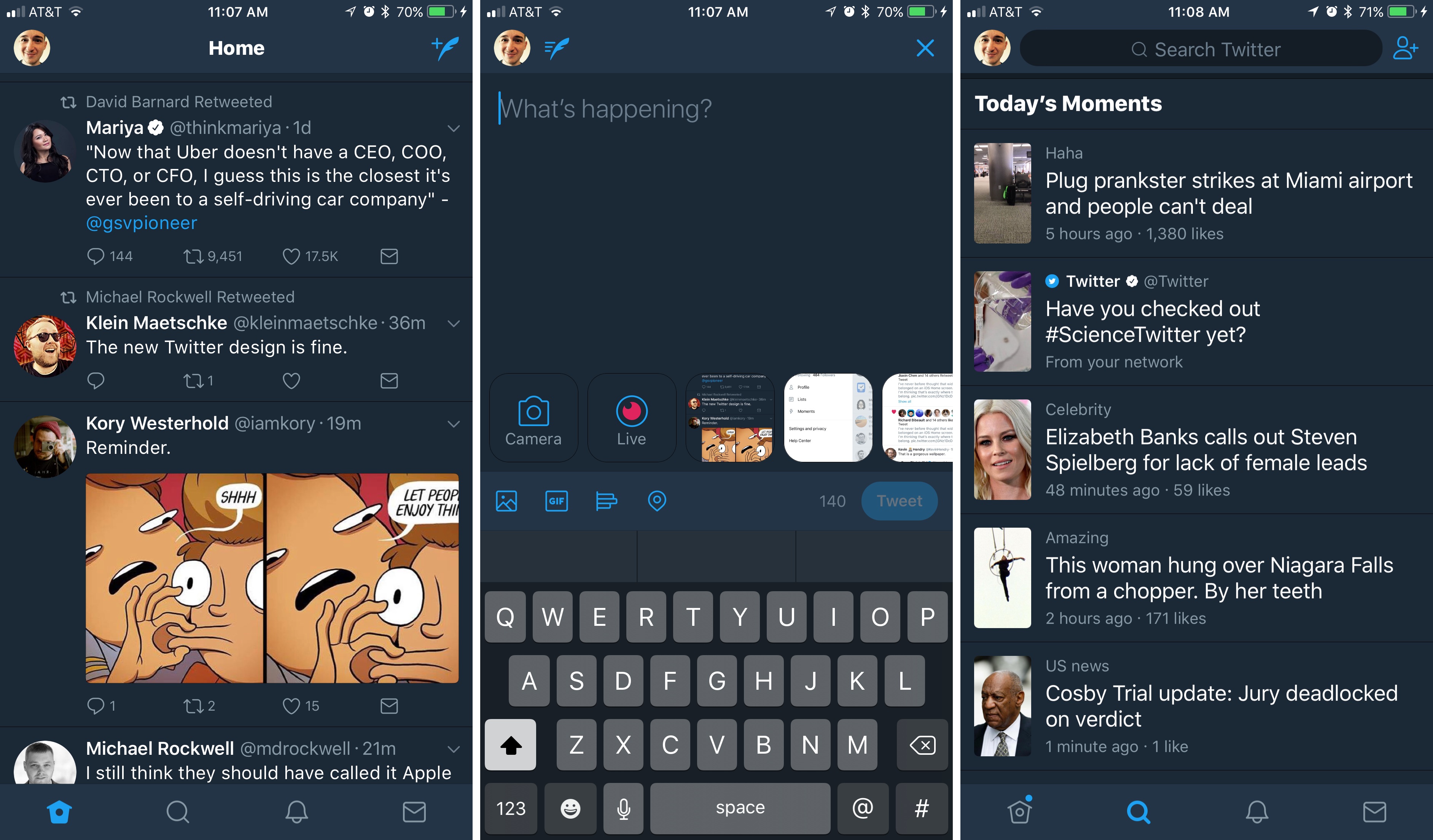
Outside of the sidebar menu, the rest of the app feels very familiar, but with a variety of small tweaks that improve the overall experience.
- The reply icon has changed to a speech bubble, purportedly to create less confusion for new users.
- With your Profile now available from the sidebar, that leaves only four main navigation tabs: Home, Search, Notifications, and Messages. They all have fresh new icons that look great.
- Safari View Controller is now the default viewer for opening links. For a long while Twitter had been testing Safari View Controller with some groups of users, but making it universal is a welcome, long-overdue change.
- Reply, Retweet, and Like counts will update in real-time as you use the app.
- A variety of visual improvements, such as updated typography that includes the use of bold headers for different sections, rounded avatars, and more.
There’s more to explore, but that covers the bulk of changes.
Overall, I am a big fan of this redesign. The changes add up to a freshly improved, yet still familiar Twitter app, and my fear that it would too strongly resemble an Android app were unfounded. It may closely resemble Twitter for Android, but this still feels very much like an app that belongs on iOS.
Twitter says the changes are rolling out over the next several days, so it’s possible you may not see them yet. Twitter for iOS is available on the App Store.
iWork Updates Bring Professionally Drawn Artwork, New View Options, and More
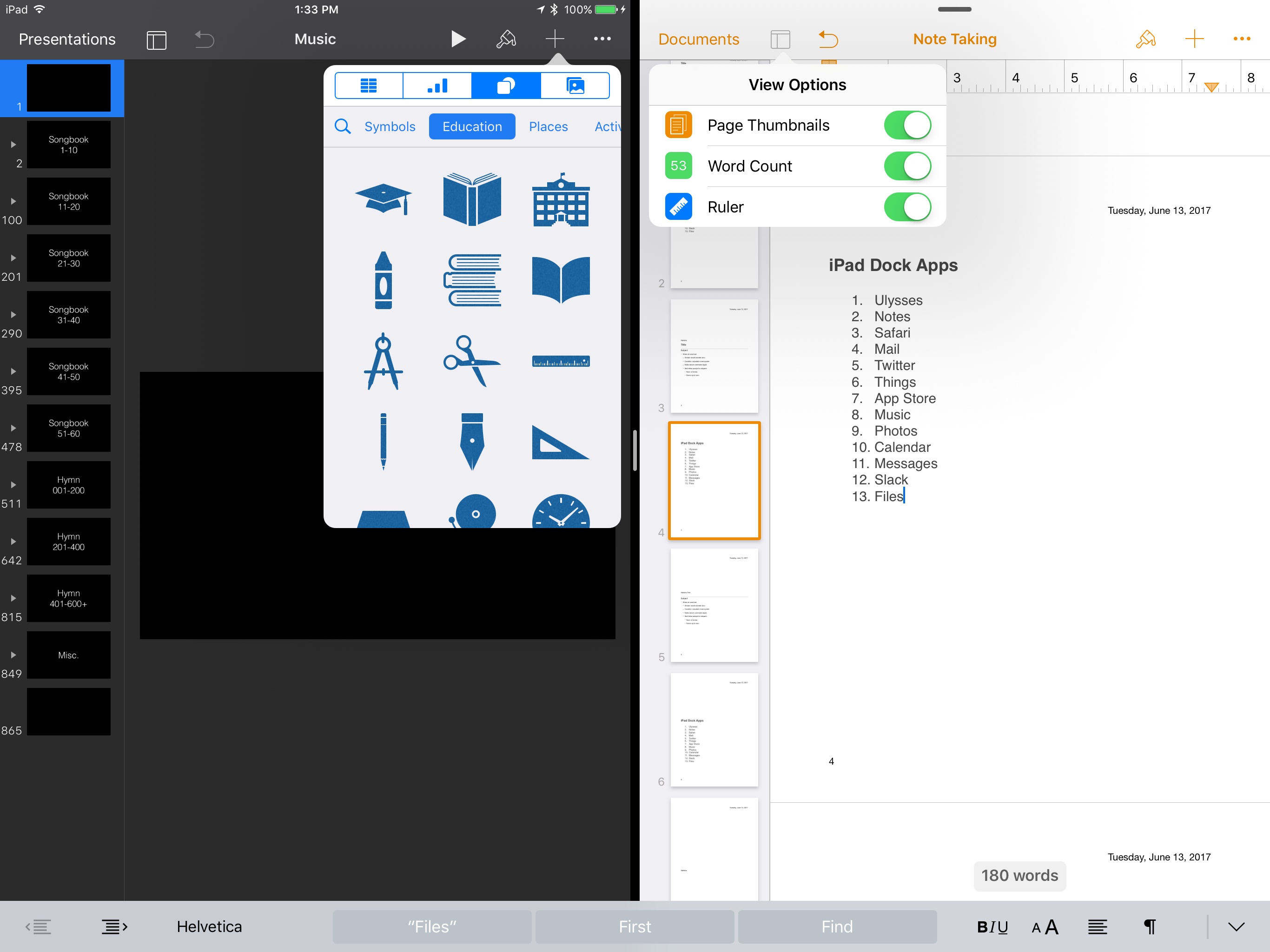
Today Apple released updates for its entire iWork suite across iOS and macOS. Pages, Keynote, and Numbers each received several improvements, some of which are shared and others of which are unique to certain apps.
Apple Introduces Changes to Podcasting→
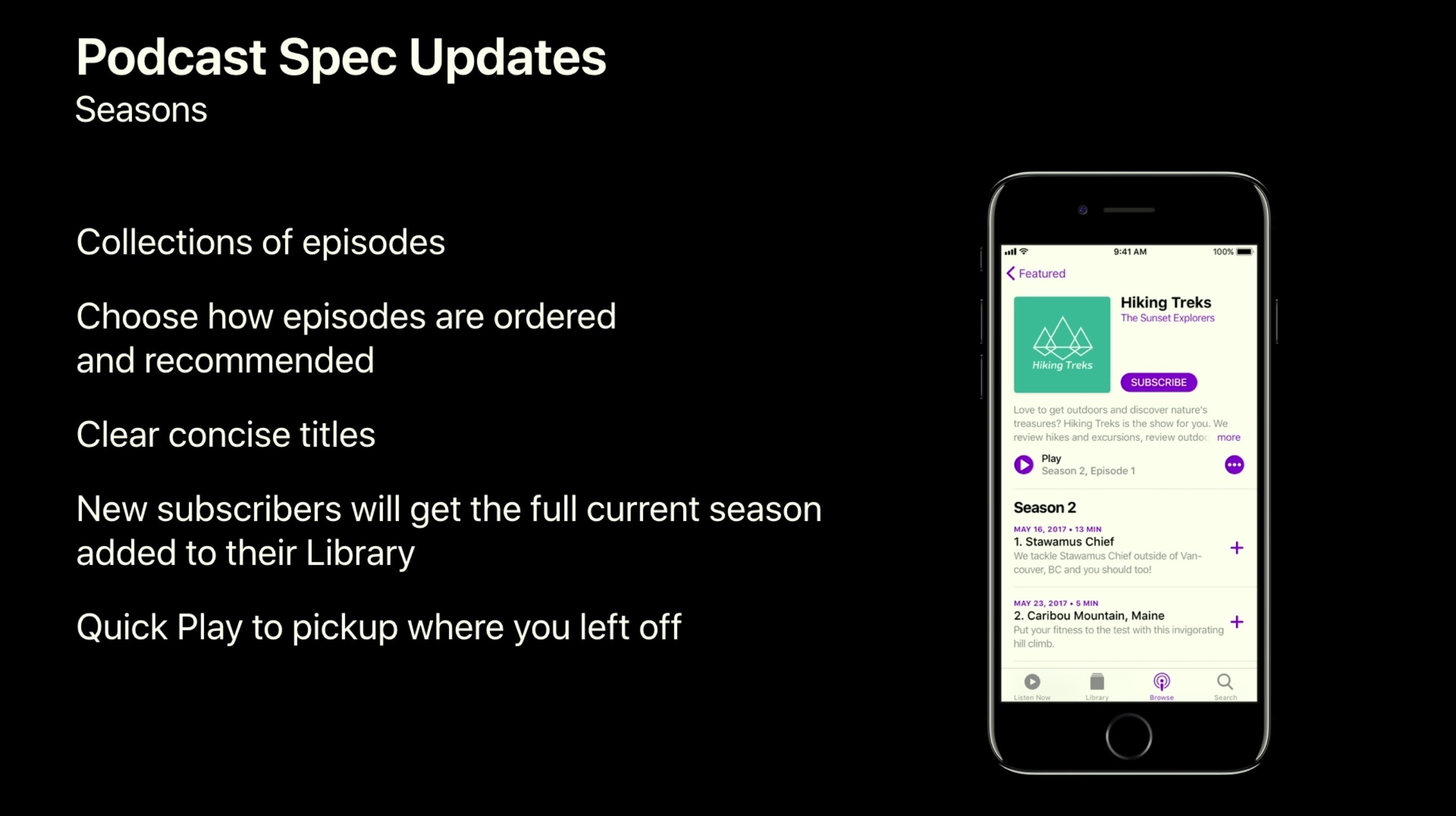
Alongside the introduction of a revamped Podcasts app in iOS 11, Apple is making a few tweaks at the podcast feed level that will improve the way shows can be organized and displayed inside podcasting apps. Jason Snell shares the details on Six Colors:
New extensions to Apple’s podcast feed specification will allow podcasts to define individual seasons and explain whether an episode is a teaser, a full episode, or bonus content. These extensions will be read by the Podcast app and used to present a podcast in a richer way than the current, more linear, approach. (Since podcast feeds are just text, other podcast apps will be free to follow Apple’s lead and also alter how they display podcasts based on these tags.)
Users will be able to download full seasons, and the Podcasts app will know if a podcast is intended to be listened to in chronological order—“start at the first episode!”—or if it’s more timely, where the most recent episode is the most important.
As the world of podcasting has grown, there is now a more diverse selection of shows than ever before, leading to the need for more nuanced formatting of those shows. I appreciate how Apple is implementing these changes at a feed level so that third-party apps can take advantage of them as well.
The full array of podcasting changes, including a brief walkthrough of the redesigned Podcasts app in iOS 11, were first covered in a session from WWDC.
Apple Reveals Its Focus on Self-Driving Vehicle Technology→
Apple’s famous reputation for secrecy continues to morph. While much of the company’s upcoming products remain shrouded in mystery – as evidenced by the numerous surprises at WWDC last week – other works in progress have voluntarily been thrust into the public eye. Alex Webb and Emily Chang report for Bloomberg on the latest big disclosure:
After years toiling away in secret on its car project, Apple Inc. Chief Executive Officer Tim Cook has for the first time laid out exactly what the company is up to in the automotive market: It’s concentrating on self-driving technology.
“We’re focusing on autonomous systems,” Cook said in a June 5 interview on Bloomberg Television that amounted to his most detailed comments yet on Apple’s automotive plans. “It’s a core technology that we view as very important.” He likened the effort to “the mother of all AI projects,” saying it’s “probably one of the most difficult AI projects to work on.”
Apple’s car-related work has been a loosely kept secret to this point due to the various permits and regulatory approvals required to test self-driving vehicles on public roads, but that doesn’t make today’s news any less surprising. It’s one thing to announce a product six months out, or even a year or more out as happened recently with the Mac Pro, but publicly disclosing an entrance into a huge new market – potentially a long while before the product is ready to ship – is a different thing entirely.
Cook at least isn’t giving away the whole story yet. The end of the Bloomberg story notes:
Cook was hesitant to disclose whether Apple will ultimately manufacture its own car. “We’ll see where it takes us,” Cook said. “We’re not really saying from a product point of view what we will do.”
iOS Apps with Alternate Icons, Vol. 1
Bear Bear has had a wide array of theme options since launch, and now there is an option to activate a custom app icon with each of those themes; the icon is meant to reflect a color from the selected theme. ](https://2672686a4cf38e8c2458-2712e00ea34e3076747650c92426bbb5.ssl.cf1.rackcdn.com/2017-06-07-16-33-10.jpeg) Showrunner Showrunner is a new app for tracking your TV watching, and...
On the Other Side of WWDC
I shared last week that WWDC would bring my first MacStories coverage of an Apple keynote. With Federico and John tied up all week in San Jose, and Apple holding one of its biggest keynotes ever, it was a little bit of a trial by fire – but I had a blast. After writing...
App Debuts
Affinity Photo Affinity Photo is a highly regarded, powerful photo editing client for macOS and Windows, and this week it arrived on iPad for the first time. Whereas competitor Adobe has taken the approach of breaking down its desktop version of Photoshop into several tighter, less powerful apps for iPad, Affinity Photo has chosen...