
Federico Viticci

10804 posts on MacStories since April 2009

Federico is the founder and Editor-in-Chief of MacStories, where he writes about Apple with a focus on apps, developers, iPad, and iOS productivity. He founded MacStories in April 2009 and has been writing about Apple since. Federico is also the co-host of AppStories, a weekly podcast exploring the world of apps, Unwind, a fun exploration of media and more, and NPC: Next Portable Console, a show about portable gaming and the handheld revolution.

MacStories Shortcuts Icons: 50% Off for Black Friday and Cyber Monday

Black Friday and Cyber Monday are nearly upon us, and we’ve prepared something truly special to celebrate the occasion at MacStories: starting today through Monday, December 2, MacStories Shortcuts Icons will be available at 50% off the regular price.

To purchase MacStories Shortcuts Icons at $7.49 rather than the usual $14.99, tap the ‘Buy’ button below and enter promo code bficons19 at checkout.

All sales are final. You can read our license and terms of use here.

For those not familiar with MacStories Shortcuts Icons, they’re a set of 350 custom icons for shortcuts added to your iPhone and iPad Home screen. You can read more about them here. Designed specifically with Shortcuts users in mind, these icons expand upon the options provided by Apple in the Shortcuts app, bringing glyphs for task management, calendars and files, AirPlay, home automation, and lots more. With MacStories Shortcuts Icons, you’ll be able to personalize your iOS and iPadOS Home screen by pinning shortcuts whose icons are representative of their purpose. If you use the MacStories Shortcuts Archive on a regular basis, you’ll be happy to know that every shortcut from the archive is represented in MacStories Shortcuts Icons.

You can take a look at what MacStories Shortcuts Icons have enabled our Ryan to do with his iPad Home screen in this article. And you can take a look at my own iPad and iPhone Home screens below – both are based on MacStories Shortcuts Icons.
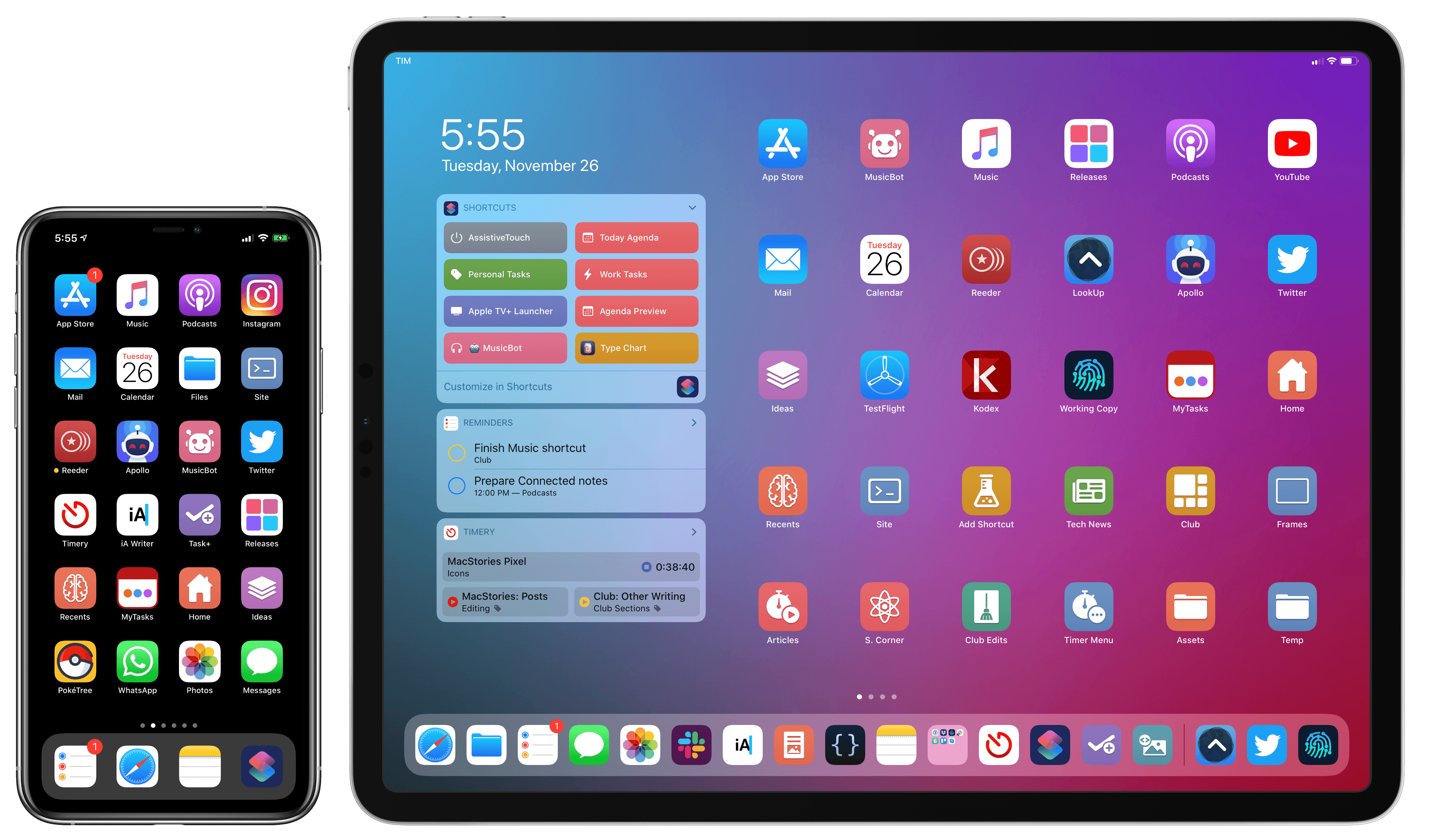
My Home screens, powered by MacStories Shortcuts Icons.

My Home screens, powered by MacStories Shortcuts Icons.

Both Silvia and I are incredibly humbled by the amazing response to MacStories Shortcuts Icons since we launched them in September. For this reason, we want to take Black Friday and Cyber Monday as an opportunity to let even more people enjoy the benefits of a Shortcuts-based Home screen powered by MacStories Shortcuts Icons.

MacStories Shortcuts Icons will be available at 50% off through Monday, December 2 at 11:59 PM Eastern. Once again, make sure to use promo code bficons19 at checkout for the deal to apply. You can purchase MacStories Shortcuts Icons here or by tapping the Buy button below.

All sales are final. You can read our license and terms of use here.

Automating a Dyson Fan with HomeKit and Push Notifications

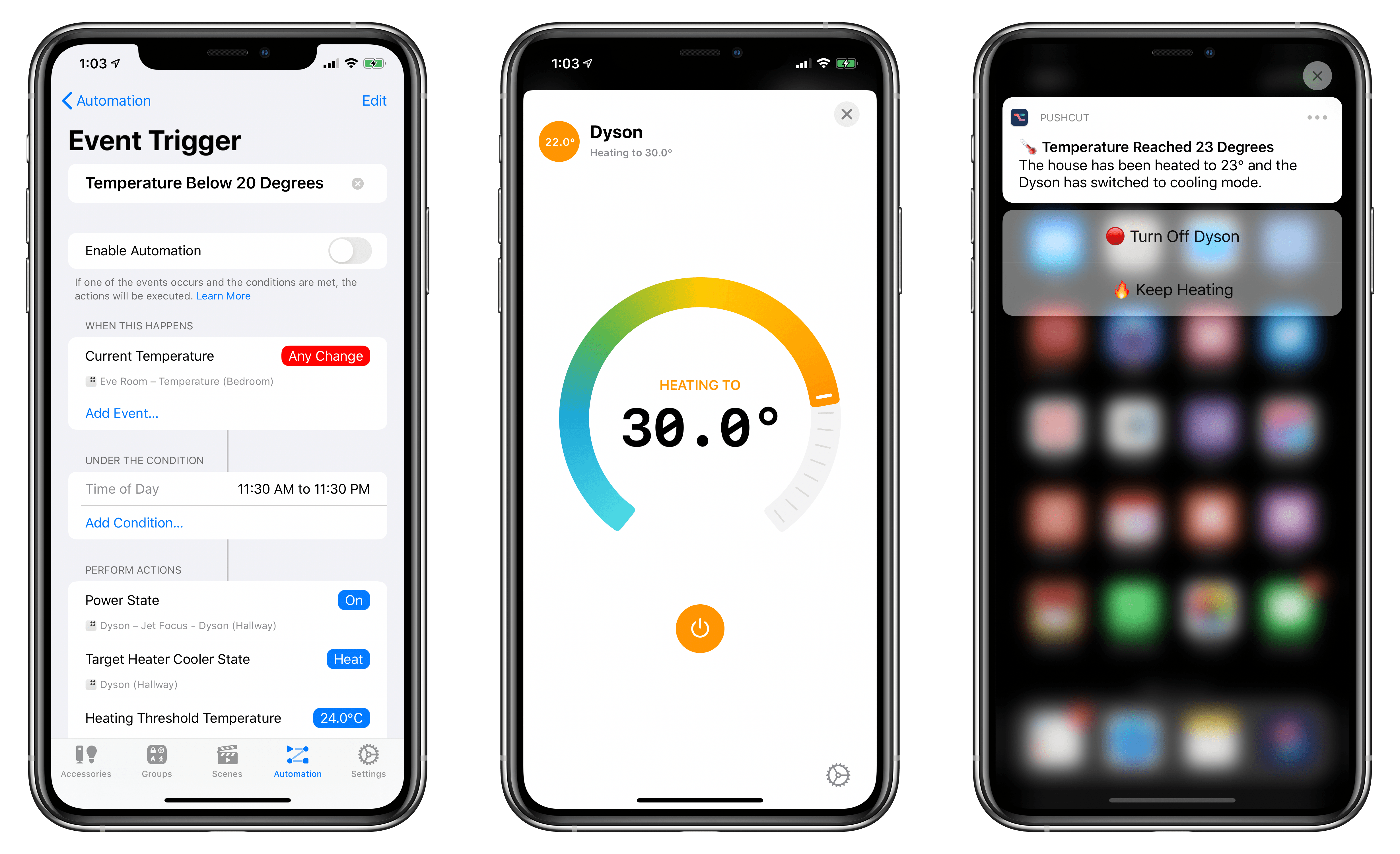
A few weeks ago, following a long research process, my girlfriend and I finally decided to buy a Dyson fan for our apartment – specifically, the Pure Hot + Cool model. We’ve been keeping an eye on this product for a while as a potential solution to purify air as well as heat our (small) apartment; unlike other Dyson fans, this one combines cooling and heating modes in a single compact, good-looking product that we’ve placed on top of an IKEA BESTÅ cabinet in our hallway. So far, we’re liking it a lot.

Whenever I buy a new appliance these days, one of my priorities is to ensure that it can become part of our HomeKit setup, either via native HomeKit support, custom integration via homebridge, or, if all else fails, a smart plug. As far as native HomeKit fans are concerned, I couldn’t find anything here in Italy that combined cooling and heating functions in a single product. Modern Dyson fans do not come with official HomeKit support either, but they can communicate over Wi-Fi using a proprietary service called Dyson Link. This service can be controlled via an iPhone app (which comes with a virtual remote and stats collected by the fan’s built-in sensors) or Amazon’s Alexa assistant. As I was researching the Pure Hot + Cool, I discovered a homebridge plugin that, with minimal configuration, allows you to add a Dyson fan along with its sensors and different modes to your Home setup as a series of accessories and sensors. And since I’m already using homebridge to bring HomeKit compatibility to various devices around the house (including two TVs), adding a new one wasn’t a hard decision at all.

Read more


Automating HomePod Volume Levels

Great idea by Matthew Cassinelli: using the new HomePod and AirPlay 2 actions for home automation in iOS 13.2, it is possible to automate a HomePod’s volume level (including its Siri responses) throughout the day.

But one of the nagging problems with HomePod is the way Siri, regardless of the current time of day, will respond loudly at whatever volume you’ve previously set.

Whether it’s the middle of the night or super early in the morning, it’s all too common to ask Siri something and the answer shouted backed at you, only because you listened to music loudly sometime yesterday. Hopefully nobody wakes up, you curse at how dumb your supposedly “smart” speaker can be, and frantically try to turn it down.

Thankfully, iOS 13.2 provides a route to a solution by adding HomePods and AppleTV to scenes and automations – the HomePod didn’t fix this on its own, but, with a Home Automation, you can make it “smart” enough yourself.

As I explained when iOS 13.2 came out, you can put together these automations by using the ‘Adjust Audio Only’ option after selecting a HomePod or compatible AirPlay 2 speaker in the Home app. I just set this up for my three HomePods and Sonos One, and, sure enough, at 11:20 PM, volume was set to 15% on all my speakers (it should be raised back up to 50% tomorrow at noon).

In theory, I would like to turn this automation into a shortcut and add a Pushcut notification to confirm the volume change (and optionally shuffle a playlist by choosing a HomeKit scene from the notification’s actions). There’s a bug that prevents me from doing this in the latest iOS 13.3 beta, but I’ll keep it in mind for the future.

Permalink

Connected, Episode 270: Best Trees in the Country

On this week’s episode of Connected:

Federico and Stephen each attempted to use HomeKit Secure Video, and it didn’t go well. Myke is excited about a new folding phone, and the whole crew orders iPhone 11 Pro battery cases before solving many mysteries presented in photos of Apple’s new Mac Pro factory.

You can listen below (and find the show notes here).

AppStories+ Deeper into the world of apps
0:00
01:42:10

Connected, Episode 270

AppStories+ Deeper into the world of apps

Sponsored by:

  • Squarespace: Make your next move. Enter offer code CONNECTED at checkout to get 10% off your first purchase.
  • PDFpen, from Smile : The ultimate tool for editing PDFs on the Mac.
  • Freshbooks: Online invoicing made easy.
Permalink


Adapt, Episode 13: Automated Shortcuts

On this week’s episode of Adapt:

One of the most common Shortcuts feature requests was granted in iPadOS 13: the ability to run shortcuts automatically in the background. Federico walks through this powerful feature in detail, then Ryan surveys the App Store’s best calendar apps.

You can listen below (and find the show notes here), and don’t forget to send us questions using #AskAdapt and by tagging our Twitter account.

AppStories+ Deeper into the world of apps
0:00
01:14:31

Adapt, Episode 13

AppStories+ Deeper into the world of apps

Permalink



