John
John
AppStories Episode 58 - Imagining What iOS Could Do for Mac Apps
0:00
26:20
26:20
Federico and John look at what Apple could do to use iOS and its large developer community to revitalize the Mac app ecosystem.


 Imagining What iOS Could Do for Mac Apps
 The WWDC Happy-o-meter is back! Come along with Stephen, Myke and Federico on a trail of joyful wishes and hopeful dreams.
If you want to know which kind of announcements would make us happy at next week’s WWDC, you can’t miss the latest episode of Connected. Even better: the results of this “challenge” will be discussed in front of an audience at our live show in San Jose on Wednesday. You can listen here.
Sponsored by:
 Member Requests
Pick 2: Spark 2 and 1Password 7 for Mac
Member Requests
Pick 2: Spark 2 and 1Password 7 for Mac
Federico and John go in-depth on two recently-updated apps. In this installment of Pick 2, Federico covers Spark 2, which has added app integrations into the iOS version and team collaboration to the iOS and Mac versions while John covers 1Password 7 for the Mac, a significant redesign that expands the functionality and flexibility of features like Watchtower and Vaults.
Despite Apple’s message that the iPad Pro can be a viable PC replacement because, among other features, it natively supports a dedicated external keyboard, its software still isn’t fully optimized for keyboard control. This isn’t surprising at all: iOS was designed with multitouch in mind; as long as the iPad shares a common foundation with the iPhone, it’ll always be first and foremost a touch computer. The iPad Pro line, however, is nearing its third anniversary, and its external keyboard integration still feels like an afterthought that’s hard to reconcile with the company’s marketing.
Take multitasking for example: after three years, Split View, one of the iPad’s marquee exclusive features, still can’t be controlled from an external keyboard. If you buy an iPad Pro with a Smart Keyboard and assume that you’re going to be able to assign an app to a side of the Split View, or maybe resize it, or perhaps change the keyboard’s focus from one side to another…well, do not assume. As much as Apple argued against vertical touch screen surfaces in laptops years ago, the iPad Pro ended up in this very situation: if you want to take advantage of all the great features iOS 11 offers to pro users, you will have to take your hands off the Smart Keyboard and touch the screen. There are dozens of similar instances elsewhere in iOS. For the most part, the iPad treats external keyboards as inferior, bolt-on input devices.
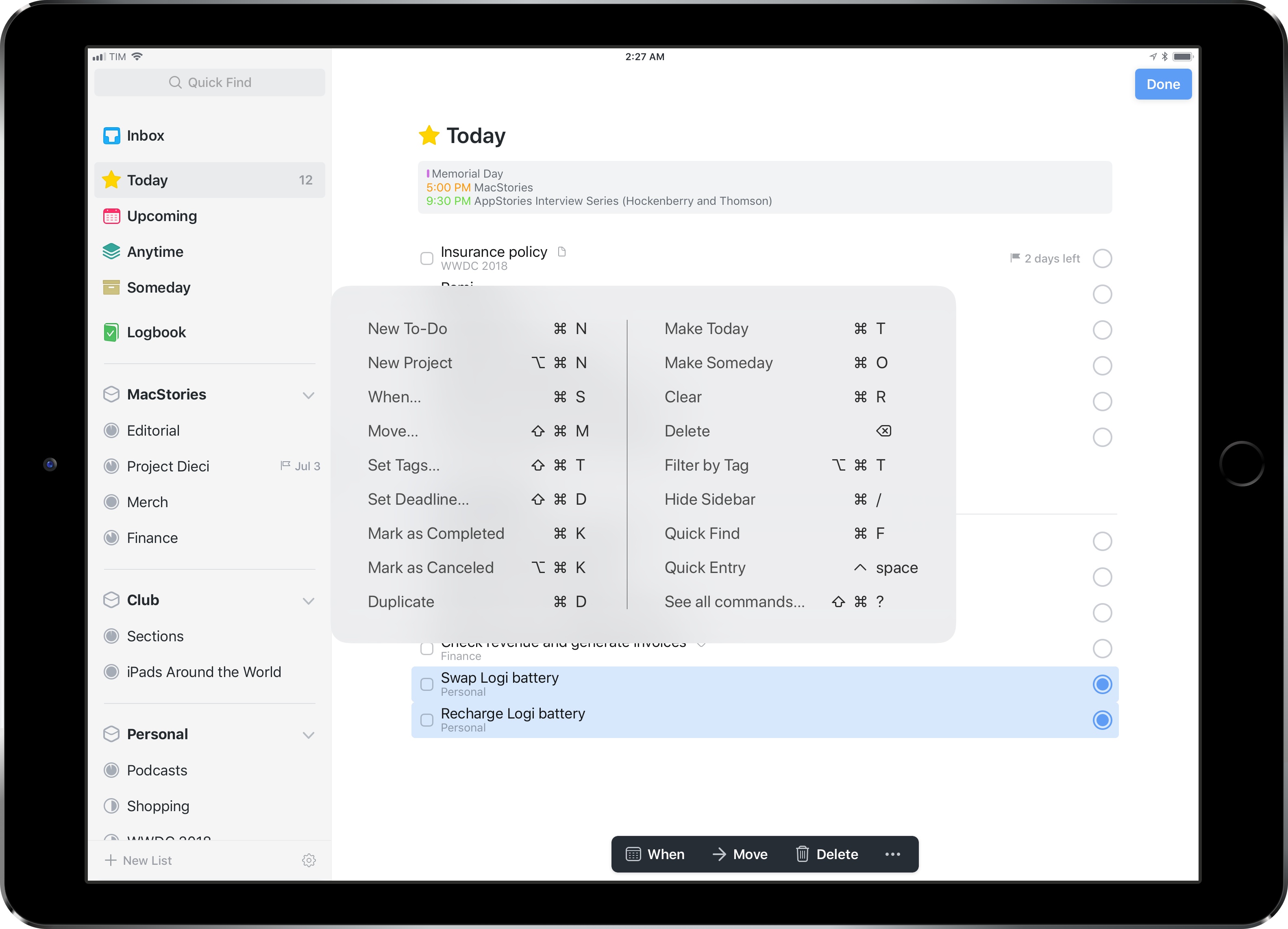
It’s with this context that I want to cover Things 3.6, a major update to the task manager’s iPad version that gives us a glimpse into what Apple could do with external keyboard control on iPad if only they understood its potential.
I’ve been able to play around with Things 3.6 on my iPad Pro for the past couple of weeks. This isn’t another “keyboard-centric” update that only adds a handful of shortcuts to trigger specific commands. Instead, the developers at Cultured Code have focused on an all-encompassing keyboard control framework for the whole app, from task lists to popovers and multiple selections. With version 3.6, Things has the best implementation of external keyboard support I’ve ever seen in an iPad app.
Myke and Federico talk about Spark 2, Castro 3, and Ticci’s big article about his Second Life.
If you want to hear Myke and I discuss my story from yesterday, you don’t want to miss this week’s Connected. You can listen here.
Sponsored by:
Emojipedia’s Jeremy Burge, following a series of tests with emoji search, a built-in macOS feature that still isn’t available on iOS:
Prior to macOS Sierra’s release in September 2016, emoji search for Mac was the opposite: general terms wouldn’t return any results - but if you knew the emoji name you could get it to appear 100% of the time. This is no longer the case.
I do wonder if an internal effort to make these types of search and prediction tools better in the longer term is making them worse for users in the short term.
It’s not just that it’s bad because the results are somewhat lackluster. It’s bad in the sense that typing Apple’s exact description for an emoji sometimes doesn’t bring up the character it belongs to. If someone is in charge of this feature for the Mac, I hope they can take a serious look at whatever is going on.
Khoi Vinh, writing about one of my favorite aspects of the iOS 11 App Store:
Apple’s dramatically redesigned App Store got a decent amount of attention when it debuted last year with iOS 11, but its unique success as a hybrid of product design and editorial design has gone little noticed since. That’s a shame, because it’s a huge breakthrough.
I myself paid it scant attention until one day this past winter when I realized that the company was commissioning original illustration to accompany its new format. If you check the App Store front page a few times a week, you’ll see a quietly remarkable display of unique art alongside unique stories about apps, games and “content” (movies, TV shows, comics, etc.). To be clear: this isn’t work lifted from the marketing materials created by app publishers. It’s drawings, paintings, photographs, collages and/or animations that have been created expressly for the App Store.
We don’t see this particular flavor of artistic ambition from many companies today, especially tech companies. The predominant mode of product design almost exclusively favors templates and automation, what can be done without human intervention. The very idea of asking living, breathing art directors who need to be paid real salaries to hire living, breathing illustrators who also need to be paid a living wage in order to create so-called works of art that have no demonstrably reproducible effect on actual profits is outlandish, absurd even. The mere suggestion would get you laughed off of most design teams in Silicon Valley. Design in this century has little use for anything that can’t be quantified.
I haven’t seen a lot of praise for the artistic side of the App Store’s Today page. I think it’s remarkable that Apple is commissioning these illustrations and making them instrumental in highlighting apps and developer stories. Don’t miss Vinh’s roundup of his favorites.
Speaking of the Apple Watch becoming an essential everyday device, Mike Murphy published a fascinating story at Quartz:
You might’ve noticed that the person who took your order at the bar, brought you the shoes you wanted to try on, or perhaps even patted you down at the airport security line, is sporting an Apple Watch, which starts at $329 for the newest Series 3 watch. And there’s a pretty simple explanation: Many service-industry jobs where employees have to be on their feet all day don’t allow workers to check their phones while they’re on the clock. But that rule doesn’t necessarily apply to a piece of unobtrusive jewelry that happens to let you text your friends and check the weather.
Quartz spoke with airline attendants, bartenders, waiters, baristas, shop owners, and (very politely) TSA employees who all said the same thing: The Apple Watch keeps them in touch when they can’t be on their phones at work. Apple has increasingly been pushing the watch as a health device, and seems to have moved away from marketing it as one that offers more basic utility, as Apple continues do with the iPhone. But given that roughly 23% of the US labor force works in wholesale or retail operations, perhaps it’s a market Apple should reconsider.
While I obviously hope Apple continues to improve the Watch as a health and fitness accessory, I would love to see new ways to triage and customize notifications too – especially when it comes to more granular controls for Do Not Disturb and notification mirroring on the iPhone. I have my fingers crossed for improvements in iOS 12.