Federico Viticci

10804 posts on MacStories since April 2009

Federico is the founder and Editor-in-Chief of MacStories, where he writes about Apple with a focus on apps, developers, iPad, and iOS productivity. He founded MacStories in April 2009 and has been writing about Apple since. Federico is also the co-host of AppStories, a weekly podcast exploring the world of apps, Unwind, a fun exploration of media and more, and NPC: Next Portable Console, a show about portable gaming and the handheld revolution.

Halide 1.8

Lovely update to Halide, my favorite third-party iPhone camera app, released today on the App Store. Among other improvements (such as an Apple Watch app and self-timer), I’m a fan of the new grid-based photo reviewer (try swiping down slowly on the grid to dismiss the view) as well as the advanced setting to prevent attaching location metadata when sharing a photo to social networks. I wish more apps offered an explicit preference like Halide does.

The focus on Accessibility in this release is also commendable:

We care deeply about Accessibility and have improved Halide with every update to make it easier to use for all users, but this update is our biggest push yet. With support for Dynamic and Bold Type throughout, VoiceOver support and many more enhancements. Even our 30 second timer option was included with Accessibility in mind, offering users with limited mobility more freedom to take photos.

That being said, we’re not done: this year we’ve worked with noted accessibility specialist Sommer Panage. She advised us on this release, and and helped set goals for accessibility in the year ahead.

Permalink

In Search of Apple TV Apps

AppStories+ Deeper into the world of apps

AppStories Episode 53 - In Search of Apple TV Apps

0:00
31:02

AppStories+ Deeper into the world of apps

Federico and John cover how they use the Apple TV and highlight a handful of notable Apple TV apps.

Read more


Apple Discontinues AirPort Routers

With a statement provided to iMore earlier today, Apple confirmed what Bloomberg’s Mark Gurman first reported in late 2016 (not a typo): the company is officially exiting the WiFi router business by discontinuing the AirPort line of products.

From Rene Ritchie’s story:

Routers are different. They’re infrastructure. They’re behind televisions, underneath desks, and in closets. For some people, especially people who appreciate Apple’s design and manufacturing, and its unequivocal stance on security and privacy, the loss of the AirPort line will still be a blow.

I’m one of those people.

But I’m also reminded of a comment Steve Jobs once said to one of his direct reports: Sure, Apple could do that and make some money at it, but was it really a business Apple had to be in?

As much as I’ve tried to understand the argument that Apple needs to focus on fewer products, I just can’t buy into the idea that they had to stop making WiFi routers.

My stance is pretty straightforward: everybody needs a WiFi router and the vast majority of routers suck. They are unsightly pieces of plastic that feature an assortment of meaningless blinking lights which you have to manage through terrifyingly confusing web apps intentionally designed to resemble accounting software from the late 90s. Sure, you could buy one of the fancy modern mesh systems, but they’re expensive, and some of them are not available in all regions, and people who live in small homes don’t need them. Doesn’t an elegant, integrated, affordable, and modern router sound like something that Apple should continue to offer as an option for its users?

I guess that WiFi routers don’t generate as much good PR as recommitting to Pro displays. But if there’s an aspect of modern technology that could use great hardware and software design, a focus on privacy and security, and user-friendly controls for families, that would be WiFi routers. I’m disappointed to learn that Apple has chosen to give up instead.

Permalink

Connected, Episode 190: The Robot Should Keep Its Mouth Shut

Federico is gone, but the show had to to go on, so Stephen and Myke talk about the death of Liam, whatever is happening with Flickr and Amazon’s future robotic army.

I wasn’t on Connected this week, but I really enjoyed the discussion on robots – both those that passed away and the ones who may become our home assistants in the future. You can listen here.

Sponsored by:

Permalink


Connected, Episode 189: Nah, Hummus!

Stephen and Myke are still recovering from a trip to Atlanta, and it shows in this discussion of the future of iOS and digital magazines. Federico thankfully saves the episode by sharing some about Drafts 5.

On this week’s episode of Connected, we try to understand the role of digital magazines in the modern web landscape and talk about Drafts 5. You can listen here.

Sponsored by:

  • Linode: High performance SSD Linux servers for all of your infrastructure needs. Get a $20 credit with promo code ‘connected2018’
  • Pingdom: Start monitoring your websites and servers today. Use offer code CONNECTED to get 30% off.
  • Hover: Show the world what you’re passionate about with 10% off your first purchase
Permalink

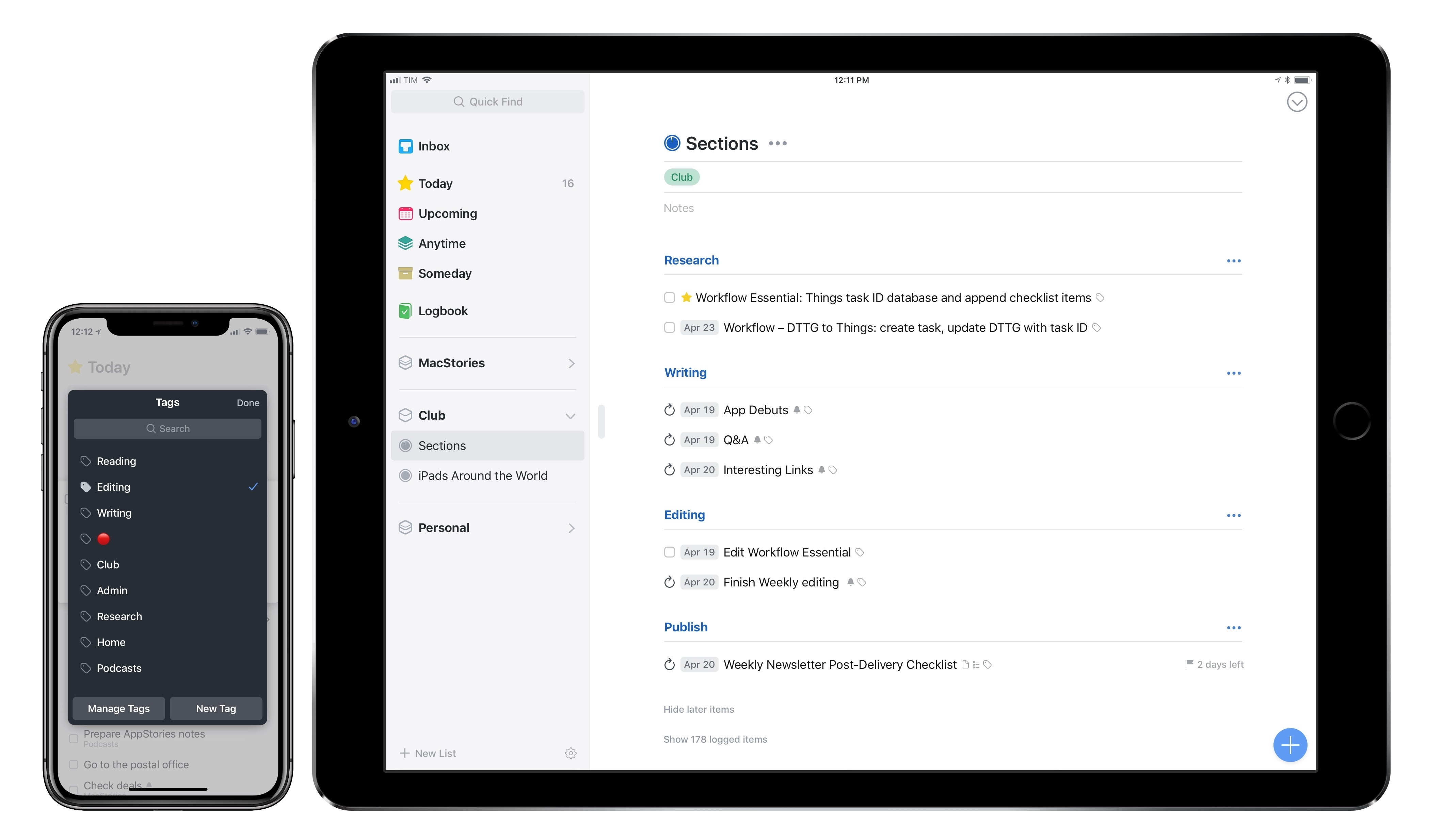
Things 3.5 Brings UI Refinements, Tagging and Automation Improvements, Clipboard Integration

It’s been a busy 2018 so far for Cultured Code, makers of Things for Mac and iOS. Earlier this year, the company shipped Things 3.4, which, thanks to app integrations and a toolkit for third-party developers, propelled the task manager into the elite of automation-capable apps on iOS. It doesn’t happen very often that a task manager becomes so flexible it lets you build your own natural language interpreter; Things 3.4 made it possible without having to be a programmer by trade.

Today, Cultured Code is launching Things 3.5, a mid-cycle update that refines several aspects of the app and prepares its foundation for other major upgrades down the road. There isn’t a single all-encompassing change in Things 3.5 – nor is this version going to convince users to switch to Things like, say, version 3.4 or 3.0 might have. However, Things 3.5 is a collection of smaller yet welcome improvements that are worth outlining because they all contribute to making Things more powerful, intuitive, and consistent with its macOS counterpart.

Read more