Federico Viticci

10804 posts on MacStories since April 2009

Federico is the founder and Editor-in-Chief of MacStories, where he writes about Apple with a focus on apps, developers, iPad, and iOS productivity. He founded MacStories in April 2009 and has been writing about Apple since. Federico is also the co-host of AppStories, a weekly podcast exploring the world of apps, Unwind, a fun exploration of media and more, and NPC: Next Portable Console, a show about portable gaming and the handheld revolution.

HomePass Can Store All Your HomeKit Setup Codes

Developed by Aaron Pearce (the creator of Homecam, one of my favorite iOS apps this year), HomePass is a handy utility for iPhone and iPad to store HomeKit setup codes.

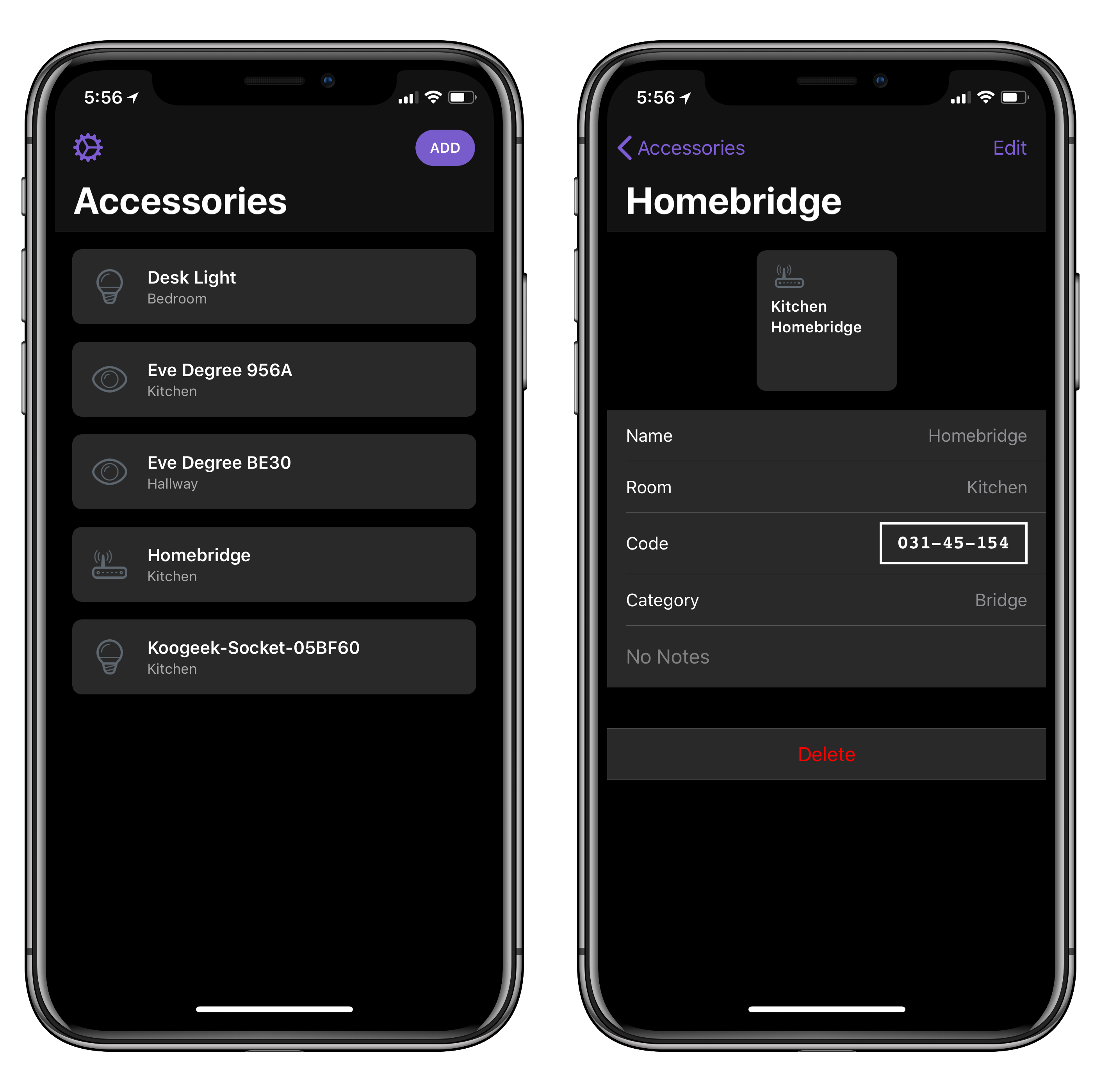
If you’ve been playing around with home automation on iOS, you know that managing accessory pairing codes isn’t exactly fun or convenient. While iOS 11 added support for QR codes and special NFC pairing tags, most accessory makers still stick basic alphanumeric codes on the back or at the bottom of accessories and essentially require you not to lose them. That’s not ideal. HomePass aims to be a single repository where you can easily keep track of all your setup codes, sync them across devices with iCloud, and even protect them with Face ID. Instead of taking pictures of your codes and storing them in Apple Notes (which is what I’ve been doing), you can collect every HomeKit code in HomePass, where they’ll be presented alongside device names, HomeKit rooms they belong to, and custom icons.

I’ve been testing HomePass for the past couple of weeks, and there are some nice touches I want to point out. First, if you grant the app access to your HomeKit data, it’ll be able to see existing accessories and allow you to simply enter the code without choosing a device name or icon (you can also create new accessories from scratch). In addition, the code displayed in the Code field of a device’s detail view is formatted with the same shape and font used on physical setup codes; this means you can open HomePass on your iPad and scan a code directly with the Home app on your iPhone. Lastly, you can add notes to your accessories and export everything as CSV if you prefer to have an additional backup of your accessory database.

One of the many shortcomings of Apple’s native Home app is the lack of deeper organizational tools for users who own dozens of HomeKit accessories and need a better way to store their codes. Ideally, such a feature shouldn’t be needed, but in my experience things sometimes go wrong and you may need to reset an accessory and add it to HomeKit again. When that happens, you don’t want to go hunting for the setup code on the back of a thermostat. I highly recommend using HomePass instead, which is available at $2.99 on the App Store.


Workflow 1.7.8 Adds ‘Mask Image’ Action, Things Automation Support, PDF Text Extraction, and More

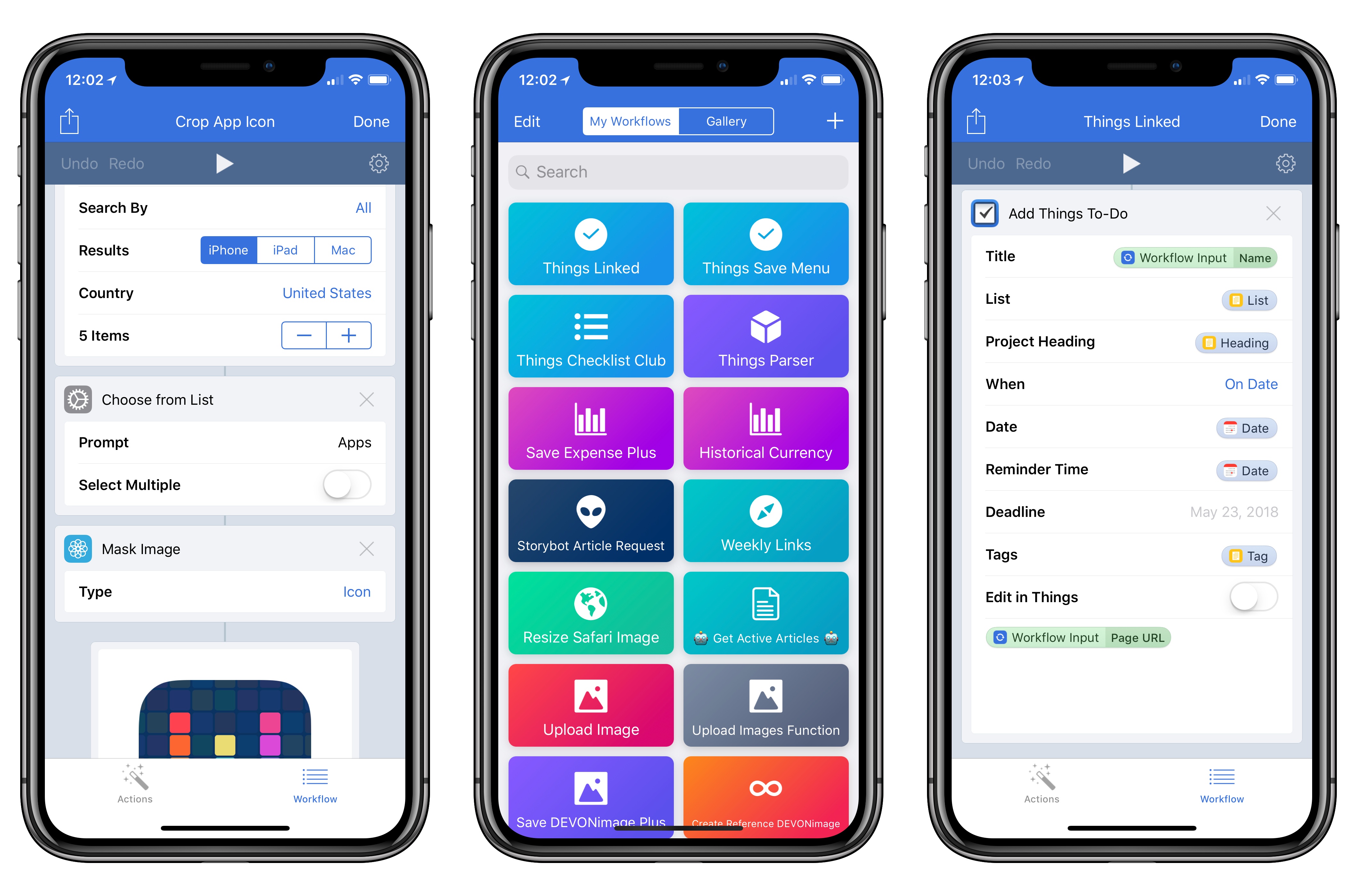
In the first update since November 2017, Apple today released version 1.7.8 of Workflow, the powerful iOS automation app they acquired last year. The latest version, which is now available on the App Store, introduces a brand new Mask Image action, adds support for Things’ automation features, and improves the ability to extract text from PDFs using the company’s PDFKit framework, launched in iOS 11. While the unassuming version number may suggest a relatively minor update, Workflow 1.7.8 actually comes with a variety of noteworthy changes for heavy users of the app.

Read more


10 Years of iPhone SDK

Whether you’re a developer who’s working on mobile apps, or just someone enjoying the millions of apps available for your phone, today is a very special day. It’s the ten year anniversary of the original iPhone SDK.

I don’t think it’s an understatement to say that this release changed a lot of people’s lives. I know it changed mine and had a fundamental impact on this company’s business. So let’s take a moment and look back on what happened a decade ago.

Craig Hockenberry published a fantastic retrospective on a decade of the iPhone SDK, which, after months of jailbreaking, allowed developers to start making real iPhone apps in 2008. It’s an excellent, well-researched story (with a lot of links, which you should open in new tabs; take your time to explore) that brings back a lot of memories. You should also check out the replies (standard and quoted) to Craig’s tweet for a lot more interesting stories.

It’s not an exaggeration to say that I wouldn’t be here, typing this post today, hadn’t Apple decided to open iPhone app development to third-party developers 10 years ago. I think many of us in this community of people who still care about this stuff at least partially owe our careers to the iPhone SDK. I’ve shared this story before, but in 2008 I dropped out of university, got a job at a physical “eBay store”, and later started blogging with a free WordPress website because I wanted to write about apps. But really, I wanted to write about iPhone apps and try as many as possible to share my thoughts with other people. That website eventually became MacStories and these words I’ve been putting out for almost 9 years now.

In hindsight, it feels strange that thousands of jobs around the world were created or inspired by a huge and sprawling corporation, but it didn’t feel that way back then. Even as a nobody watching and blogging (in poor English) from the sidelines of a burgeoning industry, that period between the spring of 2008 and early 2009 carried a palpable sense of discovery, surprise, and wild experimentation that I remember fondly. I saw app developers as pioneers charting a future we couldn’t even imagine. It was, in many ways, a different, ingenuous, more enthusiastic era – one that I hope to live through again someday.

Permalink

Halide 1.7 Brings New Depth Photography and ARKit Features, Darkroom Integration

We first reviewed Halide, the powerful third-party camera app by Ben Sandofsky and Sebastiaan de With, when it debuted in the summer of 2017, providing a powerful and elegant alternative to Apple’s Camera app that fully embraced RAW photography and advanced controls in an intuitive interface. We later showcased Halide’s iPhone X update as one of the most thoughtful approaches to adapting for the device’s Super Retina Display; to this day, Halide is a shining example of how the iPhone X’s novel form factor can aid, instead of hindering, complex app UIs.

While Halide was already regarded as an appealing alternative to Apple’s stock app for professional photographers and RAW-curious iPhone users (something that designer de With covered in depth in his excellent guide), it was lacking a handful of key features of the modern iPhone photography experience. Sandofsky and de With want to eliminate some of these important gaps with today’s 1.7 update, which focuses on bringing the power of Portrait mode to Halide, supporting the iPhone X’s TrueDepth camera system, and extending the app’s integrations via a special ARKit mode, new export options, and native integration with the popular Darkroom photo editing tool.

Read more


An Interview with Harry Nesbitt and Ryan Cash About Alto’s Odyssey

AppStories+ Deeper into the world of apps

AppStories Episode 45 - An Interview with Harry Nesbitt and Ryan Cash About Alto’s Odyssey

0:00
37:17

AppStories+ Deeper into the world of apps

Federico and John interview two members of Team Alto, Harry Nesbitt and Ryan Cash, about Alto’s Adventure, the challenges they faced in following it up with Alto’s Odyssey, the creative process of making games, and the mobile game industry.

Read more


Things Automation: Building a “Natural Language” Parser in Workflow

One of the Todoist features I miss the most as a Things user is the service’s natural language parser. Available in the Quick Add field of Todoist for iOS, web, and macOS, this feature is, effectively, Fantastical for tasks. Instead of having to manually select task fields such as projects, tags, or dates, you can take advantage of an easy-to-remember syntax and quickly type them out. As you do that, Todoist will highlight the parts it understands in red, indicating that it knows how to parse them. I entered hundreds of tasks in Todoist using this system, and I think it’s an aspect of task creation that every other task manager should implement as well. It makes perfect sense, and it saves a lot of time.

Aside from a half-baked attempt at supporting natural language entry in its date assignment UI, Things doesn’t unfortunately offer a quick entry feature comparable to Todoist’s. So, of course, I set out to make my own using the app’s latest automation features.

Well, kind of. For starters, as much as I’d love to, automation doesn’t mean I can make my own interfaces in Things, supplementing the app with my custom UI to more easily create tasks. Things’ new URL scheme only lets us send data from other apps such as Workflow or Drafts. More importantly though, the workflow I’m sharing today isn’t based on a complex natural language engine such as the one used by Todoist or, say, the Chrono JS parser; I’m just using some special characters sprinkled with some delicious regex to make sure Workflow knows what constitutes a task title, a project, or a due date. Thus the quoted “natural language” in the headline of this story: it’s only natural as long as you don’t forego the special syntax required to make the workflow run.

That said, I’m quite happy with how this workflow lets me add multiple tasks to Things at once. I’ve been finding it especially useful at the end of the work day or during my weekly review, when I make a list of all the things I’m supposed to do next and want an easy way to add them all to Things. For this reason, rather than restricting this workflow to Club MacStories members, I thought every MacStories reader could benefit from it and modify it to their needs.

If you’re a Club member, you can still look forward to advanced Things workflows over the next few issues of MacStories Weekly; this one, however, has been too useful for me not to share with everyone.

Read more


Connected, Episode 182: Wireless Charging Denier

Federico and Myke slander Stephen’s good name before talking about iPhone and headphone rumors and Amazon’s acquisition of Ring.

Also on this week’s episode of Connected: a discussion about the long-term impact of Apple’s Beats acquisition and the company’s approach to an increasingly growing ecosystem of smart devices. You can listen here.

Sponsored by:

  • Squarespace: Make your next move. Enter offer code WORLD at checkout to get 10% off your first purchase.
  • PDFpen, from Smile: Everything you need for more powerful PDF editing.
  • Pingdom: Start monitoring your websites and servers today. Use offer code CONNECTED to get 30% off.
Permalink

WatchKit as a “Sweet Solution”

Marco Arment (who’s been struggling with Watch app development for a while now) makes the case for WatchKit to be either discontinued or substantially expanded as, in its current form, it hinders the creation of more powerful apps.

Developing Apple Watch apps is extremely frustrating and limited for one big reason: unlike on iOS, Apple doesn’t give app developers access to the same watchOS frameworks that they use on Apple Watch.

Instead, we’re only allowed to use WatchKit, a baby UI framework that would’ve seemed rudimentary to developers even in the 1990s. But unlike the iPhone’s web apps, WatchKit doesn’t appear to be a stopgap — it seems to be Apple’s long-term solution to third-party app development on the Apple Watch.

When I first read his post, I thought that asking Apple to discontinue and replace WatchKit was perhaps too much. But after spending some time reorganizing my Watch favorites and complications last night and this morning, I agree with Marco. My favorite apps on the Watch are all made by Apple and are not based on WatchKit. The only exception is Workouts++ (which, as a workout app, has specific privileges). The only third-party Watch apps I regularly use besides Smith’s app are Things and Shazam (which is somewhat ironic) and they’re both accessed via complications; they’re okay, but I don’t love them because they’re often slow to sync data with their iPhone counterparts or take too long to launch and be in a usable state. When I’m out and about, I still don’t trust Watch apps to be as reliable as iPhone apps.

Despite three years of watchOS updates and more powerful hardware (I use a Series 3), the Apple Watch still doesn’t feel like the rich, diverse, and vibrant app platform that the iPhone is. Some might say that’s precisely the point – it doesn’t have to be because the Watch works best through notifications and complications. However, I often ask myself if such argument is the wearable equivalent of Aesop’s sour grapesreal Watch apps wouldn’t make sense anyway. Like Marco, I wonder what would happen if only Apple exposed real watchOS development tools to app makers.

Permalink