App Debuts
...

 App Debuts
Workflow and the Trello API, Part 2: Exporting a Single Trello Card
Q&A
App Debuts
Workflow and the Trello API, Part 2: Exporting a Single Trello Card
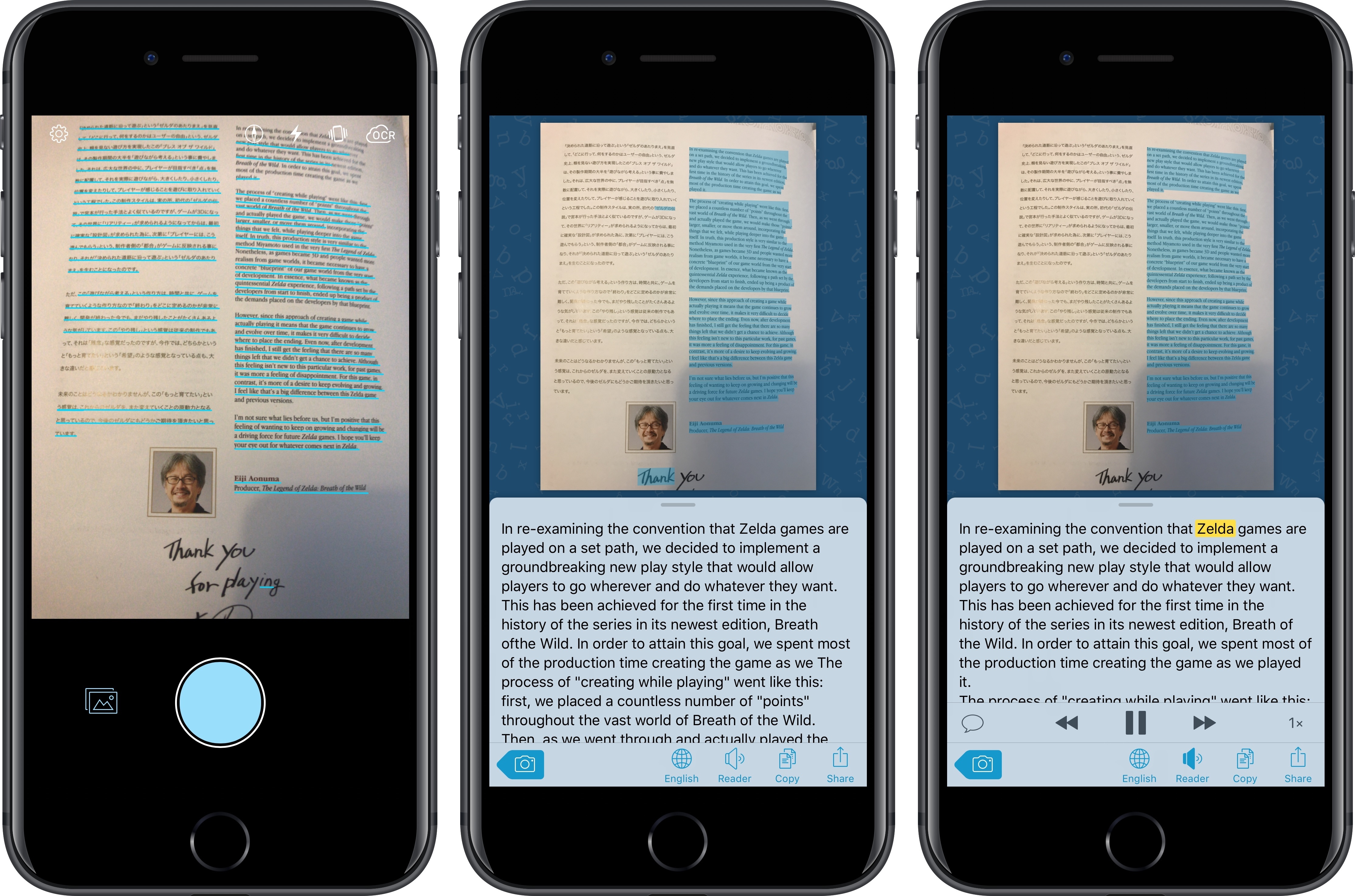
Q&A I’ve long been using Prizmo to quickly extract text contained in photos using the iPhone’s camera. Developed by Creaceed, Prizmo has always stood out among iOS scanner apps thanks to its accurate and fast OCR. While most scanner apps focus on digitizing documents and exporting PDFs, Prizmo complemented that functionality with the ability to recognize and share text with just a couple of taps. Prizmo could be used as a scanner app for paperless workflows, but I preferred to keep it on my devices as a dedicated utility to effortlessly extract and share text.
With Prizmo Go, released today on the App Store, Creaceed is doubling down on Prizmo’s best feature with a separate app that’s been entirely designed with OCR and sharing text in mind. While OCR was a feature of Prizmo, it becomes the cornerstone of the experience in Prizmo Go, which takes advantage of impressive new OCR technologies to make character recognition smarter, faster, and better integrated with other iOS apps.
iPad Diaries is a regular series about using the iPad as a primary computer. You can find more installments here and subscribe to the dedicated RSS feed.
When I covered DEVONthink To Go in the first iPad Diaries column back in February, I briefly mentioned the app’s limited support for URL schemes and automation. I concluded the article noting that DEVONthink’s advanced file management features were ideal candidates for my writing workflow – particularly given the app’s ability to store different types of documents, reference them with unique links, and search them with Boolean operators. I also expanded upon the idea of using DEVONthink as my only iOS file manager in the latest episode of Mac Power Users.
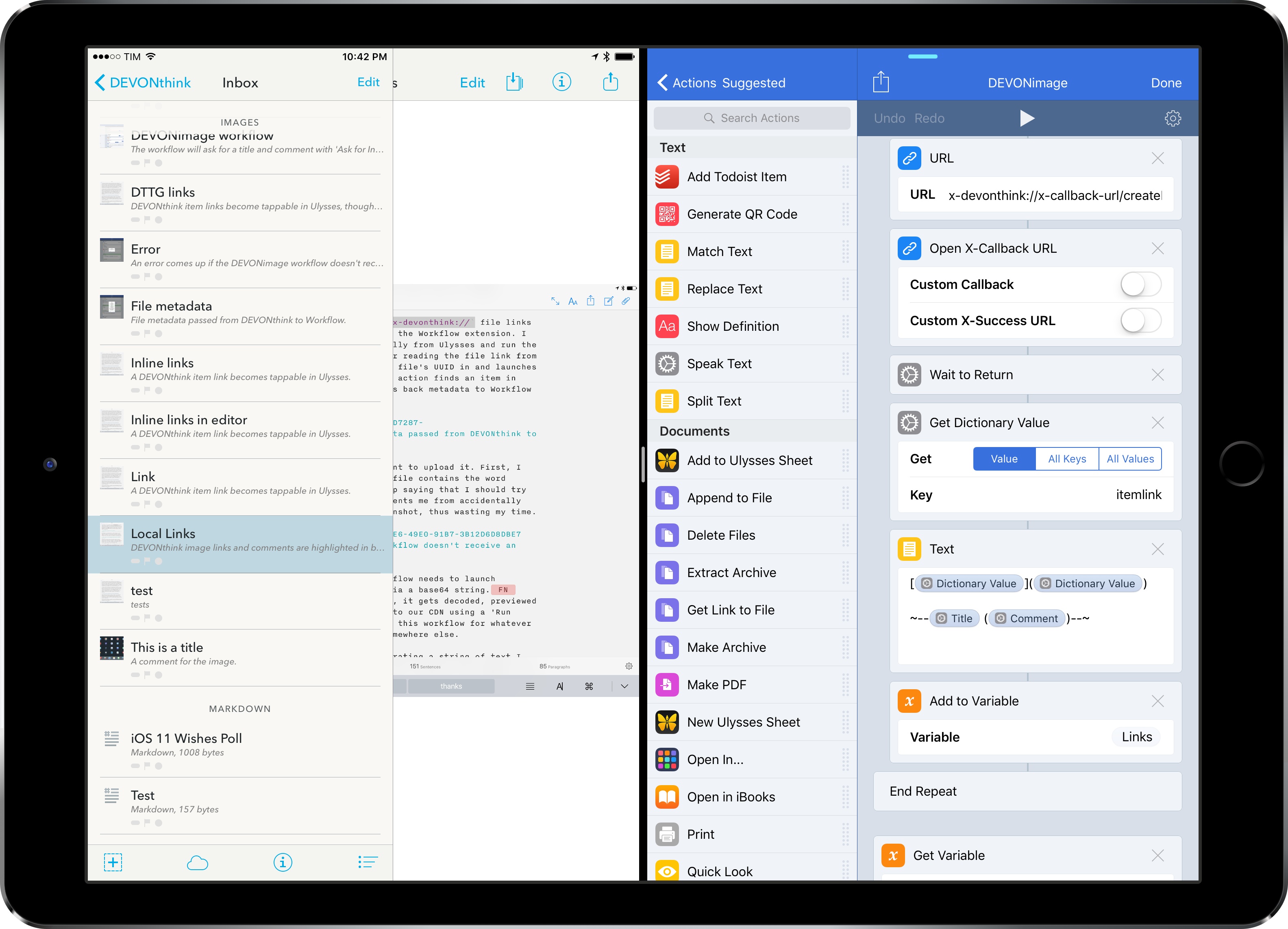
I’ve been moving more work documents and other research material (web archives and PDFs, mostly) to DEVONthink over the past two months. The turning point occurred a few weeks ago, when DEVONtechnologies began adding advanced x-callback-url automation to DEVONthink’s beta channel and were kind enough to let me test and provide feedback for the functionality.
I was genuinely excited by the prospect of a scriptable DEVONthink: due to iOS’ lack of a deeply integrated Finder, I’ve always wanted a file manager that could be extended and enhanced through automation and other apps. With an improved set of URL commands and various optimizations for usage in Workflow, DEVONthink To Go can now be that kind of file manager. I made my decision: this is the app I’m going to use to manage the research content for my iOS 11 review this summer.
The automation features introduced by DEVONtechnologies in the latest DEVONthink for iOS go deep into the app’s structure, covering discrete functionalities such as file creation, search, and data retrieval. These changes will enable a greater number of users to integrate DEVONthink with their favorite iPad apps and workflows. And while the new commands are documented in the app, I thought it’d be useful to provide some concrete examples of how we can take DEVONthink to the next level through automation.
Casey Liss comes to set Federico straight about Plex in a new segment called Follow-on. Then, Stephen and Federico talk about Apple’s recent environmental push, the changes coming to the iTunes Affiliate Program and AppStories, Federico’s new podcast and website.
On this week’s Connected, Casey tells us why managing media in a Plex library isn’t so complicated and we also discuss the recent launch of AppStories. You can listen here.
Sponsored by:
 Setting Up a New iOS Device
Federico and John discuss setting up a new iOS device, whether they do a clean install with new iOS releases, the first apps they install, and tips and tricks to make the process easier.
On this week’s episode of AppStories, we discuss setting up a new iOS device, whether we do a clean install with new iOS releases, the first apps we install, and we share some tips and tricks to make the process easier.
Sponsored by:
You can listen to the episode below.
https://staging.macstories.net/podcasts/appstories/episodes/2/embed/






In an update released today on the App Store, Tapbots has started taking advantage of Twitter’s more flexible third-party API to allow users to send images in private conversations (DMs). The feature – which has long been available in Twitter’s official app – is limited to static images for now (no videos or animated GIFs), although the Twitter API could make more attachment types possible in the future.
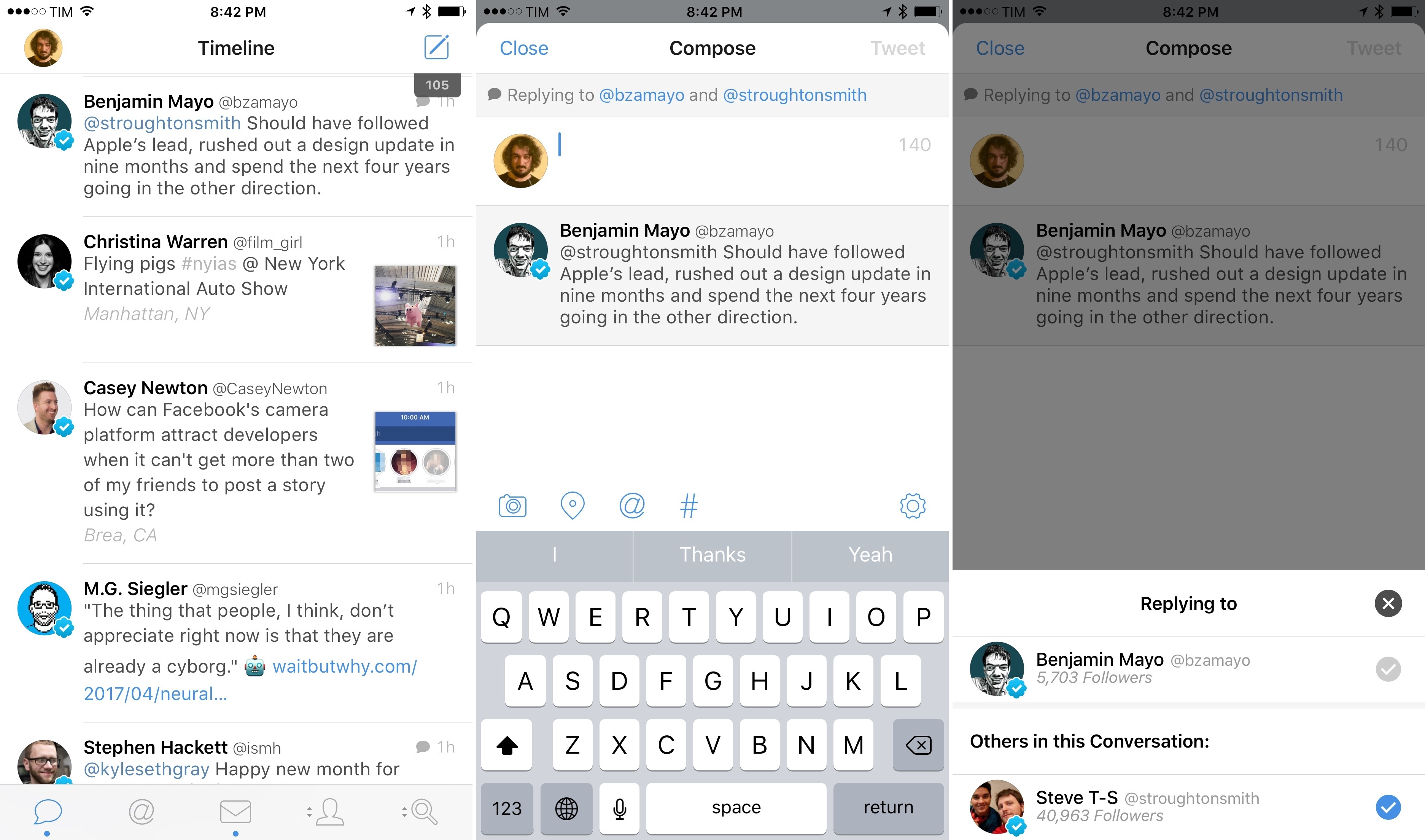
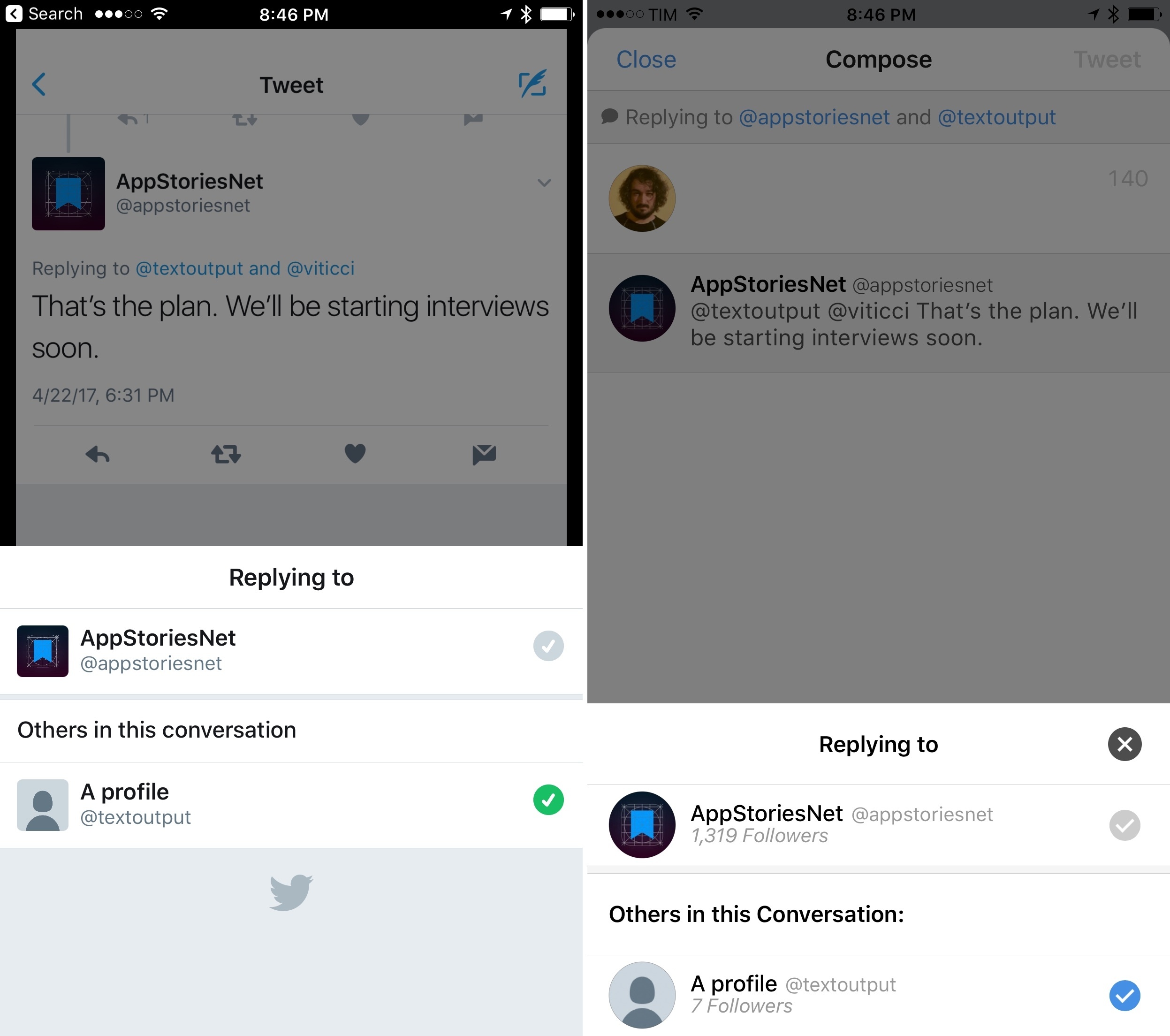
Perhaps more notably, Tweetbot 4.6 comes with a redesigned compose interface for replies. Similarly to Twitter’s iPhone app, Tweetbot 4.6 doesn’t count usernames against the 140-character limit. To present this change in functionality, Tapbots has opted for a Twitter-like design where usernames aren’t displayed in the compose box upon starting a reply. Instead, a “Replying to…” banner at the top of the screen highlights the tweet’s original author and other participants in a conversation. Tap the banner, and, like in the Twitter app, you’ll be a shown a popup with a list of users you’re replying to. The author at the top of the list can’t be de-selected; other users in the conversation can be removed by tapping on the blue checkmarks.
While this design is similar to Twitter’s, it should be noted that Tweetbot limits this presentation to the compose view for replies. Unlike Twitter’s official apps, usernames are still displayed in the body of a tweet in both the Timeline and Mentions views, providing a familiar format that doesn’t force you to tap on the “Replying to…” banner from every section of the app. Personally, I believe Tapbots adopted a better solution than Twitter itself: the compose UI is nicer and usernames are easier to remove, but the timeline retains the familiar @usernames that add context to inline conversations.
I’m curious to see how Twitter’s new API roadmap will impact third-party clients such as Tweetbot over the next few months. Tweetbot continues to be my daily Twitter client on every platform, and I hope Tapbots will be able to add even more native Twitter features in future updates (I’d love to have support for polls in Tweetbot).
Tweetbot 4.6 is available on the App Store.
 John
John