Federico Viticci

10804 posts on MacStories since April 2009

Federico is the founder and Editor-in-Chief of MacStories, where he writes about Apple with a focus on apps, developers, iPad, and iOS productivity. He founded MacStories in April 2009 and has been writing about Apple since. Federico is also the co-host of AppStories, a weekly podcast exploring the world of apps, Unwind, a fun exploration of media and more, and NPC: Next Portable Console, a show about portable gaming and the handheld revolution.

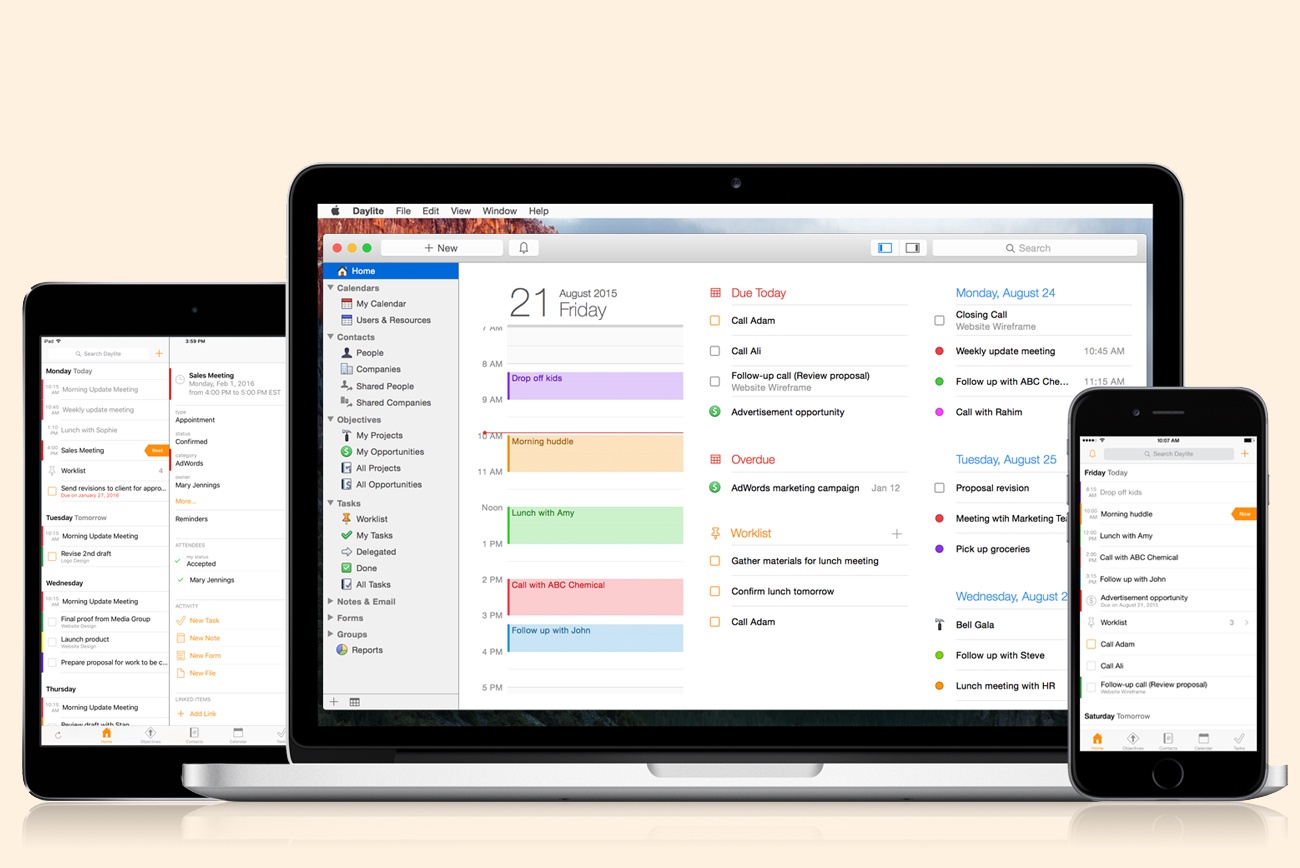
Daylite: A Business Productivity App for Mac and iOS [Sponsor]

Daylite is a business productivity app for Mac, iPhone, and iPad.

Organize you and your team’s contacts, calendars, projects, tasks, emails, notes, and new business opportunities all in one app.

Track sales and set reminders for follow-ups. See a full history of all emails, calls, and notes for each customer. Customize your own pipelines to track sales and projects. View your whole team’s calendar to make scheduling meetings simple. Daylite even integrates with Apple Mail so you can update customer info, set tasks and reminders, and add appointments to your calendar – all without leaving Mail.

Automate lead generation from online web forms with Daylite & Zapier integration. When someone fills out a form on your website through Google Forms or Wufoo, a new contact and business opportunity are creating in Daylite. You can then segment leads for specific email campaigns and track all of your communication with them in Daylite.

Always have your business info no matter where you go. Daylite is a native app so you can access your information on your Mac, iPhone, or iPad even when you don’t have an Internet connection.

Read how businesses all over the world are becoming more efficient with Daylite.

Our thanks to Daylite for sponsoring MacStories this week.

AppleScript, the Perfect Adjunct to iTunes

Kirk McElhearn, writing for Macworld on automation in iTunes following Sal Soghoian’s departure from Apple:

No application can do everything its users need, and none should offer everything they want. For this reason, AppleScript has long been the perfect adjunct to iTunes, which is already feature-rich (some say “bloated,” but I disagree), and doesn’t need more options and tools. Many of these AppleScripts are designed to tag files, edit their metadata to correct errors, improve consistency, and ensure that users can find the files they want, and help them efficiently use smart playlists.

It’s not clear whether the termination of Mr. Soghoian means the demise of AppleScript altogether, and particularly in iTunes, but many developers, iTunes users, and others are concerned by this decision.

You see, it’s all about freedom. Freedom to do things we want that Apple doesn’t think we need to be able to do. Freedom to explore. Freedom to discover new ways to link applications, to interact with files, to create our own solutions. We can’t expect apps to cater to all our whims, and tools like AppleScript and Automator allow us to go a step further and discover ways to do things that Apple never even considered.

Losing AppleScript and automation features altogether would be a horrific loss for the Mac. However, I don’t think that’s going to be the case. Like Jason Snell, I believe today’s Apple finds this stuff uninteresting and “vintage”; rather than removing it, I feel like they’ll stop pretending they care about it, just as they did for Dashboard. Which isn’t an ideal scenario either, but between two poisons, it’s the one I’d pick.

See also: Dr. Drang back in 2013, ‘When and why I automate’.

Permalink


iA Writer 4 Adds Markdown Content Blocks

A major update to iA Writer, the popular Markdown text editor for iOS and macOS, has been released earlier today. I didn’t have enough time to test the beta of version 4.0, but I’m intrigued by the idea of file transclusion – effectively, a way to structure documents with content blocks based on local file references.

From the blog post:

We’ve made a swath of improvements in iA Writer 4. The meat on the bone is this new file referencing syntax. Every file reference you insert adds a block of content to your document, be it an image, table, or plain text file. These content blocks can then be ordered, stacked and chained with ease.

We think this syntax is a natural extension to Markdown, and it would please us to see other apps use it too. We’re a bit nervous since it’s a deviation, but we’d still like to try it out and hope it finds friends. We’ve published an introductory spec on GitHub to get the ball rolling. Hopefully, content blocks based on file transclusion will become a thing beyond iA Writer. One day all Markdown editors may work like that, but, as IBM famously said, why wait?

You can reference text files, images, and even .csv files to include in the compiled text output as MultiMarkdown tables. I think this is a genius way to handle file embeds in longer documents, and it’s something I would consider for future longform projects. I’m not aware of any other Markdown text editor for iOS that implements a similar option. I’d also like to see iA go beyond local file callbacks (which only work with iCloud) and allow documents to be comprised of files stored in iOS document providers. iA Writer is one of the few text editors that fully support opening and editing files from external document providers, so extending that integration to content blocks would be the next logical step.

There’s a lot to like in iA Writer; I don’t think it’s appreciated enough by iOS power users. The aforementioned integration with iOS document providers is solid, there are several editing tools such as writing statistics and parts-of-speech highlights, plenty of output options, support for iCloud versions, and more. I hope that iA will consider adding more features to the app’s basic URL scheme in the future – one area where iA Writer is considerably behind alternatives such as Ulysses and 1Writer.

I’m going to play around with iA Writer for a while – I feel like the app deserves more attention, and I want to experiment with document providers and content blocks for MacStories reviews and our newsletters.


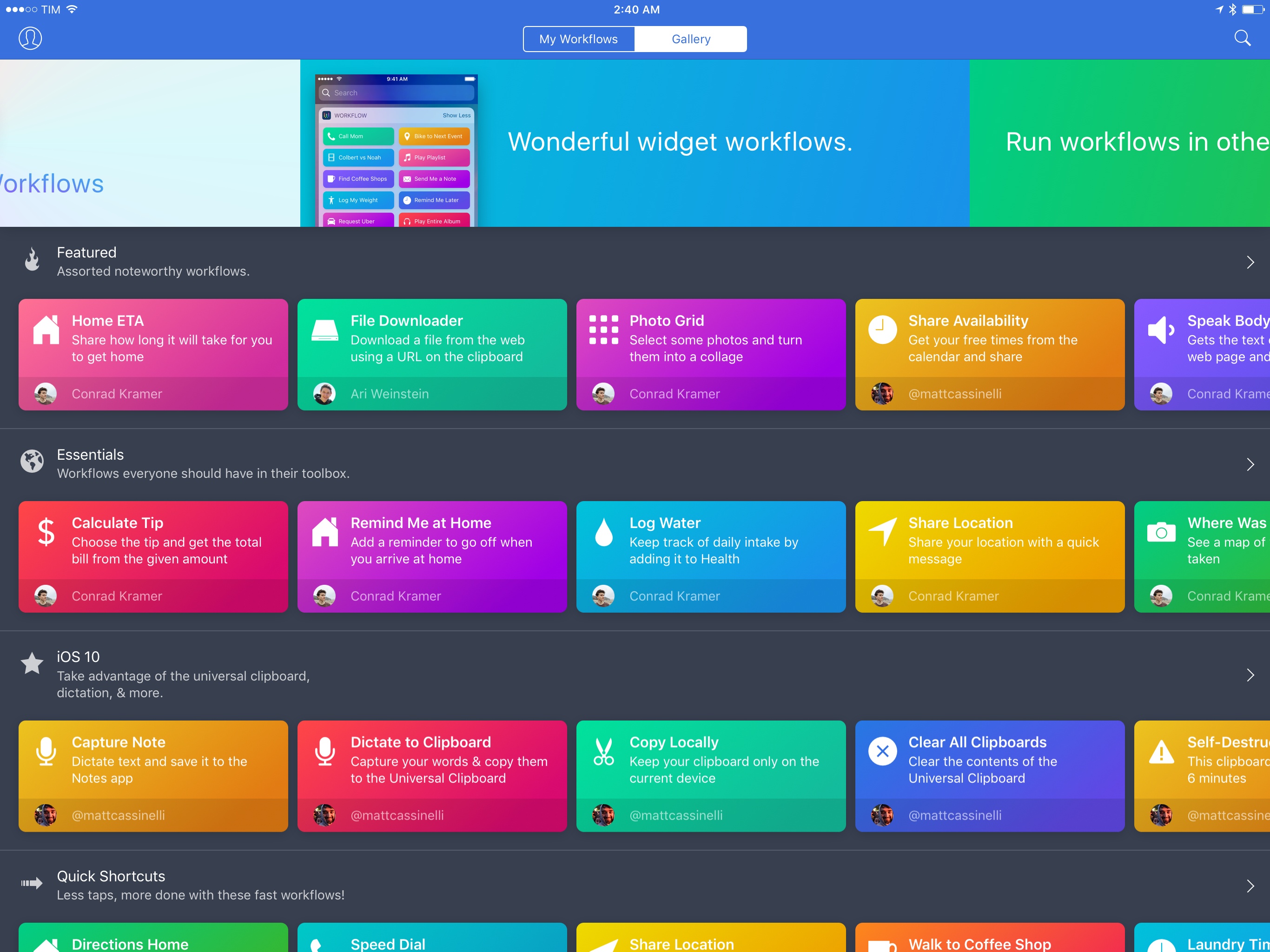
Workflow 1.6 Brings Revamped Gallery, Better Tools to Share and Import Workflows

Since version 1.0 launched nearly two years ago, Workflow has always offered the ability to share workflows with others. While somewhat simplistic, Workflow’s ‘Copy Link’ button has allowed the proliferation of sites and communities aimed at sharing workflows with the app’s users – here at MacStories, workflows are one of the key aspects of our MacStories Weekly newsletter, for instance.

With version 1.6, launching today on the App Store, the Workflow team is revising some of the features that have been in the app since the beginning, starting with the Workflow Gallery and major updates to how workflows are shared, installed, and explained to other users.

Read more


Sal Soghoian Leaves Apple

Sad news for the Mac automation community: Sal Soghoian, Product Manager of Automation Technologies since 1997, has left Apple. Details from Soghoian himself:

Q. I hear you no longer work for Apple; is that true?

A. Correct. I joined Apple in January of 1997, almost twenty years ago, because of my profound belief that “the power of the computer should reside in the hands of the one using it.” That credo remains my truth to this day. Recently, I was informed that my position as Product Manager of Automation Technologies was eliminated for business reasons. Consequently, I am no longer employed by Apple Inc. But, I still believe my credo to be as true today as ever.

Soghoian’s work on AppleScript and other macOS automation, scripting, and accessibility technologies has always been inspiring – we wouldn’t have apps like Workflow today hadn’t Soghoian pushed the boundaries of user automation at Apple.

I don’t know what this means for automation on macOS going forward, but it doesn’t feel like a good sign to me. I love his determination, though:

Q. Are you still upbeat about the future of user automation?

A. Absolutely. The need for user automation is a constant. I’ve seen the benefits and power of individuals being able to automate critical and repetitive tasks. Solution apps are great, emojis are fun, but there’s nothing like really great automation tools. I have faith in this community, and that makes me optimistic about what we can do together.

More than ever before, I’m going to keep an eye on Soghoian’s website and future projects.

See also: the transcript of Soghoian’s WWDC 2016 session on using macOS dictation to perform specific actions (unfortunately, Apple’s session video URL doesn’t seem to be working anymore).

Permalink

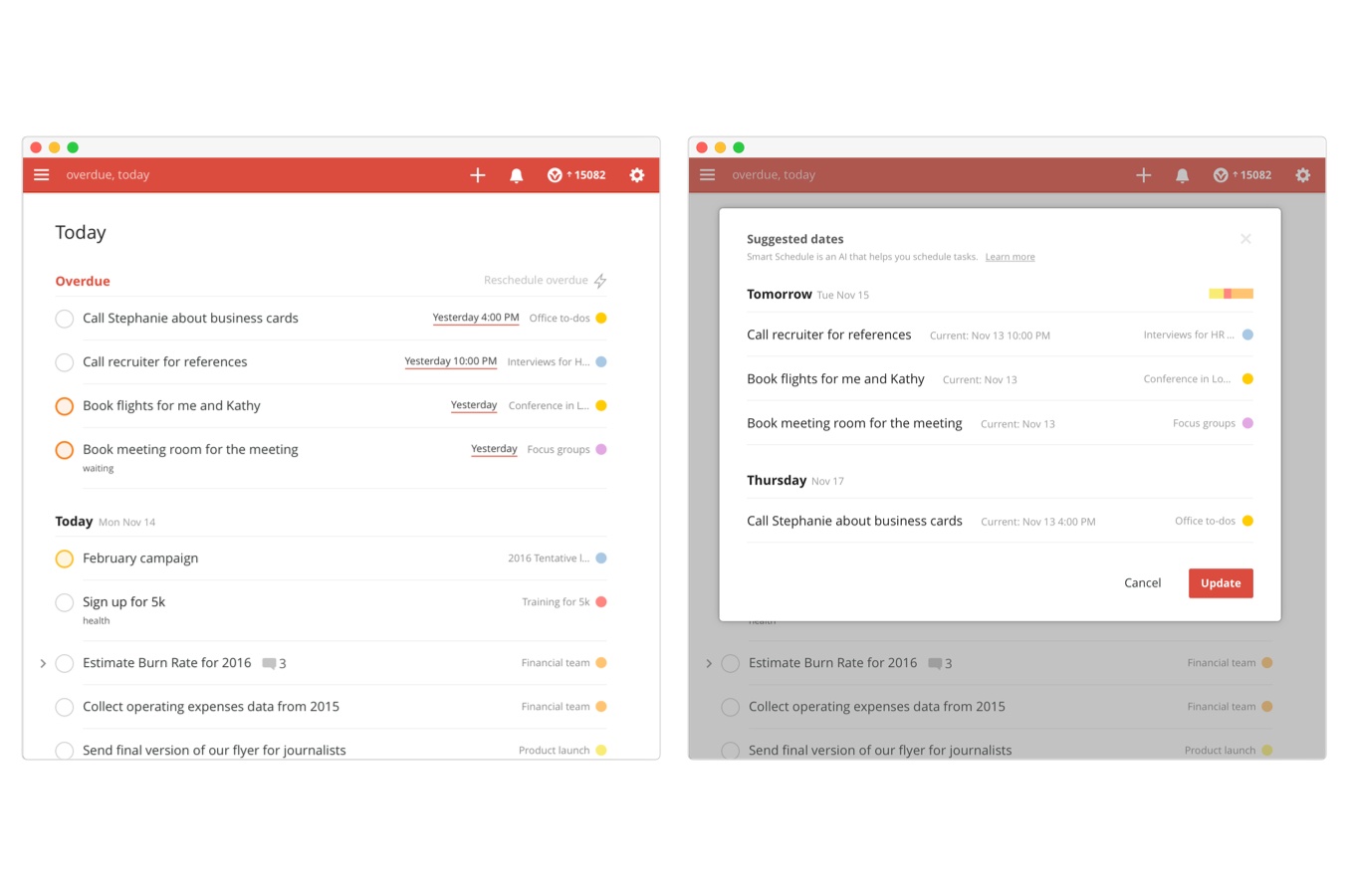
Todoist Launches Smart Schedule, an AI-Based Feature to Reschedule Overdue Tasks

When Todoist’s data scientist Oleg Shidlowsky and his team started looking at aggregate task data earlier this year, they discovered an interesting pattern: despite tools to assign due dates and good intentions, most people tend to accumulate incomplete tasks and defer them indefinitely.

The result is a task manager overflowing with rescheduled tasks that not only defeat the entire purpose of GTD (or any other system) – they’re never going to be taken care of because their snowball effect lacks an action plan. You’ve probably done this with your tasks and emails, too: you keep snoozing and deferring some of them because you feel like you don’t have the time or patience to deal with them now. But is there ever a good time?

Instead of reinventing the way due dates and scheduling options should be presented – something that, admittedly, Todoist already does quite well thanks to its natural language support – the company is launching Smart Schedule, a feature powered by AI that wants to help users catch up on their todo list and regain control of overdue tasks.

The goal is simple, yet promising: Todoist is betting on algorithms to understand what’s most important to us and where we can find the time to get everything done without overcommitting to unrealistic deadlines.

Read more