iOS Apps with Great Dark Themes, Vol. 1
...

 iOS Apps with Great Dark Themes, Vol. 1
App Debuts
Q&A
iOS Apps with Great Dark Themes, Vol. 1
App Debuts
Q&A Slack is a fun product to use (and company to observe) because they’re constantly challenging how things should get done in a team collaboration service. Their latest addition to the desktop client lets you easily attach reminders to messages with a contextual menu:
Today we welcome a new addition to reminders: Message reminders! #changeloghttps://t.co/DYD2uqGjXO pic.twitter.com/h80kqultuq
— Slack (@SlackHQ) April 14, 2016
Once this becomes available on iOS too, I think I’m going to use it a lot.
This week, Myke speaks about his two-iPad setup, Federico discusses his Telegram usage and Stephen interviews Kristen Gallerneaux from The Henry Ford Museum about their working Apple I.
This was a fun one: Stephen had a great interview with Kristen Gallerneaux of The Henry Ford Museum and we talked about Myke’s dual iPad setup. I also offered a bit of background on why we’re trying a Telegram channel for MacStories.
You can listen here.
Sponsored by:
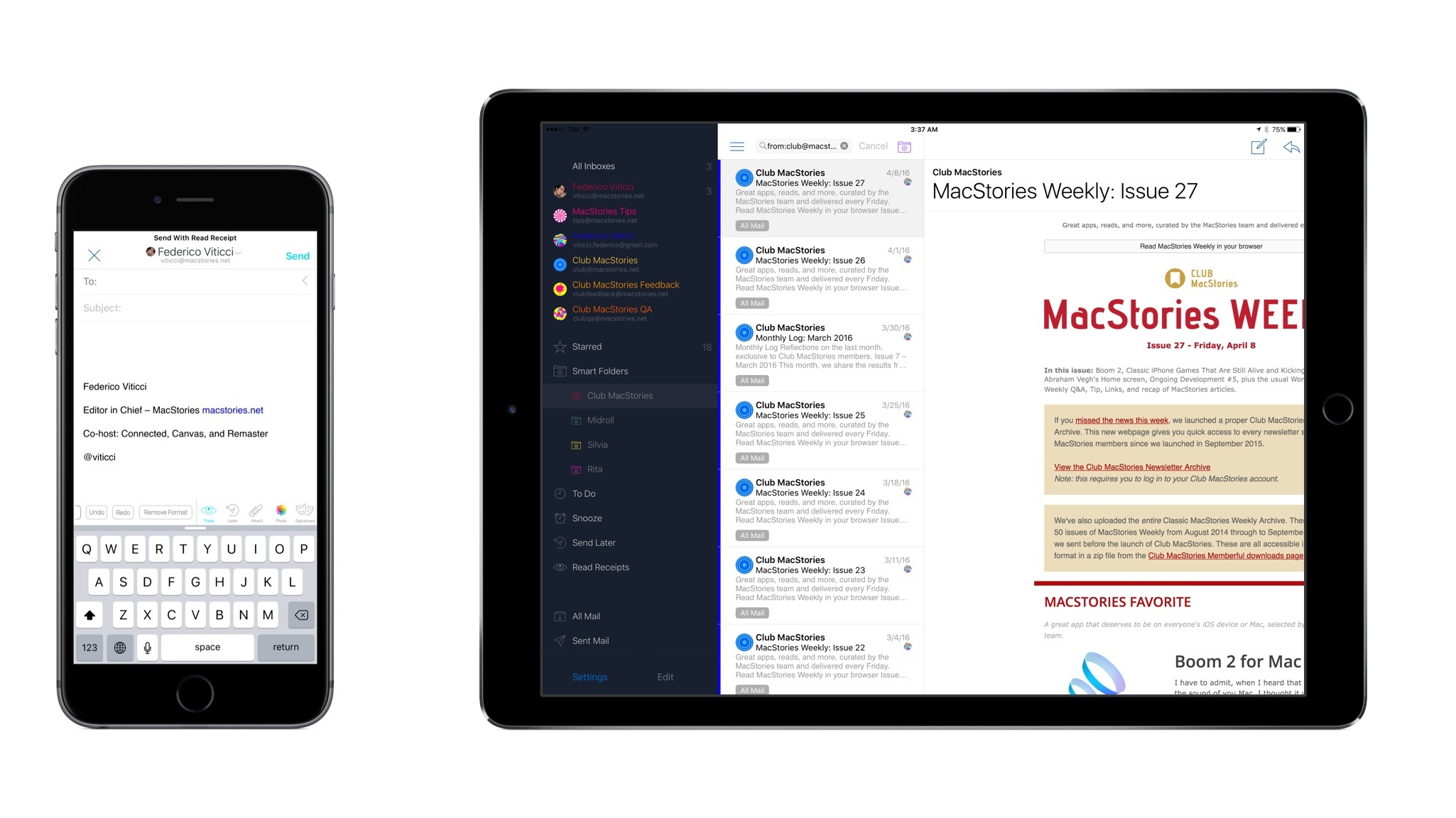
When I first covered Airmail for iPhone, I noted how the vision of an email client for power users on iOS was only halfway there due to the lack of an iPad app and a variety of glitches and technical issues. Airmail showed that it was possible to build an email app for power users on mobile devices – asking for a fair price in the process – but I couldn’t switch to it as my full-time client yet.
That’s changing with today’s update to Airmail for iOS, which I’ve been using as my only email client on the iPhone and iPad for the past several weeks. In addition to an iPad app – which mostly follows in the footsteps of its iPhone counterpart in terms of UI and navigation choices – Airmail 1.1 brings powerful new features such as saved searches, customizable keyboard shortcuts, support for send later and read receipts, and more.
While the majority of “modern” email clients are focused on reinventing email with new display options for the inbox and novel interfaces, Airmail wants to redefine how much control you’re given over your email on iOS. Which is to say – Airmail is the most powerful email app for iOS out there right now, treating iPhone and iPad users with the same respect and attention other developers would only show for their Mac apps.
Alissa Walker, writing for Gizmodo on a fascinating study about emoji implementations across different platforms:
A study by the GroupLens Research team at the University of Minnesota examines the variations between some popular emoji presentations and how they are perceived. The most widely misinterpreted is the “grinning face with smiling eyes” emoji, which—depending on the platform—can range from the rosy-cheeked cherubic face of glee to the anguished clenched-teeth look of constipation.
Just seeing the difference in emoji presentations is revelatory in itself. But then it gets even more interesting. GroupLens researchers asked subjects to rate 22 anthropomorphic emoji from five platforms by sentiment, using a scale that ranged from strongly negative (-5) to strongly positive (5). And here’s where you start to see where “grinning face with smiling eyes” goes so very wrong. Apple’s average sentiment ranking was almost -1, while Microsoft, Samsung, LG, and Google all were 3 or above.
It’s curious to see what happens when you only have a loosely defined standard.
This week is sponsored by Marketcircle, the developers of Daylite.
Daylite is a business productivity app that organizes your contacts, calendars, tasks, emails, notes, projects, and new business opportunities – all in one app. It helps you stay on top of calls and meetings, prioritize your tasks, and track projects and new business opportunities on your Mac, iPhone, and iPad.
You can use Daylite on your own to manage your solo business, or use it within a team to schedule meetings, delegate tasks, and track projects together. Daylite is a native app so you don’t need an Internet connection to use it. Your information is stored right on your Apple device so it’s always with you. When you get an Internet connection, it syncs your Mac, iPhone, and iPad so you and your team are up-to-date.
Daylite is loved by consultants, real estate agents, lawyers, photographers, designers, and more. For many small businesses, Daylite is the lifeline of their business and “makes order out of what would otherwise be chaos”. Learn how small businesses use Daylite to stay organized and increase productivity on Marketcircle’s website.
Our thanks to Marketcircle for sponsoring MacStories this week.
Scanning with just the camera on the back of the device is an area of iOS that has been around for many years and has matured significantly over that time. The latest generation of iOS scanner apps, coupled with ever-better cameras on our devices are really very usable scanners indeed. Couple that with increasingly sophisticated post-scan workflows and you have a tool that James Bond could only dream of.
On last week’s episode of Canvas, we talked about one of the kinds of mobile software that has been reinvented by the iPhone’s camera – scanner apps. There’s a lot of choice when it comes to scanning documents and going paperless on iOS. You can listen here.