Federico Viticci

10804 posts on MacStories since April 2009

Federico is the founder and Editor-in-Chief of MacStories, where he writes about Apple with a focus on apps, developers, iPad, and iOS productivity. He founded MacStories in April 2009 and has been writing about Apple since. Federico is also the co-host of AppStories, a weekly podcast exploring the world of apps, Unwind, a fun exploration of media and more, and NPC: Next Portable Console, a show about portable gaming and the handheld revolution.

Just Press Record Adds 3D Touch Actions

I first covered Just Press Record in September. Primarily positioned as the missing voice recorder for Apple Watch with fast performance thanks to watchOS 2, the app is also a capable voice recording utility for iPhone that makes it easy to save files to iCloud Drive.

The latest 1.2 update to Just Press Record has added 3D Touch support with a shortcut to start a new recording from the Home screen (also available in Apple’s app), plus peek and pop actions to preview the contents of each folder. The latter is useful because Just Press Record organizes recordings in subfolders in your iCloud account, which means you can view the contents of each folder (presumably containing renamed files) with a stronger press in the app.

I’ve been using Just Press Record regularly on my iPhone for the past two months, and I’ve recommended it to friends who also find it superior to the default Voice Memos app. Version 1.2 is available on the App Store.

Permalink

WhatsApp Adds Rich Previews for Web Links

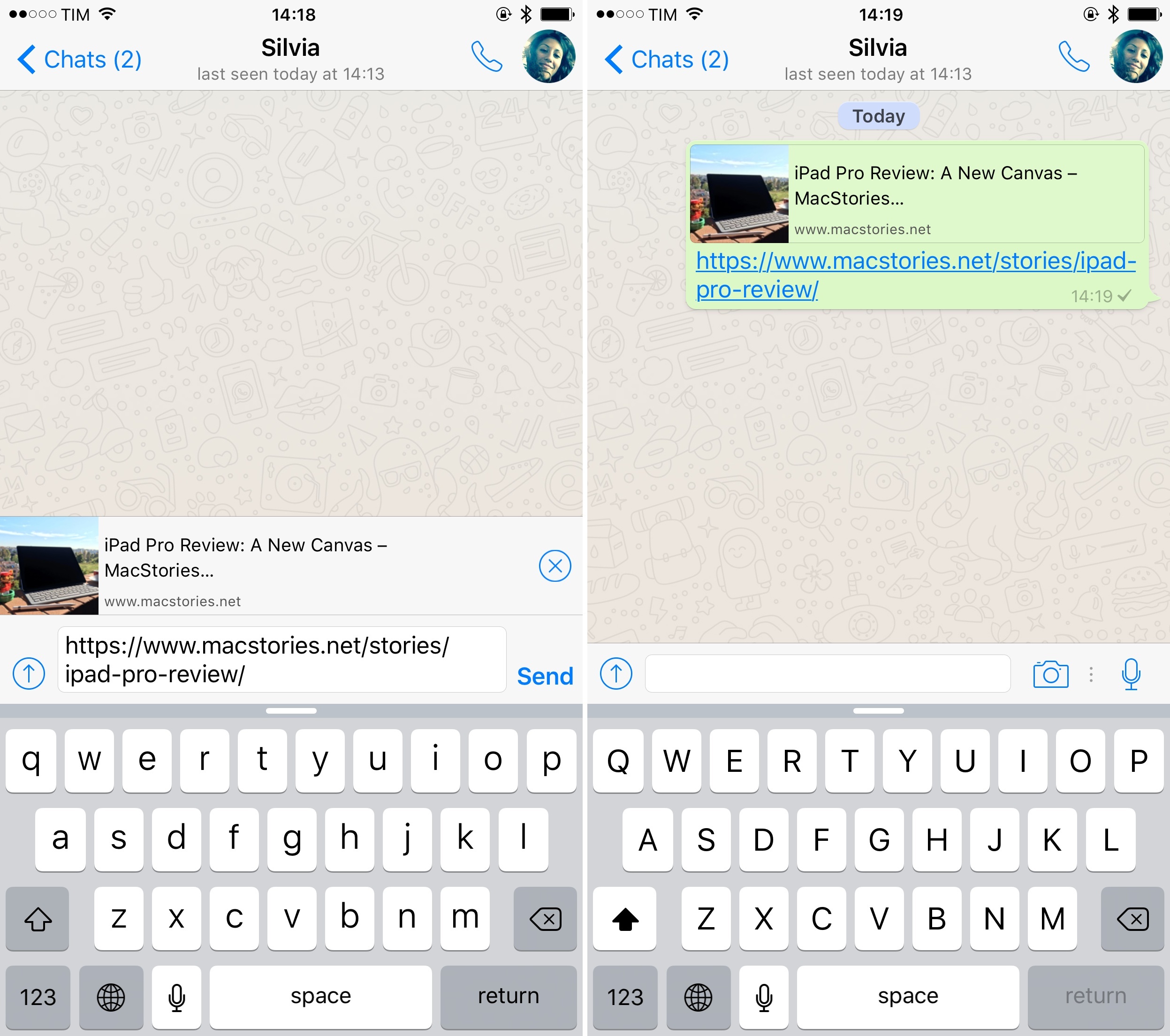
A link preview in the new WhatsApp for iPhone.

A link preview in the new WhatsApp for iPhone.

With an update released today on the App Store, WhatsApp has brought a functionality I’ve long wished was also available in Apple’s Messages app: rich previews for links shared in conversations.

Similar to existing implementations in Facebook’s iOS apps and other services such as Slack, the new option lets you include a rich snippet for each link pasted in a chat. Instead of sharing a simple tappable URL that opens Safari, these previews can show a webpage’s title and lead image alongside the link in a conversation, adding context that can be useful to see what a link is about before tapping it. Link previews aren’t sent by default: after pasting a URL, a preview is automatically generated and displayed above WhatsApp’s text field, so you can choose to add it or dismiss it by tapping a close button.

As I argued in the Notes section of my iOS 9 review, I’d like to see Apple make Notes’ link previews (which are very similar to WhatsApp’s) a system-feature of iOS, bringing them to Messages, Mail, Reminders, and other apps with a consistent design, perhaps even offering a developer API to enable link previews in third-party apps.

WhatsApp’s latest update – which also includes a redesigned Settings screen and more 3D Touch quick actions to preview chats – is available on the App Store.


Virtual: Sounds Like a Threat

This week Federico shares his thoughts on a live-action Metroid short film,
and joins Myke in discussing the final Nintendo Direct of 2015.

This week on Virtual, we discuss Nintendo’s latest announcements from their Direct presentation. You can listen here.

Sponsored by:

  • Igloo: An intranet you’ll actually like, free for up to 10 people.
  • Harry’s: An exceptional shave at a fraction of the price. Use code VIRTUAL for $5 off your first purchase.
Permalink

App Store Gets a Smarter Search Engine

As reported by TechCrunch, Apple appears to have tweaked the search algorithm of the App Store over the past few weeks, leading to more consistent results:

According to multiple sources, including developers who tracked their own rankings, as well as app store analytics firms, the change that began November 3 included several adjustments. Apps are now ranking in search results on a mix of contextual keywords for the app, including partial keyword matches, along with competitor brand names and other matches.

I’m curious to see how this latest change will affect independent developers over the next couple of months. For better or worse, search – not the Store’s curated Explore section – is still the easiest way to find any kind of app. A major change to the search algorithm can potentially affect the livelihood of thousands of indie developers.

Permalink

Spotify Adds Concert Recommendations

Earlier this week, Spotify announced a feature I’ve long argued would make sense in Apple Music: concert recommendations powered by Songkick.

From the Songkick blog:

As of today, you can now view a personalised list of recommended shows from right inside your Spotify app on iPhone and Android, and in just a few taps purchase tickets seamlessly through Songkick.

Based on the artists you’ve been listening to, the Concerts feature will surface upcoming Songkick events for your favorite bands, as well as undiscovered acts that you’re destined to fall in love with.

Songkick is an excellent service I’ve been using for years to stay on top of concert announcements by my favorite artists. The service works by scanning your music library and external accounts to look for music you listen to. It makes perfect sense to combine this with a streaming service on a smartphone. I still believe concert recommendations would make for a solid addition to Apple Music’s Connect in the future.

Permalink

No One Minding the Mac App Store

Michael Tsai, writing on the latest issue that hit the Mac App Store, preventing users to launch apps they previously downloaded:

I woke up to an inbox full of e-mails from customers reporting that my apps wouldn’t launch. This included new customers who had just purchased from the Mac App Store as well as people who had purchased long ago, hadn’t made any changes, and expected that things would just keep working.

And:

The Mac App Store is supposed to make things easier, but it’s also a single point of failure. Not only is it neglected, but sometimes even the existing functionality stops working. Mac OS X 10.9 introduced a code signing bug that prevented me from submitting updates for several months. In June 2015, there was a month-long iTunes Connect bug that prevented my uploaded build from entering the review queue. And I currently have a bug fix update that Apple has been reviewing for 33 days (with 8 days of waiting before that). When I inquired about the status, Apple told me that everything was normal and that I should just keep waiting. In short, the system is broken on multiple levels, and there is no evidence to suggest that things will get better.

This problem hit me as well – I had to check something on Tweetbot for Mac last night, but it wouldn’t launch. Same with other apps. There is a workaround, but it’s not working for everyone. And, despite the widespread nature of the problem, Apple has said nothing about it.

The Mac App Store lives in a sad state of abandon when compared to its iOS counterpart. For years now, Mac developers haven’t gotten access to the same tools made available to iOS developers. And that’s not to mention the myriad of issues and uncertainty they had to go through when Apple started rolling out sandboxing.

But preventing people from using apps they bought without a proper explanation, affecting third-party developers in the process? Just inexcusable.

Permalink

Apple Highlights Apps and Games Updated for iPad Pro

In yesterday’s weekly refresh of the App Store’s front page, Apple launched a new section highlighting apps updated to support the iPad Pro with design optimizations and new features.

Creativity and productivity soar when you pair great apps with iPad Pro. We’ve compiled some of our favorites that take advantage of its expansive Retina display and astounding performance. On iPad Pro, everything from drawing to multitasking to watching videos is a stunning experience.

The section is organized in six sub-categories, each grouping apps that have been updated with integrations for specific iPad Pro and iOS 9 features, such as ‘Enhanced for Apple Pencil’, ‘Powerful Multitasking’, or ‘Desktop-Class Apps’. Featured apps include well-known names such as Evernote, 1Password, Slack, and OmniGroup apps, but also apps from smaller indie studio like Numerics (which takes advantage of the Pencil in an interesting way), LiquidText, Curator, and Workflow.

With the exception of Apple Pencil, apps featured by Apple in this section don’t have access to iOS features that are exclusive to the iPad Pro, and they’re not iPad Pro-only apps. Instead, Apple is highlighting apps that optimize for the iPad Pro’s hardware and bigger screen to augment existing iOS 9 functionalities. Thanks to the 12.9-inch display, multitasking on the iPad Pro is more powerful than its counterpart on the iPad Air 2; with the four speaker audio system, video apps can be more immersive.

In a separate section, Apple is also highlighting games for iPad Pro – which include titles like The Room Three, Broken Age, and Geometry Wars 3. You can find the section here.


“Why the iPad Pro Needs Xcode”

Steve Streza, writing on the state of some iPad apps and developers stretching their iPhone UIs for the big screen:

App developers don’t feel this pain as much, because they’re not living on iPad. For 8+ hours a day, they’re stuck using Xcode on a Mac. They aren’t living and breathing the idioms and design patterns of great iPad apps. Instead they’re stuck on Macs, usually sitting on desks with mice or trackpads, using a very underpowered and unwieldy iPad simulator, to build apps you touch with your hands on the couch.

Xcode running directly on the iPad Pro could fix many of those problems. You now have a tablet powerful enough to run an IDE, with a very nice keyboard cover, and a screen big enough to encompass all the functionality of Xcode, capable of testing almost every feature of every iOS device ever made. You can code with your keyboard and test with multitouch. You could work on a desk and take your whole development environment with you on the couch, bed, or plane.

I couldn’t agree more with all the points mentioned by Steve, especially about the potential benefits in education. As I wrote yesterday, the iPad Pro’s hardware demands to be used by new kinds of apps. This includes Apple.

Fortunately, I want to believe there’s some hope here. Over the past few months, I’ve personally heard about an iPad Pro version of Xcode in early stages, being demoed internally at Apple. I don’t know if this will ever actually happen, but it sure would make for a nice surprise at WWDC next year.

My fingers are crossed.

Permalink

Castro for iPhone Goes Free, Adopts Patronage Model

Supertop is releasing Castro 1.5 today, and, in preparation for a major Castro 2.0 update scheduled in a few months, they are making the app free with a patronage model.

From the Supertop blog:

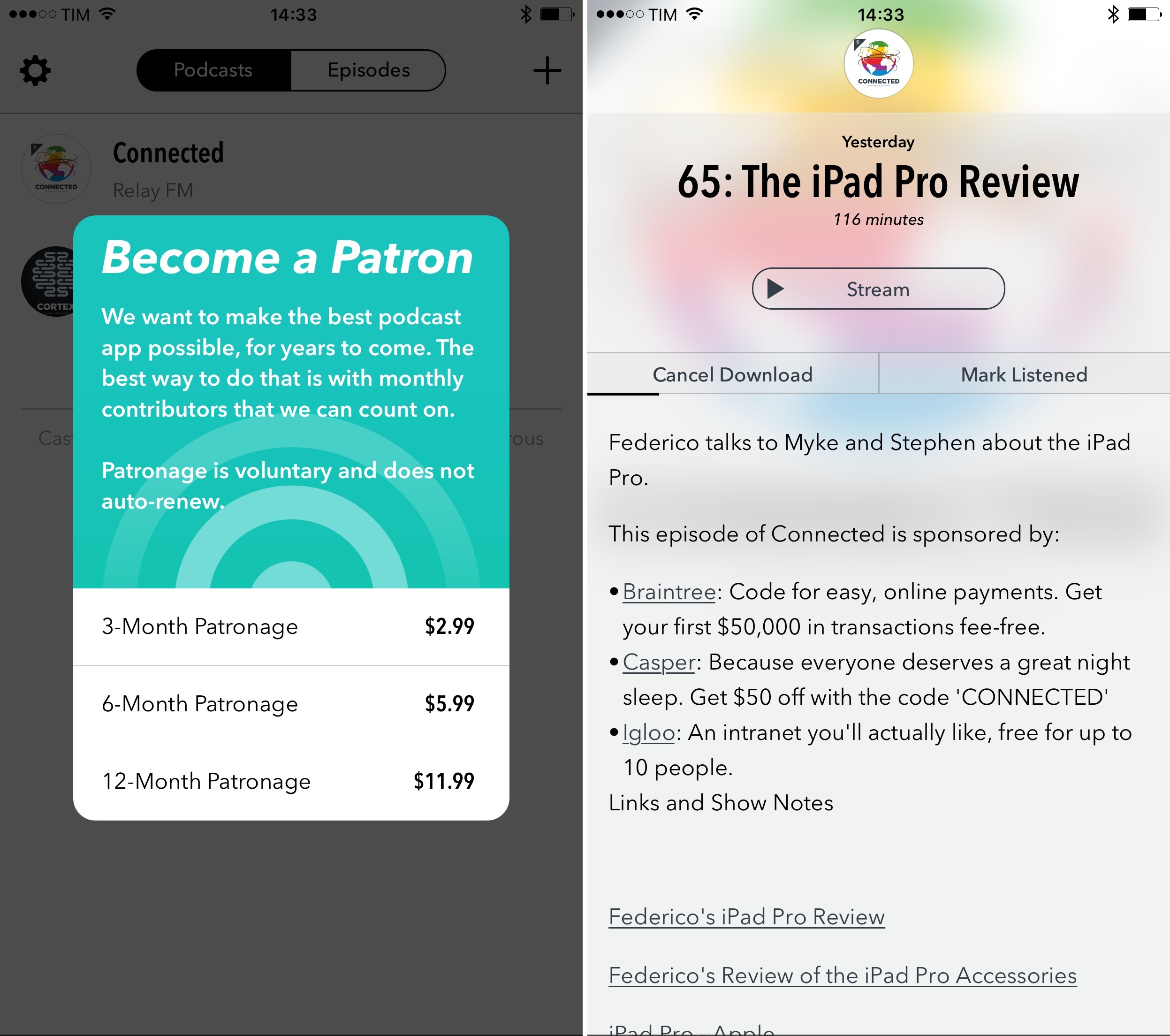
If you like Castro, please consider becoming a patron by contributing $1/month. You will support the work of a small indie app studio in a way that the standard App Store model never can. Yesterday, Supertop needed an endless stream of thousands of new customers to sustain our business. From today, we can be successful with a far smaller number of much happier customers. We can offer better support. We can add new features more often, instead of holding them back for splashy major releases. In other words, we can do the things that indies do best.

The patronage options are 3, 6 or 12 month bundles that don’t auto-renew. We know that this model will only work out for us if you love the app enough to voluntarily choose to pay, so there will be no sales-y notifications or nag screens. Castro 1.5 adds a small note at the bottom of the two main screens and a button in settings to invite users to become patrons.

With this model, the entire app has gone free – no features have to be purchased separately, and patronage is tastefully advertised at the bottom of the main podcast list. There are no annoying alerts or nagging prompts to sign up.

In addition to patronage, Castro 1.5 has been updated with 3D Touch support, Safari View Controller, and Spotlight search. The latter is a nice addition as a lot of podcast apps don’t support it, but I wish Castro could also index titles of links from show notes (at least it doesn’t for Relay FM shows ). As you can imagine, Safari View Controller for in-app web views is pretty great in a podcast client.

Like with Overcast and other patronage-based products, I hope that users who love and depend upon Castro will consider signing up. Making money on today’s App Store isn’t easy for an indie studio, and we need to support developers who try something different to remain sustainable thanks to their audience. I hope this works out and I’m curious to see what Supertop does with Castro 2.0.

Castro 1.5 is available on the App Store.