Federico Viticci

10804 posts on MacStories since April 2009

Federico is the founder and Editor-in-Chief of MacStories, where he writes about Apple with a focus on apps, developers, iPad, and iOS productivity. He founded MacStories in April 2009 and has been writing about Apple since. Federico is also the co-host of AppStories, a weekly podcast exploring the world of apps, Unwind, a fun exploration of media and more, and NPC: Next Portable Console, a show about portable gaming and the handheld revolution.

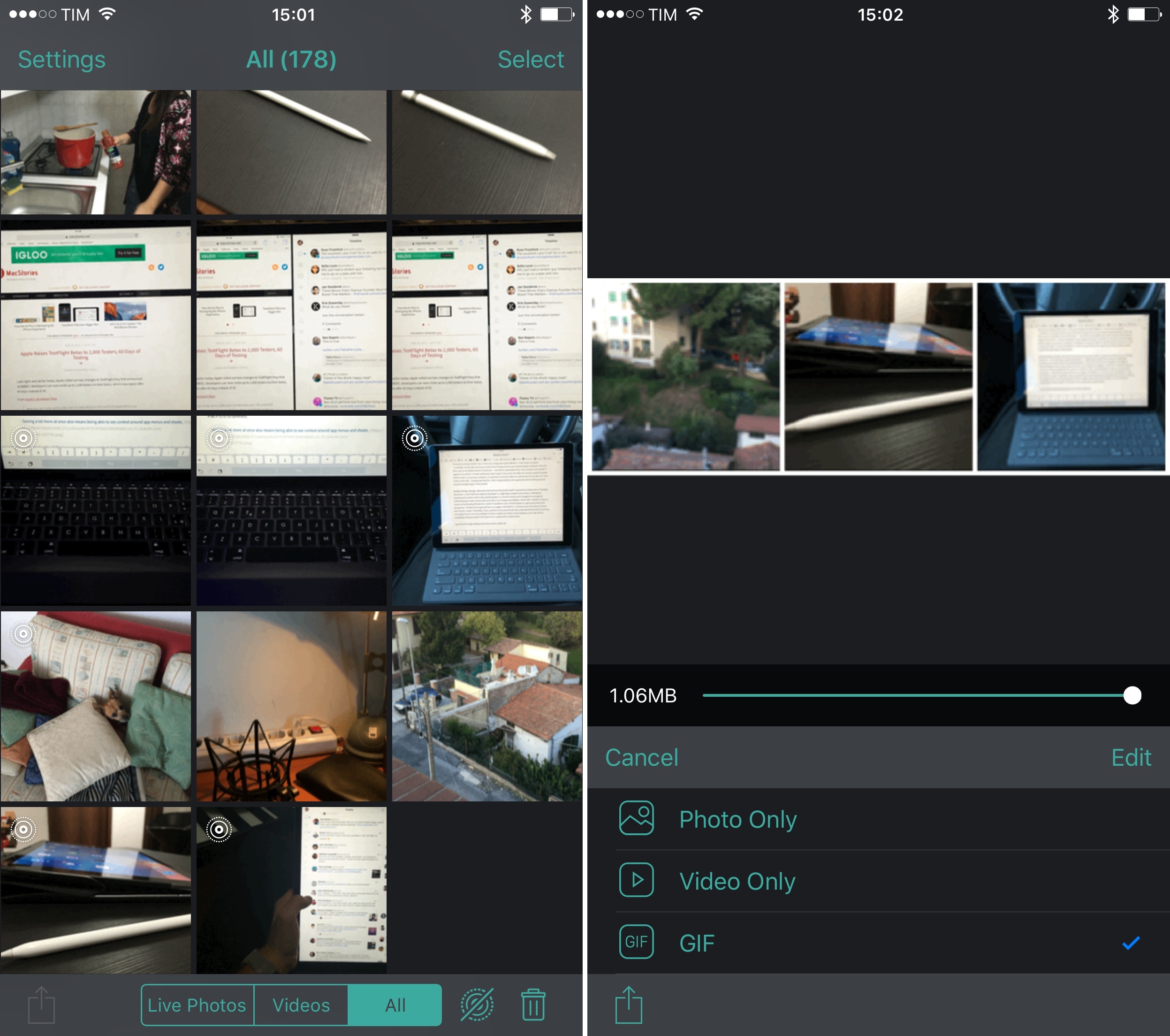
Alive Is a Full-Featured Live Photo Manager and Exporting Tool

As I’ve written before, I love Live Photos. They can capture the fleeting nature of a moment like nothing else can, and the integration with the well-known Camera UI is seamless. Unless I’m taking product shots for reviews, I always keep Live Photos enabled.

Apple doesn’t provide a lot of options to manage and export Live Photos from the Photos app, which is why third-party developers have stepped up to the challenge with dozens of utilities to export Live Photos as GIFs, clean up their videos, and more.

Alive, developed by Clean Shaven Apps (Dispatch, Due, Clips), is a new full-featured solution that combines management functionalities with handy exporting and stitching tools for Live Photos and traditional videos.

Read more


‘The Start of Something New’

Great piece by Ben Bajarin on the iPad Pro, with an important section in the middle on the mobile generation (which is often unaccounted for in a lot of product reviews):

There is truly something happening with this generation growing up spending the bulk, if not all, of their computing time using mobile operating systems and doing new things with new tools. Being the techie that I am, I was a bit disheartened that my twelve-year-old was getting more out of the iPad Pro and pushing it further limits than I was. But she is a part of the mobile generation after all. For them, the future will look quite different and the tools they use to make that future might look quite similar to the iPad Pro.

Permalink

Disney Infinity for Apple TV Offers Nimbus Controller Bundle

Sarah E. Needleman, reporting for The Wall Street Journal on Disney Infinity 3.0 for Apple TV:

The Apple TV version of Infinity 3.0 includes the pad and the usual figurines but also a wireless controller called Nimbus designed specifically for Apple’s device. It features buttons and analog control sticks that gamers are familiar with, as well as Apple’s Lightning connector. It’s made by SteelSeries, a 14-year-old company that specializes in gear for competitive gamers. The controller also works with games played on iPads and iPhones.

On its own, the Nimbus sells for roughly $50 in Apple’s retail stores. When bought as part of Infinity 3.0, it basically comes at a $15 discount. (The Apple TV version of Infinity 3.0 costs about $100; the console versions run for about $65.)

Obviously, Disney can afford to physically bundle the controller inside the game because it comes with figurines to collect and use. But if I were SteelSeries, I’d be seriously looking at more of these partnerships and discounts for high-profile games coming to tvOS – whether they have a physical counterpart or not.

Permalink

Sideloading f.lux on iOS

I know quite a few people who, upon setting up a Mac for the first time, immediately set up f.lux on it. f.lux is a free utility that changes the color of your computer’s display to adapt to the time of the day, so it’s warmer and easier on the eyes at night. I was never able to get into it (maybe because I didn’t have the patience), but many people trust it as it’s made their OS X experience better for years.

The f.lux team has built an iOS version of the app – unfortunately, they can’t release it publicly due to App Store restrictions. So, they’ve come up with a beta version that anyone can install with a free developer account and Xcode on the Mac:

Xcode 7, you can install apps directly to your iOS device with a free account from Apple. So we decided to make a beta version of f.lux for people to try.

It’s a few more steps than installing the app store, but there are plenty of harder things even on Pinterest. So, here’s how to get f.lux installed on your iOS device.

Obviously, by sideloading an app like this, you’re installing an app outside of the controlled App Store environment at your own discretion:

By loading an app this way, there are no automatic updates or bug fixes, so this version does a daily update check. If one is available, a message will appear at the bottom of the app, so you can stay up to date when we make fixes.

I’m not sure I’ll finally try f.lux this time, but it’s fascinating to see how popular this beta has become over the past 24 hours on blogs and Twitter. Imagine if, like on the Mac, Apple provided a framework to distribute and install iOS apps outside of the App Store with some security in place and a UI to manage sideloaded apps. Until a couple of years ago, it seemed obvious that it would eventually happen on iOS too.

Update 11/12

Well, that didn’t take long:

Apple has contacted us to say that the f.lux for iOS download (previously available on this page) is in violation of the Developer Program Agreement, so this method of install is no longer available.

We understood that the new Xcode signing was designed to allow such use, but Apple has indicated that this should not continue.

I assumed this would happen, and I hope we’ll see an open-source mirror on GitHub soon. f.lux has such a positive impact on lots of people (f.lux for desktop has been downloaded over 15 million times), I think Apple should work with the company to bring it to iOS as well – if only from an Accessibility standpoint.

Permalink

Connected: The iPad Pro Review

Federico talks to Myke and Stephen about the iPad Pro.

On this week’s Connected, we prepared a special episode to discuss my iPad Pro review, how I’ve been using the device for the past week, and what we expect from it going forward. It’s a good one. You can listen here.

Sponsored by:

  • Braintree: Code for easy, online payments. Get your first $50,000 in transactions fee-free.
  • Casper: Because everyone deserves a great night sleep. Get $50 off with the code ‘CONNECTED’
  • Igloo: An intranet you’ll actually like, free for up to 10 people.
Permalink


Jony Ive on the Apple Pencil

I liked this bit from The Telegraph’s Rhiannon Williams interview with Jony Ive on the Apple Pencil:

“I always like when you start to use something with a little less reverence. You start to use it a little carelessly, and with a little less thought, because then, I think, you’re using it very naturally. What I’ve enjoyed is when I’m just thinking, holding the Pencil as I would my pen with a sketchpad and I just start drawing,” he enthuses.

“When you start to realise you’re doing that without great intent and you’re just using it for the tool that it is, you realise that you’ve crossed over from demoing it and you’re actually starting to use it. As you cross that line, that’s when it actually feels the most powerful.”

Something I noticed I’ve started doing since having the Pencil: when I was editing my review, I kept playing with the Pencil as a distraction, and I even occasionally used it to highlight words on screen instead of reaching to it with my finger (the iPad Pro was held upright by the Smart Keyboard) – just like I’d normally point to something with a real pencil. It does feel familiar.

Permalink