Federico Viticci

10804 posts on MacStories since April 2009

Federico is the founder and Editor-in-Chief of MacStories, where he writes about Apple with a focus on apps, developers, iPad, and iOS productivity. He founded MacStories in April 2009 and has been writing about Apple since. Federico is also the co-host of AppStories, a weekly podcast exploring the world of apps, Unwind, a fun exploration of media and more, and NPC: Next Portable Console, a show about portable gaming and the handheld revolution.

Workflow Co-Founders Want to Bring AI to the Desktop

When I read earlier this year that Ari Weinstein, one of the co-founders of Workflow before it was acquired by Apple, had left the company, I had a feeling he’d team up soon enough with Conrad Kramer, another Workflow co-founder. I was right. Alex Heath, writing for The Verge, has some initial details on Software Applications Incorporated, the new venture by Weinstein, Kramer, and Kim Beverett, another Apple vet you may remember from the original Siri Shortcuts demo at WWDC 2018:

In their first interview since leaving Apple to start something new, the trio tells me that their focus is on bringing generative AI to the desktop in a way that “pushes operating systems forward.” While they don’t have a product to show off yet, they are prototyping with a variety of large language models, including OpenAI’s GPT and Meta’s Llama 2. The ultimate goal, according to Weinstein, is to recreate “the magic that you felt when you used computers in the ’80s and ’90s.”

“If you turned on an Apple II or an Atari, you’d get this basic console where you could type in basic code as a user and program the computer to do whatever you wanted,” he explains. “Nowadays, it’s sort of the exact opposite. Everybody spends time in very optimized operating systems with pieces of software that are designed to be extremely easy to use but are not flexible.”

An example he gives: “Sometimes you’ve got a browser window open with a schedule on it, and you just want to say, ‘add this to my calendar,’ and somehow, there’s no way to do that… We think that language models and AI give us the ingredients to make a new kind of software that can unlock this fundamental power of computing and make everyday people able to use computers to actually solve their problems.”

They don’t have a product to show yet, but I’ll say this: if there’s anyone out there who can figure out how to turn generative AI into something more than a text prompt or writing assistant for Word and Notion – something that can be truly integrated with your computer, your data, and, well, your workflow, it’s this trio. I absolutely can’t wait to learn more about what they’re working on.

Also worth noting: the company’s website (great domain, too) is a delightfully retro, emulated browser version of Mac OS 8.

Permalink


Using the iPad Pro as a Portable Monitor for My Nintendo Switch with Orion, a Capture Card, and a Battery Pack

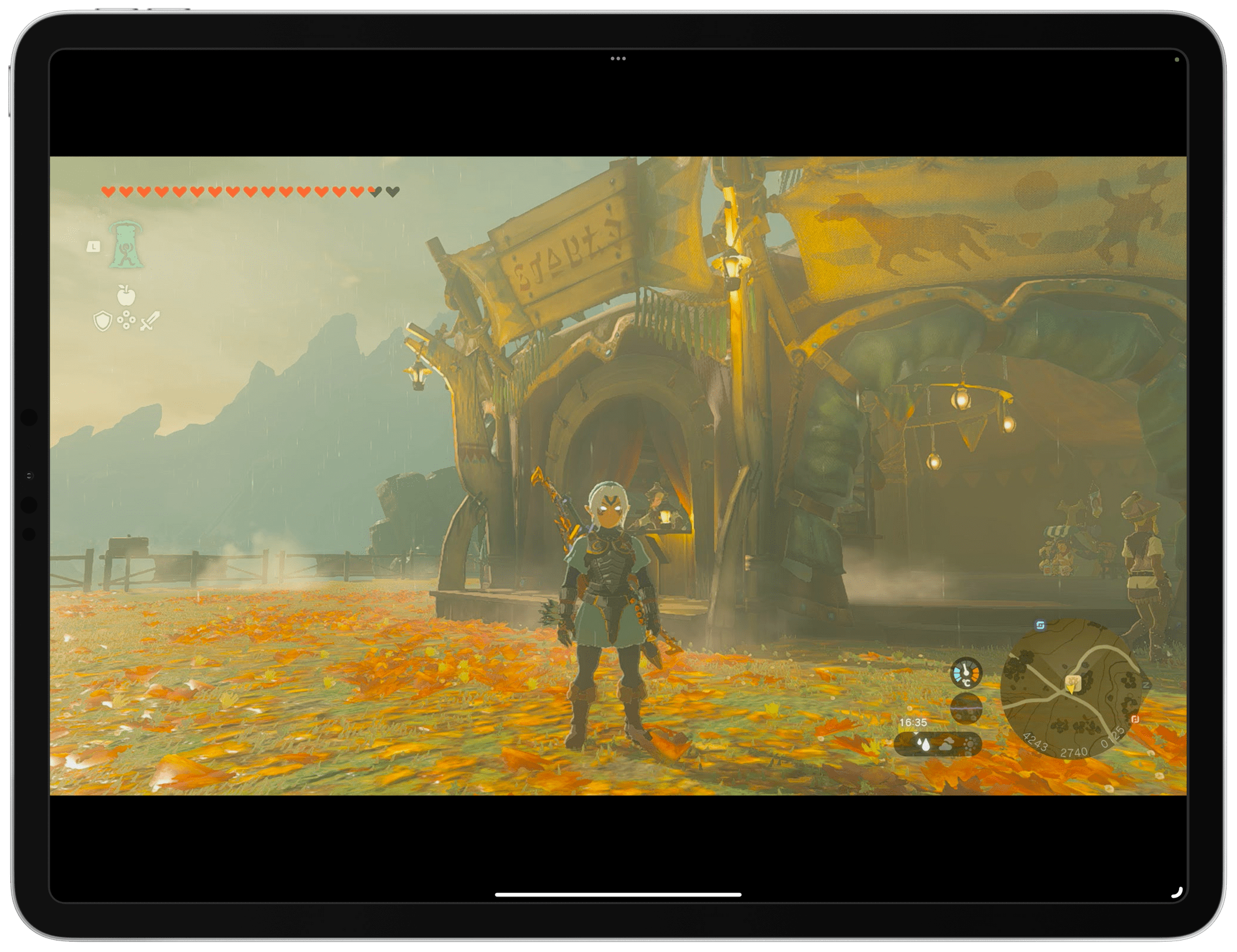
Tears of the Kingdom on my iPad Pro.

Tears of the Kingdom on my iPad Pro.

Those who have been reading MacStories for a while know that I have a peculiar obsession for portable setups free of the constraints typically involved with working at a desk or playing games in front of a TV.

It’s not that I don’t want to have a desk or dislike my 65” OLED TV: it’s that I don’t want those contexts to be my only options when it comes to getting work done or playing videogames. This is why I’ve spent the better part of my career fine-tuning my iPad-first lifestyle and why I’m so excited at the prospect of a giant screen that can always be with me. Modularity, portability, and freedom from a desk or TV are the driving factors in everything I use or buy these days.

For these reasons, it shouldn’t come as a surprise that I embraced the ability to use the iPad Pro as a portable monitor for videogame consoles thanks to UVC support. As I covered in my iPadOS 17 review, this feature was primarily conceived to let iPad users connect external webcams to their computers, but that hasn’t stopped developers from re-using the same underlying technology to create apps that allow you to display a video feed from any accessory connected via USB.

It’s a very intriguing proposition: the 12.9” iPad Pro has a gorgeous mini-LED display; what if you could use that to give yourself a little extra screen real estate when playing Super Mario Bros. Wonder or Tears of the Kingdom without having to pack a separate portable monitor with you?

In my review, I mentioned the Genki Studio app, which I used to play games with my Nintendo Switch and ROG Ally and output their video feeds to the iPad Pro’s display. Today, I want to explain how I took my setup a step further by enhancing the picture quality of the Nintendo Switch when viewed on the iPad Pro and, most importantly, how I created a fully-portable setup that allows me to play Switch games on the iPad Pro anywhere I am.

Read more


Getting Your Digital Life in Order

AppStories+ Deeper into the world of apps

AppStories Episode 359 - Getting Your Digital Life in Order

0:00
25:51

AppStories+ Deeper into the world of apps

This week, Federico and John tackle the struggle with staying organized in the face of the never-ending stream of files and other information.

Read more


The Trouble with Task Management

AppStories+ Deeper into the world of apps

AppStories Episode 358 - The Trouble with Task Management

0:00
29:38

AppStories+ Deeper into the world of apps

This week, Federico and John explore why there are so many good task managers, but none is a perfect fit with the way they work.

Read more