


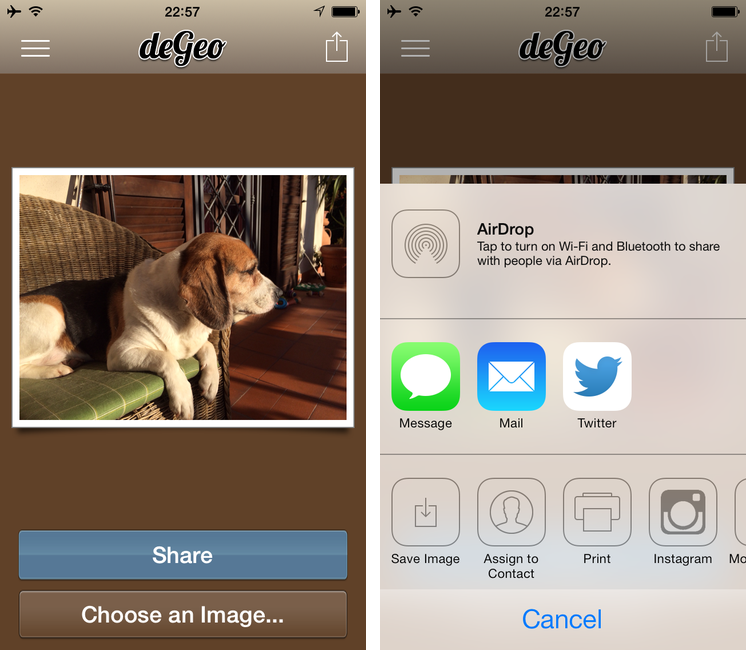
If you take pictures on your iPhone (or iPad) and you’ve allowed Apple’s Camera app to use your location, your photos will contain hidden, uneditable geotag data that are embedded in the files and that you can’t remove using system apps. Last week, I covered Photos+ by Second Gear, an alternative Photos app that allows you to view locations attached to photos through inline map views. deGeo, a $0.99 app for the iPhone and iPad, takes the opposite approach: it’s a geotag remover that lets you pick photos from your Camera Roll, clean them up to remove metadata, and share them or export them again with no location data attached.
Ken Segall On Apple’s Christmas Ad→
Ken Segall:
Most of these people mistake their personal opinion, instinct, values and/or taste for actual marketing talent. There are tens of millions of people who will stop in their tracks at this commercial and wipe a tear from their eye. As a result, they will feel slightly more attached to Apple, which is the marketing purpose of this spot.
Far from depressing, this ad is wonderfully optimistic. In the most human terms, it says that the right technology can bring people closer together. It’s a perfect thought for the holidays.
There will always be people who like to compare speeds and feeds and enjoy a commercial focused on tech specs, but Apple is going in a different direction with this ad.
Leigh Alexander’s Top 5 Video Games of 2013→
Great picks (I have to buy 868-HACK now). I particularly liked Leigh’s take on Ridiculous Fishing:
Pixelly-looking indie game with distinctive physics-oriented mechanic and chippy music goes gangbusters. Not news, anymore. But it’s hard to feel blase about Vlambeer’s success when they keep trying so hard to pay it forward. Vlambeer’s Rami Ismail is a genuine pillar of his community, sharing thoughts on competition and pitching in writing, making the Presskit() tool to help fellow devs reach the media, and showing care for colleagues in public spaces. The success of Ridiculous Fishing, at a fixed $3 price point that had no intention of experimenting with popular free-to-play models, became an important example of how the industry mustn’t leap to assume that micropayments always lead to a more valuable experience for players.
Aside from being a story with a happy ending, Ridiculous Fishing is just a good iOS game. If I had to compile a list of my must-have iOS games for 2013, Ridiculous Fishing would be my top pick.
Technical Difficulties: Scanning→
The work that Gabe, Erik, and potatowire have been doing with Technical Difficulties is top-notch: here’s a podcast that’s useful, enjoyable, and innovative in how show notes cleverly complement the audio segment.
The episode about scanning is good. I’ve probably learned more in 22 minutes and through the show notes than I have in over a year of reading blog posts on the Internet.
App Santa: Tweetbot, 1Password, Vesper, and 12 Other Great iOS Apps On Sale For Christmas

Back in 2006 and 2007, there was an initiative called MacSanta that, through a holiday sale, allowed users to buy great Mac apps at discounted prices. Today, App Santa has launched, and while the project isn’t affiliated to the old MacSanta, the core idea is the same: great, award-winning apps on sale for Christmas.
The apps included in App Santa are all for iOS devices and have been discounted up to 60% off the original price; the project is the collaboration of indie developers Tapbots, Q Branch, Contrast, Readdle, TLA Systems, Junecloud, Edovia, Realmac, and Bloom Built. These are all great apps that we’ve reviewed or mentioned in the past on MacStories, so check out the links below for the full discounts available on the App Store.
Note: If you don’t see the discounted price on the App Store yet, keep refreshing – price changes are propagating in iTunes.
- Tweetbot 3: $4.99 > $1.99
- 1Password 4: $17.99 > $9.99
- Day One: $4.99 > $2.99
- Vesper: $4.99 > $2.99
- PCalc: $9.99 > $6.99
- Delivery Status: $4.99 > $2.99
- Printer Pro: $6.99 > $2.99
- Mileage Log+: $9.99 > $4.99
- Perfect Weather: $2.99 > $1.99
- Launch Center Pro: $4.99 > $2.99
- Clear+: $4.99 > $1.99
- Screens VNC: $19.99 > $14.99
- PDF Converter: $6.99 > $2.99
- Calendars 5: $6.99 > $2.99
- Scanner Pro: $6.99 > $2.99
Amount for iPad→
I first reviewed Amount back in September when the app was iPhone-only and iOS 7 wasn’t out yet. Amount was a simple unit converter that was already compatible with the new OS and that had a nice approach to unit conversions.
Since then, developer Marco Torretta has made the app Universal and added a URL scheme to launch unit conversions from other apps. On the iPad, Amount uses a split-screen layout to organize categories and units. The number pad is a floating widget in the middle of the screen that makes it easy to enter numbers, and, because of the larger screen, you don’t have to tap and swipe as much as on the iPhone. I like it.
Amount strikes a good balance between simplicity and features, and it’s only $0.99 on the App Store.
The Prompt: Cinderella And The 9 Dwarfs→
Apple and Inter-App Sharing→
Ole Begemann writes about the dilemma Apple may be facing with adding new inter-app communication features to iOS:
I think Apple faces a real dilemma here. Any API that facilitates data sharing between apps without user interaction can easily be abused for tracking purposes, a practice Apple has opposed pretty strongly – at least in word if not in actual rejections of apps.
After Apple forced Smile to stop using the Reminders database to sync TextExpander snippets across apps, this was often mentioned as the reason behind the removal of named pasteboards (which Smile used to leverage): advertisers were abusing the system to track users.
Ole’s proposed solution is “an official sharing API that only works with user interaction”, and I agree with that idea. I have lost hope over the years and I don’t think that Apple will bring something like Automator to iOS any time soon (though I’d always accept a surprise), but adding user-controlled app sharing features would be a good start.
My idea is still the same one from May:
This is an issue that I have been pondering for years. In 2010, Chris Clark posted a prototype (powered by Briefs) of a “services menu for iPhone”, and I keep thinking that such menu could be the solution to iOS’ inter-app communication woes. I don’t see Apple moving away from the one-app-at-a-time model, but I think that allowing users to invoke a menu (either for text selection or general shortcuts) to activate actions could help in better linking apps together. The menu would be sanctioned by Apple and available with a new API, so that developers would also be able to integrate it in more classic versions of “Open In” and “Share” menus.
Furthermore, by leveraging technologies like XPC, I’d like to see Apple enabling users to do less switching back and forth between apps. Today, you can tap on “Email” buttons to bring up a Mail.app modal view that doesn’t yank you out of the current app. Imagine, with iOS 7, being able to “read this later” by tapping on a link and saving it in a Pocket popup; pasting text and links from Safari into a Pages popup of the document you are working on; or, tweeting a photo from the Camera app with a Tweetbot menu and composing a Drafts note from anywhere.
Today, Greg Pierce tweeted about a possible “OAP” (Other-App Purchase) concept, and that’s also something I’ve been thinking about. If apps could better communicate with each other, apps could become “features” to unlock. Imagine if the user could choose to save a photo to Evernote or Dropbox from any app using a Mail-like popup that doesn’t take you out of the current app. Maybe next year?
Rdio for iOS Gets New Profile Views, Sleep Timer
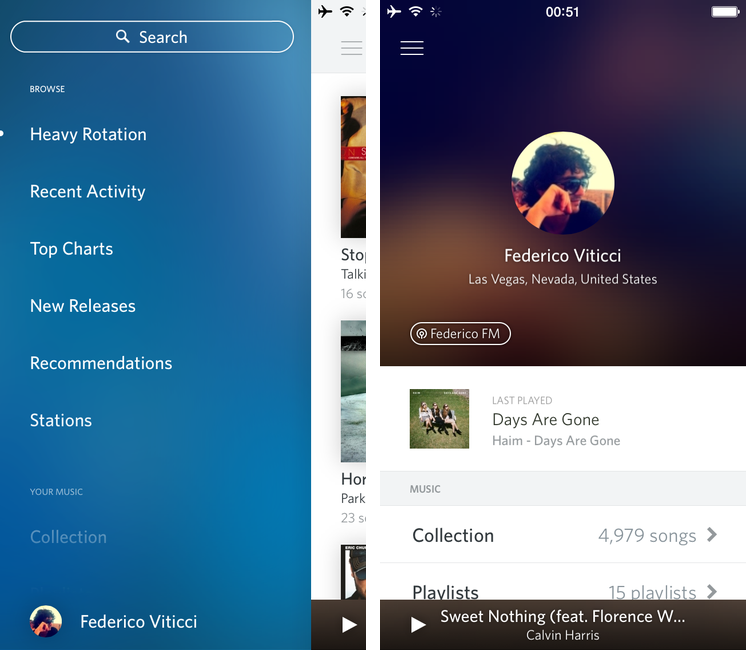
Music streaming service Rdio has today released an update to their iOS app that brings a new design for Profile views, a sleep timer, and various UI improvements for iOS 7.
The Rdio app has been regarded as one of the iOS 6 apps that, in hindsight, got the design of iOS 7 right before Apple even unveiled iOS 7, but, after the release of the OS in September, Rdio hasn’t done much to turn what was a forward-looking iOS 6 app into a real iOS 7 app. Today, version 2.5.4 shows an iOS 7 keyboard for search and it brings subtle changes to backgrounds, but otherwise Rdio hasn’t received a major redesign for iOS 7 yet.
Profiles views have been updated, showing avatars in the middle of the screen on a blurred background of the profile picture itself. The new design is available for both your personal profile and other people’s profile views, and it gives you easier access to a person’s “FM” station as well as the song they last played on Rdio.
In this update, Rdio also included a sleep timer feature: from the Settings, you can choose to automatically stop music playback after 15 to 120 minutes, which is a handy addition for people who like to put on some music before bedtime. You can get Rdio 2.5.4 on the App Store.