
Federico Viticci

10804 posts on MacStories since April 2009

Federico is the founder and Editor-in-Chief of MacStories, where he writes about Apple with a focus on apps, developers, iPad, and iOS productivity. He founded MacStories in April 2009 and has been writing about Apple since. Federico is also the co-host of AppStories, a weekly podcast exploring the world of apps, Unwind, a fun exploration of media and more, and NPC: Next Portable Console, a show about portable gaming and the handheld revolution.

Dropbox Automatic Screenshot Sharing Now Out of Beta

Back in June, we noted that Dropbox was testing an automatic screenshot sharing feature in their public beta for Mac:

The first one, an automatic screenshot sharing feature, is somewhat reminiscent of tools like Droplr and CloudApp: once enabled in the Preferences, it will allow Dropbox to redirect every screenshot taken on OS X to a /Screenshots folder in your Dropbox, sharing that file and putting a public link in your system clipboard. While not as full-featured as the aforementioned third-party tools, automatic screenshot sharing could indeed make for a nice solution to quickly share screenshots on Twitter and IM — retaining control over files that are simply located in the Finder.

Today, Dropbox has promoted the feature out of the beta channel and into the public, stable release of the app:

Starting today, all the screenshots you take can automatically be saved straight to your Dropbox. And on top of that, Dropbox will also create a link to your screenshot and copy it to your clipboard — so your picture’s instantly good to share.

The update, available here, also includes the iPhoto import tool that Dropbox started testing earlier this year.
Permalink

Simple Photo Collages with Diptic PDQ

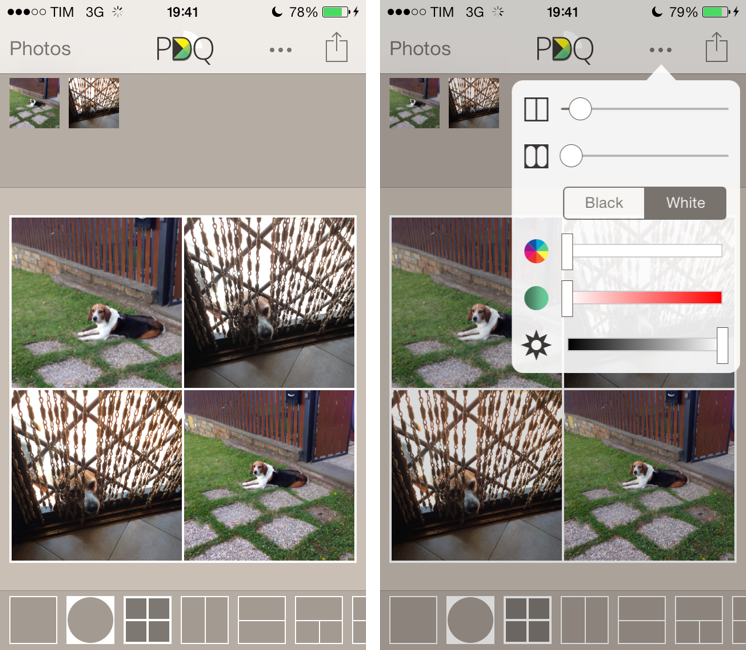
I’ve never been into the idea of sharing my photos as “collages”, especially because all the iPhone and iPad apps that promised to make it easy to assemble collages looked overly social, filter-oriented, or just badly designed. However, I recently wanted to send a photo collage of my dog to my parents, and I conveniently came across Diptic PDQ on the App Store thanks to Apple’s feature for iOS 7-ready apps. Apparently, PDQ (a Universal app) is the “lighter” version of Peak Systems’ more advanced Diptic app, which comes with all sorts of settings, textures, and In-App Purchases. I just needed to create simple collages with thin borders, so I bought PDQ and have been using it for the past week with nice results. Read more


MacUpdate Bundle

The latest MacUpdate Bundle includes 10 Mac apps and you can get it at $49.99. Normally, you’d spend $564 to get all the apps individually.

While there are many OS X software bundles these days, the MacUpdate ones always include some gems worth grabbing. In this bundle, you can get ScreenFlow 4 and PDFpen 6, among others. Both are excellent apps that I use on a daily basis – ScreenFlow was a terrific companion when I had to create videos for my Editorial review and I can’t recommend it enough. PDFpen is at the heart of my paperless system thanks to its AppleScript support (a topic that I want to write about soon).

There are only two days left to get the bundle. If you use this link, we’ll get a small kickback.

Permalink

iOS 7 and Enterprise Improvements

Ryan Faas has published a good overview of the changes Apple made for enterprise distribution and MDM in iOS 7. A key aspect:

From an administrator’s perspective, the new model works very similar to what’s been around for decades - single source software licensing coupled with network-based deployment tools. From a user perspective, it’s extremely similar to the consumer App Store system.

Read the article here.

Permalink

Rdio Brings Recommendations Back

From the Rdio blog:

Hot on the heels of our Stations launch, we’ve built Recommendations as another great means of effortless music discovery. Powered by technology from The Echo Nest, the new feature provides a steady stream of new music recommendations — including albums, stations, and playlists — based on what you listen to most and who you’re following.

I’ve long wished for Rdio Recommendations to come back, as I think they used to a great way to find new music in the Rdio 1.0 days. Rdio has changed in the past two years, and the need for Recommendations was partially obviated by Your FM and stations. However, I’m looking forward to seeing if the dedicated section will be as good as the original one used to be – particularly in how it should recommend entire albums and stations.

According to Rdio, Recommendations will be added to the iOS app “soon” – hopefully alongside an update for iOS 7.

Permalink

Logacal: A Smarter Visualization Of Calendar Events

Logacal

Logacal

In the past few months, I’ve been obsessed with finding the best Calendar and Reminders clients for my iPhone and iPad. While I wouldn’t call myself a calendar power user, I do rely on iCloud Calendar to organize my daily appointments and events that require my complete attention, and I’ve been lured by the simplicity and immediacy of Reminders. As I noted in my article on living with iOS 7, I’ve also been liking the OS’ new Today view in Notification Center, which gives me a summary of all the things – events or reminders – I have to do today.

I don’t like calendar apps that are limited by old rules defined by physical calendars. For instance, what’s the point of showing a full month with past events when our devices know what the current day is? Why showing empty days in views that should list upcoming events? Our devices have a little, powerful silicon brain inside them, and yet so many calendar apps – supposedly, digital assistants for the modern age – are still stuck with concepts and metaphors of two decades ago. This is a topic that other smart people have also touched upon in the past, and I recommend reading this piece by Jason Snell.

Earlier this week I was browsing the App Store and I came across Logacal, a $2.99 iPhone app developed by Czech developer Pavel Doležal. I was intrigued by the app’s clean iOS 7 design and description:

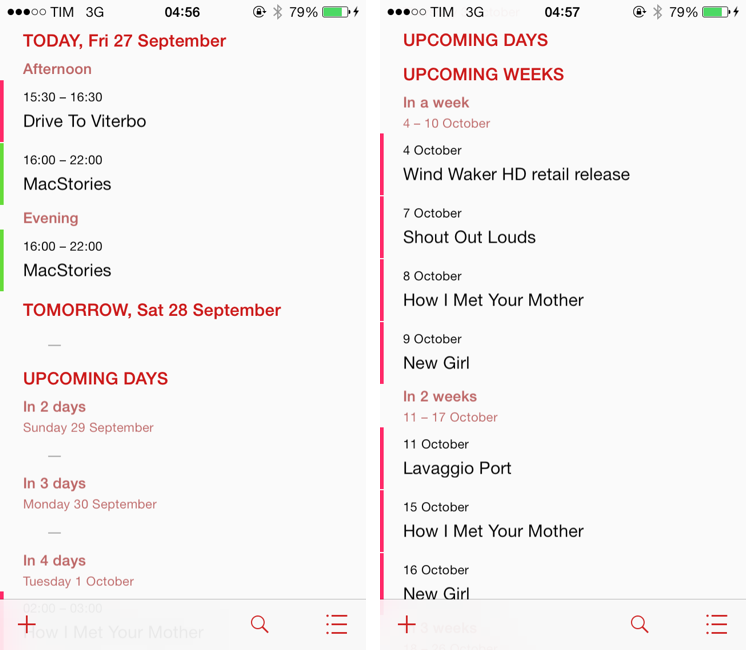
Unlike traditional month, week or day-based calendars, Logacal doesn’t split time equally, but instead depending on how far in the future it is.

And:

Its design is vastly inspired by logarithmic scale that enables you to see and manage your calendar in a very natural and intuitive way.

Now, I’m no expert of logarithmic scales and other high level mathematical theories, but I’m good enough at clicking the Buy button in iTunes and doing some reading on Wikipedia. Apparently, some of our senses operate in a logarithmic fashion, and Pavel’s idea was to represent future days, weeks, months, and years on a scale that gets less granular as you move further in time. Read more


Steve Streza On Discounted App Upgrades

But people have no right to complain about an update that costs 99 cents/$2/$3/etc. when their iPhone cost hundreds of dollars!

This privileged point of view comes from people who love supporting developers and who have spare money. And while it’s noble, it doesn’t reflect how most customers think about apps. The toothpaste isn’t going back in the tube here; people are now used to free and cheap apps with updates. Your app isn’t why they bought an iPhone; it’s an accessory, one that can be discarded as easily as an iPhone bumper.

Steve Streza makes a compelling argument against the theory that Apple should allow paid upgrades on the App Store. The reality that Steve describes – apps as cheap, replaceable accessories – is sad and harsh, but true. None of my friends “care” about particular apps or developers – they just want their problems solved and their entertainment taken care of.

That said, paid upgrades or not, I hope that developers of fine, well-crafted apps will continue to find ways to stay in the business – perhaps by catering to a smaller audience that doesn’t mind paying more and more often.

Permalink

Evernote Essentials 4.0

Speaking of Evernote news, my friend Brett Kelly released version 4.0 of his Evernote Essentials eBook today. Brett’s book provides, in my opinion, the best introduction to Evernote for anyone who’s always been curious to try it as it covers all the basic and advanced features of the service.

In version 4.0, Brett also added a chapter called “How I Use Evernote” that includes practical examples of how he relies on Evernote to organize his life, and I can’t wait to read it. I’m also looking forward to the next update to the book, which should cover the major redesign of Evernote for iOS released last week.

Get the book on the iBookstore.

Permalink