Federico Viticci

10804 posts on MacStories since April 2009

Federico is the founder and Editor-in-Chief of MacStories, where he writes about Apple with a focus on apps, developers, iPad, and iOS productivity. He founded MacStories in April 2009 and has been writing about Apple since. Federico is also the co-host of AppStories, a weekly podcast exploring the world of apps, Unwind, a fun exploration of media and more, and NPC: Next Portable Console, a show about portable gaming and the handheld revolution.

Twitter for iOS Adds DM Sync, Twitter for Mac Updated with Connect Timeline

In an update released today, Twitter brought direct message sync to its official iOS app. As explained by the company in the release notes, reading a DM in Twitter for iOS will now automatically mark it as read in Twitter for Mac, the Twitter website (both desktop and mobile versions), TweetDeck, and Twitter for Android.

It’s not clear whether DM sync will ever be made available for third-party developers through the API; right now, it’s a nice plus for users who receive several direct messages on a daily basis and use the official Twitter apps. It’ll also be interesting to see if Twitter will eventually consider syncing timeline position across apps – something that third-party apps like Tweetbot and Twitterrific are capable of using solutions like iCloud or Tweet Marker.

Twitter for Mac has also been updated to version 2.3 today, adding a Connect timeline for viewing tweets that have been retweeted or favorited, as well as new followers. Interactions can be viewed with notifications in real time, and the app also supports DM sync.

Last, in a blog post, Twitter details the search improvements they’ve made to simplify user discovery and retrieve new tweets:

For Android, iPhone, iPad and mobile.twitter.com, we’re making more improvements to search results. Now when you search for people on Twitter, you may see an expanded user result that shows a full bio. This account preview makes it easier and faster to find and learn more about the accounts you’re looking for. And if you swipe the preview to the left, you’ll find similar accounts –– for example, if you search for the MLB, you’ll see suggestions for ESPN, Ken Rosenthal, and other MLB-related accounts. Additionally, a new in-app indicator in search results will show you when there are new Tweets for your query, making it easier for you to stay up to date on the latest Twitter conversation.

Twitter 5.8 is available on the App Store; Twitter for Mac 2.3 is available on the Mac App Store.
Permalink

Apple Celebrates 5 Years of App Store With Free App Promotion, Timeline

Ahead of the App Store’s fifth anniversary on Wednesday, July 10, Apple has launched a new promotion that includes five “groundbreaking” iOS apps and five “landmark” iOS games; these apps will be available for free for a limited time to celebrate the first five years of App Store. Apple has posted an official page with links to download the apps and games on iTunes.

From the 500 apps available at launch in 2008 to the more than 900,000 at your fingertips today, it’s been a remarkably prolific five years for the App Store. To celebrate, we’re giving everyone five landmark games and five groundbreaking apps for a limited time. Plus, look back at the key moments that have made the App Store the world’s most innovative destination for apps.

The apps and games picked by Apple include Day One (a journaling application with an OS X counterpart that was named “Mac App of the Year” in 2012), award-winning game Badland, Infinity Blade II, Superbrothers: Sword and Sworcery EP, Over, and Traktor DJ. Read more


Enhancing Reminders with AppleScript and Macros

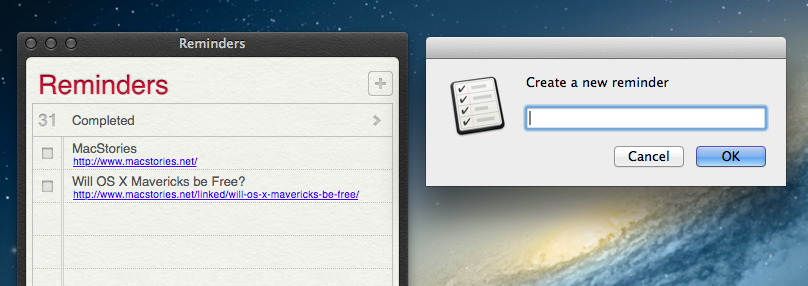
As The Omni Group keeps working on OmniFocus 2 for Mac and Apple continues seeding new betas of iOS 7 and OS X Mavericks to developers, I have been reconsidering Reminders’ simplicity and enjoying the built-in iCloud sync, which, unlike other types of iCloud, is working fine for me. However, two things I miss from OmniFocus are the possibility to integrate the app with a web browser through bookmarklets and the system-wide Quick Entry panel; I use both tools on a daily basis to easily save a browser’s tab into OmniFocus’ Inbox, or to bring up a text field where I can jot down an idea and know that, no matter the app I’m using, it’ll be saved into OmniFocus. Luckily for me, Apple’s Reminders app comes with a good AppleScript Dictionary, which is likely something that Reminders’ core mainstream audience won’t ever care about, but that we can leverage to extend the app’s capabilities and input areas beyond Mountain Lion’s leather-and-paper window.

Read more


Automating Mail Signatures and Senders with AppleScript and Keyboard Maestro

Mail Keyboard Maestro

Mail Keyboard Maestro

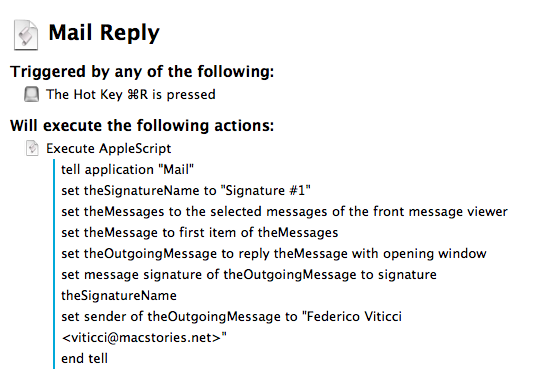
I’m aware of the fact that it’s a common trend to call email a “nightmare” these days, but the truth is – email works for me. I have multiple addresses set up, I have my filters and smart folders to automate the process of filing and finding emails, and I’m enjoying the renewed interest of iOS developers in building email apps that solve old problems in new ways. But there is one thing I don’t like: Apple’s Mail app and how many clicks it takes to switch between configured accounts and signatures. As you can guess, I came up with a way to automate the process using AppleScript and (optionally) Keyboard Maestro.

I receive several messages every day to different email addresses, but I always want to reply with the same address and the same signature. Apple’s Mail app makes it easy to see all messages sent to all accounts with the unified Inbox, but it makes it surprisingly hard to set default accounts and signatures that should always be treated as, well, default ones. I don’t want to click on menus for accounts and signatures: I want to hit ⌘R and receive a new Reply window with the account and signature I want already set. Read more


Apple’s Poster Celebrating 5 Years of App Store

Ahead of the App Store’s fifth anniversary on July 10, Apple has sent tech reports a celebrative poster with a timeline of the App Store from 2008 to 2013. The Financial Times’ Tim Bradshaw received a copy and posted a photo (via MacRumors).

Two things stand out to me: Apple’s focus on third-party apps and games in the poster, and how much quicker downloads have been growing in the past year. It’s also nice to see the original Instagram icon in there.

It’ll be interesting to see if Apple will post an interactive “5 Years of App Store” page as they did with iTunes (when they also sent celebrative items to the press).

Permalink

“Jobs” Poster Debut

Moviefone:

“Some see what’s possible, others change what’s possible” are the words sprawled across this exclusive poster for “Jobs,” which features a nearly unrecognizable Ashton Kutcher.

Kutcher is utterly transformed into late Apple co-founder Steve Jobs in the colorful new poster (below). Sporting Jobs’s signature round-framed glasses and beard, the actor certainly looks the role.

The movie’s poster focuses, unsurprisingly, on Kutcher, whose resemblance to Steve Jobs is almost uncanny in some shots (shown so far). But as I (briefly) argued last week on The Prompt, I worry that, with such a strong visual resemblance, Kutcher’s voice will break the illusion.


Permalink

Oh Hai

So ‘Oh Hai’ was the eventual outcome. It makes use of iOS face detection and to address our bugbear, we removed the need to interact directly the photo by including two sliders (one for eyes and the other for the mouth). These enable fine adjustments to be made with a complete and uninterrupted view of the results. The final working version was technically finished after more or less three days of work.

A simple, fun app by ustwo. I tested it over the weekend, and it does exactly one thing, quite well, with a straightforward design. The iOS face detection technology behind it is smart and accurate. Free on the App Store.

Permalink