Federico Viticci

10804 posts on MacStories since April 2009

Federico is the founder and Editor-in-Chief of MacStories, where he writes about Apple with a focus on apps, developers, iPad, and iOS productivity. He founded MacStories in April 2009 and has been writing about Apple since. Federico is also the co-host of AppStories, a weekly podcast exploring the world of apps, Unwind, a fun exploration of media and more, and NPC: Next Portable Console, a show about portable gaming and the handheld revolution.

Apple’s Desktop Pictures

The public unveiling of each new version of Mac OS X has brought a new default desktop picture, and a new hunt to find a full-res copy of that wallpaper before the official release. The introduction of OS X Mavericks was no different, only this time instead of a space-themed galaxy or nebula, Apple decided to bring Mac’s default look and feel back to earth.

Thomas Brand takes a look back at Apple’s history with Mac OS and OS X default desktop pictures.

Permalink


Reeder 3.2 Brings Feedly, Feed Wrangler Sync

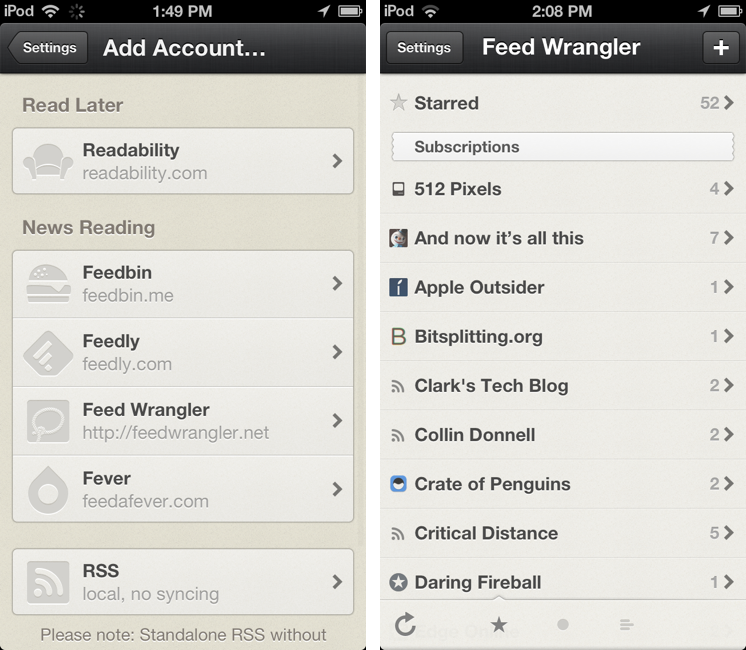
As announced last month, an update to RSS client Reeder for iPhone has been released today on the App Store, adding support for Feedly and Feed Wrangler. Arriving just in time for Google’s shutdown of Reader, the latest Reeder update for iPhone brings the app’s supported sync services to four (previously added Feedbin, Feedly, Feed Wrangler, and Fever) and removes Google Reader from the “Add Account” screen (existing accounts won’t be deleted from the app).

Feedly and Feed Wrangler integration in Reeder is solid, but it lacks some features. While I have been generally happy with Reeder’s speed in syncing with Feedly and Feed Wrangler, the app lacks support for Smart Streams – a key functionality of Feed Wrangler that’s already supported by clients like ReadKit and Mr. Reader. To access Smart Streams on the iPhone, my recommendation still goes to Feed Wrangler’s official app, which may not be as polished as Reeder, but that works perfectly with the service’s Smart Streams.

Reeder, a longtime MacStories favorite, is moving into the post-Reader era with an iPhone update that should work for most people and major iPad and OS X updates on the horizon. Developer Silvio Rizzi hasn’t provided a release date yet, but he announced the iPad version will be a completely redesigned app. Due to the lack of compatibility updates, both Reeder for iPad and Reeder for Mac have been removed from the App Store.


Apple Announces Q3 2013 Conference Call for July 23

Apple’s third quarter earnings report and conference call will take place on July 23rd, 2013, according to an Investor Relations update on Apple’s website first noted by 9to5mac. Apple will provide a live audio webcast of the event.

Apple plans to conduct a conference call to discuss financial results of its third fiscal quarter on Tuesday, July 23, 2013 at 2:00 p.m. PT / 5:00 p.m. ET.

In the second quarter (which ended on March 30, 2013), Apple posted revenue of $43.6 billion. The company sold 19.5 million iPads, 37.4 million iPhones, and  ”just under” 4 million Macs, earning a quarterly net profit of $9.5 billion. The company ended the quarter with a cash balance of $145 billion.

In April, Apple posted its guidance for the third quarter, with revenue set between $33.5 billion and $35.5 billion and operating expenses between $3.85 billion and $3.95 billion. During the quarter, Apple hit the milestone of 50 billion apps downloaded from the App Store, introduced a new low-end iPod touch, and held its annual Developers Conference in San Franisco, where it released an updated line of MacBook Airs and announced new versions of iOS and OS X coming this Fall. Apple also previewed the new Mac Pro, a completely redesigned new machine coming later this year.

In the year-ago quarter, Apple posted revenue of $35 billion, with 17 million iPads, 26 million iPhones and 4 million Macs sold. Last year, Apple held its Q3 2012 earnings call on July 24, and released OS X Mountain Lion on July 25. Apple’s Q3 2013 call will provide insight into sales of the iPhone and iPad over the past months, which lacked updates to both lines. On July 23, the iPhone 5 will reach the 305th day of its cycle, and the iPad mini its 263rd.

We will provide live updates from the conference call on our site’s homepage on July 23rd starting at 2 PM PT.


Search For Rdio Lyrics with Keyboard Maestro

Macro

Macro

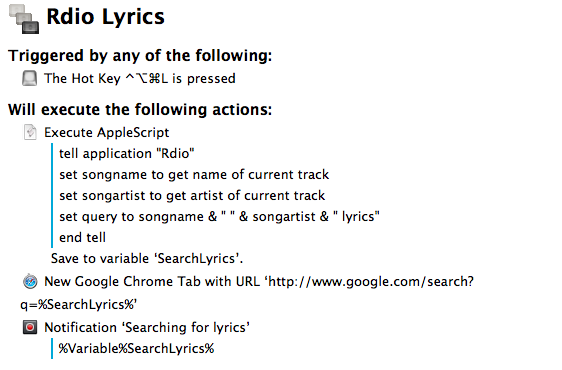
In spite of the existence of various Mac apps to display lyrics of a song that’s currently playing in iTunes or Rdio, I often find myself having to manually look them up through a web browser. It’s not uncommon to see a dedicated lyrics app being unable to fetch lyrics for a certain song, and, unsurprisingly, that always seems to happen when I’m in the mood for learning new lyrics. Having to Google lyrics and type a song’s name is a tedious process that ought to be automated, so that’s what I did. Read more


Change

Matt Alexander has a good piece on the hypocrisy behind some people’s reactions to iOS 7:

One of the most trite and oft-spoken philosophies in the technology world — originating from hockey’s Wayne Gretzky and popularized in our community by Steve Jobs in 2007 — is that companies ought not to skate to wear the puck is, but where it will be. That is what both Apple and Microsoft have sought to do in recent weeks.

We responded, however, with premature dismissals and cries that our technology is changing.

It’s embarrassing.

And Harry Marks has some solid counterarguments, but especially this bit:

Apple may or may not pay attention to the complaining about the icons in the beta. It may or may not read all the scathing editorials about how Helvetica Nueue Light was the wrong font choice because something something zzzzzz…sorry, I dozed off for a second. What it will do is make iOS better. It will change the way we use our phones and tablets whether we like it or not.

So, you can either upload your alternate stock icon designs to Dribbble, or you can adapt your app to better suit the coming change. Which will it be?

Permalink


Quickly Append Browser URLs To Evernote with Keyboard Maestro

I often come across webpages and interesting links that I can’t check out right away, but that I also don’t want to send to Instapaper, Pinboard, or my OmniFocus inbox. They are, put simply, “stuff to check out”; I append these URLs to an Evernote note carrying the same name:

Macro

Macro

As I detailed in my review of Drafts 3.0 for iOS, appending text from an iPhone or iPad is easy with Agile Tortoise’s app and a combination of Evernote actions and browser bookmarklets, but I had to think of an equally straightforward workflow for the Mac. Unfortunately, the lack of a Drafts app for OS X forced me to resort to AppleScript to achieve the same kind of functionality, but the deal was (partially) sweetened by the new features introduced in Keyboard Maestro 6.0, released back in May.

Read more


Feed Wrangler’s Smart Streams

Shawn Blanc:

Anyone who has been subscribing to RSS feeds for longer than a few months will know your subscription list regularly needs pruning and adjusting. Well, I want my RSS reader to help me with that task. Smart Streams can help by making it easier to wrangle my feeds based on more than just which website they came from. I expect in the long run that they will prove very accommodating and useful as my interests change and as my attention ebbs and flows.

A good overview of Feed Wrangler’s best feature. I’ve been using Feed Wrangler since April and I’m very happy with it.

Permalink