
Federico Viticci

10804 posts on MacStories since April 2009

Federico is the founder and Editor-in-Chief of MacStories, where he writes about Apple with a focus on apps, developers, iPad, and iOS productivity. He founded MacStories in April 2009 and has been writing about Apple since. Federico is also the co-host of AppStories, a weekly podcast exploring the world of apps, Unwind, a fun exploration of media and more, and NPC: Next Portable Console, a show about portable gaming and the handheld revolution.

The Market for Paid iOS Apps

Marco Arment:

I haven’t always used these particular apps to solve these problems, but it takes a lot to change my mind on one. If you make another RSS reader or Twitter client, there are certainly a lot of people who could use it, but you’ll need to compete with very mature, established apps. Competing in these categories isn’t about price: it’s about relevance and attention. If you can’t find enough customers here, it’s probably not because you’re charging $2.99 instead of $1.99 or $0 — it’s because your app isn’t convincing enough people that it’s worth using over the alternatives.

This is also the same problem I run into every time I’m sent new apps to review: is this going to be better than Tweetbot, Fantastical, or Drafts for my workflow? Should my readers know about this app even if I won’t use it every day? How do I balance the expectations of my readers, who want to know about new apps, with my personal opinions and workflow preferences?

I’ve thought deeply about this, and I concluded that, ultimately, my readers prefer honesty over quantity of mediocre app discoveries. When a new app comes around and it improves substantially on my workflow, they deserve to know about it. From my perspective, I have chosen to remain curious while having high standards for the apps I’m interested in.

From a developer’s standpoint, I agree with Marco’s article. The 2013 app market is fine if you have the right idea, executed well at the right time. In four years of writing this site – it was launched 9 months after the App Store – I’ve learnt this: people like new apps, but they expect a certain degree of quality and functionality from modern iOS apps.

Again, like Marco says, the bar is higher today. But it doesn’t mean developers can’t still raise it.

Today, the App Store has other problems.
Permalink

iPad and MacBook Running Nintendo DS Game with OpenEmu

Cool demonstration of the capabilities of OpenEmu for OS X using the iPad as a second monitor. (via)

I’m looking forward to OpenEmu, which is still in private beta (though you can compile the source). I haven’t played my old GameBoy and SNES games in years, but, in the light of recent Nintendo announcements, I’d like to play them on a computer today. OpenEmu is promising:

Open Emu is an open source project to bring game emulation to OS X as a first class citizen, leveraging modern OS X technologies such as Cocoa, Core Animation and Quartz, and 3rd party libraries like Sparkle for auto-updating. Open Emu is based on a modular architecture, allowing for game-engine plugins, this means Open Emu can support a host of different emulation engines and back-ends while retaining a familiar OS X native front-end.

From what I’ve seen so far, OpenEmu will support both hardware controllers (with lots of configuration options) and software solutions like Joypad (which we reviewed).

Matt Gemmell had an excellent article a while back on playing Nintendo games on a Mac, with lots of great photos as well.

Update: In case it wasn’t clear enough, we don’t condone piracy here at MacStories. Either for apps or games, don’t be greedy. Support developers and buy original games. As Matt also says, most second-hand consoles and games are cheap on eBay these days.

Permalink

Iconic Bites by Susan Kare

Recognizable to almost anyone who has used a computer, Susan’s art helped make early computers user-friendly and fun and bridged the divide between humans and modern technology. Here she talks to us about how her rich experience as an illustrator has colored her designs for the Path Shop.

I don’t use Path, I don’t get the appeal of this recent “stickers” trend in social networking apps, but these show that Susan Kare’s still got it.

For more Susan Kare-related reading, I recommend this article from late 2011 and this page on Susan’s website. I’ve always liked this quote from a 1996 interview with The New York Times:

I tend to think of icons more like traffic signs than as illustrations. It’s much more successful if it is simple.

Permalink

The Floating-Over-Everything Button

Dan Frommer:

And it feels a bit more futuristic than the old nav-bars-of-square-buttons, in a Minority Report/Google Glass sort of way. Eventually, there might be a bunch of buttons hovering over our field of vision, on our car windshields, eyeglasses, wherever. This simulates that heads-up display effect.

Design trends come and go: some of them stick around, others are popular for a while but then slowly disappear as designers figure out better solutions. Remember when, after Instagram 1.0, dozens of apps started using large buttons in the middle of a toolbar? Or when pull-to-refresh could be seen in all sorts of designs?

Trends subside with time: new ones come out and gain traction, old ones re-surface with refreshed implementations. In the past few months, there seems to be a comeback of fun, entertaining pull-to-refresh animations after Apple’s default take with iOS 6. Two examples: Twitterrific 5 and the just-released Twitter Music.

The iOS ecosystem is now mature enough that we can recognize specific design patterns evolving and changing with time. I agree with Dan’s conclusion.

Permalink

Slugline

New screenwriting app for OS X by Stu Maschwitz. I like how Jonathan Poritsky briefly describes it:

Slugline allows you to write in Fountain while making your script look like a formatted screenplay. It’s like Final Draft without all the headaches. It’s magic. And since your documents are always in plain text, you can take them with you anywhere.

Fountain is, of course, the plain text syntax for writing screenplays inspired by John Gruber’s Markdown. I don’t write screenplays, but I’m aware of the alternatives that already exist on the market (namely, Final Draft). Slugline, from what I see, looks like a mix of FoldingText and traditional screenwriting software: it’s got automatic formatting of plain text for screenplay documents, deep OS X integrations, and a rich preview that, however, is still based on a plain text file. I also like the Outline view, which more Mac text editors should support. Plus, even John August seems to like this app.

Slugline is available for $39.99 on the Mac App Store. You can watch the promo video below.

Permalink

Sublpress - Sublime Text WordPress Plugin

Interesting work by Nicolas Dienstbier:

Sublpress is a Sublime Text WordPress Plugin that allows you to remotely manage many WordPress 3.5 installations from within Sublime Text. The mostly quick panel based system allows for managing settings, posts(and custom post types), pages and taxonomy terms of a WordPress blog.

I use Sublime Text 2 as a Markdown text editor every day, and I’m intrigued by this plugin. Once I’m done with a post in Sublime, I fire up Marked, hit CMD+Shift+C to copy the HTML code, and go to WordPress to post it. With Sublpress, I could do the posting directly from Sublime, so I’ll make sure to check it out.

Sublpress works with both Sublime Text 2 and 3. You can find it on GitHub (via Brett on Pinboard).

Permalink

Facebook SDK 3.5 for iOS

Some nice updates for developers who integrate Facebook functionality in their iOS apps. A new native Share Dialog, with support for photos like the iOS 6 Share Sheet, will be available in beta today:

The native Share Dialog is simple to integrate and significantly improves people’s sharing experiences from your native mobile app. It has built-in support for publishing Open Graph actions. In addition, people now have the option to share activity from apps through this dialog without needing to login to Facebook first. This makes it faster and easier for people to share.

The data and publishing permission dialogs look good as well. Facebook says they’re 20% faster, too.

Permalink

Thoughts On Twitter #music

Music

Music

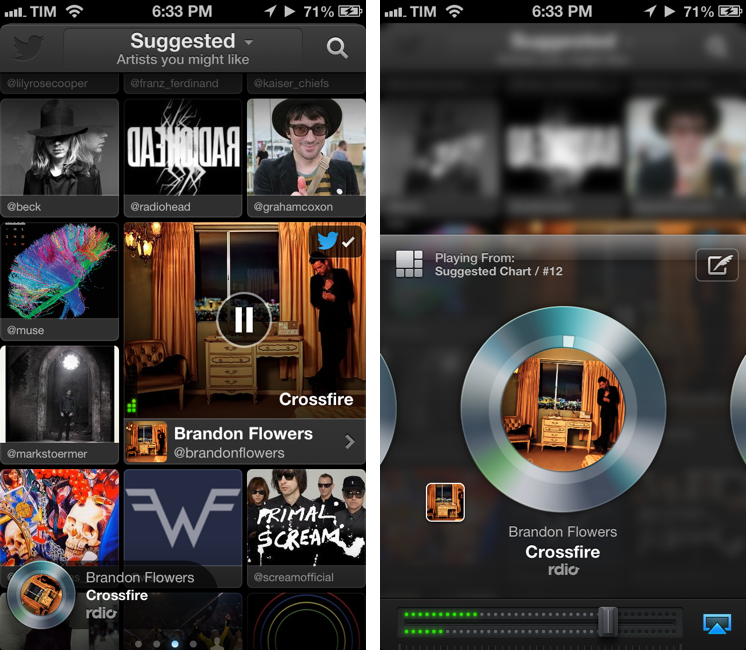
Earlier today, Twitter released its official #music app.[1] This first release, like Vine before, is iPhone-only with a web counterpart. I believe that Music, more than Vine, can give an indication of the direction Twitter may take in regards to its media strategy. But first, I’d like to highlight two excerpts from Twitter’s blog post announcing Music:

Twitter and music go great together. People share and discover new songs and albums every day. Many of the most-followed accounts on Twitter are musicians, and half of all users follow at least one musician. This is why artists turn to Twitter first to connect with their fans — and why we wanted to find a way to surface songs people are tweeting about.

Today, we’re releasing Twitter #music, a new service that will change the way people find music, based on Twitter. It uses Twitter activity, including Tweets and engagement, to detect and surface the most popular tracks and emerging artists. It also brings artists’ music-related Twitter activity front and center: go to their profiles to see which music artists they follow and listen to songs by those artists. And, of course, you can tweet songs right from the app.

“Tweets and engagement” are key factors of the algorithm Twitter is using to “detect and surface” tracks, both popular and emerging. The fact that half of all users (active or not) follow at least one musician on Twitter is an important metric to keep in mind. Read more


Yahoo Releases New Weather and Mail Apps

Casey Newton:

Yahoo Weather represents one such attempt to delight users into giving the rest of the company’s products a try. Meteorology has been a strength for Yahoo, which has provided data for the default weather app for iPhone since it came out in 2007. But Apple’s weather app has evolved very little over the years, and Yahoo decided to build a new app that emphasizes photos over text. Open Yahoo Weather in big cities around the world and you’ll see sharp, high-resolution images that have been gathered from Yahoo-owned Flickr. The app displays different photos based on location, weather conditions, and time of day.

Nice updates by Yahoo, which seems to be iterating faster than ever with Marissa Mayer at the helm. The new Weather app uses a photo background fetched from Flickr, with clean font and icon overlays for weather information. For my location, the app can only fetch one photo; interestingly, weather data for forecasts is provided by Wunderground.

There are several nice touches in the app. Information is laid out vertically, and as you swipe the background is slightly blurred to put the focus on weather data. There’s no pagination, and the only screen that snaps into view is the first one; at the very bottom, the Wind & Pressure and Sun & Moon sections are both animated (and the current time of the day is reflected in Sun & Moon). Something I don’t like is the advertisement for other Yahoo apps in the left sidebar, though I understand why the company wants people to know Yahoo does still make stuff for the App Store.

I won’t switch from Today Weather, but Yahoo Weather is a good 1.0 release. I like it more than Apple’s own Weather app (which is powered by Yahoo).

Permalink