Federico Viticci

10804 posts on MacStories since April 2009

Federico is the founder and Editor-in-Chief of MacStories, where he writes about Apple with a focus on apps, developers, iPad, and iOS productivity. He founded MacStories in April 2009 and has been writing about Apple since. Federico is also the co-host of AppStories, a weekly podcast exploring the world of apps, Unwind, a fun exploration of media and more, and NPC: Next Portable Console, a show about portable gaming and the handheld revolution.

Apple Announces Q1 2013 Conference Call for January 23

Apple’s first quarter earnings report and conference call will take place on January 23rd, 2013, according to an Investor Relations update on Apple’s website first noted by MacRumors. Apple will provide a live audio webcast of the event.

Apple plans to conduct a conference call to discuss financial results of its first fiscal quarter on Wednesday, January 23, 2013 at 2:00 p.m. PT / 5:00 p.m. ET.

For the fourth fiscal quarter of 2012 (which ended on September 29th), Apple posted revenue of $36 billion ($8.67 per diluted share), with 14 million iPads, 26.9 million iPhones and million 4.9 Macs sold. In Q4 2012, the company reported quarterly net profit of $8.2 billion, and the entire 2012 fiscal year generated $156.53 billion revenue for Apple.

The first fiscal quarter is traditionally the biggest quarter of the year for the company, as it directly follows the holiday season, including sales for Thanksgiving/Black Friday in the US and Christmas. Q1 2013 will provide a first real insight into sales of the iPad mini, and it will offer details on the iPhone 5’s performances following several international launches in the past few months (international sales accounted for 60 percent of Apple’s revenue in Q4 2012) and the fact that, when Q4 2012 ended on September 29th, the device had only been out for 8 days in 9 countries (where it was released on September 21st).

On December 3rd, the iPhone 5 was available in 47 countries; after Apple’s announcement, the availability of the device jumped to 102 countries by the end of December 2012, with an average of 1.04 countries added in 98 days since the first rollout on September 14th (when pre-orders were launched). In mid-December, Apple announced that first weekend sales of the iPhone 5 in China topped 2 million units.

As for the iPad, the WiFi version of the mini went on sale on November 2 in 34 countries alongside the fourth generation model. Various international rollouts followed the initial launch; Apple also started releasing the WiFi + Cellular version of the iPad mini in mid-November. On November 5th, Apple announced it had sold 3 million iPads (mini + 4th gen) in three days. For context, the 3rd generation iPad launched in 10 initial countries, and then rolled out to 25 more a week later; both WiFi and WiFi + Cellular versions of the 3rd generation iPad were available at launch.

In its guidance for the upcoming first fiscal quarter, Apple said they are expecting ”revenue of about $52 billion and diluted earnings per share of about $11.75”; it’s worth keeping in mind how Apple usually “lowballs” its guidance, subsequently “beating” analysts’ (and their own) expectations.

We will provide live updates from the conference call on our site’s homepage on January 23rd starting at 2 PM PT.



MacStories Interviews: Greg Pierce

In our ongoing series of interviews with developers and creators in the Apple community, I had the chance to talk with Greg Pierce, founder of Agile Tortoise. Greg makes some of our favorite iOS apps here at MacStories, namely Drafts and Terminology. Greg is also the man behind x-callback-url, an inter-app communication spec that I’ve been personally researching for the past few months. On Twitter, you can find Greg as @agiletortoise.

The interview below was conducted between May 7 and December 29, 2012.

Federico Viticci: Hey Greg! Could you introduce yourself to the readers who haven’t heard about you or haven’t tried any of your apps before?

Greg Pierce: Well, my name is Greg Pierce. I’m a family man and somewhat accidentally a professional developer living near Fort Worth, Texas. I am President of Agile Tortoise, an indie software company I founded in 2006 – where I split my time between developing my own iOS and web projects, and doing consulting.

Most of your readers would know me best for my word reference app Terminology, and for my newer apps Drafts and Phraseology. While I, sadly, am not a great writer myself, I’ve always had a great love of language and writing and I try to focus on producing simple and useful tools to writers (or anyone else using text and words) that exploit some of the interesting possibilities of the iPad and iPhone.

When I’m not working on my apps, I do Ruby on Rails development – primarily STEMscopes.com, a Texas-based science curriculum resource that serves K–12 schools. This is also an exciting project that is on the cutting edge of the move to replace traditional textbooks with online resources. Read more


Apple Airs New “Dream” Commercial For “Do Not Disturb”

Apple has today aired its first new commercial of 2013: called “Dream” it features the Williams sisters playing table tennis with the main character. As with the previous iPhone 5 ads, the commercial features voiceover by Jeff Daniels. In the ad, Apple explains that with iOS’ Do Not Disturb your iPhone won’t ring (thus waking the character from his dream) unless it’s really important (Apple shows Do Not Disturb’s “allow from Favorites” setting).

Ever have a really cool dream? I’m having one right now. I don’t want to be disturbed; and I won’t, because before I went to sleep, I set this. Now my iPhone knows not to ring, unless it’s important. ‘Cause disturbing this would just be…wrong.

In a somewhat surprisingly unfortunate turn of events, several users reported today having issues with Do Not Disturb on the first day of the new year, with the feature not turning itself off automatically in the morning.

Apple has uploaded the commercial to its YouTube channel. You can check out the video below. Read more


Sponsor: Digiarty

My thanks to Digiarty for sponsoring MacStories this week.

Digiarty’s best selling product is MacX DVD Ripper Pro. A backup and DVD ripping solution, MacX DVD Ripper Pro lets you rip your DVDs to a variety of file formats (MP4, H.264, MOV, FLV, MPEG, M4V, AVI, and QuickTime) with high quality video/audio, and for devices like Apple’s iPhones, iPads, Macs, Apple TV, or other gadgets such as Samsung and HTC devices. The software combines a DVD ripper and video converter with additional options to quickly edit videos and add subtitles.

Until January 7th, Digiarty is also running giveaways for MacXDVD and WinXDVD.

Find out more about MacX DVD Ripper Pro here.


Sponsor: SilverWiz

My thanks to SilverWiz for sponsoring MacStories this week with MoneyWiz.

The new year is the perfect occasion to start fresh with your finances. MoneyWiz is a great personal finance app for Mac, iPhone, and iPad that allows you to keep track of your accounts and manage budgets, transactions, and due bills. With MoneyWiz you can import your bank statements in a variety of file formats, and, when you want to have an overview of your financial status, check out beautiful reports that will help you be aware of how you spend, plan better, and avoid penalties from unpaid bills.

MoneyWiz comes with built-in sync, so you’ll have the same data always available across your Mac and iOS devices.

Find out more about MoneyWiz here.


Apple Airs New iPad mini Commercial: I’ll Be Home

Just in time for Christmas, Apple has aired a new TV commercial for the iPad mini. Focused on FaceTime, the commercial shows a girl and her grandfather sharing a moment of holiday cheer with the girl playing and singing the classic hit “I’ll Be Home for Christmas”. As with the first iPad mini commercials, the device plays side-by-side with a bigger iPad, suggesting that, in spite of the smaller size, it’s just an iPad.

This isn’t the first holiday-themed commercial Apple aired this year, as just a month ago they launched “Turkey” to showcase the iPhone 5 and iOS’ Shared Photo Stream feature. A nice touch: there’s snow falling over the Apple logo at the end of the video.

You can watch the commercial below. Read more


The Omni Group’s 2013: OmniFocus 2, OmniOutliner 4, New “OmniPresence” Sync

The Omni Group’s 2013: OmniFocus 2, OmniOutliner 4, New “OmniPresence” Sync

In a post published on the company’s blog, The Omni Group CEO Ken Case has detailed their plans for the first quarter of 2013. In the upcoming months, The Omni Group will unveil OmniFocus 2, OmniOutliner 4, and a new sync engine based on open web standards called OmniPresence.

OmniFocus 2 will officially be announced on January 31, during the week of Macworld/iWorld. As expected, it will bring a redesign inspired by the iPad app, dedicated review and forecast modes, a clearer navigation, and “a fresh look and feel”. An OmniFocus 2 private beta will be given to attendees of the private event. Another major update will be OmniOutliner 4: as explained by Case, the original OmniOutliner 3 was released in 2005, before Apple’s transition to Intel processors for Macs. With version 4.0, The Omni Group has “completely rebuilt” the outlining engine to support zooming text, showing and hiding columns, and a better handling of attachments. As an OmniOutliner user myself (I used the app to build a massive outline for my Mountain Lion review earlier this year), I have to say I’m looking forward to OmniOutliner’s update in particular as the app feels outdated at this point.

The biggest news in my opinion is OmniPresence, Omni’s new automatic document syncing. Based on open web protocols, OmniPresence will run on The Omni Group’s Omni Sync Server as well as other cloud servers users can set up on their own. It will support Omni’s apps and, on OS X, even syncing of documents from other apps configured with the service.

OmniPresence is not limited to syncing with a single cloud, either: you can choose which folders to sync with which clouds. This means that teams can set up separate folders in separate clouds, and you can access files from any of them on each of your devices.

Because it’s open and you can host your own cloud, OmniPresence is designed to sync any documents you want: it’s not limited to syncing documents created by our apps. In fact, on the desktop OmniPresence is completely independent of our other apps: if you wish, you can use it to sync TextEdit documents! (But when using OmniPresence with non-Omni apps, we’ll ask that you limit the amount of space you use on our Omni Sync Server since we can’t provide infinite storage to everyone for free. On your own cloud server, though, do whatever you want!)

I have been running my own OmniFocus syncing server for months, but lately I went back to using the Omni Sync Server – initially out of curiosity to see whether it had improved over the past months. Not only is it faster, The Omni Group has also started testing features exclusive to their service, such as Mail Drop. That’s the reason I’m excited about OmniPresence: it’s an open standard and it’ll work with other apps and your own server, but I have no doubt The Omni Group will enhance their hosted solution with better integration with their apps.

Read the details of The Omni Group’s future updates here.

Permalink

Personal Search Results In Google with CloudMagic and Evernote

Personal Search Results In Google with CloudMagic and Evernote

Following my decision to switch back to Google Chrome as my default desktop browser, I have installed two extensions that are making Google search results more useful for me.

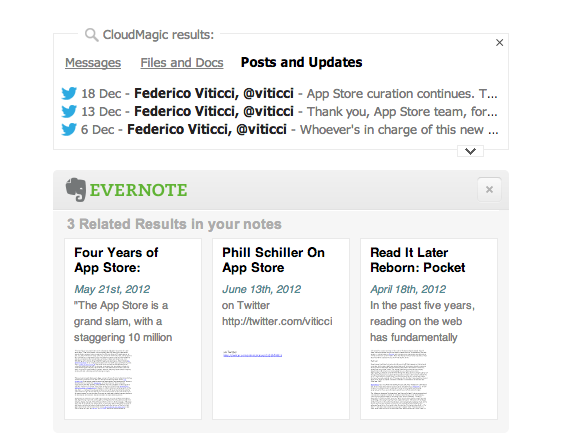
Last week, I installed the Evernote web clipper for Chrome, which was capable of displaying my own Evernote notes alongside Google’s search results. This means I can look for, say, “AppleScript iTunes” and likely find something that I had already clipped in Evernote in the past. It is a powerful addition when combined with Evernote’s new Related Notes feature; it also allows me (in the extension’s options) to make the thumbnail results open directly with the Evernote Mac app when clicked. Evernote announced yesterday the possibility to have the same kind of inline results with Safari.

The second addition is CloudMagic’s new extension, which I discovered today thanks to TechCrunch. MacStories readers know why I like CloudMagic:

CloudMagic is fast: it can search across thousands of indexed items in seconds, with results updating in real time. It is astonishingly accurate, even when it has to match a couple of words with, say, hundreds of tweets from last year or an Evernote PDF inside a nested notebook. I use CloudMagic on a daily basis to retrieve old tweets (as reference material), email messages, or notes; in fact, I would say the app has better search than Evernote’s iOS app. Which, by the way, is supported with an URL scheme – so you’ll be able to search notes and open them directly in the Evernote app.

The new CloudMagic extension is exactly what you think it is. Once installed, it’ll find results for your Google query by looking inside the accounts you’ve already configured with CloudMagic. By using both Evernote and CloudMagic, I can get Google results in an instant (the main Google search results load first), then get relevant results from my email inbox, Twitter accounts, Dropbox and Evernote notes, and more Evernote related notes thanks to Evernote’s different algorithm. I would say that 50% of my searches are for items that I have already saved in the past but that I have also likely forgotten about. CloudMagic and Evernote results in the browser allow me to keep using Google but also have my own results show up alongside the normal search I’m used to.

The updated CloudMagic extension is available here.

Permalink

Interesting For iPhone: Simple News

Interesting For iPhone: Simple News

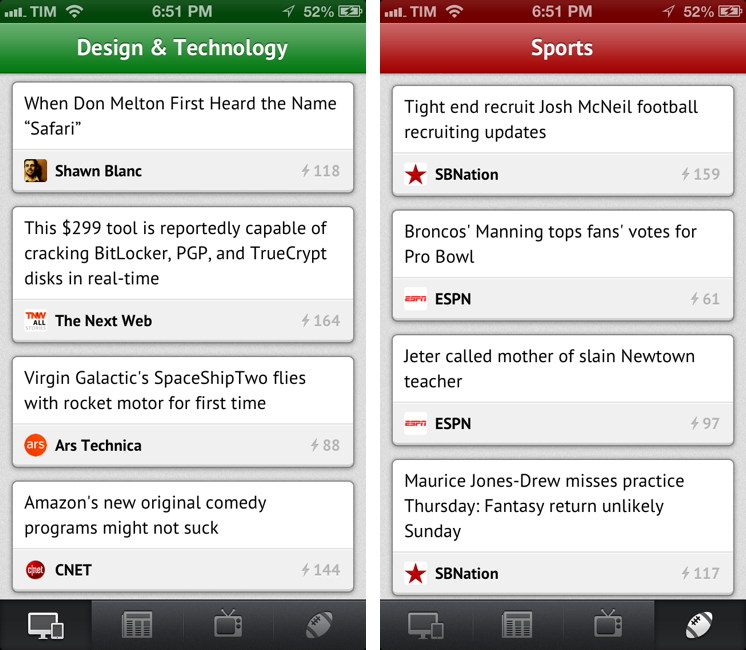
Nice new app by Mike Rundle: Interesting is a super-simple $0.99 aggregator of news for iPhone organized in four sections. Interesting collects new articles from a variety of sources and displays a list of entries in reverse chronological order. Tapping on an item opens an embedded web view, which has a toolbar for navigation, refresh, and sharing options. Sharing includes Pocket and Twitter integration, Copy Link, Open in Safari, and Mail Link. Interesting has four sections: Design & Technology; News & Politics; Entertainment & TV; and Sports. The built-in list of sources includes websites like The Next Web, Wired, SBNation, CNN, SPIN, and various sub-reddits.

Interesting has some great details. For instance, Mike has used the iOS 6 status bar tint in a way that’s not too bad, but that actually contributes to better identify sections visually: each section has a different title bar color, which consequently changes the color of the iOS status bar. I like the color choices. Further, tab bar icons have a nice animation when you tap on them, and I don’t mind the custom font and pull-to-refresh animation.

As Marco Arment learned with The Magazine, completely avoiding settings is a tricky decision. Interesting is very easy to use, but you can’t pick a different read later choice (only Pocket has native integration in the sharing menu and with tap & hold) and you can’t, say, set a different browser for opening links. I appreciate the simplicity; on the other hand, I wish the app had at least some options in the iOS Settings app.

As you know, I already use MacHash as an Apple news aggregator on my iOS devices. Interesting is a cool option for other kinds of news – TV is especially useful to me – and it’s only $0.99 on the App Store.

Permalink