Federico Viticci

10804 posts on MacStories since April 2009

Federico is the founder and Editor-in-Chief of MacStories, where he writes about Apple with a focus on apps, developers, iPad, and iOS productivity. He founded MacStories in April 2009 and has been writing about Apple since. Federico is also the co-host of AppStories, a weekly podcast exploring the world of apps, Unwind, a fun exploration of media and more, and NPC: Next Portable Console, a show about portable gaming and the handheld revolution.

Apple Highlights Apps “Enhanced for OS X Lion”

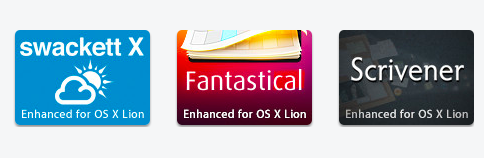
OS X Lion has been out for less than a month, and Apple is now starting to promote apps that take advantage of some of the new features of the OS on the front page of the Mac App Store. As noted by Stephen Hackett at Forkbombr, Apple has included the “Enhanced for OS X Lion” tagline in the banners pointing to applications that have recently been updated with Lion-exclusive features such as Versions, Full-Screen, or multi-touch gestures. These banners can be seen on the front page of the Mac App Store, both in the top section (Screenflow 3.0 and Touchgrind) or in the lower part of the page, where currently there are promotional images for Fantastical, swackett x, and Scrivener. Fantastical is indeed one of the apps that has been updated in the past month with “Lion compatibility” and Lion-only gestures for navigation in the calendar view.
This is not the first time Apple has taken special interest in apps updated to take advantage of new functionalities introduced by the company in a new version of their OSes. For example, Apple went as far as creating a dedicated section for apps updated with AirPlay support soon after the release of iOS 4.2 back in November 2010. In April, Apple showcased subscription-based magazines in the App Store’s homepage. The “Enhanced for OS X Lion” tagline doesn’t have its own category just yet, but it wouldn’t be a surprise as more customers upgrade to Lion, and developers start releasing Lion-specific app updates.

With over 250 new user features and 3,000 new developer APIs, Lion is opening a whole range of possibilities for developers willing to rewrite or update their applications to trigger the new OS. Such features and APIs include the aforementioned full-screen mode and Versions support, as well as desktop notifications, In-App Purchases, new UI controls, Resume, and Auto-Save. This Fall, developers will also be able to integrate their apps with iCloud, which will allow them to store documents and data in the cloud, enabling seamless synchronization of content between devices.

In November, Apple will also start requiring developers to update their apps with Lion’s Sandboxing APIs – you can  read more about this in John Siracusa’s OS X Lion review. By highlighting apps that have already been updated for Lion, Apple is both encouraging other developers to do the same in the next few weeks, and showcasing great software for new customers that have installed Lion and are looking for new apps to try out. Apple itself updated several apps ahead of Lion’s launch to enable new functionalities exclusive to 10.7, such as Safari 5.1 – which comes pre-installed on Lion – and the iWork suite.
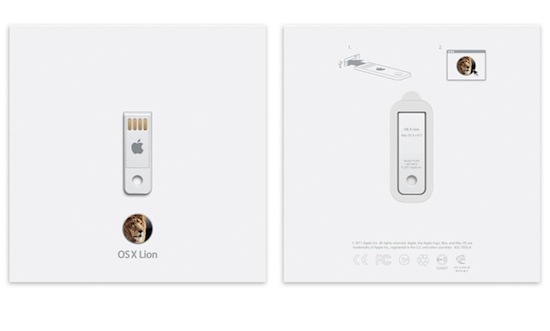

OS X Lion USB Thumb Drive Now Available

Initially announced on July 20, when OS X Lion was released to the public through the Mac App Store at $29.99, Apple has released the OS X Lion USB Thumb Drive today, allowing customers without a broadband connection – unable to download the 3.49 GB installer from the Store, or willing to keep a physical copy of the OS – to install the latest version of OS X with a USB stick similar to the one Apple shipped with the 2010 MacBook Airs (and didn’t include in the 2011 models, which come with Lion pre-installed but no USB drive in the box).

OS X Lion is available on a USB thumb drive for installation without the need for a broadband Internet connection. Just plug the drive into your USB port and follow the instructions to install. OS X Lion is also available for a lower price as a digital download from the Mac App Store.

As noted by 9to5mac, those who install Lion through the USB Thumb Drive won’t be able to perform re-installs with Lion’s built-in Recovery functionalities, as they will need to use the thumb drive again. The OS X Lion Thumb Drive is shipping in 1-3 business days.

Earlier this month, Apple released a free utility to turn any external drive into a Lion Recovery partition, and a number of unofficial solutions have also surfaced. You can find Apple’s OS X Lion Thumb Drive at $69 in the online store.


MobileMe to iCloud Transition Goes Live for Developers

As first noted by 9to5mac, Apple is now allowing developers with access to the iOS 5 beta or OS X Lion 10.7.2 preview to migrate their existing MobileMe accounts to iCloud. A MobileMe account needs to be associated with a development device to be correctly transitioned to iCloud for now – once an account is eligible, the migration process can be initiated from OS X Lion (from the MobileMe control panel) or by directly visiting me.com/move.

As Apple previously detailed in its MobileMe to iCloud Transition Q&A, some functionalities of MobileMe won’t transfer over to iCloud. This includes MobileMe Gallery, iDisk and iWeb publishing, which, however, will still be accessible until June 30, 2012, even after moving to iCloud. Another feature that iCloud won’t include is the ability of syncing several Mac OS X items like Dashboard widgets, Preferences, and Mail Rules.

Apple’s web interface for the transition is very straightforward and guides you through the process of moving your MobileMe account to iCloud by detailing each step with an explanation, and links pointing to support articles.

Once upgraded, an already configured MobileMe account on iOS or OS X will need to manually “confirmed” before completely moving to iCloud. If the account isn’t already configured, you’ll just need to log in as a new iCloud account and choose which content you’d like to keep stored on Apple’s servers.

The process is now exclusive to developers and there’s the chance Apple will tweak the interface/steps required before the public release of iCloud. However, the information available today falls in line with what Apple revealed months ago about the transition. Furthermore, it appears MobileMe accounts will be automatically upgraded to a paid 20 GB plan for free until June 30, 2012, (with pricing depending on where you live, and the 20 GBs are in addition to the 5 GBs iCloud already gives you for free) although there are no subscription management options available yet to developers on iCloud.com. Read more


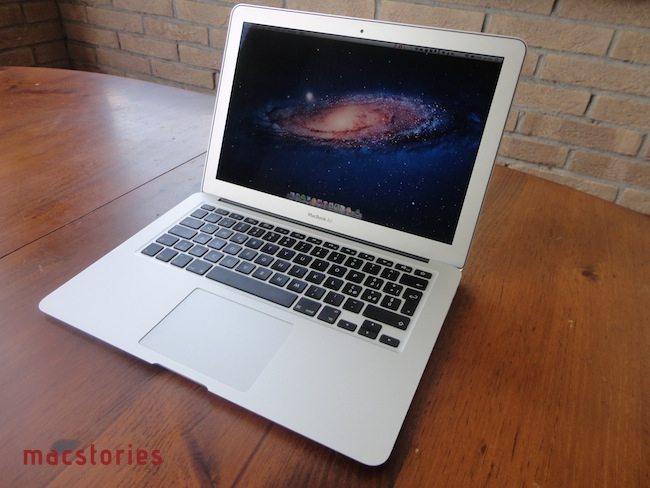
13-inch MacBook Air Review

The new MacBook Air is the best Mac I’ve ever owned. This machine is shaping the future of OS X, both as an operating system and a bridge between iOS and the desktop.

In October 2008, I bought my first Mac. I had been a Windows PC user for seven years, and I was accustomed to using a PC at home for my browsing and writing needs, and at work – where my boss demanded we used PCs as he said they were more “reliable” and “fast”. After months of reading and peeking through Apple’s FAQ pages and video tutorials, I decided to buy a MacBook Pro. It was a 15-inch Unibody model with glossy screen, 4 GB of RAM, multi-touch trackpad, and Core 2 Duo processor. Back then, it was my first Mac but also the best computer I ever had. The moment I took it out of the box – and I was immediately impressed by Apple’s attention to detail in packaging and overall presentation – I knew that machine was going to change the way I “did work” on a computer. And it did. A few months later my boss fired me, and I started MacStories.

That MacBook Pro has been with me until last week.

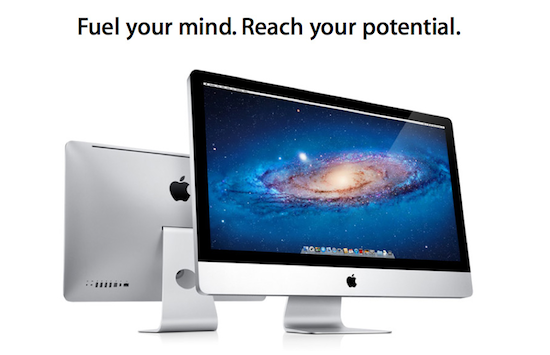
Last year, I bought an iMac. Being the kind of Mac user that travels back and forth every day between his office (where I spend most of my day writing and managing the site) and his home, I was tired of being constantly forced to pack my MacBook Pro inside a bag, carry it around, gently place it on the passenger seat of my car, and pray that the hard drive wouldn’t die because of the terrible roads we have here in Viterbo. In spite of the fact that the MacBook Pro was the best computer I ever had, I slowly came to a point where I couldn’t stand carrying it around anymore. I decided to buy an iMac and make it my “home computer” so that I could offload media on it, backup documents, and do all those other things you’re supposed to do on “a home computer”. I bought a 21.5-inch model – again with a glossy screen – as I thought I wouldn’t ever need anything bigger than that. I was right. I’m happy with my purchase – the iMac is the finest piece of desktop hardware Apple has come up with in the past decade. Sure, my 2009 iMac doesn’t feature a Thunderbolt port and won’t get the performance boost of a Sandy Bridge-enabled machine, but it’s a trusted companion that I plan to keep for at least the next two years (that is, unless something really bad happens to the hardware, or Apple comes out with a desktop computer so revolutionary that it’ll be impossible to say no and don’t buy it).

For me, an iMac is the perfect desktop computer. It sits there, it makes my desk more elegant and classy than it could ever be, and more importantly it never failed me.

But I still had a problem with the MacBook Pro being a clumsy machine I didn’t want to carry around with me all the time. Read more


Apple’s Training Site Back With Lion, FCP X Certifications

As noted by TUAW, Apple’s training website has come back online with new OS X Lion certifications and training courses – some of them “coming soon” and others starting “this fall”. The training website is available at training.apple.com and it’s also received a facelift with a cleaner design, and plenty of OS X Lion and Final Cut Pro X graphics.

Indeed, the New Releases section on the site points to new FCP X training and exams, OS X Lion training and exams, as well as new Mac Integration Basics. IT professionals willing to support and learn about new OS X technologies might want to look at the new Lion courses coming this fall to Apple Authorized Training Centers worldwide. Books and resources are already available online and others will soon be for pre-order, and the new 10.7 certifications coming this fall will include:

  • Apple Certified Associate: Mac Integration 10.7
  • Apple Certified Support Professional 10.7
  • Apple Certified Technical Coordinator 10.7

The Mac Integration Basics 10.7 exam “will be available soon” according to the Training website, but full documentation has already been posted online for download as PDF or iBookstore guide. On the other hand, those interested in Final Cut Pro X certification can watch Final Cut Pro X Apple Pro Video Training, with classes coming “soon” worldwide.

Snow Leopard certification and courses are still available and according to Apple will remain online until January 2012.


Keep Your Lion Computer Protected with Witness

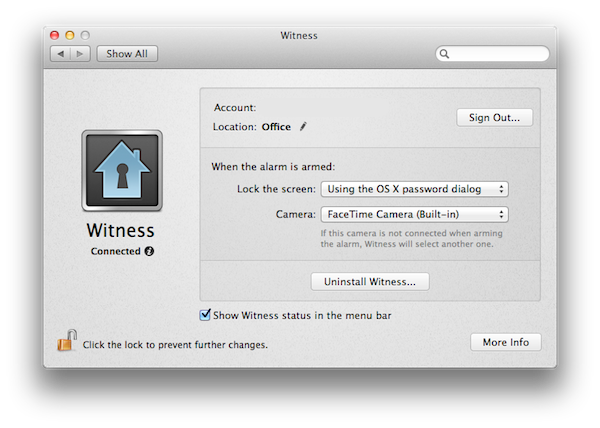
A few months ago I reviewed Witness for Mac, an OS X utility from the creators of Undercover – a tracking app for stolen computers – aimed at letting you remotely lock/unlock a machine, and see who’s using it thanks to webcam integration. The Witness app, available on the Mac as a System Preferences panel, iOS and the web, leverages the Mac’s built-in FaceTime camera (nèe iSight) to send you “mugshots” of whoever is using a locked computer – Witness can also detect motion in front of your screen and send you a push notification as soon as something happens.

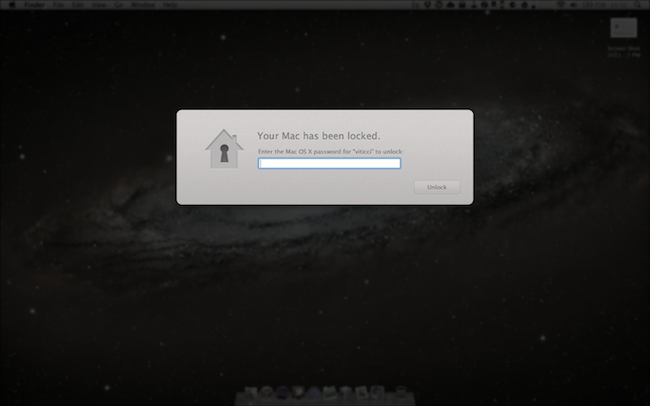
When I upgraded to Lion GM on my two Macs, I was disappointed to see the new OS broke Witness, which simply stopped working with Lion’s new Screen Saver and login screen. I could send the lock command from my iPhone or iPad, but the app would only freeze to a lockscreen. With a series of updates, the Orbicule developers have updated Witness to fully integrate with OS X Lion and its new authentication window, which in version 1.2 is used instead of the old screensaver method. Now, you can choose to lock your Mac either using Witness’ own lock system, or through the default login screen in Lion.

The screensaver/login screen triggered by Witness on Lion

For what it’s worth, Witness’ notifications already play nice with iOS 5 beta, which will list alerts of “detected motion” in its new Notification Center. Witness is a great addition to the Mac, with minimal footprint on memory and an optional menubar icon to trigger the alarm system and open the Settings.

You can create a Witness account here ($39 with student licenses available) and download the free Witness Remote app from the App Store.


Measures for iPad Is A Powerful Unit & Currency Converter

Back in 2009, I installed a simple currency and unit conversion utility on my iPhone called Measures. Developed by Michael Neuwert, I remember Measures as one of the first “popular” converter apps for the iPhone, one that actually managed to move thousands of sales back when the App Store was still relatively small. Two years and hundreds of thousands of app later (let alone the iPad and two new App Stores), Measures is coming back with an HD version built specifically to take advantage of the iPad’s screen. Retaining the same icon and UI color scheme of its iPhone counterpart, Measures HD packs 170 currency exchange rates (constantly updated over the air) and 1000 different units, organized in 40 categories.

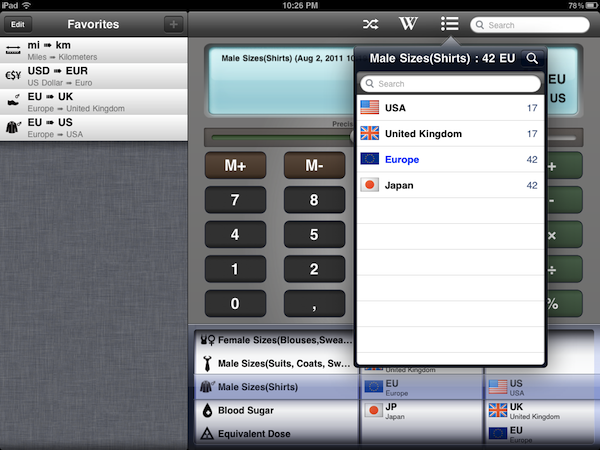
I like Measures HD not because of its design, but because it’s functional. Measures may lack the amount of polish seen in any Tapbots or Iconfactory app, but as far as the actual unit and currency conversion goes, Measures works better than anything else I’ve tried on the iPad to date. There are two aspects of the app that truly stand out to me: the Favorites sidebar, and the fact that Measures doesn’t stop at normal units like those pertaining to length, area, speed, or temperature. Measures adds dozens of categories ranging from Male Shoe Sizes and Data Storage to Radioactivity, Male Sizes for suits/coats/shirts, and Typography. With all these types of “units” available at your fingertips, Measures lets you convert, say, a European shoe size to a UK or US one, or your milligram/deciliter blood sugar level to millimol/liter. And again: you can easily convert megabytes to yottabytes, short tons to pounds, and obviously US Dollars to Euros and other currencies as well.

Measures’ unit database is huge, and if it’s not the biggest one on the App Store yet, then it definitely get very close to it. Whilst most converter apps focus on providing a fresh interface for the usual units and currencies, Measures sacrifices some attention to the overall design (I don’t like the slider to adjust decimals and the looks of the keypad – but this is just personal taste) to focus on “real life usage” with options like the aforementioned shirt sizes, or fuel consumption and data storage. This is the kind of stuff I always need to check (especially when buying some cool t-shirt from a website that doesn’t list EU sizes), but that very few apps provide. In fact, most of the times I’m forced to look it up on Wikipedia. Speaking of which, Measures HD comes with a Wikipedia search function to look up the selected unit on the website’s database. Multiple Wikipedia articles (when found, otherwise it’s just a single one) are listed inside a popover, and you can decide to open the webpage within Measures, in Safari, or in Sophiestication’s Articles. Next to the Wikipedia button in the top toolbar, there’s also a “list” icon to see all converted results without being restricted to a single conversion.

Another nice feature is the Favorites sidebar, which enables you to save any conversion for quick access at a later time. If you find yourself converting Euros to Dollars pretty often, you might want to consider saving that conversion as a shortcut in the Favorites so you won’t have to use the (gimmicky) unit picker at the botton; Apple itself suggests in its Interface guidelines to use a “date and time picker” for iPad  inside a popover rather the main screen – I agree, as the result is not really pleasant in Measures and it feels unresponsive if your finger runs down to the iPad’s bezel.

Overall, I enjoy having Measures on my iPad because it’s useful. The app could use some UI refinements and re-thinking, but as it stands now it is the converter app for iPad with the largest array of options I’ve seen so far. You can download Measures HD at $1.99 on the App Store. Check out more screenshots of the app after the break. Read more


Facebook Acquires Award-winning iOS Publishing Platform Push Pop Press

It was only last February that Push Pop Press started teasing a brand new kind of digital books for the iPhone and iPad, promising to revolutionize the way users interact with text, images, and video on a multi-touch screen. Started by former Apple employees, Push Pop Press built a unique publishing platform and physics engine that was best demonstrated in Our Choice, Al Gore’s book ported over to Push Pop Press’ platform, released on the iPhone and iPad and winner of an Apple Design Award in June.

With an update on their website, Push Pop Press has announced that they’ve been acquired by Facebook. It’s unclear how the technology will be integrated into the “world’s largest book”, but the blog post says “although Facebook isn’t planning to start publishing digital books, the ideas and technology behind Push Pop Press will be integrated with Facebook, giving people even richer ways to share their stories”. Push Pop Press’ first book Our Choice will remain available for sale with profits donated to The Climate Reality Project; future books planned with Push Pop Press’ closed beta won’t be published following this acquisition.

Now we’re taking our publishing technology and everything we’ve learned and are setting off to help design the world’s largest book, Facebook.

TechCrunch also reports a statement from Facebook:

We’re thrilled to confirm that we’ve acquired Push Pop Press, a startup whose groundbreaking software changes the way people publish and consume digital content. We can’t wait for co-founders Mike Matas and Kimon Tsinteris to get started, and for some of the technology, ideas and inspiration behind Push Pop Press to become part of how millions of people connect and share with each other on Facebook.

You can read our original review of Push Pop Press’ Our Choice here. Whilst Facebook apparently has no plans to enter the publishing market, Push Pop Press’ interaction methods and innovative engine might be a good fit for Facebook’s iPhone and upcoming iPad app.