Federico Viticci

10804 posts on MacStories since April 2009

Federico is the founder and Editor-in-Chief of MacStories, where he writes about Apple with a focus on apps, developers, iPad, and iOS productivity. He founded MacStories in April 2009 and has been writing about Apple since. Federico is also the co-host of AppStories, a weekly podcast exploring the world of apps, Unwind, a fun exploration of media and more, and NPC: Next Portable Console, a show about portable gaming and the handheld revolution.

iCloud Storage: International & Competitor Pricing Comparison

Last night, Apple launched a first developer beta of iCloud.com, a set of web apps based on the iCloud functionality originally introduced in iOS 5 beta that mimic the appearance of Apple’s Lion desktop apps like Address Book and iCal, or the Mail app for iPad. The new web apps, seen as replacements for MobileMe’s existing web offerings, have been completely rewritten to take advantage of iCloud’s faster and invisible sync of content between devices, and they also include a new web-based version of iWork that, however, isn’t live yet. Screenshots (and videos) of the iCloud web apps have surfaced online and partially on Apple’s website too; early screenshots of the login page had been leaked ahead of the WWDC in June.

The iCloud web apps provide an alternative to their iOS and OS X counterparts – being entirely web-based, they can come in handy “if you happen to be away from home without your computer or one of your iOS devices” so that “you can access your mail, contacts, and calendar — ad-free — from any computer at icloud.com”. Read more


Skype for iPad Released

Skype for iPad, first “leaked” online back in late June, has finally been released for free in the App Store as a standalone app, as noticed by TUAW. The app isn’t a universal update for the iPhone version, meaning you’ll have to download it as a separate app on your iPad, and it’s not yet available in the US App Store. The app will likely be released in the US Store later today, perhaps in a few hours.

Skype for iPad features an all-new interface design with larger contact pictures, a buddy list on the left, and possibility of starting a new video-calling session in full-screen with video being captured from the iPad’s rear or front-facing cameras. The app can do video and audio calling both on WiFi and 3G, much like the iPhone version already can.

A list of features from the iTunes page:

  • Talk face-to-face or show what you’re seeing with front and back-facing cameras.
  • Use Skype for iPad to call anyone else on Skype – and enjoy near CD quality (SILK) sound.
  • Instant message and add emoticons to personalize your messages.
  • Make cheap calls to landlines or mobiles from your iPad.
  • Get an Online Number from Skype so people can call you on your iPad.
  • Pay As You Go with Skype Credit - great for when you’re using Skype every now and again.
  • Pay monthly with a subscription – best if you use Skype a lot.

We will update this story with more details on the app and first impressions as soon as we get our hands on it. More screenshots and original “leaked” promo video below.

Update: Skype for the iPad is now live in the United States. Download it here.

Update 2: We have first impressions and some screenshots up past the break.

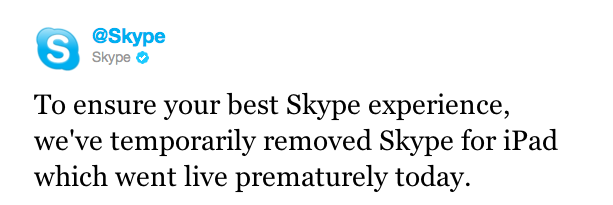
Update 3: Skype has pulled the app from the App Store, saying that it went live “prematurely”.

Update 4: It appears the app is back and can be downloaded from the App Store.

Read more


Apple Seeds iWork for iOS Beta Apps With iCloud Support

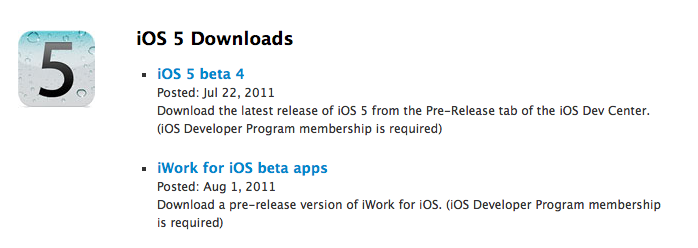
Following the launch of iCloud.com beta to developers, Apple updated its iCloud beta for Developers page including special versions of the iWork for iOS apps. Labelled “iWork for iOS beta apps” by Apple, the package includes new versions of Pages, Keynote and Numbers for iOS that will allow developers and testers of iCloud to start working on a new document on a device, and find it after a few seconds on another iCloud-connected device or the web counterpart, which also comes with web apps to edit documents.

The functionality was first demoed by Apple at the WWDC in June, and an iOS developer program membership is required to test the new iWork beta apps.


TweetFire: A Lightweight and Fast Twitter Companion for iPhone

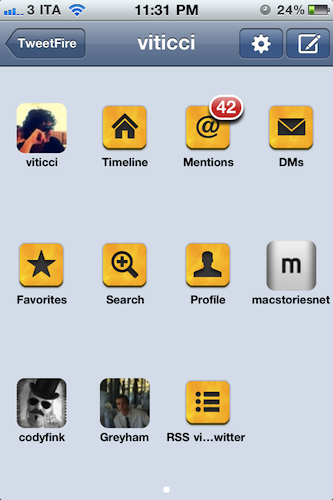
In my review of the first version of Tweetbot, I asked whether it was still possible to bring innovation to Twitter clients for iPhone, a category of apps that have offered more or less the same features for quite some time now, with the focus now being on interface design to make an app feel “unique”. With different takes on the same concept (interacting with Twitter) and with the company itself advising against “regular” third-party client apps that most users won’t install (they say people fire up the App Store, download Twitter’s official app, and that’s it), mine was a legitimate question. Is there still room for something new?

As Tweetbot’s successful launch has proved, there’s a niche of users willing to try out what’s new in the Twitter ecosystem. Tapbots have managed to build a loyal new userbase of customers interested in their unique spin on Twitter clients – these people have stuck around long enough to wait for push notifications and the consequent rapid rollout per Twitter’s own API approval. But I also take a look at Twitterrific from The Iconfactory, another third-party client that has built its own ecosystem across the Mac and iOS and which, from what I’m hearing, is about to introduce great new features in an upcoming update. I’ve mentioned Tweetbot and Twitterrific so far, but there are dozens of clients from both big and smaller indie companies that are thriving in spite of Twitter’s official free tools for the iPhone, iPad, and Mac.

And then there’s Apple’s initiative with Twitter and iOS 5, which will bring native Twitter access (single sign-on, contact lookup, tweet integration) to its mobile operating system. Users will be able to tweet photos and webpages, addresses in Maps and cool videos they find on YouTube. But they won’t be able to read their timelines, or receive push notifications through Apple’s native implementation. For these reasons, and because it is my job to look out for what’s next, I believe innovation in Twitter clients is far from done (that is, unless Twitter adopts changes that will make it impossible for developers to keep creating third-party tools), and we just need to keep looking to find the next app that may, in some way, improve the way we share information on Twitter from a smartphone or tablet. Read more


Mockups Show Lion Inspired Changes For Future Firefox

Like Google’s Chrome browser, Mozilla announced earlier this year its intention to move to a fast release cycle for new major versions of its popular browser for Windows, Linux and Mac, Firefox. Following the launch of Firefox 4 in March – which brought major design changes from Firefox 3 – Mozilla moved up its schedule and released Firefox 5 in June, just three months after the previous upgrade, adding a “Do not track” feature for all browsers and platforms, as well as other HTML5 and CSS improvements, although the UI design remained largely unchanged from Firefox 4. As part of Mozilla’s new channel-based alpha and beta testing, Firefox 6.0 is already available as beta, whilst Firefox 7.0 has been made available as early developer preview (or alpha) in the Aurora channel. You can read more about Mozilla’s new “every six weeks” policy here.

While waiting for the future Firefox 6.0 and 7.0, Mozilla’s Product Visual Designer with the Firefox team, Stephen Horlander, has posted some mockups of what the future Firefox could look like on Windows and OS X machines. The images, posted as a presentation on Mozilla’s website, don’t necessarily reflect any upcoming feature in the next versions of Firefox, but they provide some kind of insight into the kind of discussions the team is having in regards of what could come next.

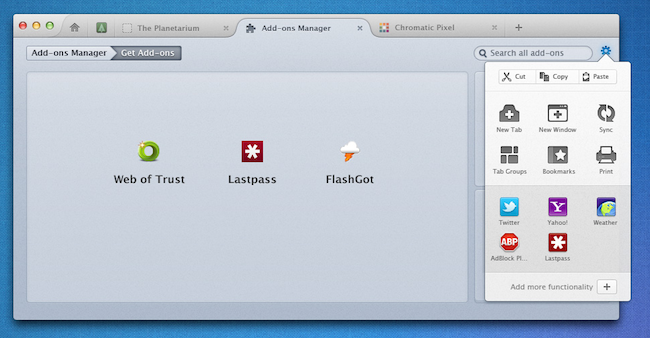
As you can see from the image above (more here), the proposed solution unifies Firefox’s top bar to accomodate tabs, a Home button, a new tab button, as well as integrated add-on manager that has its own tab (much like Google Chrome opens its settings in new tabs, rather than windows). The mockups have been built on top of OS X Lion, as you can tell from the window texture and the traffic lights in the upper left corner. Speaking of which, Horlander has also played around with Lion’s monochrome and popovers, implementing monochromatic icons for cut/copy/paste, bookmarks and tab controls inside a settings popover accessible from a gear icon next to the address bar. Another screenshot shows native full-screen support with minimal chrome when browsing a website. On the PC side, the proposed changes are similar, but based on Windows’ default theme.

It’ll be interesting to see whether these Lion-inspired changes for Firefox on the Mac will evolve into an actual release in the coming months. Meanwhile, Windows users can install this fan-made theme that takes some of Horlander’s UI elements, and applies them to the current version of Firefox.


Apple Releases iOS 4.3 for Apple TV [Updated]

Apple has just released a new version of iOS for the Apple TV second-generation – iOS 4.3 with build number 8F455. Whilst there is no official changelog for the update yet, a series of tweets from Daring Fireball’s John Gruber suggests iOS 4.3 brings the possibility of streaming purchased TV Shows, including all the shows you’ve already bought in iTunes. Since the introduction of iCloud at the WWDC in June, Apple rolled out new features in iTunes to let users re-download every single purchase they made with their Apple IDs – this applied to music, apps, and books. With a new tab in the same Purchased section, Apple now allows you to re-watch TV Shows you’ve bought through iTunes. The “Purchased” option in iTunes was announced alongside iCloud (which will launch this Fall) and the broader iTunes in the Cloud initiative – in spite of iCloud still being a “beta” for developers, every Mac, iPad, iPhone and Apple TV can benefit from these re-download functionalities now. Read more


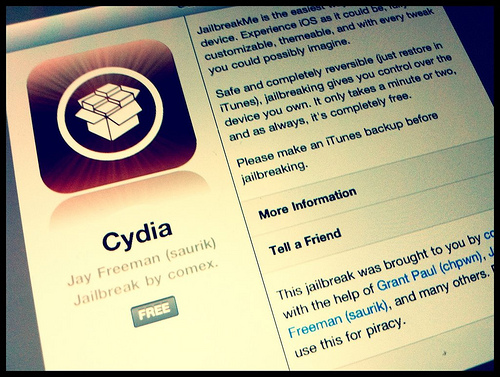
Forbes Profiles Comex, The iPhone Hacker Behind JailbreakMe

Forbes Profiles Comex, The iPhone Hacker Behind JailbreakMe

Forbes has published an interesting story on comex, the 19-year old hacker and Cydia developer who has released jailbreak tools for the iPhone multiple times in the past years. Namely, the latest iteration of JailbreakMe (which relied on a vulnerability in the iOS’ PDF rendering library that Apple patched after 9 days) has been used over 2 million times to jailbreak iOS devices (including the iPad 2) running iOS 4.3.3. Last year, comex released JailbreakMe 2.0, again based on a bug in the PDF engine, which allowed users to jailbreak devices running iOS 4.

The popularity of comex (his Twitter account alone has over 172,000 followers) and the anticipation that precedes every jailbreak release had the unpleasant side effect of a leak of an early beta version of JailbreakMe 3.0, which forced comex to rush the public release fearing Apple’s upcoming fix.

Perhaps the most interesting part from Forbes’ story is this little tidbit about comex’s background:

The young hacker taught himself to code in the programming language Visual Basic at the age of nine, gleaning tricks from Web forums. “By the time I took a computer science class in high school, I already knew everything,” he says. When he found that he couldn’t save a screenshot from the Nintendo Wii video game Super Smash Brothers to his computer, he spent hours deciphering the file, and later worked on other Wii hacks, getting a feel for its obscure operating system.

“I didn’t come out of the same background as the rest of the security community,” he says. “So to them I seem to have come out of nowhere.

Whilst Apple is seemingly “borrowing” ideas from the jailbreak community to implement them in iOS 5 in a more polished way, questions remain whether the future of the iPhone has much room left for jailbreakers. The way I see it, as long as Apple won’t allow users to freely customize the experience of iOS at the same degree the Mac does, and as long as people like comex will be around, there will always be a reason – we’re not talking about the necessity – to jailbreak a device.

Read the full story over at Forbes[image via]

Permalink

The New Yorker Has Sold 20,000 Annual iPad Subscriptions

The New Yorker Has Sold 20,000 Annual iPad Subscriptions

The New York Times profiles the status of The New Yorker iPad app, which was released in September 2010 but implemented iTunes subscriptions last May. According to The New Yorker, over 75,000 print subscribers have taken advantage of the offer to download the iPad app for free, whilst “several thousands more people” are downloading $4.99 single issues each week.

Offering the first detailed glimpse into iPad magazine sales since subscriptions became available in the spring, The New Yorker said that it now had 100,000 iPad readers, including about 20,000 people who bought subscriptions at $59.99 a year.

In the old in-app purchase model, The New Yorker used to sell single issues-only at $4.99. Since Condè Nast rolled out subscriptions for many of its magazines in May, the publication adopted a new model with subscription to the weekly magazine priced at $5.99 per month (or $1.50 per issue) and full annual iPad access at $59.99. Unlike several other digital versions of magazines ported to the iPad (many of them sold by Condè Nast itself), The New Yorker took a different approach: rather than re-working its information architecture to present articles alongside lots of images, “interactive ads”, video, and infographics, The New Yorker went for the simpler route of presenting readable text on screen. And as The New York Times reports, this strategy seems to have worked really well for them:

The New Yorker, a magazine that has always been heavy on text, took a different tack from its peers. Instead of loading its iPad app with interactive features, the magazine focused on presenting its articles in a clean, readable format.

“That was really important to us: to create an app all about reading,” said Pamela Maffei McCarthy, the magazine’s deputy editor. “There are some bells and whistles, but we’re very careful about that. We think about whether or not they add any value. And if they don’t, out the window they go.

Read the full report – including some remarks from the magazine’s editor David Remnick – here. [via Poynter]

Permalink

Alfred for Mac Gets Extensions, Growl Support, New Lion Theme

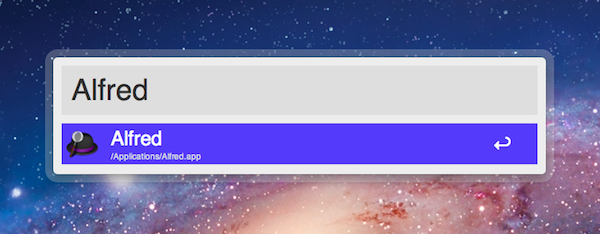
Alfred, the application launcher for the Mac, received a fairly substantial update today which brings important new functionalities such as extension support, Growl integration for action outputs, a new theme inspired by OS X Lion, and several bug fixes. Personally, I’ve been a big fan of Alfred since its first release last year, and I’ve followed the development closely as I switched from Quicksilver (which came back from a long hiatus a few months ago) and started looking into the customizable search and launch environment offered by Alfred. In the past months, in fact, Alfred evolved into a minimal, yet powerful application launcher capable of doing a bunch of other things such as filesystem navigation, clipboard management, AppleScript launching and dictionary. I was particularly impressed with the 0.9 version, which allowed users to assign a keyboard shortcut to any AppleScript on your machine, similarly to how the popular FastScripts lets you pair a shortcut with a script.

Whilst the developers are still planning a major 1.0 release that will likely see the Powerpack (a set of premium additional features) become available as in-app purchase on Lion’s Mac App Store, Alfred 0.9.9 has been publicly released today and, in spite of what the version number suggests, it is a milestone release that sets the path for future Alfred versions and the kind of integration with the system the developers are willing to bake into their application launcher . Read more