Federico Viticci

10804 posts on MacStories since April 2009

Federico is the founder and Editor-in-Chief of MacStories, where he writes about Apple with a focus on apps, developers, iPad, and iOS productivity. He founded MacStories in April 2009 and has been writing about Apple since. Federico is also the co-host of AppStories, a weekly podcast exploring the world of apps, Unwind, a fun exploration of media and more, and NPC: Next Portable Console, a show about portable gaming and the handheld revolution.

GrowlingLion - A Lion Inspired Growl Theme

GrowlingLion - A Lion Inspired Growl Theme

Lion has been released, and I wanted to make a theme that felt native to the new system, So I created Growling Lion based on the Safari 5.1 downloads window.

Two weeks ago, we covered Mono, a popular Growl theme that’s been updated to work on Lion. Inspired by the work of Christopher Lobay on Mono and Lion’s light color scheme in Quick Look and Aqua popovers, GrowlingLion is a new Growl theme by Andreas Heiberg that works on Lion and the latest release of Growl (before the app goes Mac App Store-only with version 1.3). I’ve installed the theme and I really like it, although I’d like it to have a bigger font.

You can download GrowlingLion here.

Permalink

1Password Safari Extension Gets Complete Redesign with New Features

Ever since the release of OS X Lion and Safari 5.1, the Agile Bits team has been busy updating its 1Password Safari extension to work with the new OS and the updated version of the browser, which brings major changes both on Snow Leopard and Lion. Whilst initial Lion support (alongside Firefox 5 and Fluid 1.0 compatibility) was rolled out on June 20, Agile Bits spent the last month releasing new public and beta versions of 1Password for Mac, tweaking its extension engine and re-implementing features requested by their customers in an attempt to bring old functionalities back to Lion and Safari 5.1. First came support for Safari 5.1 on Snow Leopard (which has less features than its Lion counterpart, but still is a major upgrade from Safari 5.0), then Agile Bits released 1Password 3.7 for Mac through the public beta channel, adding features like copy to clipboard from the extension, universal unlock (if 1Password is already unlocked, so is the Safari extension), improved Auto Submit and a bunch of other changes and optimizations throughout the app and extension. You can read more about 3.7 beta here.

In the meantime though, Agile Bits was working on a complete redesign for the Safari extension, teased on the developer’s blog exactly a week ago. The new extension is now live, and as usual it needs to be installed from 1Password’s desktop Preferences panel (more information here). Read more


“The Americana at Brand” Apple Store Opens in Glendale, California

Officially announced earlier this week and rumored for several months, the new “The Americana at Brand” Apple Store has opened today in Glendale, California, at 10 AM, roughly 500 feet away from the original Glendale Galleria retail location dubbed store R001, which opened on May 19, 2001. The Glendale Galleria Apple Store was the first location to be planned (thus the “R001”), but it opened a few hours after the Tysons Corner one because of timezone differences with the East Coast.

The new Apple Store in Glendale will serve as a way to drive customers to a second location relatively near to the highly trafficked Galleria store – this is not the first time Apple has opened retail stores with short distance between each other.

A MacStories reader sent us some photos of the new Store, which uses an all-new glass front panel with floating Apple logo, and obviously has new Lion signage and promo material, as well as iPad Smart Signs on the inside. We are told there was a line to get in earlier this morning, though we don’t know if Apple gave away promo material like t-shirts or postcards to celebrate the launch of the new store, as they usually do.

After the break, we have embedded more photos and two videos showing the grand opening and Apple employees cheering and clapping this morning.

[Thanks, Aditya] Read more


Mac App Store Is Slow? Try This “Fix”

Mac App Store Is Slow? Try This Fix

On Tuesday, I received the new MacBook Air (13-inch, base model) I bought from the Apple online store last week. After I booted it up and entered my personal information, I immediately launched the Mac App Store to re-install all my apps (and I also happened to get free iLife apps in the process). However, I noticed something: the Mac App Store was terribly slow, unusually unresponsive when compared to the same Mac App Store running on my 2008 MacBook Pro and 2009 iMac. I asked on Twitter, and lots of people seemed to share my frustrations with “beachballs”, slow loading times, and general bugginess of the program.

It was strange, because as I said the Mac App Store used to run okay on my two old machines. Apple’s App Stores have never been the fastest or most stable applications for the Mac, but they were acceptable. On my new MacBook Air, the Mac App Store displayed a beachball on launch, quit, and everything in between (including simple actions like loading a new Category). That was until 10 minutes ago, when reader Stu Helm sent me this tip from his personal blog that almost magically fixed my issues with the Mac App Store.

Stu writes:

  • Quit the Mac App Store with Command + Option + Q
  • Open Keychain Access from Applications > Utilities

  • Go to Keychain Access > Preferences > Certificates

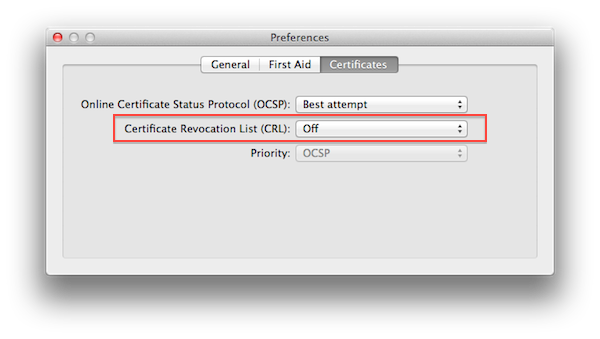
  • Set ‘Certificate Revocation List (CRL)’ to ‘Off’

  • Quit Keychain Access

  • Relaunch the Mac App Store and you should be set

From a quick search online, I can see this is a rather old fix – I didn’t know about it. Like I said, it worked perfectly on my machine, and now the App Store’s slowness only depends on the speed of my Internet connection. The ‘Certificate Revocation List (CRL)’ was originally set to “Best Attempt” on my MacBook Air, though I have MobileMe Keychain syncing enabled, so I can’t confirm on the default settings in OS X Lion. As for CRL itself, you can read more on Wikipedia.

If your Mac App Store is acting weird, try this fix. Here’s a video of what it looked like before I set CRL to “off”.

Update: Obviously, you’re changing Keychain Access preferences at your own risk. Our only intention is to point out that, security issues aside, changing this preference “fixes” the problem for several users. Other readers are reporting that you can also set Keychain Access’ CRL back to “Best Attempt” after the first Mac App Store launch, and the app will stay “fixed” in the future. Nate Silva posted more information about CRL and the Mac App Store back in April.

Permalink

Report Claims No New Apple TV In Third Quarter

According to a report by Concord Securities analyst Ming-Chi Kuo relayed by AppleInsider, Apple may not release an updated model of the Apple TV in the third quarter, instead focusing on software updates to extend the AirPlay features of the device and make it compatible with the upcoming next-generation iPhone. Earlier this month, AppleInsider reported they had been hearing rumors of a new HD+ format for movie content set to bring full 1080p capabilities to a version of the Apple TV. Such new Apple TV, according to “people familiar with the matter”, would run Apple’s latest A5 chip to bring the necessary horsepower to play 1080p movies without playback issues. However, if Ming-Chi Kuo’s industry checks are to be believed, it appears Apple may instead roll out new version of iOS for the Apple TV, rather than a hardware refresh.

Looking ahead to the second half of the year, Kuo said his industry checks have turned up no evidence that Apple plans push a hardware revision to the Apple TV into production during the third quarter. Instead, the Cupertino-based company will reportedly take a more measured approach to advancing the platform in 2011, relying instead on an Apple TV Software Update this fall that will allow devices such as the iPad 2 and upcoming iPhone 5 to beam their content to the big-screen.

Apple doesn’t disclose exact sales numbers of iPod touches and Apple TVs, but Ming-Chi Kuo believes the company sold approximately 480,000 units in the second quarter. In the past months, the second-generation Apple TV has proven to be a successful “hobby” for the company: whilst Tim Cook at the Q3 earnings call said they still don’t consider the Apple TV “another leg of the stool”, in the first three months of availability the Apple TV sold over 1 million units, with allegedly 2 million units placed by April 2011. Meanwhile, similar Internet-connected devices failed to capture the attention of the market partly because of non-competitive prices and lack of streaming features – whereas the Apple TV can stream movies and TV shows using iTunes, and can be integrated with iOS devices thanks to AirPlay. Apple is indeed baking a new feature into iOS 5 that will allow users to beam the full contents of an iPad’s screen to the Apple TV, thus making it an interesting solution for wireless gaming and business presentations. Most recently, Netflix CEO Reed Hastings said the Apple TV was “more important” for them as Netflix keeps expanding to new devices, and an experiment by Mac Mini Vault successfully managed to host a webpage on a jailbroken Apple TV 2nd gen.


New Macs Give Users iPhoto, iMovie, GarageBand For Free On All Macs

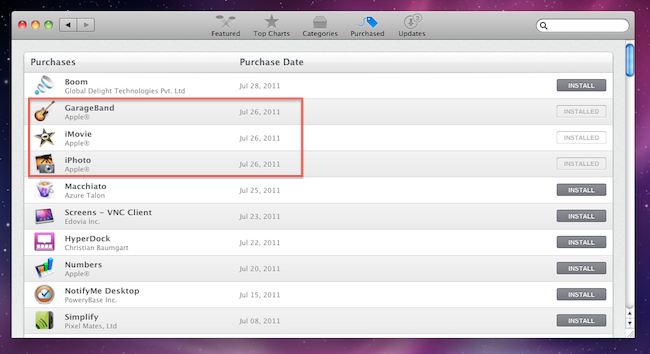
When I received my new MacBook Air three days ago, I immediately launched the Mac App Store to re-download all my apps with a few clicks thanks to Apple’s unified solution that makes it easy to get all the software you already own on a new machine. As I headed over the Purchased tab, however, I noticed downloads for three iLife ‘11 apps – iPhoto, iMovie, and GarageBand – automatically started in the background. With new Mac purchases, in fact, it turns out Apple is giving away the iLife suite as standalone apps available on the Mac App Store. Normally, these apps would set you back $14.99 each – instead, I got them for free on my new MacBook Air with OS X Lion pre-installed.

As reported by Macworld, the new Mac Minis and MacBook Airs released on July 20th come with the latest versions of OS X and iLife bundled for free. Owners of Macs purchased between June 6 and July 20 can request a copy of OS X Lion through Apple’s Up-to-Date program, whilst the Minis and Airs released two weeks ago already have Lion, but don’t have a physical copy or backup of the OS in the box. This is because Apple will start selling a Lion USB Thumb Drive at $69 in August, and Lion automatically creates a Recovery HD partition that, among other things, allows you to re-install the operating system via an online system that, through a series of security, hardware and Apple ID checks, pulls Lion directly from Apple’s servers.

The iLife apps users will receive with a new Mac, however, can easily be “ported” to an old Snow Leopard installation through the Mac App Store. Once the apps are downloaded and tied to your account, the usual Mac App Store licensing terms apply: apps can be downloaded on any of your Macs authorized with your Apple ID. And because these apps are not exclusive to Lion, they’ll appear in the Purchased tab on a Snow Leopard’s Mac App Store.

The iLife license you get when you set up one of the latest Macs is no different. Which means that if you haven’t yet gotten around to upgrading to iLife ’11, buying a new Mac mini or MacBook Air essentially gets you iPhoto, iMovie, and GarageBand for all your Macs running OS X 10.6.6 or later (since you need at least that version of Snow Leopard to run the Mac App Store). And this isn’t sneaky or dishonest—it’s right there in the Mac App Store’s software license.

Obviously, these free downloads won’t include digital versions of iWeb and iDVD, which are not available on the Mac App Store. Apple had previously announced its intention to discontinue iWeb, suggesting existing users to find an alternative solution to host their iWeb-designed websites.


Apple Using Smaller, Cheaper Thunderbolt Controller In New MacBook Airs

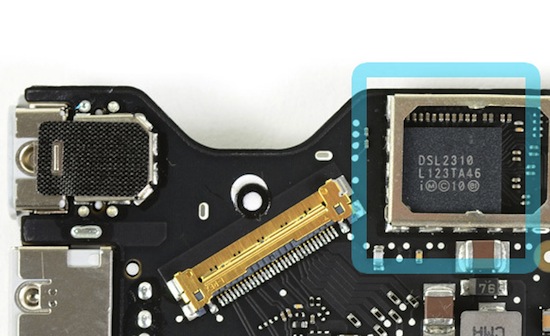
As noted by AnandTech, Apple is using smaller and cheaper Thunderbolt controllers in the new MacBook Airs released on July 20th alongside new Mac Minis, OS X Lion, and the Thunderbolt Cinema Display. The website notes, whereas the 2011 MacBook Pros, iMacs and Mac Minis use Thunderbolt controllers codenamed “Light Ridge” with four bi-directional channels at 10 Gbps (thus achieving 80 Gbps aggregate bandwidth), the smaller chip implemented in the MacBook Air, called Eagle Ridge, is a scaled-down version with access to two channels. Furthermore, whilst Light Ridge comes with up to two DisplayPort outputs, the MacBook Air’s Thunderbolt controller has only one DisplayPort output.

Eagle Ridge is available in two form factors (normal and SFF) and is effectively half of a Light Ridge chip. That means you only get two Thunderbolt channels and one DP output.

Presumably to cut down costs, save motherboard space and have a better impact on battery life, Apple decided to use a smaller version of the Thunderbolt controller that made its first appearance in February on the new MacBook Pros, first to feature the Thunderbolt technology co-developed by Apple and Intel and originally named Light Peak. It was previously reported high production costs of Thunderbolt ports could be the reason behind relatively slow adoption by third-party accessory makers. Currently only a series of high-end RAID configurations are available on the Apple online store and Apple’s own Thunderbolt Display is set to ship sometime next month. You can read more about Thunderbolt here.

[via AnandTech - image: iFixit]


Sidekick Automates Your Mac’s Settings Based On Your Location

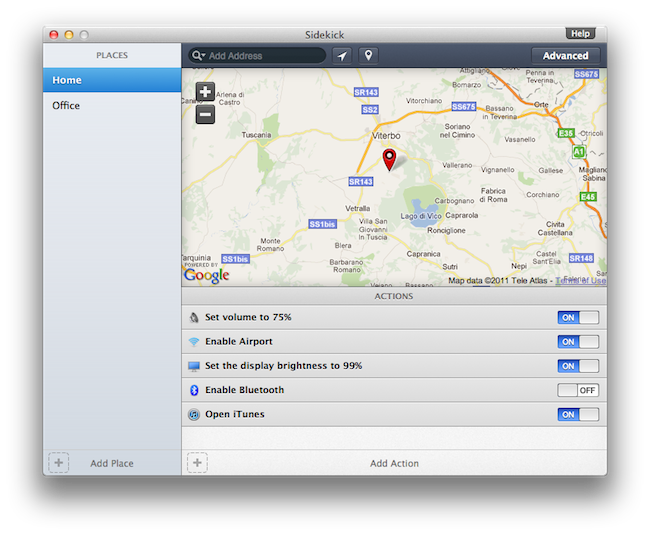
Last week, I ordered a new MacBook Air from Apple’s website. My MacBook Pro was getting old, so I decided it was time for an upgrade – and the new MacBook Airs looked like a worthy upgrade. As with the Apple online store’s tradition, the computer showed up at my doorstep in roughly three days. As soon as I got it, I opened it up, set up my personal information, and connected it to the Internet to start downloading my first apps. I was at my office, and in less than two hours I had my new MacBook Air up and running with my favorite applications, Dropbox, work documents, and so forth. A few hours later, when it was time to go home for dinner, I took my MacBook Air, got home, and placed it on the desk in my room. Thirty minutes later, I opened the MacBook’s lid again, fired up Spotify and Google Chrome, launched MacStories’ internal chat URL, and opened iTunes to check for app updates. Sure, the computer was new, but the pattern of actions that followed the opening of the lid wasn’t uncommon: this is what I do every day after dinner. I fire up some music, talk to my co-workers overseas, and browse iTunes. My laptop may be changing location travelling from my office to my house and everything in between (usually a coffee shop downtown), but the workflow is the same.

Sidekick, a new app by Oomph, aims at automating the tedious process of changing your Mac’s settings basing on the location of your computer. Read more


Screens for Mac Makes VNC Easy and Organized

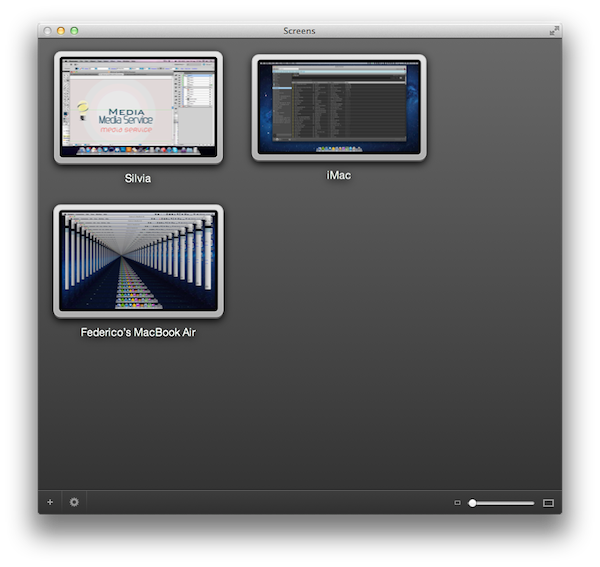
I’m a big fan of Edovia’s Screen VNC client for the iPhone and iPad. Whilst I still use LogMeIn when I need to access my computer’s filesystem remotely and I enjoy the service’s social features and network-recognition capabilities (when combined with Hamachi), my basic VNC needs can be easily satisfied with Screens, which provides a very intuitive interface to set up new computers, connect to them, and use them. I don’t recall a single time I haven’t used Screens at least once a day in the past few months to quickly connect to my iMac while I’m on the couch, and fire up some Spotify through the room. For quick connections, Screens is a great app – it even works on 3G and remote Wi-Fi networks thanks to a companion desktop app that will make your Mac available outside your local network.

In my overview of the improved Screen Sharing app in OS X Lion, I detailed how Apple enhanced the system utility with new clipboard features, per-user login, and possibility of grabbing a screenshot of the connected machine. With Screens for Mac, released last week, Edovia offers an alternative to Apple’s default Screen Sharing app that doesn’t have new breakthrough functionalities, but dramatically improves the organization of your remote desktops, and gives you more control over what you’re connecting to. Read more