


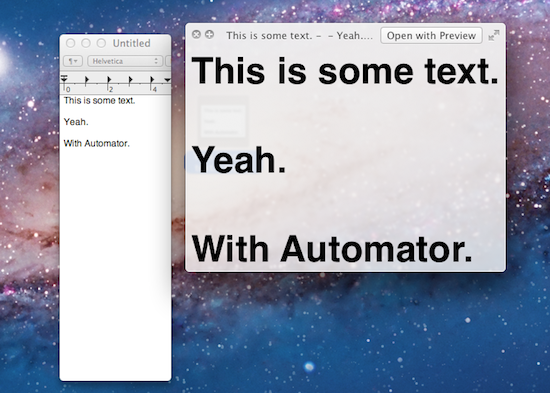
Automator, the suite of automation tools for OS X that can create user workflows, services or apps, has received a series of interesting improvements in Lion, some of them useful additions that will likely eliminate the need for certain kinds of third-party software for many users. In spite of Lion being described as a “user-friendly” OS thanks to the implementation of gestures or full-screen apps, as we’ve seen in our review and other articles following the Mac App Store launch it’s clear there’s still much room for tweaking and “taking control” of the OS when you want to get the most out of it. Take the Option key for example: Option has been capable of reversing certain behaviors in Mac apps for quite some time, but in Lion it gets a whole new usage as it can reverse the entire Resume system, show the Library in the Finder’s menubar, or change the Finder’s “Arrange By” feature to “Sort By”. And that’s just the Option key. Personally, I disagree on the assumption that Apple is “dumbing down” the operating system only by introducing functionalities that make interacting with a computer easier. The way I see it, Lion is the most powerful and feature-rich version of OS X to date (and several developers, from a technical standpoint, agree with this) and, actually, the gestures themselves can appease any power user when correctly mastered. Lion may look simpler on the surface (and to an extent, I can see why the addition of the Launchpad doesn’t help as far as this argument goes), but it’s a very powerful entry in the OS X family once you take a peek under the hood. Read more
Mono, Beautiful Growl Theme, Updated for Lion

Mono by Christopher Lobay is a beautiful theme for Growl, the popular notification system for OS X, that I’ve been using on my MacBook Pro and iMac since it was first released last year. Of all the Growl themes I’ve used, Mono was the one that provided a good compromise of gorgeous interface and usability – I like my Growl themes to be informative, beautiful to look at, unobtrusive and definitely not “sticky” on screen. I typically set my Growl preferences to display a notification for 1.5 seconds, which plays very well with Mono’s animation that makes alerts slide into your Mac’s screen from the side.
Mono has been updated to version 2.0, and while this update doesn’t bring any major visual change from Mono 1.0, it does add full Lion compatibility. Indeed I tried to configure Mono with Growl on Lion last week, but couldn’t get it to work – that was particularly unfortunate for me as my favorite theme couldn’t be tested with GrowlMail, which has been updated to version 1.3 to, again, work with Lion and the new Apple Mail. With Mono 2.0, everything works: notifications show up correctly on Lion, as do new messages from Mail. As a side note, I noticed I had to manually restart the Growl process and all associated apps to get notifications to work on OS X Lion.
Meanwhile, the Growl developers are busy building a new Mac App Store version that won’t be free, and it’s supposed to come out soon with several enhancements and new features. While waiting for the all-new Growl, you can download Mono 2.0 here.
Verizon Activates 2.3 Million iPhone 4s In Q2

As noted by ZDNet, Verizon reported its second quarter earnings today, delivering strong results and reporting revenue of $27.53 billion. The company added 1.3 million postpaid customers, with data revenues up 22.2 percent year-over-year and 189,000 FiOS Internet and 184,000 FiOS TV net additions. As with the iPhone, the earnings reveal Verizon activated 2.3 million iPhone 4 units in the second quarter, a 100,000 units increase from the 2.2 million iPhone 4s they activated in the previous quarter after roughly two months of availability in the US since the February 10 launch.
Verizon’s relatively flat growth rate with activated iPhone units doesn’t surprise when compared to AT&T’s similar trend - AT&T activated 3.6 million iPhones in the last two quarters. The difference, however, is that Verizon only has access to the CDMA iPhone 4, both in black and white, whereas AT&T sells both the black/white iPhone 4 and the older iPhone 3GS model, which is still on sale and considered a good entry option for new iPhone users that don’t want to spend a ful $200 on an iPhone 4 with a two-year contract. AT&T’s offer is diversified, Verizon Wireless doesn’t have a cheaper iPhone 3GS to sell to its customers.
Moreover, with increasing rumors of a new iPhone coming out in September (allegedly confirmed by Apple’s “product transition for the September quarter” revealed at the Q3 earnings call), it’s likely customers are holding off new purchases (and thus, contracts) as they wait for a new device to become available in the Fall. The iPhone 5 has been rumored to have worldphone capabilities with an integrated GSM/CDMA chip, and most recent speculation has also claimed Apple could be considering a new, cheaper iPhone to sell off contract at less than $200 to attract the masses of the pre-paid market.
[ZDNet - PRNewswire]
Adobe Clarifies: Flash Hardware Video Acceleration Not Disabled in Lion→
Adobe Clarifies: Flash Hardware Video Acceleration Not Disabled in Lion
Following the release of OS X Lion yesterday, a number of users immediately noticed that some of Adobe’s desktop tools, including Flash Player, had a series of compatibility issues with Apple’s new OS. Adobe started acknowledging these issues with a Known Issues official page, and TUAW noted most of Adobe’s product line was affected by the upgrade. Among the mentioned issues, Adobe stated ”higher CPU activity when playing a YouTube video” with Flash Player was ”possibly related to disabled hardware acceleration” on Lion. Several blogs and tech publications implied Apple had done some changes to Lion’s final build to “kill” Flash Player for OS X.
With an update and a blog post, Adobe has now clarified that video hardware acceleration is not disabled in Lion.
The final release of Mac OS X Lion (10.7) provides the same support for Flash hardware video acceleration as Mac OS X Snow Leopard (10.6). The previous “Known Issue” described in a tech note suggesting that video hardware acceleration was disabled in Lion was incorrect and based on tests with a pre-release version of Mac OS X Lion that related to only one particular Mac GPU configuration. We continue to work closely with Apple to provide Flash Player users with a high quality experience on Mac computers.
From the Known Issues page:
Flash Player may cause higher CPU activity when playing a YouTube video. Possibly related to disabled hardware acceleration.
But then there’s an update below the first note:
UPDATE: The final release of Mac OS X Lion (10.7) provides the same support for Flash hardware video acceleration as Mac OS X Snow Leopard (10.6). The previous “Known Issue” suggesting that video hardware acceleration was disabled in Lion was incorrect and based on tests with a pre-release version of Mac OS X Lion that related to only one particular Mac GPU configuration. We continue to work closely with Apple to provide Flash Player users with a high quality experience on Mac computers.
Flash Player can be downloaded here, but the webpage still doesn’t include OS X 10.7 as supported OS.
Lodsys Sues Rovio Over Angry Birds for iOS and Android, More Developers

As noted by FOSS Patents, Lodsys, the company that started suing app developers over alleged patent infringement for in-app purchases and upgrade buttons back in May, has amended its complaint including more companies allegedly infringing on their patents, like Rovio. Lodsys has left out Vietnamese company Wulven Games from the suit, but has now included other bigger names like the makers of Angry Birds, EA, Atari, Square Enix, and Take-Two Interactive. In total, Lodsys is now suing 37 defendants – smaller independent companies like The Iconfactory were first sent notices by Lodsys in May.
Lodsys is still not impressed by Apple’s assertion that its own license to Lodsys’s patents extends to its app developers. I also pointed out that Apple’s “exhaustion” theory is not necessarily accurate. Also, Lodsys may be able to capitalize on contractual commitments that might preclude Apple and Google from challenging Lodsys’s patents and the related infringement allegations.
With today’s amended complaint, Lodsys is currently suing a total of 37 defendants, and there may be more to come.
In the first weeks of June, Apple filed a motion to intervene in the proceedings between Lodsys and app developers hit by the patent infringement claims – which Apple claimed have no basis as Apple is “indisputably licensed” to the patents, and the app makers are protected by the development agreement with Apple. Florian Mueller at FOSS Patents doesn’t seem to share a similar view, and we recommend you check out all the updates and timeline of events over at his blog.
Lion: 1 Million Downloads In First Day

With a press release, Apple just announced over million copies of OS X Lion were downloaded on the first day of availability through the Mac App Store. That’s roughly $30 million for Apple in just 24 hours, with the OS receiving around 90% of positive reviews in the Store. Currently, Lion has over 9000 ratings with 8120 being five-star ones. Lion marks the first time Apple is distributing a new OS digitally through an online platform, though the company confirmed yesterday a USB Thumb Drive will be made available at $69 for people without a broadband connection to download the OS. As Lion is distributed through the Mac App Store, which is likely part of the iTunes services running on Apple’s North Carolina data centers, Apple’s new infrastructure should have moved 3.6 petabytes in the latest 24 hours.
Lion is off to a great start, user reviews and industry reaction have been fantastic,” said Philip Schiller, Apple’s senior vice president of Worldwide Product Marketing. “Lion is a huge step forward, it’s not only packed with innovative features but it’s incredibly easy for users to update their Macs to the best OS we’ve ever made.
You can read more about Lion’s new features in our coverage. Full press release embedded below. Read more
OS X Lion: Screen Sharing Overview
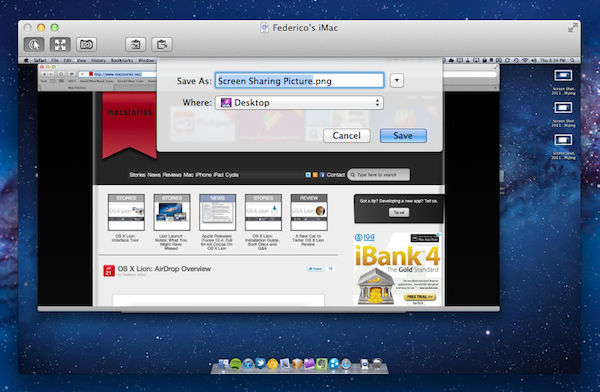
Since yesterday’s launch, we’ve detailed the biggest new features of OS X Lion in our review, covered the installation steps and took a quick tour across Aqua’s new interface elements; we’ve also listed the first five things we usually do when setting up Lion, and collected some of the best tips we received in the comments and via Twitter. After AirDrop, another app that I’ve been using daily on my Macs running Lion for the past few weeks is Screen Sharing, which gained some important improvements on the new OS and the possibility of logging into a user’s account even while it’s not being used, without disturbing who’s currently using a remote computer. Read more
OS X Lion: AirDrop Overview
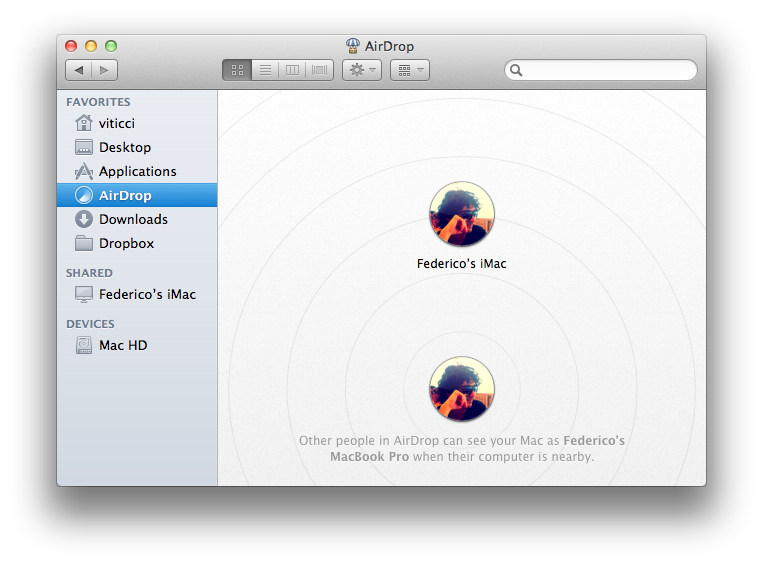
Among the new features of Lion that Apple touts on the Mac App Store and the OS’ official webpage, there is a new peer-to-peer file sharing functionality called AirDrop, which uses the Finder as a way to share files with Macs nearby through drag & drop. Acting as a replacement to the omnipresent USB stick and providing an easier approach to wireless file sharing than the Mac’s default “Drop box” feature, AirDrop wants to replace any physical media and alternative software solutions used to share documents with your friends, family, or colleagues that happen to have a Mac next to your machine. I can’t tell you how many times in the past I found myself using my MacBook next to a friend’s MacBook, and doing something as simple as sharing an .mp3 file required us to either go through the Mac’s Sharing settings in System Preferences, upload it online for a one-time usage, or rely on the typical USB thumb drive.
AirDrop is aimed at making file sharing easy, and secure at the same time. Before I delve deeper into its feature set though, here’s the list of computers Apple says are compatible with Lion’s AirDrop:
- MacBook Pro (Late 2008 or newer)
- MacBook Air (Late 2010 or newer)
- MacBook (Late 2008 or newer)
- iMac (Early 2009 or newer)
- Mac mini (Mid 2010 or newer)
- Mac Pro (Early 2009 with AirPort Extreme card, or Mid 2010)
Miscellaneous Lion Tips and Tricks
Lion is a solid update to OS X and it comes with several new features as we’ve outlined in our review, however there are so many little touches and minor features it is possible some of them will go unnoticed, leaving a user wondering whether something he thought would be possible was removed by Apple. In this post, we’ve collected some of the best tips and tricks we’ve received from our readers and Twitter followers since Lion came out yesterday, as well as stuff that didn’t make it to the review. More will follow throughout the next days, but in the meantime check them after the break.
Note: Part 2 is now online.