Federico Viticci

10804 posts on MacStories since April 2009

Federico is the founder and Editor-in-Chief of MacStories, where he writes about Apple with a focus on apps, developers, iPad, and iOS productivity. He founded MacStories in April 2009 and has been writing about Apple since. Federico is also the co-host of AppStories, a weekly podcast exploring the world of apps, Unwind, a fun exploration of media and more, and NPC: Next Portable Console, a show about portable gaming and the handheld revolution.

How The iPad Changed A 9-Year Old Girl’s Life
How The iPad Changed A 9-Year Old Girl’s Life

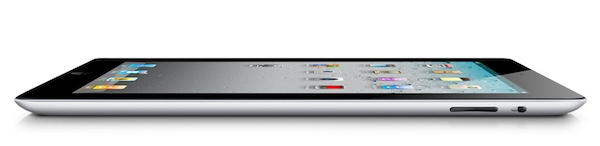
Evonne Barry at the Herald Sun tells the story of Holly Bligh, a 9-year old girl from Melbourne, Australia, whose life has been changed forever since she started using an iPad instead of regular paper and textbooks. As the publication reports, in fact, Holly has albinism, a condition that, alongside her skin, also affects her vision. Before the iPad, Holly’s parents and teachers were forced to print out papers with larger characters in order to let her read properly. The iPad, with its multitouch capabilities, changed that. Holly can now read her books with ease thanks to pinch and zoom, and her mother says the device is improving her ability to be independent from teachers as well.

But there’s more. Holly’s mother, Fiona, decided to send an email to Steve Jobs to personally thank him for producing a device that contributed so deeply to the betterment of her daughter’s life, and he replied.

Within hours of directly emailing multi-billionaire chief executive Steve Jobs, she was thrilled to receive a response.

“Thanks for sharing your experience with me. Do you mind if I read your email to a group of our top 100 leaders at Apple?” he wrote.

Mr Jobs signed off with “Thanks, Steve”, and asked for a high-resolution photo of Holly with her iPad.

This isn’t the first example of how the iPad as a revolutionary device changed the lives of children affected by different conditions and disabilities. Still, it’s always nice to hear a good story, rather than speculation on the next MacBook Air or Sandy Bridge CPU. Make sure to head over the Herald Sun for the full article.
Permalink

Tweetbot 1.3 Released with New Features & Favstar Support

It was only three weeks ago that we covered Tweetbot 1.2, an update to the popular Twitter client from Tapbots that added retweet undo options, old-style retweets, Pinboard support and a new user/hashtag picker in the compose screen. Today, another update to Tweetbot has been released, reaching version 1.3 and adding new design refinements, Twitter features, as well as general fixes aimed at improving the user experience.

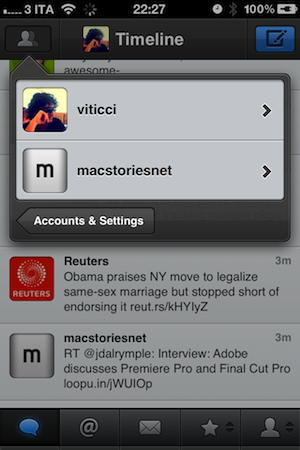
Tweetbot 1.3 comes with a new account switcher popover that adds one extra step to go back to the account screen, but should prevent users from accidentally hitting the button when touching the top timeline bar. Tapbots received several reports of users annoyed by the fact that the button was too close to the timeline selector, and rather than removing it or replacing it altogether, they figured out a way to quickly switch accounts or go back to the accounts & settings page. It is an extra step but the trade-off should be worth it. Also improved in Tweetbot 1.3 are direct messages: you can now delete entire threads and single messages, copy them and translate them, but also enjoy a new recipient selector when composing a new DM. Obviously, Tweetbot has already been updated to include Twitter’s recent policy changes and OAuth login to use direct messages (if you haven’t re-authorized the app, do it now).

Another new feature that had me excited to check out Tweetbot 1.3 is Favstar support: for those who don’t know, Favstar is a fantastic ego-booster service that lets you see how many people have retweeted and marked your tweets as favorite. It provides a “most recent” list, as well as an all-time chart to see your most successful 140-character messages ever. I’m addicted to Favstar, and Tweetbot now comes with handy integration to invoke the “award tweet of the day action” (tap and hold the favorite button in the tweet drawer) and open your Favstar profile (double tap your profile tab). I love this.

Other changes in Tweetbot 1.3 include:

  • Local trends
  • “Add to List” feature improved and renamed to “Manage List Memberships”
  • Added “go to user” feature in people search (shows when typing into the “Search People” box)
  • Gaps now load above or below depending on position of gap when button is invoked.
  • Compose Tweet from hashtag (by holding down on a hashtag in a tweet)
  • Drafts button now displays # of drafts.

It’s great to see Tweetbot getting better and more powerful on each release, and you can read more about the future of the app here. Or, you can check out more screenshots of version 1.3 below and download the app here. Read more


First Thunderbolt Tests: “Dramatically Faster” Than FireWire, Supports Booting from Disk

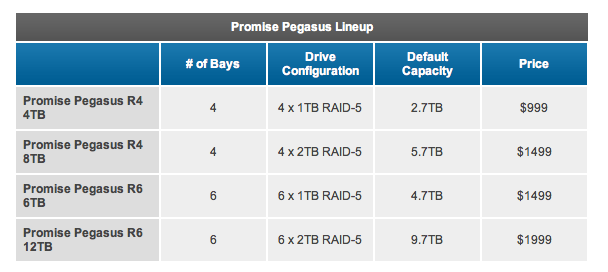
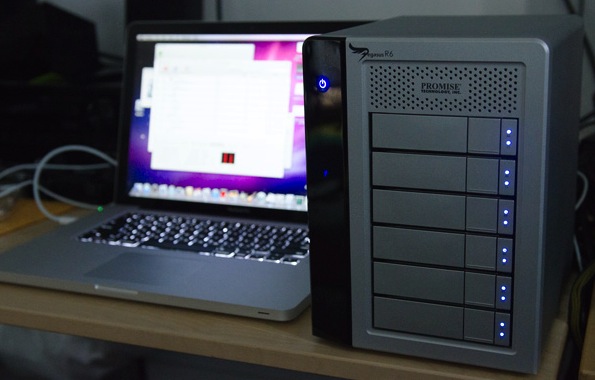
With the release of the official Thunderbolt cable from Apple earlier this week, the first Thunderbolt-enabled products also started appearing on the Apple online Store. As announced back in February soon after the introduction of the new MacBook Pros with Thunderbolt, Promise made available a set of four different RAID systems called Promise Pegasus R4 (4x1TB and 4x2TB configurations) and Promise Pegasus R6 (6x1TB and 6x2TB capacities). A few publications managed to get their hands on the newly released models and the first results are coming in, detailing how, indeed, the Thunderbolt technology is incredibly faster than regular USB 2.0, but also FireWire 400 and FireWire 800.

First off, AnandTech received a 6-bay 12 TB model of the Promise Pegasus and, whilst a full review will be available later this week, they have confirmed that booting OS X from an external Thunderbolt disk properly partitioned will be possible, unlike some reports in the past months suggested. Thanks to Thunderbolt’s high speed and possibility of daisy-chaining devices, it’ll be interesting to see how fast will Lion run when configured on an external (perhaps even SSD) drive with other peripherals connected.

All of the available Pegasus systems ship with 7200RPM 3.5” hard drives, although Promise mentioned that we will may see SSD enabled configurations in the future. The 12TB R6 we received uses six Hitachi Deskstar 7K3000 2TB drives (HDS723020BLA642) in a 9.7TB RAID-5 configuration. The 7K3000 spins its four platters at 7200RPM and buffers data with a 64MB on-board cache. The drive has a 6Gbps SATA interface although the Pegasus R4/R6 supports SAS drives as well. All of the Pegasus devices ship in RAID 5 however they do support RAID-0/1/5/50/6/10.

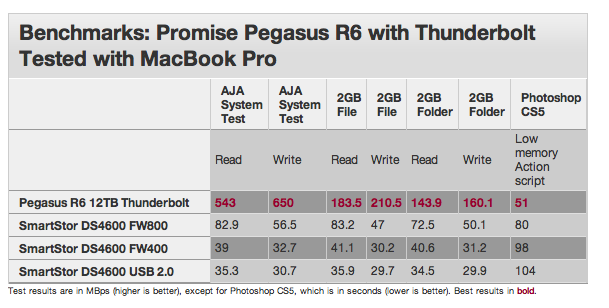
Similarly, Macworld received a Thunderbolt 6-bay 12TB Promise Pegasus RAID system and put it through a first round of tests to measure its speed against common standards like USB and FireWire. Unsurprisingly, Thunderbolt scored better reading times – between 6.8 and 11.5 times faster than a FireWire drive from Promise itself, while a copying process of a 2 GB file was 30 percent faster on the Thunderbolt-equipped R6.

We used two different systems to test the RAIDs: a 15-inch 2.2GHz Core i5 MacBook Pro with a 256GB solid-state drive and 4GB of RAM; and a 27-inch 2.7GHz Core i5 iMac with a 1TB hard drive and 4GB of RAM.

When connected to the MacBook Pro (which has a slower processor than the iMac, but a faster internal SSD), we see that the R6’s AJA System Test results are very similar to the results when the R6 is attached to an iMac. In our tests involving the 2GB file and 2GB folder of files, the R6 benefited from the solid-state drive in the MacBook Pro. Across the board in these tests, the R6-MacBook Pro/SSD combination outperformed the R6 attached to an iMac with an internal hard drive.

More benchmarks will be available this week as people get their hands on new Thunderbolt products.


Shine, Beautiful Weather App for iPhone, Goes International

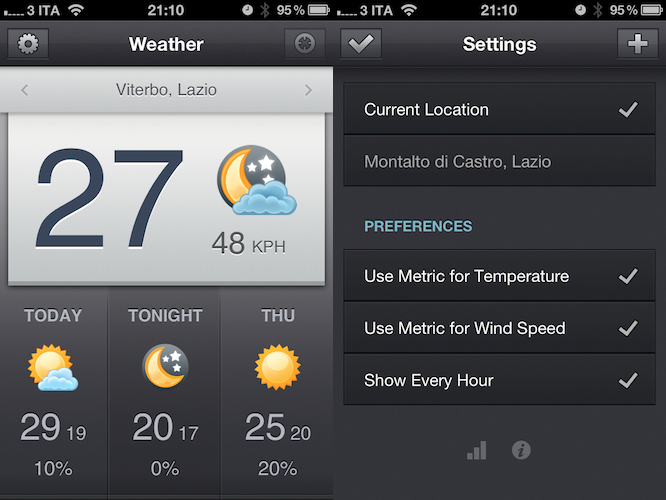
When I reviewed the first version of Shine, a simple weather app for the iPhone, I noted how it was backed by a beautiful interface design but full international support was nowhere to be seen. The app looked great, but I couldn’t get forecasts and wind speeds to display correctly in Italy. Most of the times, they just weren’t there – clearly, Shine was aimed at US iPhone users looking for a neat weather solution.

After the release of iOS 5 beta and the introduction of the weather widget in Notification Center, I didn’t stop looking for great weather apps that would keep me updated on my favorite locations for the summer. After all, my town is only 45 minutes away from the beach and I like to check on weather conditions before I drive there. Shine 2.0, released today, finally allows me to use the app in a reliable way thanks to proper support for international countries. I can’t check on every single country in Europe (or worldwide, for that matter) but I can say that it seems to be working just fine in Italy. I can see current conditions, forecasts (whose UI has been tweaked to offer more detailed info) and wind speeds; data matches with weather info provided by other Italian websites and weather services.

Shine 2.0 won’t change anything if you’ve been using the app in the United States, but it finally allows people overseas to check on weather using this beautiful app they bought last month. You can download Shine at $0.99 from the App Store.


AirServer Now Available On iOS, Turns Devices Into AirPlay Receivers

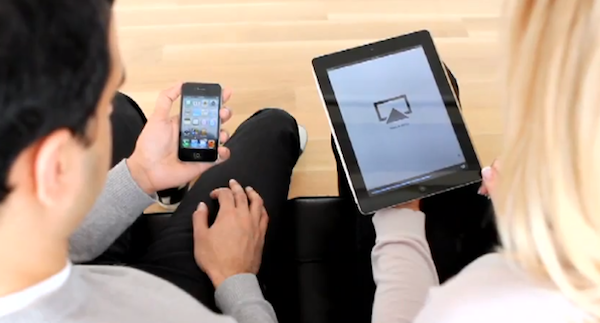
AirServer is a great Mac utility we’ve covered a couple of times in the past months which, of all the unofficial AirPlay solutions we’ve tried, impressed us because of its stability, steady flow of updates and overall support from the developers. For those who missed it, AirServer installs on your OS X machine as a menubar utility with a System Preferences panel that will make your Mac appear as an AirPlay receiver on your local network. This means you’ll be able to send music, videos and photos from any iOS device (or another computer) to your Mac, wirelessly through AirPlay. The app already supports OS X Lion and iOS 5, letting you send content back and forth between an iPad 2 running the latest iOS beta and a Mac powered by a Lion Developer Preview.

AirServer has now made the leap to iOS, and it’s available in the Cydia Store at $4.99. The concept is the same of the Mac version, except it runs on jailbroken devices: an iPhone, iPod touch or iPad can become an AirPlay receiver capable of displaying photos, videos from apps and Safari or music thanks to the AirPlay technology. Several apps on the App Store have tried to do this before, but Apple started pulling them after a few weeks so it makes sense for AirServer to go the Cydia way with a paid utility.

If you’re a fan of AirServer on the desktop and you have a jailbroken device, you should download AirServer for iOS to complete the picture and have AirPlay always available on any computer, iPhone or iPad. Check out the promo video after the break.
Read more


Postbox 2.5 Released: New UI, Faster, Lots Of New Features

Earlier today, we published an article detailing some of the interface changes set to be introduced in Postbox 2.5, a major update for the popular alternative email application for Mac and Windows that, among other things, was teased by the developers as one of the biggest rewrites of the app to date. With a series of blog posts, the Postbox team had in fact already announced that the client would get an overall improved interface, new toolbar icons on the Mac, a completely re-imagined message view, and a vertical pane view to take advantage of widescreen monitors – admittedly one of the glaring omissions from the previous versions of Postbox. Read more


Apple Announces Q3 2011 Conference Call For July 19

Apple has scheduled its Q3 2011 earnings call for July 19, 2011. The conference call will be streamed live on Apple’s website (audio-only) here.

Apple’s conference call webcast discussing Q3 - 2011 financial results will begin at 2:00pm PT/5:00pm ET on Tuesday, July 19, 2011.

Please note that comments made during this call may include forward-looking statements that are subject to risks and uncertainties, and that actual results may differ materially from these forward-looking statements. For more information on the factors that could influence results, please refer to Apple’s SEC filings.

In Q2 2011, Apple posted revenue of $24.67 billion, with 4.69 million iPads, 18.65 million iPhones and 3.76 million Macs sold. The company also reported quarterly revenue growth of 83% and profit growth of 95% with international sales were 59% for the quarter. In the year-ago quarter, Apple posted record revenue of $15.7 billion with 3.47 million Macs, 8.4 million iPhones, 9.41 million iPods and 3.27 million iPads sold.

The third quarter is set to provide some insight into the sales of the long-awaited white iPhone 4, and whether or not the lack of a new iPhone release this summer has affected the overall sales of the iPhone 4, now a 12-month old device.

We will provide live updates from the call on our site’s homepage on July 19 starting at 2 PM PDT.

[Thanks, Shawn]


Apple Releases Java Updates for Mac OS X 10.6 and 10.5

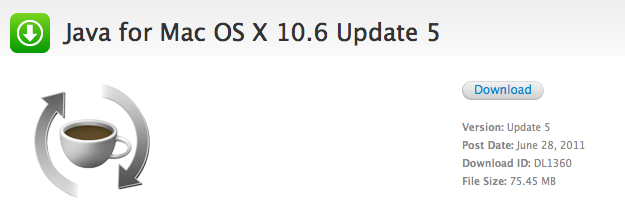
A few minutes ago Apple released two separate updates for Java on Mac OS X 10.5 Leopard and 10.6 Snow Leopard. The updates are available now on Apple’s website and Software Update desktop app, and they’re both aimed at improving “compatibility, security and reliability” alongside other Java SE 6-related updates.

Java for Mac OS X 10.6 Update 5

Java for Mac OS X 10.6 Update 5 delivers improved compatibility, security, and reliability by updating Java SE 6 to 1.6.0_26.

Please quit any web browsers and Java applications before installing this update.

Java for Mac OS X 10.5 Update 10

Java for Mac OS X 10.5 Update 10 delivers improved compatibility, security, and reliability by updating J2SE 5.0 to 1.5.0_30, and updating Java SE 6 to 1.6.0_26 for 64-bit capable Intel-based Macs.

J2SE 1.4.2 is no longer being updated to fix bugs or security issues and remains disabled by default in this update.

Please quit any web browsers and Java applications before installing this update.

More information about the updates are available in Apple’s support documents here and here.


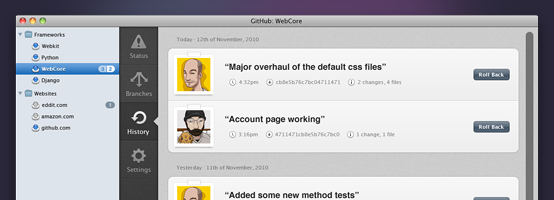
Designing GitHub for Mac

Designing GitHub for Mac

It blows my mind that no one tried to do anything special. Git (and it’s DVCS cousins like Mercurial & Bazaar) provide an amazing platform to build next generation clients — and it’s like the entire OS X ecosystem left their imagination at home.

Eventually, I (well, many of us) decided that better native clients (OSX, Windows, Linux, Eclipse, Visual Studio, etc) was the best way to grow GitHub. And since we all use Macs — we should start off with an OS X application.

Kyle Neath has posted an excellent overview of what designing the official GitHub Mac app was like, the challenges he and his team had to face when dealing with Apple’s recent interface changes coming in Lion, and the overall “new trend” of Mac apps inspired by their counterparts.

Check out the whole story and screenshot gallery here.

Permalink