Federico Viticci

10804 posts on MacStories since April 2009

Federico is the founder and Editor-in-Chief of MacStories, where he writes about Apple with a focus on apps, developers, iPad, and iOS productivity. He founded MacStories in April 2009 and has been writing about Apple since. Federico is also the co-host of AppStories, a weekly podcast exploring the world of apps, Unwind, a fun exploration of media and more, and NPC: Next Portable Console, a show about portable gaming and the handheld revolution.

Survey Claims iTunes Has 10% Market Share Of Online Video

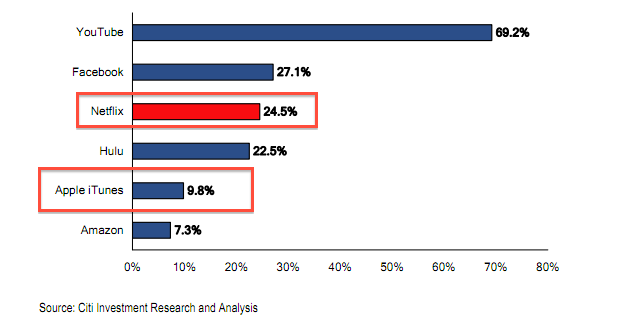
In a survey based on the results of a poll of an unspecified number of “Web users” over the last week, Citigroup analyst Mark Mahaney says Apple’s iTunes Store has roughly 10% of market share for online video. In the poll, the usual suspects are mentioned by users: YouTube leads with 69.2%, and surprisingly enough Facebook comes at #2 with 27.1%, leaving Netflix in the third spot with 24.5%. However, as the analyst notes, if you’re paying to watch web video, you’re using Netflix; neither YouTube or Facebook have premium subscriptions for videos in place, although Google’s video platform has tried several times in the past to expand to other possible profitable segments like live streams and movie rentals. However, the standard YouTube experience remains free and users are able to upload high-quality, HD videos without restrictions of sorts. These videos are then consumed on YouTube.com or connected devices such as the iPhone, iPad, Apple TV and Android handsets, thus making YouTube the leader of online video, without a price.

The “Hulu” seen in the graph above sits right below Netflix, but it’s worth mentioning that most of its visits come from free subscribers, and not Hulu Plus accounts. Similarly, Apple’s iTunes at 9.8% doesn’t include streaming options like its competitors – unless we consider the second-generation Apple TV as part of the reported 9.8% market share, but it’s unclear how many Apple TV units Apple sold since September 2010, and it’s also not clear which devices the users polled by Mahaney own. Apple was rumored to be planning an expansion in web video with the launch of a Netflix-like service, an Internet-connected television and a massive upgrade for iTunes video storage, though recent announcements at WWDC put the focus on iCloud as a delivery platform for iOS devices, rather than a video service. [via All Things Digital]


NYT: Facebook iPad App Launching “In The Coming Weeks”

Nick Bilton at The New York Times reports Facebook is in the final stages of testing its first official iPad application, which should launch in the App Store for free in the coming weeks. The lack of an official Facebook app for the tablet contributed to the rise of third-party solutions in the past year that were nothing but redesigned versions of Facebook’s website wrapped inside the iPad’s screen; according to The New York Times, Facebook’s iPad app has been carefully designed and tested by Mark Zuckerberg himself to ensure the quality of the product and a great Facebook experience on the tablet. For instance, the app will sport chat and Groups integration and will allow users to upload photos shot with the iPad’s cameras. Or, users will be able to browse photos in full-screen in a completely new, beautiful Facebook UI.

People briefed on Facebook’s plans say that in coming weeks the company plans to introduce a free iPad application that has been carefully designed and optimized for the tablet.

The app has been in production at Facebook for almost a year, going through several design iterations, and is now in the final stages of testing, according to these people, who declined to be named because they were discussing confidential product plans.

With more than 600 million Facebook users out there and 25 million iPads sold since April 2010, the potential for adoption is huge. There’s been some talks lately as to whether Facebook is really planning to launch an HTML5-based development platform to take on Apple’s Mobile Safari, and indeed The New York Times is also reporting Facebook will launch a new version of the regular website for the iPad’s browser. It’s unclear when all this will launch (NYT says the iPad app will be available in the “coming weeks”), but it’s safe to assume the new website won’t offer as many features as a native app. The Facebook app for iPhone has been around since 2008 and it’s the most popular free App Store download of all time.


Send2Mac: An Easy Way To Send Webpages To A Mac Browser

Over the past few weeks I’ve mentioned on Twitter and in a couple of articles a service I’ve started using on my Macs and iOS devices, a simple tool that has contributed to making the process of sending webpages to remote computers incredibly easy. Send2Mac, a free service by developer Bastian Woelfle, installs as an app on your Mac and a bookmarklet in your browser to enable you to instantly send a webpage from any device or computer, to another Mac. It doesn’t matter where the target Mac is, or what kind of Internet connection you’re using on your iPhone, iPad, or office PC: as long as you can run a web browser and the remote Mac is connected to the Internet, the webpage will magically open in a few seconds.

In the past months, I’ve actually been busy trying to find the best way to remotely send webpages from a device to another. First, I came up with a Dropbox tweak to email links to myself, and watch them open in my desktop browser. Then I stumbled upon Push Browser, an iOS app and Chrome extension that enables you to send webpages back and forth between devices and desktop computers. I love Push Browser, but it’s got one major downside: on a Mac, it’s limited to Google Chrome, and I haven’t heard back from the developer about a possible Safari or system-wide integration. That’s why I thought of giving Send2Mac a try: rather than having a dedicated extension for each browser, this app directly plugs into a Mac’s default browser, whatever it is, and can send webpages to it. Simple. On the other end, Send2Mac generates a unique bookmarklet for each of your target machines, based on an API key thet you’re given randomly every time you visit send2mac.com to set up a new computer.

It works like this: I have two Macs, and both of them run the Send2Mac utility in the background. My MacBook Pro and iMac, however, have been assigned different API keys: they’re different, because they correspond to two different bookmarklets that let me send webpages from my iOS devices – or other computers I might happen to have. So when I’m on my iPhone and I find a webpage I’d like to check out later on my iMac, I hit the “Send2iMac” bookmarklet and it goes straight to the iMac, in a couple of seconds. If I want the page to open on my MacBook Pro, I hit the bookmarklet for that computer. If I want the page to open on my iMac, but while running Lion, I have another bookmarklet. It’s really simple: each target machine and OS has its own key and bookmarklet. No menus to navigate and no interface, you hit a button and the webpage travels from a browser to another.

I’d pay for Send2Mac if it were a premium service, but it’s surprisingly free and “might be really buggy”, as the developer writes on the app’s website. In my tests, I’ve found Send2Mac to work reliably as it’s even capable of launching a closed browser with the new webpage I sent because it’s a process that runs in the background all the time, alongside the default browser of your Mac. You can configure Send2Mac on iOS and Mac browsers, send webpages from Mac to Mac, iOS to Mac and even Windows to Mac as long as you have the bookmarklet installed.

You can start using Send2Mac by heading over here with your device, and generating a new API key for your Mac.


Report Claims No New Macs Until Lion Launches

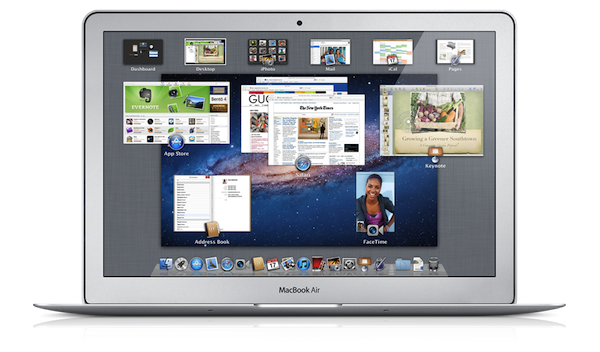
As Apple is getting ready to launch the next major version of OS X, Lion, in July, AppleInsider reports the company has decided to postpone the release of refreshed Mac models until the OS is available, so customers buying new computers will find Lion already installed. The move would make sense considering the new features being introduced in Lion: a customer that doesn’t need to manually upgrade (in spite of the simple upgrade process of the Mac App Store with one-click install) may result in a customer already tied to the new iCloud ecosystem once the suite launches this Fall, as well as immediate access to new functionalities like AirDrop, full-screen apps, or Mission Control. To put it simply: by releasing new Macs with Lion built-in, Apple would eliminate the risk of users putting off the upgrade for any reason.

Apple management is so pumped up over the advantages presented by its forthcoming Mac OS X Lion operating system that the company has been holding back the release of at least one new Mac refresh until the software is finalized, AppleInsider has learned.

For instance, new Thunderbolt-enabled Sandy Bridge MacBook Air models expected to go into production this month have been ready and waiting for some time, according to people familiar with the matter. But management is currently unwilling to usher the new models into the market with the current Mac OS X 10.6 Snow Leopard operating system.

With Apple’s Lion Up-To-Date program, customers will also be able to request the OS for free for Macs purchased between June 6, 2011, and the day OS X Lion comes out. This means that, even if the rumor’s untrue and Apple is not considering waiting for Lion’s release to unleash new Macs, customers would still have the chance to spend $0 to get the latest operating system.

As for the Macs rumored to be getting an update soon, the most notable ones are the MacBook Airs, allegedly set for a Thunderbolt and Sandy Bridge spec bump following the MacBook Pro and iMac refreshes from earlier this year. According to the rumor mill though, the Mac mini and Mac Pro lines are also due an update, with the server counterparts specifically mentioned in a report last week.


Alternative Ways To Add Actions Into OmniFocus

It is no secret I’m a big fan of The Omni Group’s OmniFocus for Mac and iOS, as over time it has become my “trusted system” (as people like to call great applications you can rely on nowadays) to organize actions (tasks), contexts and, in general, stuff I have to do and don’t want to forget about. If you’ve been reading MacStories in the past few months, you know we care about the latest OmniFocus updates and new features implemented by the developers, but more importantly we, like many others, have fallen in love with the iPad version of OmniFocus, which contrary to expectations has turned out to be a great portable counterpart that retains most of the functionalities of the desktop OF without sacrificing usability – actually adding new intuitive schemes, navigation options, and more. With an update to the iPhone app around the corner and a major 2.0 update for the Mac coming out sometime in the next months, there’s plenty of features to look forward to.

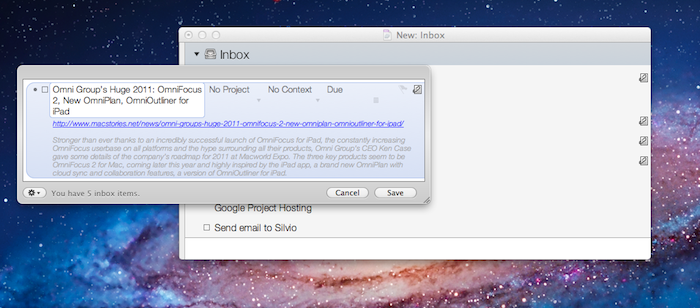
Over the past weeks, however, rather than reading tutorials on how to get the most out of OmniFocus or learning about other users’ setups (something that I usually love to do, by the way, as my Instapaper queue can prove), I decided to play around with tools and utilities provided by The Omni Group to customize the way you can get actions into OmniFocus without actually using OmniFocus. That’s an interesting concept: as OmniFocus can be integrated with OS X, accessed to from a web browser or even linked to by other apps, there are ways to quickly get items into it without following the usual pattern of opening the app + writing down a new action, or launching the desktop Quick Entry window manually. And as much as I love the iOS versions of OmniFocus, there’s always something that bothers me when I’m in a hurry but I need to get some actions saved quickly: as others have outlined before, I think I’d really enjoy a “mini OmniFocus” that’s exclusively aimed at entering tasks in seconds without loading the entire database. Or, there could be a way to send an action quickly to OmniFocus’ cloud server, without having to open OmniFocus at all. While this is not possible today – but I have a pretty good feeling The Omni Group is considering it for future updates – there are ways to quickly create tasks outside of the main OmniFocus environment and save them in seconds.

After the break, I take a look at some of the tools I’ve been using to add actions in my OmniFocus using an iPhone, iPad, or Mac. Read more


Discovr Apps Is Like Pandora For The App Store

Back in January I reviewed Discovr, an interactive music map that was aimed at letting you easily and joyfully discover new artists and songs based on your tastes. By providing an original interface that turned classic hyperlinking into an interactive experience with animated maps and multitouch, Discovr still holds up as one of the most original iPad apps to explore the iTunes Store in an alternate view that, eventually, also made its way to the iPhone. But after music, the Filter Squad developers might have asked themselves what is that iOS users want to discover on a daily basis. And that is apps, obviously. Discovr Apps, a new version of Discovr available in the App Store at $0.99, runs on the iPhone and iPad and, just like its music counterpart, wants to turn the App Store categories and links into a map that changes every time according to the suggestions you’re given and the apps you’re interested in.

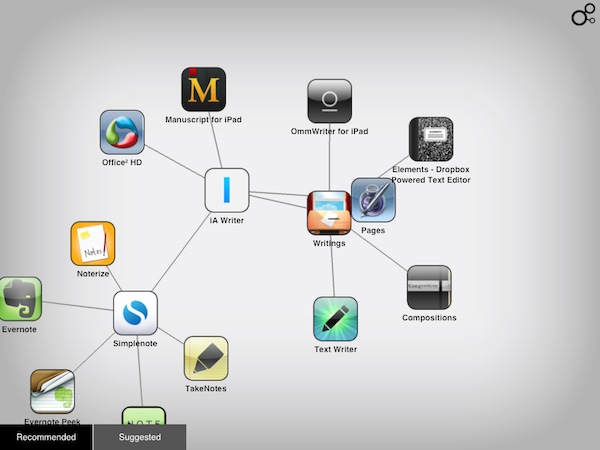
In the main page, you’re presented with a search box to manually start looking for an app, or two tabs at the bottom: recommended for you, and suggested apps. For those who don’t know how Discovr works: after the first element – in our case, an app – pops up on screen, a tap will generate related items connected to it, thus creating a map. As you keep tapping to view related items, the map grows and the connections expand. To view an item in detail, you just have to double-tap and you’re brought to an App Store-like page with description and screenshots. If you want a broader view of the map you’ve generated, pinch to go back.

You can share discoveries on Twitter and Facebook or via email, but the main point of the app is to sit down, check out the recommendations or start with an app you like, and see where Discovr brings you with its interactive system. And as far as recommendations go, I’m very satisfied with this app-focused version of Discovr: even more than Discovr for music, I found app suggestions to be really tailored to my tastes and needs, with gems like Twitterrific, Evernote, Simplenote and Writings often showing up in my maps.

Discovr is, once again, an interesting experiment that offers an intuitive way to discover media you’d probably miss in the sea of App Store apps and updates. At $0.99 in the App Store, that’s an investment you should consider to discover more great apps in the future.


Back To School Promo Finally Launching Tomorrow, $100 Gift Card Confirmed

The much anticipated Back to School 2011 promotion that was initially rumored to kick off in May, and then set for an announcement at WWDC with special iPad discounts, has finally been confirmed to kick off tomorrow, June 16, with a $100 gift card to buy software and media in Apple’s digital Stores. Photos posted by Italian website iPadevice [Google Translation] and MacRumors confirm that Apple has finalized work on the promotion, which will run until September 20, 2011, and will include a $100 (€75) gift card for software purchases. As Apple’s gift cards can be used everywhere though (iTunes Store, App Store, iBookstore), students who buy a new Mac will be able to redeem a code to use with apps, songs, movies, or books.

In the past years, Apple offered free iPods with the purchase of a new Mac as a clear sign of the company wanting to push iOS devices in the educational market – each student would get a free iPod touch, create an Apple ID to download apps, and eventually be tied to Apple’s ecosystem with other iOS devices. With the launch of the Mac App Store, however, and the upcoming OS X Lion, it appears Apple wants to heavily promote how the new Store will become the best way for Mac users to discover and buy software. In spite of the universal nature of gift cards, Apple clearly states on the promo material that $100 to spend on the Mac App Store can be used to buy Pages, Keynote, and Numbers.


OS X Lion Developer Preview 4 Update Released

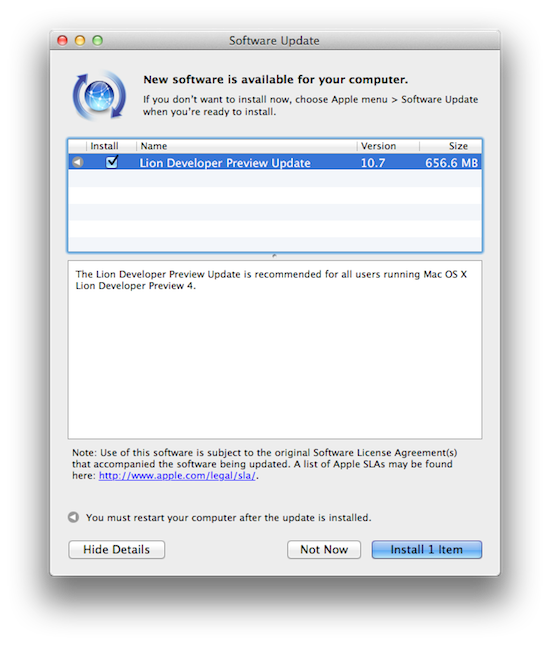
As Lion’s development moves forward and nears the public release set for July, Apple has pushed another update to developers running OS X Lion Developer Preview 4. The new version, available through the Software Update control panel on the desktop, weighs at 656 MB and should be one of the latest updates before Lion gets its pre-announced Mac App Store rollout this summer. Lion will be available at $29.99 as digital-only upgrade for all your Macs configured with your Apple ID.

We’ll update this story with more details on what’s new as we get them, so make sure to refresh this page later.

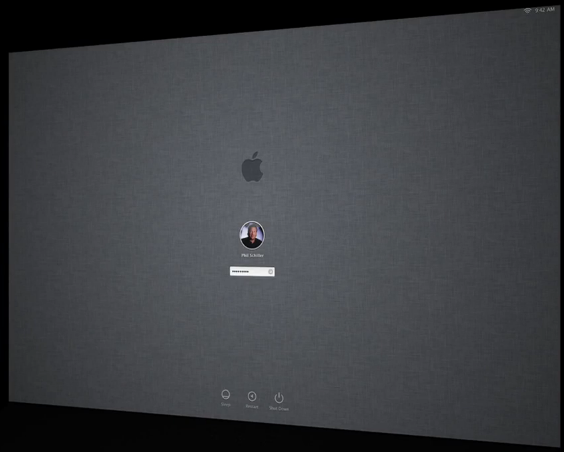
Update: Build number is 11A494a. First reports seem to indicate the login window has got a new linen background – the login window was briefly shown during the WWDC keynote. [image via]


Evernote for Mac Update Brings New View, Useful Note Links

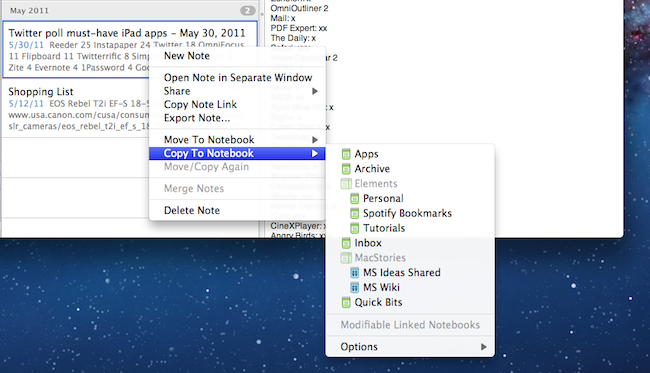
An important update for Evernote, the cross-platform “memory tool” that allows you to capture notes, ideas, images and webpages, is coming out today on Mac and Windows and, after some weeks of testing, I can say it’s one of the most interesting new versions of the desktop app to date. The new Evernote 2.2, in fact, heavily relies on a new feature called “note links” that assigns a unique URL to each note in your Evernote account – meaning, you can generate a note link, paste it somewhere else on your Mac, and clicking on it will automatically open that note in Evernote. It’s very handy if you’ve always wanted to add relevant Evernote information to, say, calendar events or OmniFocus but never found the right way to do so. With note links and the new “copy to notebook” functionality, notes in Evernote 2.2 can be linked, duplicated and accessed from anywhere. If you paste a note link on your iOS device, the system will try to launch the Evernote app with that note in the foreground – again, this is a very welcome addition that has greatly improved my Evernote workflow in the way I can reference notes and link items between various notebooks. On top of that, you can also select multiple notes and grab a list of links with a single click.

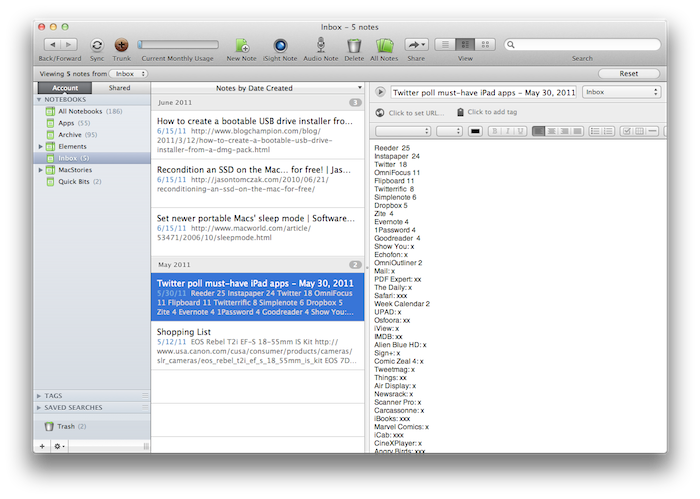
There’s more in Evernote 2.2 however: the new Snippet view, much like on the iPhone, allows you to view text and image thumbnails for notes in your account at a glance. Rather than displaying a simple list of note titles, snippet view combines text, tags, dates and media to offer an integrated view of what’s in your Evernote – plus, it looks really nice. Evernote writes on the official blog:

If you use Mixed View in your note list, the most obvious change you’ll see is the new Snippet View. Snippets are designed to provide the most useful information possible at a glance. If your note contains only text, then the Snippet will display the text at full width. If the note contains both images and text, then it will show text and a thumbnail. If it’s just an image, then the snippet will show the note title and a larger thumbnail. Not only does this view give you more information about the content of the notes, but it also makes browsing through your notes easier.

Last, new navigation buttons in the upper left corner let you easily navigate back and forth between content you’ve viewed and archived, and just like the web browser click & hold on the buttons will bring up a menu with more navigation options.

While waiting for the promised huge update for the iPad version that will bring a new UI and rich text editing capabilities, you can get the new Mac version from the Mac App Store or Evernote’s website. Evernote 2.2 is propagating at the moment of writing this, so if you don’t see the update right away, you should try later today.