Federico Viticci

10804 posts on MacStories since April 2009

Federico is the founder and Editor-in-Chief of MacStories, where he writes about Apple with a focus on apps, developers, iPad, and iOS productivity. He founded MacStories in April 2009 and has been writing about Apple since. Federico is also the co-host of AppStories, a weekly podcast exploring the world of apps, Unwind, a fun exploration of media and more, and NPC: Next Portable Console, a show about portable gaming and the handheld revolution.

Shazam for iPhone Updated, Gets New LyricPlay Feature

Shazam, the popular music tagging application for iPhone that allows you to hold your device up to a speaker and instantly get to know what’s playing, has been updated earlier today to include a new functionality called LyricPlay that, according to the developers, will display lyrics for the song you’ve just tagged in a beautiful landscape view. It works like this: once Shazam (Encore or RED, as LyricPlay has only been added to the Premium versions) has found a song, it’ll be saved in the My Tags section as usual. In the section, there’s a new LyricPlay button that is capable of syncing lyrics with the song you’ve just tagged, quite possibly promising to start visualizing lyrics in the exact position you just tagged a song. Turn your iPhone in landscape, and lyrics will start flowing in real-time in a Star Wars-esque interface that’s actually quite nice and undoubtedly accurate as far as lyrics go (Shazam says they have access to 25,000 songs with Lyrics after the acquisition of Silicon Valley startup Tunezee).

In reality, I found Shazam’s new LyricPlay feature somewhat unreliable, as it didn’t show up on most (old and recent) songs I have in my iTunes library (best way to run a quick Shazam experiment is to use your own songs), and when it did it definitely wasn’t “synced” with the position of the song. I’m not sure how a listener is supposed to follow the song and the lyrics running on screen, but there’s no doubt Shazam needs to make the whole thing more intuitive.

Overall though, the idea is pretty nice and it comes s a free update. I’m sure LyricsPlay will get better over time, so go download the app here and check out what Shazam has to say in the official press release below. Read more


Lidpop Plays A Sound When Your Mac Wakes Up

Here’s a $0.99 app from the Mac App Store that I found quite hilarious and worth a mention here on MacStories. You know when you close your Mac’s lid, or wake the computer from sleep, right? Worst case scenario, you haven’t assigned any kind of security to the process so your Mac goes to sleep and wakes up without asking for any password or displaying a login screen. Or, maybe you’re a bit like me, and you’ve told System Preferences to lock the computer as soon as it’s closed so nobody will be able to open it and log in. But in both cases, closing the lid and opening it back again doesn’t change, right? It’s just a simple action: you open, you close. Here’s when Lidpop comes in: the app will make your Mac play a sound when it goes to sleep or wakes up. Close the lid, play a sound. Wake up from sleep, play another sound. It wants to add some personalization to the whole boring concept of opening and closing a computer, but I wasn’t quite sure about the idea until I tried it. See, Lidpop comes with some hilariously well-done sound effects like “electricity surge”, “sitcom laughter” or “slamming metal lid” that will play as you close the lid, or open it. I installed the app, and found myself smiling every time the lid made a slamming metal sound – you should have seen the look on my friends’ face. In fact, I think Lidpop is the perfect app to surprise your non-geek friends and convince them that Apple computers play those sounds when you close them. Might be something I have to try out.

Close the lid with a resounding clank or a happy slide whistle. Open it back up with a laugh or a whimsical chime — it’s up to you. Lidpop brings a dash of personality to your computer.

Lidpop won’t make you more productive but it’ll make laugh when you step away from your Mac and you hear the sound of a vault closing. Get the app here.


References to New Time Capsule With Software Update Caching Found

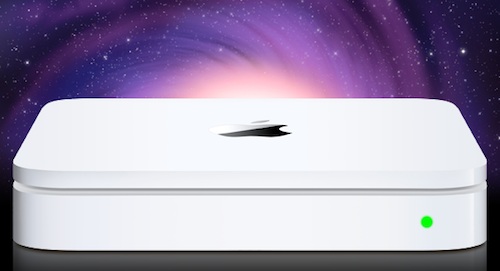
Following the variety of reports from the past weeks that claimed Apple would announce new Time Capsule and AirPort Extreme models at WWDC, an AirPort Utility update was released last night for Mac and Windows, bringing minor fixes to desktop users. AirPort Utility is Apple’s management software to configure and set up an AirPort base station or Time Capsule. Hidden in the update, however, there were some code strings spotted by MacRumors forum members that are hinting at 3rd generation Time Capsules and AirPort Extremes with a software update caching system. This was previously reported as a new feature of these products that would allow a Time Capsule (or AirPort Extreme) to download software updates in the background, cache them, and send them to computers and devices in seconds without the user waiting for the entire download process.

The code strings:

“bsUP.productName” = “Store Apple software updates on this %@”;

“bsUP.description” = “Apple software updates that are copied to this %@ are available to anyone using this network.”;

K31 K30B Time Capsule (Simultaneous Dual-Band, Gen3)

K10B Apple AirPort Extreme (Simultaneous Dual-Band, Gen3)

Mentioned in the app’s contents are also a 4th generation Time Capsule and a 5th generation AirPort Extreme. The existing simultaneous dual-band Time Capsules and AirPort Extremes are indicated as 2nd-gen by Apple, thus leading to speculation that an upcoming refresh would be the third generation mentioned in code.

In the weeks leading up to WWDC, several rumors suggested the new Time Capsule (Apple’s flagship router solution with integrated Time Machine capabilities) would be a complete redesign running a custom version of iOS through an A5 chip. Others also claimed Apple had implemented a way to store iCloud media on the Time Capsule (or hard drive attached to an AirPort Extreme) so iOS devices on the same local network wouldn’t have to download or stream content every time. As Apple didn’t announce any streaming feature for iCloud, however, it’s unlikely the Time Capsule would be capable of caching content downloadable from iTunes otherwise. The possibility of a caching system was also suggested by Daring Fireball’s John Gruber, who hinted at iOS software update without tethering to a computer. iOS 5 does have OTA updates built into the Settings app, so the Time Capsule would serve as a caching mechanism to download updates in the background, allowing users to close the Settings app and receive the update when it’s already been downloaded.


Facebook Working on Instagram-like Photo Sharing App

TechCrunch has posted a screenshot of what they claim to be a new photo sharing app for iPhone developed by Facebook and soon to be released in the App Store. The new app, internally codenamed “Hovertown” or “WithPeople” according to the website, from a first look at the leaked documents looks like a mix of Instagram, Color, Path and With. With the exception of Instagram  (for those who don’t know, an iPhone app / social network that allows you to share photos in seconds with cool built-in effects and geo-tagging capabilities), all the other apps mentioned by MG Siegler are photo sharing solutions meant to capture what’s around you, with people that are with you, are share it with people you know. Basing on these alleged similarities and the screenshot itself, Facebook may be working on an iPhone app that leverages the social graph and location information to share places, people and moments in single shots or entire photo streams.

How do we know? We have obtained roughly 50 MB of images and documents outlining the entire thing.

To be honest, we’re still sorting through all of them. But again, the app looks amazing. We’ve heard that internally it is being called either “Hovertown” or “WithPeople”. And while it looks like a stand-alone app right now, there are also signs that it could be eventually integrated into Facebook’s main iPhone app — as well as the main site.

It’s unclear whether the new photo product may be integrated with the official Facebook iPhone app (which is heavily web-based as far as the interface goes) in a new photos tab or if Facebook is really planning on releasing it as a standalone application. The Facebook iPhone app is the most popular free app of all time, and it wouldn’t be a surprise to see Facebook growing its catalogue of official software for the iOS platform. Facebook has been criticized for not having a native iPad app, a choice that has allowed third-party developers to build their own paid and successful solutions for the tablet. Read more


Final Cut Pro X Coming Out Next Week?

According to Japanese blog Macotakara, Apple may start selling the new version of Final Cut Pro, dubbed Final Cut Pro X, in the Mac App Store next week. Originally unveiled at the NAB in Las Vegas back in April, the company already announced that FCP X would be released in the digital store at the lower price point of $299 – without making any mention of additional apps previously included in the Final Cut Pro suite, such as Color or Motion. Apple said Final Cut Pro X would come out “in June”, but didn’t specify any release date.

Apple has announced to release Final Cut Pro X in this June via Mac App Store in price of $299 in NAV Supermeet, event for Final Cut users, at April 2011. And then Apple seems to start to sell Final Cut Pro X from next week as they told.

Macotakara also claims that the first Thunderbolt-enabled accessories will be available next week, with Final Cut Pro X likely capable of taking advantage of the new technology with high-speed data transfers and daisy-chaining.

From Apple’s original announcement of Final Cut Pro X:

Basing on live updates coming from attendees at NAB 2011, Final Cut Pro X has been built from scratch, and it’s entirely 64-bit. It’s based on technologies like Cocoa, Core Animation, Open CL, Grand Central Dispatch and it focuses on image quality. It features a resolution independent timeline up to 4K for scalable rendering — in fact, it appears the old render dialog is gone entirely as the app uses the available CPU to keep files always rendered. FCP X allows you to edit while you’re importing thanks to its new engine, and it’s also got automatic media and people detection on import, as well as image stabilization.

Apple is promoting the new FCP X as a complete and total rebuild.

Thunderbolt products have been announced by several third-party makers so far, with the most recent demoes at Computex 2011 showing the speedy side of the I/O technology. Apple’s recent update to the Mac line included MacBook Pros and iMacs receiving Sandy Bridge and Thunderbolt upgrades, thus making for more powerful machines better suited for video editing at higher configurations. Similarly, the Mac Pro is also rumored to be getting an update soon to implement faster processors and Thunderbolt ports – the 27-inch iMac, for instance, comes with two Thunderbolt ports to enable complex daisy-chaining and external monitor mirroring.

In the past weeks, several screenshots have surfaced online showcasing parts of FCP X’s interface and features. Macotakara is a usual reliable source of Apple information and product leaks, though details are scarce on this Mac App Store release. [via AppleInsider]


VP Of Retail Ron Johnson Leaving Apple for J.C. Penney

The Wall Street Journal reports Apple’s VP of Retail Ron Johnson is leaving the company to become J.C. Penny president and, eventually, chief executive officer. Johnson joined Apple in 2000 and greatly contributed to the realization and success of Apple’s retail division across the world, becoming the public face for the company when it came down to talk about retail stores and, in the most recent years, the popularity of iOS devices in the Apple Stores. The WSJ says a public announcement hasn’t been made yet, but should happen later today.

J.C. Penney Co. is tapping Ron Johnson, head of Apple Inc.’s iconic retail stores, as its new president and eventual chief executive, people familiar with the situation said.

The company is expected to announce Mr. Johnson’s appointment later today. Mr. Johnson will become CEO in the next few months, succeeding long-time leader Myron “Mike” Ullman. He joined Apple from Target Corp., where he was vice president of merchandising for stores.

More information about Johnson’s career are available from Apple’s PR bio:

Ron Johnson joined Apple as senior vice president in January 2000. Reporting directly to the CEO, Johnson leads Apple’s retail strategy and is responsible for its overall execution and performance. Under Ron’s leadership, Apple has opened over 300 stores to date. Johnson has over 20 years of experience in retail and merchandising as well as a strong track record for delivering consistent year over year growth for billion-dollar companies.

Before Apple, Johnson held various management positions at Target, another US-based retail chain, contributing to the expansion of Target stores playing a key role in marketing and branding for the company. If true, The Wall Street Journal’s report seems to suggest Johnson is going to back to his roots to lead a massive retail distribution chain across the United States – becoming CEO is undoubtedly a big step forward from Senior VP of Retail at Apple.

Update: J.C. Penney has just confirmed the news – Ron Johnson will become CEO starting November 1, 2011, and invest $50 million in the company:

Myron E. (Mike) Ullman, III, chairman and chief executive officer of J. C. Penney Company, Inc. (NYSE: JCP), today announced that Ron Johnson, an innovative and highly regarded retail executive, has been named the Company’s next chief executive officer, succeeding Mr. Ullman in that role. Mr. Johnson will assume the CEO position on Nov. 1, 2011, and report to Mr. Ullman, who will become executive chairman. Mr. Johnson will also join the Company’s Board of Directors, effective Aug. 1, 2011.

Mr. Johnson said, “I’ve always dreamed of leading a major retail company as CEO, and I am thrilled to have the opportunity to help J. C. Penney re-imagine what I believe to be the single greatest opportunity in American retailing today, the Department Store. I have tremendous confidence in J. C. Penney’s future and look forward to working with Mike Ullman, the Executive Board and the Company’s 150,000 associates to transform the way America shops.

Update #2: In a comment to All Things Digital, Apple says they’re “actively recruiting” for Johnson’s replacement in retail:

Apple confirmed his departure in a brief comment to AllThingsD. “Ron is excited about this opportunity and we hope it goes well for him,” a spokesperson said. “We’ve got a great retail team in place and are actively recruiting for his replacement.

Below, Apple’s popular iPad: Year One video featuring Ron Johnson talking about the iPad’s retail success. Read more


Musicon Lets You Add Albums To Your Home Screen

In the weeks leading to Apple’s WWDC announcements, there was one possible feature of iOS 5 that was making the rounds of the Internet, meeting many people’s expectations for the new OS: the possibility to create shortcuts for anything on a device’s Home screen would have been an interesting option to, say, let users create a WiFi icon to quickly access Network settings without opening the dedicated app. Playing around with the concept of aliases and app-specific shortcuts, the theories surrounding iOS 5 pointed at Apple building such a functionality to reduce the time spent tapping and scrolling around. That, of course, didn’t happen, but it hasn’t stopped third-party developers from releasing their own solutions that take on this idea of “creating Home screen shortcuts”.

Musicon, a new iPhone app by developer Fabian Kreiser, enables you to create Home screen icons for music albums you have synced on your device or, if you’re rocking the latest iCloud features, bought on your computer and automatically pushed to your iPhone. Musicon works like this: it scans your music library (the one from iPod.app, or Music.app if you’re already on iOS 5) and fetches albums and album artworks. If music is playing from the native iOS app, a “Now Playing” button lets you control it – this app isn’t meant to be a music controller on its own, unlike Kreiser’s other iPhone app On Stage. In fact, if you have On Stage (which we reviewed here) installed on your device the app won’t show any advertisement.

Once you’ve found an album you like, select it, and hit the big “Install Webclip” button. The app will already display a preview of the icon that you’ll end up with in the Home screen in the upper section of the screen. As you hit the button, Musicon does its thing to create a shortcut: it takes you to the developer’s website to install a webclip on your device. That’s right, these shortcuts are nothing but links to a webpage that somehow takes you to Musicon after you tap on the icon. Music will start playing in the native iPod app, and Musicon will come in foreground with the playback control UI. Not the most elegant solution if you ask me, but it works and the Home screen icons shine on the Retina Display.

Musicon is free, but I wish I could pay to remove advertising without having to keep On Stage installed. The idea is pretty nice and I can see why some people would want to save a couple of albums for quick access on a daily basis – if you’re one of them, get Musicon here and start creating your own shortcuts.


Mr. Reader Gets A Great Update with Evernote, Send2Mac, Terminology Support

There’s no doubt Mr. Reader is becoming one of the most powerful and integrated RSS apps for the iPad. Ever since I reviewed version 1.0 back in April, the developer went back to work to implement several features that are making Mr. Reader a Google Reader client that’s not limited at fetching and marking items as read from a native interface. Rather, Mr. Reader shipped with a good selection of external services to send your favorite articles to, but version 1.1 added support to create tasks in OmniFocus and integration with third-party iOS browsers like iCab. Whereas most feed readers want to provide a good reading experience but don’t focus on letting you get those feeds out of the closed Google Reader experience, Mr. Reader aims at filling the gap between online services / apps and RSS.

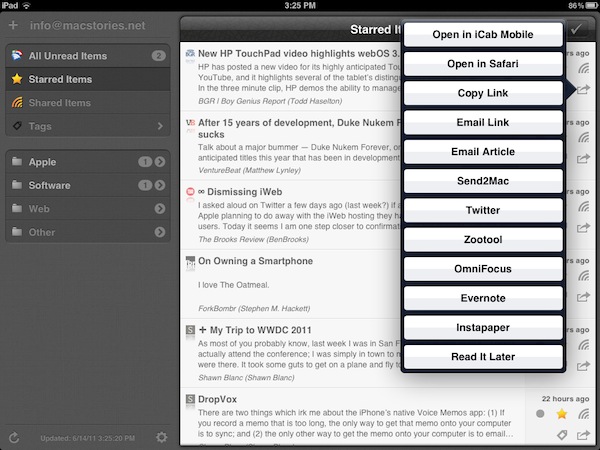
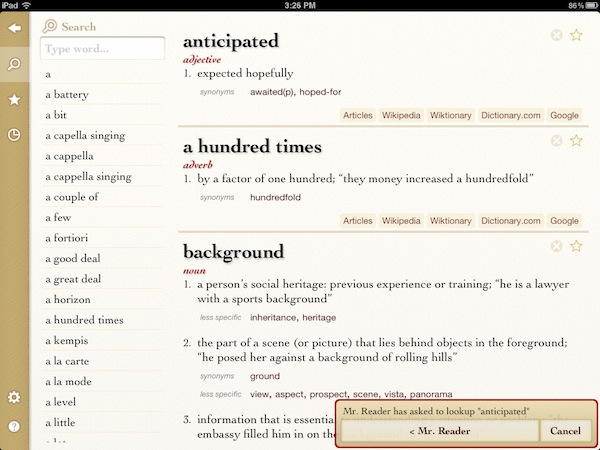
Version 1.2, released yesterday and available now at $3.99 in the App Store, takes the whole concept of getting articles out of the app a step further. With Evernote, Send2Mac and Terminology support, you’ll be able to save articles as notes in your Evernote account, send webpages to your desktop browser in the background thanks to the great Send2Mac service (which already works on Lion), or get definitions of words you don’t know if Agile Tortoise’s app is installed on your iPad. Unlike Instapaper, definitions are not provided in a popover inside the application (at least on iOS 5): when you select a word and hit the Terminology button, you’ll be brought directly to Terminology with the selected word at the top of the list and a popup at the bottom saying that you opened that word from Mr. Reader.

Evernote support is really simple, and I like it: the app will create a blank note with just the title and URL section saved from Mr. Reader. As for Send2Mac, it works perfectly but it only allows you to configure one computer – I’d love to add both my MacBook Pro and iMac to Mr. Reader.

There’s a lot more in Mr. Reader 1.2 though. Tapping on an article will let you open all feeds from the original source; you can send articles to Readability, if you’re a fan of the service; a new theme, Sydney, has been added and others have been refined; the annoying modal sync window has been changed to an unobtrusive spinning indicator that doesn’t overlay the feed list. Alongside dozens of other bug fixes and improvements, Mr. Reader now remembers your preferred view for each feed automatically.

At $3.99 and with updates coming out every few weeks to make the app more stable and integrated, I’m excited to see Mr. Reader taking on Reeder as the most powerful (yet elegant) iPad RSS reader. While looking forward to iOS 5 and (perhaps) iCloud integration, you can get the app here.


Report: New MacBook Air In Late June

Rumored to be getting an update this week as part numbers surfaced online suggested Apple was planning to release new products on Wednesday, the much anticipated new MacBook Air models were replaced by unlocked iPhones today, but sources believe they’re still on track for a late June release with 380,000 - 400,000 initial shipments. As reported by Reuters quoting the Economic Daily newspaper, Apple is expected to sell new MacBook Air units in late June, with shipments of the old line and new models reaching 460,000 units this month.

As supplies dwindle worldwide and the new Airs are increasingly rumored to be refreshed in June or July, little is known about the actual specifications of the new machines. It seems fairly obvious that Apple would implement Sandy Bridge processors and Thunderbolt technology as seen in the latest MacBook Pro and iMac updates, but there are no details on the CPUs Apple would go for in the Airs. A report from May indicated Intel was working on new ULV (ultra-low voltage) processors that would be a perfect fit for the Air, but sources haven’t corroborated the rumor since then.

It is believed, however, that the MacBook Air is becoming Apple’s crown jewel when it comes to promoting the Mac, and so the new Air would require a significant spec bump to be able to run OS X Lion smoothly.