Federico Viticci

10804 posts on MacStories since April 2009

Federico is the founder and Editor-in-Chief of MacStories, where he writes about Apple with a focus on apps, developers, iPad, and iOS productivity. He founded MacStories in April 2009 and has been writing about Apple since. Federico is also the co-host of AppStories, a weekly podcast exploring the world of apps, Unwind, a fun exploration of media and more, and NPC: Next Portable Console, a show about portable gaming and the handheld revolution.

iOS 5 To Allow 1080p Video Export

Following the increasing speculation about the next-generation iPhone getting an 8-megapixel camera, the iOS 5 beta seeded to developers earlier this week keeps providing interesting details on features that Apple is baking into the OS, but aren’t ready or usable yet as they’re being built for future devices. In addition to iOS 5 enabling playback of 1080p video files scaled down to 720p as Apple hasn’t built a screen with enough resolution to support 1080p, 9to5mac points to more code strings from the developer beta that seem to confirm developers will soon be able to activate video export options at 1080p in their applications. This means Apple’s apps like Camera and iMovie, or other third-party solutions, will be capable of saving 1080p files with the public release of iOS 5. Previously, developers could only export videos to 720p.

Programmers use the AVAsset class to work on a detailed level with timed media assets such as videos and sounds. It lets them examine, create, edit or reencode media files, get input streams from devices, manipulate video clips during realtime capture and playback and more. It is now clear that iOS 5 enables devices such as iPhone 4, iPad 1 and 2 and fourth-generation iPod touch to both decode 1080p videos and encode content in 1080p.

An improved camera/processor in the iPhone 5 could allow the device to go past the iPhone 4’s 720p limitation and also start shooting flicks at 1080p with dedicated export options, though Apple would need to bump up the screen resolution to offer native, true 1080p playback. As far as the camera speculation goes, a new report by Digitimes today also indicates camera lens maker Largan Precision (caught in the Apple rumor mill before) has hinted at increasing orders for 8-megapixel modules from smartphone vendors like Apple and HTC. Reports in the past months suggested Apple’s regular supplier OmniVision would provide the 8 MP camera lens for the iPhone 5, although separate claims pointed out that Largan Precision was selected by Apple.

redsn0w Tethered Jailbreak Now Available For iOS 5 Beta 1

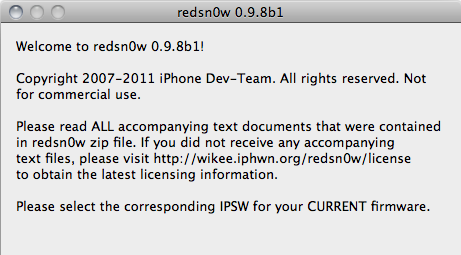
This week’s developer release of iOS 5 has brought hundreds of new features for iPhone and iPad owners, but jailbreakers haven’t wasted any time trying to figure out a way to get the old tweaks and hacks from Cydia working on the devices running the new OS. As tweeted by Musclenerd two hours ago, a new beta of popular jailbreaking tool redsn0w is available, bringing compatibility with devices on iOS 5 beta but exclusively meant for developers willing to beta test the software. As iOS 5 beta is developer-only and consumers shouldn’t get their hands on it, the Dev Team is asking developers of jailbroken apps to test their tweaks against the OS Apple will release this Fall.

Compatible devices:

  • iPod touch 3G
  • iPod touch 4G
  • iPad 1
  • iPhone3GS
  • iPhone4 (GSM)
  • iPhone4 (CDMA)

Furthermore, iSpazio reports a first list of compatible and not working tweaks on iOS 5 beta 1:

Working

  • iFile
  • CyDelete
  • OpenSSH
  • iSHSHit

Not Working

  • MobileSubstrate
  • Springtomize
  • PhotoMail
  • ActionMenu
  • Celeste
  • BiteSMS
  • WinterBoard

The new beta is Mac-only, and if you’re a developer interested in checking out whether your Cydia app is working on iOS 5 beta, you can download it here.


Mac mini, Mac Pro Server Refresh Coming Soon?

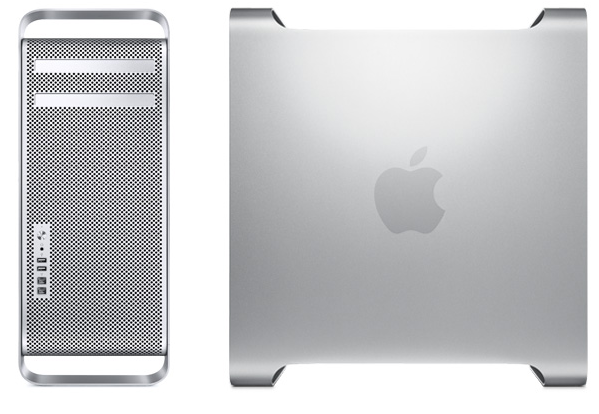
According to 9to5mac, “sources” are pointing to an upcoming refresh for the Mac mini and Mac Pro server lineup which could come in “the next month or so”. Apple will launch OS X Lion in July and, following the implementation of Sandy Bridge processors and Thunderbolt I/O technology in the latest MacBook Pro and iMac refreshes, it’s very likely the company will begin shipping new Mac minis and Mac Pros featuring the new aforementioned hardware. 9to5mac mentions, however, that the server lineup will go under a refresh, so we’re not sure how that would play out with the consumer version of the products. Still, it seems fairly obvious that all forthcoming Mac updates will carry Sandy Bridge and Thunderbolt. Apple quietly introduced its Mac Pro Server product after the Xserve’s discontinuation was announced in November.

The interesting part about both the Mac Pro and Mac mini server models become constrained simultaneously is that Apple might be looking to completely revamp their server offerings, not just update each respective product.

In past few weeks, rumors claimed Apple would soon refresh the MacBook Air family (perhaps in June or July) and the AirPort Extreme/Time Capsule lineup to bring better integration with its recently announced iCloud service. Whilst the Time Capsule announcement didn’t come true at the WWDC keynote, several sources have indicated the MacBook Air would soon receive an update to increase performances with new processors, as well as better connectivity with Thunderbolt.


Tweetbot 1.2 Released With Several Enhancements

Tweetbot, the Twitter client from Tapbots we reviewed here, has been updated to version 1.2, adding several features requested by users in the past weeks and fixing some of the minor gripes we had with the application when it first came out. Whilst version 1.1 focused on adding CloudApp and landscape support, Tweetbot 1.2 brings a series of refinements and enhancements across all the sections of the client that should dramatically improve the experience. For example, you can now undo retweets, and retweet from another account if you hold down the retweet button. That’s quite handy: not only you can delete accidental retweets, you can also retweet quickly without constantly switching between accounts. And if you don’t like Twitter’s standard retweets, Tweetbot 1.2 has an option to send old “quote style” retweets.

Tweetbot 1.2 introduces absolute and relative timestamps, Google/Instapaper Mobilizer support for when you need to strip away all the clutter from a webpage and read it in a text-only view, as well as integration with Bitly.Pro for those who keep a custom domain on the popular link shortening service. Besides the new great user & hashtag picker from the compose view (make sure to check out the animations), short link geeks should be happy to know Tweetbot 1.2 has support for custom API endpoints. Other features in this update include:

  • Pinboard support in the read later options
  • Pikchur image upload support
  • Tapping on a success/failure message dismisses it instantly
  • Added @username/listname for followed lists

Tweetbot 1.2 is available now at $1.99 on the App Store.


iOS 5 To Enable FaceTime in Middle East?

According to a report posted by website Apple-wd.com [Google Translation], the iOS 5 beta seeded to developers earlier this week doesn’t come with the FaceTime restrictions in Middle East countries we first covered back in October. Soon after Apple started removing graphics and mentions of FaceTime from its Saudi Arabia eight months ago, the company released an official document detailing the carriers that were not supporting FaceTime video calls on iOS – the document is still available here and shows Saudi Arabia and United Arab Emirates having FaceTime unavailable on certain carriers.

Other reports also confirmed FaceTime for Mac wasn’t showing Middle East countries as supported ones in the app’s preferences, which left us wondering why would the Mac version go under the same “rules” if a carrier wasn’t needed at all. Well, according to Apple-wd the iOS 5 beta has FaceTime working between iPhones in Saudi Arabia from STC and Mobily, as seen in the screenshot above.

Apple-wd speculates this might be a good indication of iOS 5 finally easing carrier restrictions on FaceTime which, as spotted at the WWDC keynote slides, is getting improvements for video call quality and may even work on 3G come the final release. However, it’s also possible that carriers will update their configuration files when iOS 5 is released publicly to block FaceTime again.


iOS 5 To Feature Panoramic Camera Option?

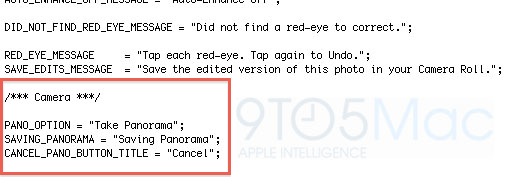
According to some code strings posted by 9to5mac and found in the first beta version of iOS 5, Apple may soon introduce a panoramic camera functionality to go alongside the photo editing enhancements announced at the WWDC keynote. As detailed by Scott Forstall on stage, iOS 5 will bring the possibility to crop, rotate and auto-enhance images from the native Photos app – these features won’t be available on the iPhone 3GS, but they represent a great addition for iPhone 4 users that won’t need to purchase additional basic photo-editing apps anymore. With red-eye reduction and Photo Stream compatibility, Apple touts the new Photos app as the best way to take photos on an iPhone, and send them to an iPad for a quick touch-up. However, as the code discovered suggests, there may be more coming in future betas.

There’s a variety of “pano” photo apps available in the App Store, some of them like Occipital’s 360 Panorama and Pano we reviewed on MacStories before. These apps allow you to take photos of what’s around you to build a panoramic, zoomable representation that “stitches” the various images you’ve taken together in a single file.

The code found in iOS 5 beta doesn’t suggest much, except that Apple has been thinking about a menu to “take” and “save” a panorama. These strings are usually a good indication of new features to come in iOS 5 – in January, iOS 4.3 beta code confirmed that Photo Booth camera effects would be implemented sooner or later, and indeed the iPad 2 (released in March) sported a native Photo Booth app on its custom 4.3 version.


“There Is No Chance” Cupertino Will Say No To Apple’s Spaceship Campus

Two days ago, Steve Jobs pitched Apple’s latest project to the Cupertino City Council: a massive, spaceship-like, 4-story new campus that would be located in the 98-acre ex-campus Apple acquired from HP last year. Designed with modern and green technologies in mind and entirely based on curved glass running around the whole structure, the new “mothership” would host 12,000 employees, come with a new auditorium, labs, office, and much more. When Steve Jobs presented the project, answering questions on environmental issues, energy and free Wi-Fi (the City Council asked whether Apple would provide Wi-Fi for everyone outside the campus, like Google does – Steve Jobs simply replied being Cupertino’s top taxpayer would be enough to contribute to the city), it was clear the City Council members were inclined to accept Jobs’ proposal, though no official announcement had been made there.

In a press conference responding to Steve Jobs’ campus proposal, Cupertino Mayor Gilbert Wong stated that “there’s no chance” the City Council is saying no, even if a public hearing will be necessary. However, Wong expressed his appreciation for Apple and Steve Jobs’ visionary attitude, confirming that when they have to deal with a large sales tax producer, they’re usually very accommodating to that company. Apple’s new campus should get done by 2015 if everything goes well.

Video of the press conference after the break. [via TechCrunch]
Read more


Reeder for Mac: Now Available On The Mac App Store

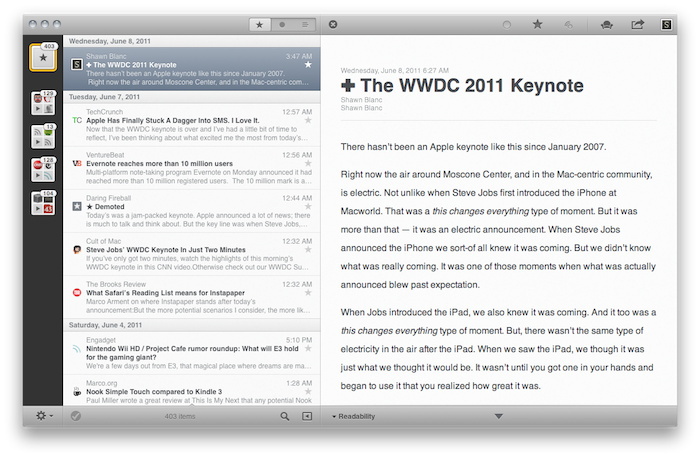
Over the past eight months, I’ve been following very closely the development of Reeder for Mac, a port of the popular Google Reader client for iOS to the OS X platform. As I was one of the first people to try the original Reeder for iPhone back in 2009, I immediately accepted Silvio Rizzi’s invite to join the beta testing group of Reeder for Mac in September 2010. Lots of things have changed since then. Sure, I never stopped using Reeder for Mac as my default desktop client, but there’s no doubt the app has gone through so many interface changes, design overhauls and feature additions I had to re-calibrate my workflow every time the developer updated something. That’s what you get by beta-testing things, but the evolution of Reeder for Mac was different: from our exclusive preview, to the first public beta and the one we reviewed last month, you can see how the app turned into something completely different from the experience I initially fell in love with. And that’s a good thing – the last full rewrite made Reeder for Mac insanely fast on Snow Leopard and ready to go on Lion. But enough with the beta talk. Read more


Configure An iCloud Email Account on Snow Leopard

Magician Software has posted a handy tip to configure an iCloud email account on Mail.app for Snow Leopard which, with the provided instructions, should work on any email program that supports IMAP as well. With the iCloud settings panel on iOS 5, Apple offers the possibility to associate a new iCloud-based @me.com email address to an Apple ID. So, for example, say you have an Apple ID with your Gmail account, you can create a new iCloud address to go alongside the Apple ID you use for your iTunes purchases, apps, and everything else. Unlike old @me.com email accounts that will need to migrate to the new iCloud infrastructure, these new addresses offered on iOS devices are already running on iCloud, allowing to receive and send messages using iOS 5 and OS X Lion DP 4 with an iCloud add-on, not available for older OS X versions.

For other OSes and email programs, Magician Software explains you’ll have to configure a custom IMAP server and MobileMe SMTP to get iCloud’s email up and running. On Snow Leopard’s Mail.app, for instance, you’ll have to start by adding a new account (@me.com) and using the same password of your Apple ID. In fact, iOS 5 doesn’t let you choose a password for now, it just simply assigns your Apple ID’s existing one to the new iCloud email address.

You will receive an error saying that it couldn’t reach the mail.me.com server, just ignore it and hit continue. At this part, it should be very similar to setting up a regular IMAP email. I can’t show you the next screen on setting up the incoming and outgoing servers as Lion doesn’t let me because of the support for iCloud. What you will need to do is change the drop down menu from the top (Currently saying: MobileMe) to IMAP, and changing the mail.me.com to

p02-imap.mail.me.com

the username should just be the name before the @me.com and the password, or course, your password.

Ignore all the errors that Mail.app will display, and use “smtp.me.com” (without quotes) for the SMTP settings. Take the account online, and you should be able to use your iCloud email account on any IMAP-enabled email client. As Apple explains, mail counts against the 5 GB of free storage provided with every iCloud account. [via]