



WWDC 2011 starts in two days, and all of us have our own hopes to be crushed, wishes to be granted, and features to drool over once we finally see Lion, iOS 5, and iCloud in action. We’ve all got something we want most out of the upcoming announcements, whether it be iOS compatibility with AirDrop, or seamless iOS updates through iOS 5, and we’ve decided to publish our wants from Apple’s big three for your viewing pleasure. In return, we expect you guys to tell us in the comments what you want to see on Monday. In the meantime, we’ll get the ball rolling! Read more
Ben the Bodyguard Finally Released, Keeps Data Safe On Your iPhone

Teased a few months ago with an impressive website that made great use of scrolling and animations, Ben the Bodyguard for iPhone has managed to gain the interest of everyone who’s closely watching the iOS development scene and is always looking for well-designed and innovative apps. In spite of the fact that little was known about the actual purpose of the app and how it would compare against other “secure data managers” like 1Password and Wallet, Ben the Bodyguard was intriguing because of the attention to detail and design, the character himself (a French bodyguard, indeed, called Benoit – Ben) and, again, the amazing website.
After months of silence (as it seems appropriate for a good spy / secret agent / whatever it is Ben does), the app came out last night on the iPhone at $4.99 and I decided to take it for a spin. Unfortunately Ben the Bodyguard can’t be compared with full-featured solutions like 1Password, but thanks to its cool design and adventure-like nature, I believe the app still has a chance to attract casual users looking for something to keep their data safe and private.
In case you haven’t heard of it, Ben the Bodyguard is an app that, like 1Password, can keep a variety of data safe & private in its database. The app uses a master password and 256-bit AES encryption to secure your data, which consists of photos, contacts, reminders, notes, and passwords. The password tab is particularly interesting, as it allows you to choose between different templates like web login, credit card, driver’s license and bank account, or create your own template if the categories above don’t fit the password you want to protect. The most interesting aspect of the app however (and what I believe will be the main selling point for the developers and users), is how the entire interface and menu options revolve around the character of Ben. For instance, once you fire up the app for the very first time you’re greeted with an intro sequence describing the life of Ben before he became a bodyguard – you can skip this intro, but it’s so well realized you might end up watching it anyway. Just like the website (which made the rounds of the Internet months ago) puts the focus on Ben – and not the features – as a man you can trust to protect your data, the app doesn’t present itself as a software capable of encrypting and securing notes and password: instead, the general feeling you get is that there’s this man on your iPhone’s screen telling you with a French-English accent that your stuff is safe with him. Character and story-wise, Ben the Bodyguard is a winner: graphics are beautiful, voice over is fun, animations are fluid – you can see the effort that went into designing the application and giving Ben an “identity” to make it stand out from the App Store ecosystem. Read more
Disney Won’t Be Part Of iCloud Launch

Amidst the rumors leading up to Apple’s iCloud and iOS 5 announcements scheduled for Monday, June 6, at the WWDC keynote, Walt Disney CEO Bob Iger said in an interview at All Things Digital’s D9 conference that the company won’t be part of Apple’s iCloud “launch” next week. Whilst it’s still unclear whether iCloud will be publicly available on Monday, or be announced as a closed beta for developers, Iger showed his appreciation for “digital lockers in the sky” that will allow users to store content in one place and access it anywhere at any time.
Kara: Are you part of the Apple iCloud launch next Monday?
Iger: No. But on lockers and clouds in general:
Ability to have your content online, accessible all in one place, that’s a better user experience. Believe that impediments to people buying things include storage: You don’t have room on your hard drive to store all this stuff, and you don’t want to throw it out.
(From Wired’s Steven Levy): Cloud makes more sense if you can move your stuff to different platforms, and different devices. Are you demanding that?
A: We haven’t made any deals yet. But we’re definitely focused on interoperability. We need to demand that.
Apple CEO Steve Jobs is the largest shareholder in Walt Disney, and the company was among the first ones to support the iPod video when it first came out. iCloud was rumored to include movies and TV shows alongside songs from iTunes by the official launch, though recent rumors and reports have focused on the music aspect of the service, failing to provide additional details on video and other media content Apple will distribute on its new platform.
Video interview is available here.
Rumor: New Time Capsule To Run iOS, A4/A5 CPU
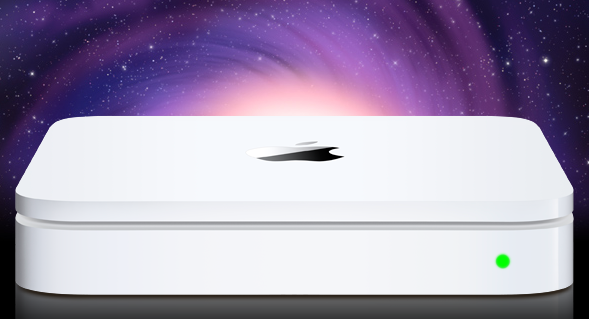
A series of reports surfaced earlier this week suggested stock for AirPort Express, AirPort Extreme stations and Time Capsule units was running low at several Apple retail locations in the United States, with a separate source confirming to us that Apple Stores in Canada have seen similar shortages for Express and Extreme devices. Speculation arose quickly claiming that Apple could release new versions next week, during WWDC, with an announcement likely set for Monday’s keynote. Amidst the rumors, many pointed at the Time Capsule receiving an important update to enable advanced caching functionalities for software updates – the Time Capsule would recognize known devices on a network, check for software updates available, download them in the background, and later seed them to all devices in a few seconds without having to wait for a download process. Others also speculated this caching feature would allow users to store portions of iCloud media locally to avoid streaming delays and pauses between songs or movies.
In a separate report, Ars Technica briefly mentions [via MacRumors] the new Time Capsule could run the A4 or A5 chip alongside iOS – perhaps a modified version much like the second-generation Apple TV.
The source didn’t mention any new functionality for Apple’s AirPort Extreme base station, but it is possible to connect an external USB drive to those devices, which then function similarly to a Time Capsule. It seems likely that Apple could enable updated AirPort Extremes to do similar caching when an external drive is connected.
Our own source tells Ars that the revised hardware is believed to be built around Apple’s own A4 or A5 processor, and will run iOS much like the most recent Apple TV model.
A Time Capsule running iOS and capable of caching content for other devices would certainly open to the possibility of iPhones and iPads connected to iCloud but also deeply tied to the local network to increase streaming speed (thanks to cache) and overall quality (higher-quality songs could be cached locally as snippets so iOS devices wouldn’t take long to fetch the remaining portions).
Speculation also suggests an iOS-based Time Capsule could be used for a much broader set of functionalities such as serving content to Apple TVs or enabling additional options in Lion’s AirDrop – though it also needs to be considered that, by making these possible features exclusive to the Time Capsule (and, say, not a server app running on a Mac), users would be forced to purchase a $299 device (current Time Capsule 1 TB) to enjoy all the potential of iCloud and iOS 5.
Developers: Tweetmarks Will Keep Your Twitter Clients In Sync
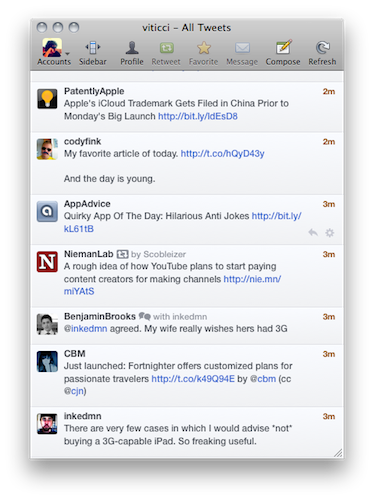
I’ve tried several Twitter clients over the past three years; some of them were iPhone apps with no Mac counterparts, others were Mac apps that found their way to iOS with smaller, more affordable versions. After the iPad came around and companies like the The Iconfactory and Echofon showed that it was possible to create a “Twitter ecosystem” outside of Twitter’s official applications (which also happen to be available on the Mac, iPhone and iPad), users like me started wondering whether it was possible to achieve the long-awaited dream of a continuous client – an app that always remembers where you left off, and allows you to start reading (in our case, tweets) again in the same position across devices, through the cloud. For Twitter clients, the concept is simple: if you’ve already read tweets from 3 hours ago on your Mac and then you pick up my iPhone, you shouldn’t see those tweets again.
Echofon has tried to implement this, with results far from perfection. Echofon’s unread sync isn’t always reliable, and when switching devices I often find the app picking the wrong spot in the timeline or automatically scrolling to tweets I’ve already read. Still, the idea is there: as users switch devices, the position of the “last read tweet” should be maintained with online sync.
Manton Reece, developer of Tweet Library for iPad at Riverfold Software, wants to offer developers who are building Twitter clients a solution to easily keep timelines in sync using Tweetmarks. Tweetmarks is a service that runs in the cloud and can be implemented to keep the last-read tweet in sync across apps and devices. With documentation available here, the developer explains:
I’ve already showed it off to a few developers, and if you’re writing a Twitter app I’d love for you to support it too. It will be baked into the next version of Tweet Library.
There are still some unknowns (especially around whether I will need to ask for help to cover hosting costs), but I wanted to launch it now before WWDC so that other Twitter app developers meeting at the conference can give me feedback on the service. Tweetmarks has actually been running for months, and when an opportunity came along this week for a new logo (thanks Alex!), I knew it was past time to finish documenting the service and get it out.
The concept is simple, yet nobody until now managed to pull it off with a system that’s reliable and unobtrusive enough to work “like magic” across platforms and different devices or computers. Developers who are interested in the project can learn more about it here and, personally, I’d love to see a new version of Twitterrific with such a feature (alongside live streams, but that’s another story). If you build and sell Twitter clients for a living, we strongly recommend checking out Tweetmarks for your next multi-platform update – the continuous Twitter client may start right here.
Currencies for Mac Makes Conversion Simple, iOS-like
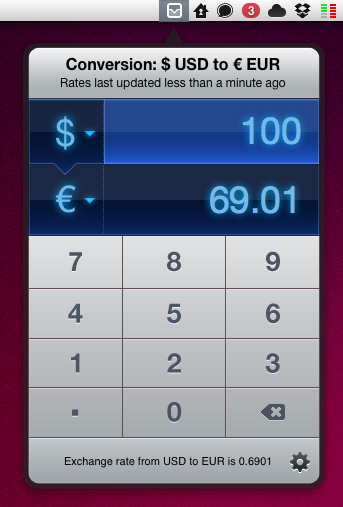
Being based in Italy, I have to deal with currency conversion on a daily basis. Most of my digital purchases are made on US websites, and either for work or personal purposes, more often that not I find myself going through my credit card billing statement to re-convert expenses from Euro to United States Dollars. As you can imagine, being able to easily and accurately convert currencies in seconds in the first place has become an essential part in my workflow. Currencies, a new app by Edovia released today on the Mac App Store, aims at making currency conversion super-simple from the OS X menubar with an interface design heavily inspired by iOS apps and multitouch.
In fact, Currencies for Mac comes from an iOS counterpart already available in the App Store. The app has been “converted” using The Iconfactory’s Chameleon engine, which allows developers to port the UIKit – the framework used to write apps for the iPhone and iPad – to the Mac. We’ve seen another example of Chameleon in action before, Carousel for Instagram. In a similar fashion, Currencies looks like an iPhone app inside an iPad popover menu running in the Mac menubar – a mix of interface schemes and devices that’s actually fun to use and once again hints at where the Mac platform is going. In the next few years, when Macs will be touch-enabled and even more similar to iOS devices, we’ll look back at this transition period, OS X Lion, iOS 5 and Chameleon.
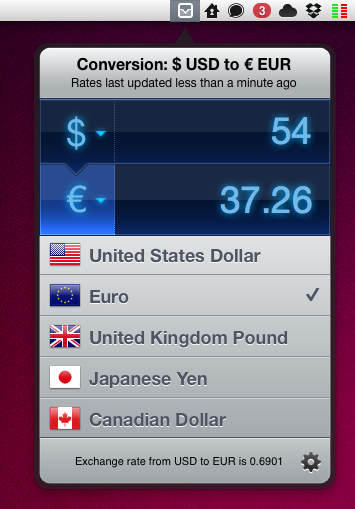
Currencies is very easy to use. One click on the menubar icon, and the app becomes visible to reveal two tabs for the currencies you’d like to convert. To type, you can either use the on-screen keyboard or your Mac’s one. To change currencies, hit the symbol and select a new one from the list – the design is nice and elegant. That’s it. The app has some preferences to choose a keyboard shortcut and a refresh time – the app relies on Yahoo for its conversion rates, supports 130 currencies and dots / commas for decimal separation.
Should you buy Currencies when your web browser takes seconds to open a currency converter and do the job for free? There’s no doubt you’ll be just fine converting units on a website like Yahoo Currency Converter or Xe.com, but if you care about good design, usability and are intrigued by the whole concept of iOS apps running in the Mac’s menubar, you should give Currencies a try. Go download the app here at $2.99 – you can find the iPhone version at the same price here.
Chirpy 2.0 Released, Unifies Twitter DMs In A Single Inbox
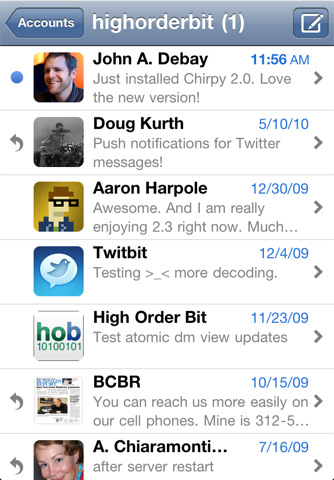
Following Twitter’s recent changes to the API for direct messages that will force developers of third-party clients to implement the web-based OAuth authorization scheme instead of the xauth scheme in all apps that want to display DMs, it’s no surprise to see app updates coming out in iTunes sporting “updated to support Twitter DM changes” bullet points in their changelogs. Chirpy 2.0, released earlier today and available now in the App Store, however, doesn’t simply comply to Twitter’s latest rules to display and interact with DMs outside of Twitter’s official software and website: in fact, Chirpy 2.0 is a major rewrite of the original application that I reviewed here, still aimed at providing a standalone, unified inbox for all your Twitter DMs and conversations.
Chirpy is not an app for everyone – if you send a very few DMs a day your default Twitter client will probably be fine. Chirpy is meant for those Twitter users that usually send as many DMs as email messages – I’ve talked about the importance of instant, private communication in my workflow before, and since I exchange around 30-50 DMs with my coworkers and friends every day, having a Twitter client with a great DM interface it’s a fundamental requirement for me. However, if you’re serious about direct messages, Chirpy offers the same choice you would have when dealing with a web browser that can send emails Vs. an actual email client: will you be fine managing DMs in your client that already does everything else, or would you prefer a separate solution to send, read, manage and share DMs? Chirpy 2.0 builds on the strong foundation of the first version to provide a single inbox for all your conversations, with the possibility to add multiple accounts and receive push notifications without installing a dedicated app like Boxcar. Chirpy 2.0 brings support for the iPhone 4’s Retina Display, alongside profile pictures in the inbox and conversation views. In the settings, you can now customize the colors of the app’s chat bubbles – I’m fine with the default color set but I can see why some users would like to tweak it a little.
Together with several “small refinements and improvements”, Chirpy 2.0 features two new important functionalities: Dropbox image sharing and inbox search. The latter is pretty obvious (it lets you search for keywords in all your conversations), whilst Dropbox uploads will require you to log in with your account, and create a sub-folder in your Public directory. After this you’ll be able to upload pictures, share them with your contacts and even preview them inline in the conversation view. Other minor additions include email sharing for entire conversations (nicely formatted for the iPhone’s screen, too), possibility to delete DMs from your account, and copy & paste. In my tests, I’ve noticed Chirpy’s push notifications were a few seconds slower than Boxcar – which remains the fastest way of being notified of new Twitter DMs on the iPhone and iPad.
Overall, Chirpy 2.0 is a solid and stable update for an app that targets Twitter power-users who spend a lot of time DM’ing people on a daily basis. For those who need a “Twitter DM client” living outside the main “timeline client”, Chirpy is the best option available on the App Store.
iCloud Logo Spotted at Moscone Center
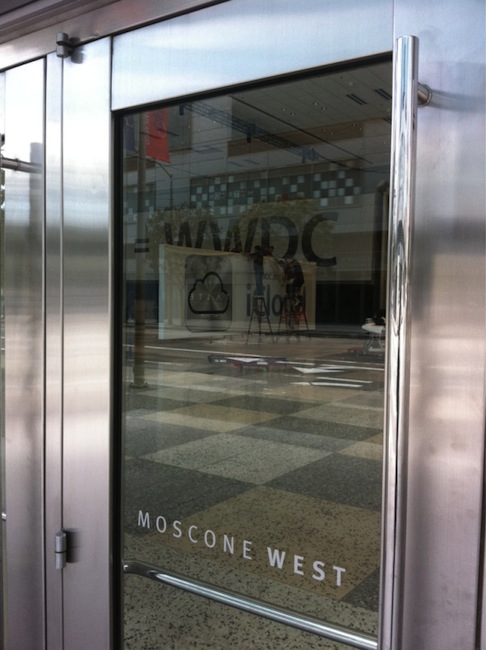
Apple started the WWDC 2011 preparations at the Moscone Center a few days ago – we tweeted pictures of the Apple logo and outside banners going up, though we weren’t able to see what Apple was working on inside the conference building. As tweeted by @stop, the photo above shows the official logo / icon of iCloud that Apple will unveil at the WWDC keynote on Monday.
What do you think? Judging from a first photo, it looks like iCloud is going to replace MobileMe entirely – several rumors in the past weeks claimed iCloud would be a service within MobileMe, but from the looks of the icon it appears iCloud will simply replace Apple’s previous cloud offering.
We should receive more photos from Moscone Center later today and we’ll update this story with the new shots. Look past the break for more updates!
Apple Releases Official WWDC 2011 App
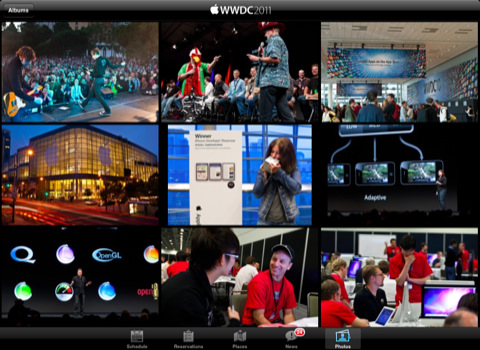
Apple has just released the free, official WWDC app on the App Store – the app is propagating now in iTunes and should be available here. Unlike last year, this year’s WWDC app works both on the iPhone and iPad with a native interface. The WWDC app allows you to check on the conference’s schedule, view floor diagrams of the Moscone Center and create your own schedule of labs, sessions and events you’re planning on attending. The app also comes with a News section to stay on top of the latest announcements made at WWDC throughout the week.
Apple says a new photo gallery will be updated daily with the latest photos from the show floor, labs and events, and the Favorites tab in the bottom toolbar will offer a way to organize sessions you want to attend. The new map feature will allow attendees to tap on a specific session or lab to find the specific level or location they need to go.
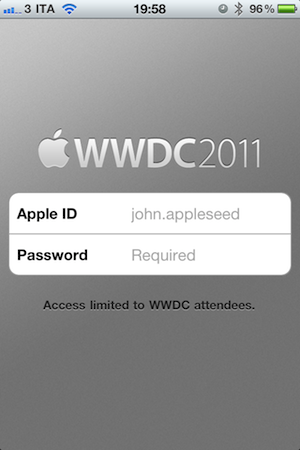
Access to the app is limited to WWDC attendees only – developers who purchased a ticket to WWDC ‘11 can use the app.
From the iTunes description:
Reserve Time at the Labs
The WWDC 2011 app allows you to make a reservation at the User Interface, App Review, iTunes Connect, Program Support, or Developer Publication lab. Once you make a lab reservation, it will appear in the schedule section of the app when you filter your view by Favorites.Sessions and Labs Schedule
View the daily conference schedule including lunchtime and evening events. Filter your view to search by technology, platform, sessions, or labs.Create Your WWDC Schedule
Tap on the detail view of any session, lab, or event. Then tap “Add to Favorites”. Your selections will be added to the Favorites section of the app and can be updated on-the-go.Locate Sessions and Labs
Easily find your way around Moscone West with detailed floor maps. You can also tap on a specific session or lab for the level and location where you need to go.
The WWDC ‘11 schedule has also been posted online but it’s only available to owners of a WWDC ticket. Check out more screenshots of the app below. Read more